
Introduction
Thank you for choosing the Gorixer AI Auto Cooling Fan and Charging Stand for your Xbox Series X console. This all-in-one accessory is designed to enhance your gaming experience by providing efficient cooling, convenient controller charging, and organized storage for your gaming essentials. Please read this manual carefully to ensure proper setup and operation.
Package Contents
Verify that all items listed below are included in your package:
- 1 x Cooling Fan
- 1 x Charge Station Base
- 1 x Charging Cable
- 1 x Headset Stand
- 2 x 1400mAh Rechargeable Batteries
- 1 x Product Manual
Visual representation of package contents:

Video showing the unboxing and components included in the Gorixer Xbox Series X accessory kit.
Setup Instructions
Follow these steps to set up your Gorixer AI Auto Cooling Fan and Charging Stand:
- Place the Console: Carefully place your Xbox Series X console vertically into the designated slot on the charging station base. Ensure it is seated securely.
- Connect Power: Plug the Xbox Series X host power cord into the console.
- Install Top Fan: Align the top cooling fan with the corresponding ventilation hole on top of the Xbox Series X console. Gently press down until it is firmly in place.
- Connect Fan to Base: Connect the Type-C cable from the top cooling fan to the USB port on the charging base. This provides power and control to the fan.
- Install Headset Stand: Attach the headset stand to the designated slot on the cooling fan unit.
Visual guide for installation:
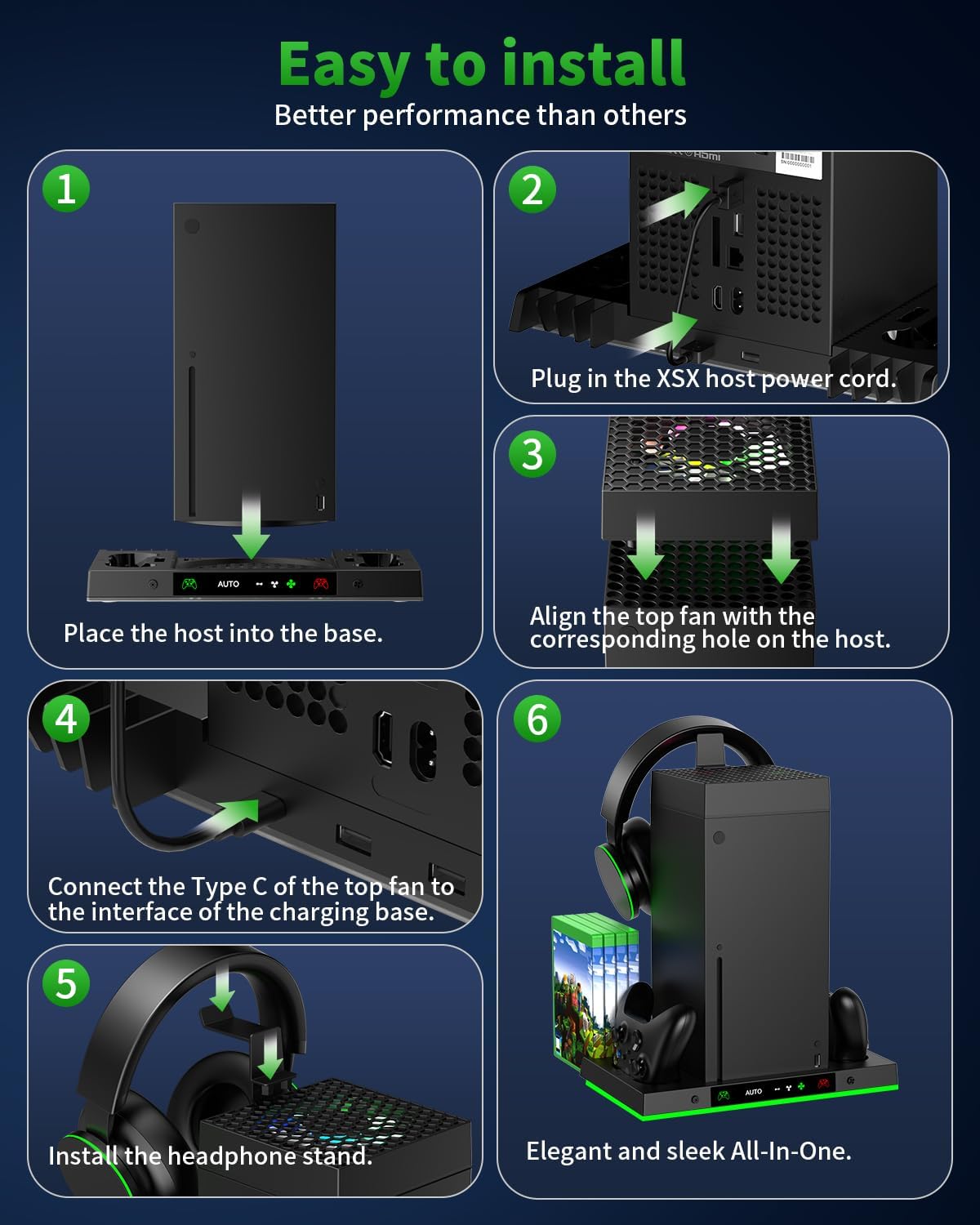
Image illustrating the six steps for installing the cooling fan, charging base, and headset stand.
Video demonstration of the setup process:
Video demonstrating the simple installation of the Gorixer charging stand and cooling fan for Xbox Series X.
Operating Instructions
Cooling System
The cooling fan features both automatic and manual operation modes to manage your console's temperature effectively.
- Automatic Mode: The fan intelligently adjusts its speed based on the console's temperature. It activates automatically when the console temperature reaches 36°C (96.8°F). Fan speed increases with rising temperature (Low Speed Mode at 36-40°C, Medium Speed Mode at 41.2-46°C, High Speed Mode at ≥48°C) and shuts off when the temperature drops below 34°C.
- Manual Mode: You can manually select from three fan speeds: Low, Medium, and High. Use the fan switch to cycle through these options. When the fan is deactivated in manual mode, its lights will turn off, but the charging stand's illumination remains active.
Cooling system operation details:

Image detailing the automatic temperature-based fan activation and manual speed settings.
Video showcasing the intelligent cooling system:
Video demonstrating the AI smart cooling fan's automatic and manual modes, showing fan speed and light changes.
Controller Charging
The charging stand is equipped with two charging docks and two 1400mAh rechargeable batteries for your Xbox Series X controllers.
- Battery Installation: Replace the standard AA batteries in your Xbox Series X controller with the provided 1400mAh rechargeable batteries. Ensure correct polarity.
- Charging Process: Place your controllers onto the charging docks. The charging indicators will show a red light when charging and turn green when fully charged.
- Charging Time: Controllers fully charge in approximately 3 hours, providing up to 20 hours of gaming time.
- Compatibility: The included batteries are compatible only with official Xbox Series X controllers.
Controller charging indicators:

Image illustrating the charging status indicators (red for charging, green for full) and battery compatibility.
Rechargeable battery details:

Image highlighting the two 1400mAh rechargeable batteries included, offering 20 hours of playtime.
RGB Lighting
Personalize your gaming setup with 15 vibrant RGB lighting modes.
- Mode Selection: Use the independent switch on the charging stand to cycle through 15 different lighting effects, including dynamic modes and static colors like red, green, blue, and cyan.
- Save Mode: Press and hold the switch for 3 seconds to save the current lighting mode and turn off the lights.
RGB lighting modes:

Image showcasing the 15 fantastic light shows, including 7 static and 8 dynamic options, and the control button.
Additional Features
Storage & Organization
The stand helps keep your gaming area tidy and organized.
- Game Disc Slots: Features storage for up to 8 game discs.
- Expansion Card Slots: Includes 2 dedicated slots for organizing your expansion cards.
- Headset Stand: A convenient stand to keep your gaming headset within reach.
Storage features:

Image detailing the 8 game card slots, 2 expansion card holders, and multi-purpose ports for efficient organization.
Connectivity
The charging stand includes additional ports for your convenience.
- USB Ports: Two USB ports located at the back of the charging stand support both data transmission and charging for other accessories.
Specifications
| Feature | Detail |
|---|---|
| Brand Name | Gorixer |
| Model Number | XSX48 |
| Manufacturer Part Number | PG-XBX024SD |
| Hardware Platform | Xbox Series X |
| Compatible Devices | Xbox Series X Accessories |
| Connector Type | USB Type A |
| Color | Carbon Black |
| Material | Acrylonitrile Butadiene Styrene |
| Battery Capacity | 2 x 1400mAh |
| Charging Time | Approx. 3 hours |
| Playtime per Charge | Approx. 20 hours |
Troubleshooting
If you encounter any issues, please refer to the following common solutions:
- No Power: Ensure all cables are securely connected to the console and the charging stand. Verify the console is powered on.
- Fan Not Working: Check if the fan is properly seated on the console and its Type-C cable is connected to the base. Ensure the fan is not in 'OFF' state in manual mode or that the console temperature is above 36°C in auto mode.
- Controllers Not Charging: Confirm that the rechargeable batteries are correctly installed in the controllers. Ensure controllers are properly seated in the charging docks. Check for any debris in the charging contacts.
- RGB Lights Not Working: Press the RGB switch to cycle through modes. If still unresponsive, check power connections.
Safety Information
Please observe the following safety guidelines:
- Do not disassemble or attempt to repair the device.
- Keep the device away from water, moisture, and extreme temperatures.
- Use only the provided charging cable and batteries.
- Ensure proper ventilation around the console and cooling fan.
- Keep out of reach of children.
Warranty and Support
Gorixer products come with a standard manufacturer's warranty. For detailed warranty information, technical support, or customer service inquiries, please contact Gorixer customer support through the retailer where you purchased the product or visit the official Gorixer website.