
Introduction
Thank you for choosing the TYBERLEY Pagani Design 1667 Automatic Dive Watch. This manual provides essential information for the proper setup, operation, and maintenance of your timepiece. Featuring a reliable NH35 automatic movement, a durable ceramic bezel, and 100 meters of water resistance, this watch is designed for both daily wear and aquatic activities. Please read these instructions carefully to ensure optimal performance and longevity of your watch.
Product Overview
The Pagani Design 1667 is an automatic mechanical watch that harnesses the motion of your wrist to power itself. Key features include a 42mm case, luminous hands and markers for visibility, a date display, and a unidirectional rotating bezel.
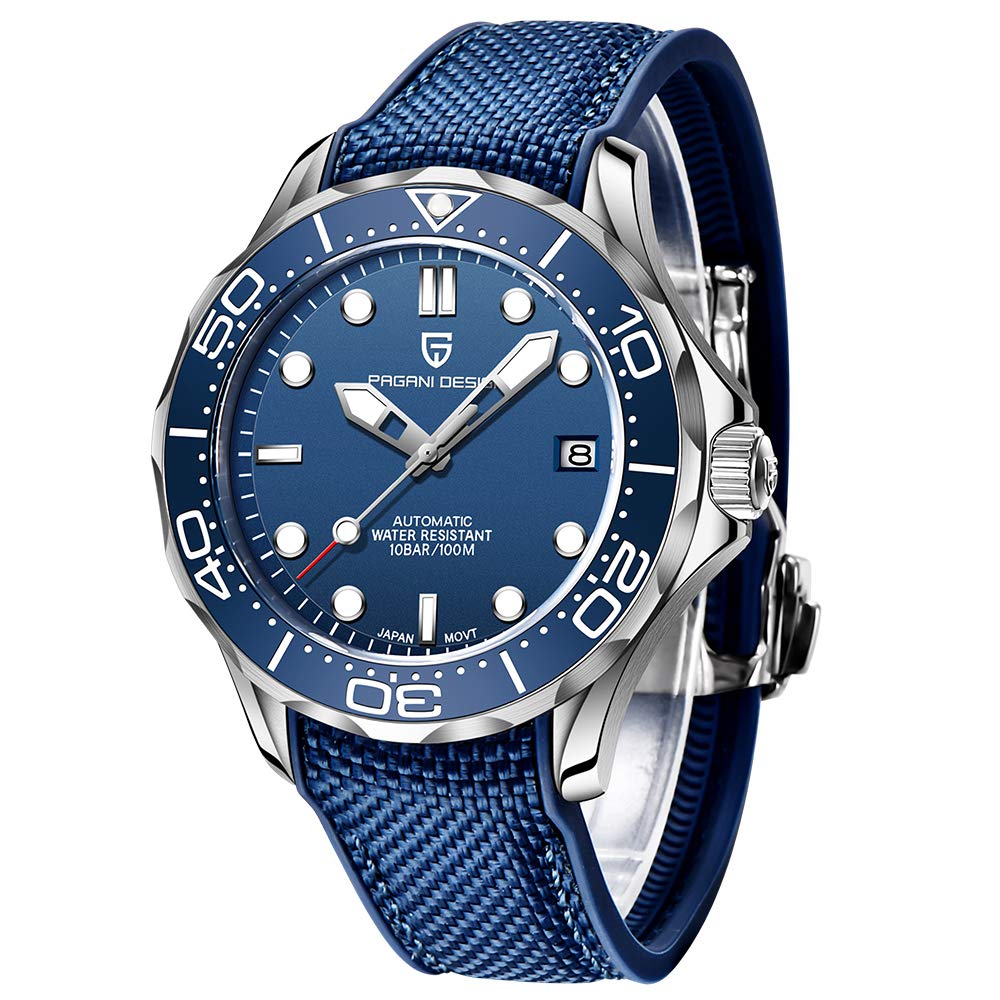
Image: TYBERLEY Pagani Design 1667 Automatic Dive Watch with Blue Rubber Strap
Components:
- Case: Stainless steel, 42mm diameter, 14mm thickness.
- Dial: Features large luminous hands and hour markers, with a date window at 3 o'clock.
- Bezel: 360° unidirectional rotating ceramic bezel for dive timing.
- Crown: Screw-down crown for enhanced water resistance, protected by shoulder guards.
- Crystal: Synthetic sapphire glass, anti-reflective for optimal clarity.
- Movement: Japanese NH35 automatic self-winding movement with a 42-hour power reserve.
- Strap: Available in various materials including stainless steel, rubber, and mesh. An extra braided nylon strap is included.

Image: Close-up of the NH35 Automatic Movement
The watch is delivered with its original box, instruction manual, cleaning cloth, stainless steel bracelet adjuster (if applicable), warranty card, Pagani logo tag, and an additional braided nylon strap.
Setup
Initial Winding
If the watch has stopped, it needs to be manually wound to initiate the movement. Unscrew the crown counter-clockwise until it pops out to position 1. Turn the crown clockwise approximately 20-30 times. This will provide enough power for the watch to start running. The watch will then continue to wind itself through the motion of your wrist while worn.
Setting Time and Date
- Unscrew the Crown: Gently unscrew the crown counter-clockwise until it releases from the case and is in position 1.
- Set the Date: Pull the crown out to position 2. Turn the crown clockwise to adjust the date. Avoid setting the date between 9 PM and 3 AM, as this can damage the movement. If the current time falls within this period, first set the time outside this range, then set the date, and finally reset the correct time.
- Set the Time: Pull the crown out to position 3. Turn the crown to set the hour and minute hands. To ensure correct AM/PM, advance the time until the date changes. Once the date changes, you know it is midnight (AM). Continue to set the correct time.
- Secure the Crown: Once the time and date are set, push the crown back into position 1 and screw it clockwise firmly against the case. This is crucial for maintaining the watch's water resistance.

Image: Watch Crown Operation for Time and Date Setting
Adjusting the Strap
For watches with a stainless steel bracelet, use the included adjuster tool to remove or add links for a comfortable fit. Rubber and nylon straps can be adjusted using their buckles or by trimming if necessary (for rubber straps, ensure careful measurement before trimming).

Image: Various Watch Strap Types
Operating Instructions
Automatic Movement
Your watch is powered by an automatic movement. It winds itself automatically through the natural motion of your arm while you wear it. If the watch is not worn for an extended period (e.g., 42 hours), it will stop. To restart it, manually wind it as described in the 'Initial Winding' section.
Unidirectional Rotating Bezel
The ceramic bezel rotates in one direction only (counter-clockwise). This feature is designed for dive timing. Align the bezel's zero marker with the minute hand at the start of your dive. The minute hand will then indicate the elapsed time against the bezel's scale. The unidirectional rotation prevents accidental increases in recorded dive time, enhancing safety.
Luminescence
The hands and hour markers are coated with a luminescent material, allowing you to read the time in low-light conditions or darkness after exposure to light.

Image: Watch Dial with Luminous Hands and Markers
Maintenance
Cleaning
Regularly clean your watch with a soft, dry cloth. For water-resistant models, after exposure to saltwater, rinse the watch with fresh water and dry it thoroughly. Avoid using harsh chemicals or abrasive materials, which can damage the case, crystal, or strap.
Storage
When not wearing your watch, store it in a cool, dry place away from direct sunlight, extreme temperatures, and strong magnetic fields. The original watch box is ideal for storage.
Service
For optimal performance, it is recommended to have your automatic watch serviced by a qualified watchmaker every 3-5 years. This includes cleaning, lubrication, and adjustment of the movement.
Strap Care
- Rubber Straps: Clean with mild soap and water. Avoid prolonged exposure to oils or solvents.
- Stainless Steel/Mesh Straps: Clean with a soft brush and mild soapy water. Ensure to dry thoroughly to prevent water spots.
- Nylon Straps: Can be hand-washed with mild soap and air-dried.
Water Resistance Guidelines
Your TYBERLEY Pagani Design 1667 watch is water-resistant up to 100 meters (10 ATM). This classification indicates its suitability for:
- Daily hand washing
- Exposure to rain
- Swimming
- Snorkeling
Important Precautions:
- Always ensure the crown is fully screwed down before any contact with water. Failure to do so will compromise water resistance and may lead to water damage.
- Do not operate the crown or pushers underwater.
- Avoid exposing the watch to hot water, such as in hot showers, saunas, or hot tubs. High temperatures and steam can cause the seals to expand and contract, potentially leading to water ingress.
- This watch is not suitable for scuba diving (diving with tanks) or high-impact water sports.
Specifications
| Feature | Specification |
|---|---|
| Model Number | PD1667-TYU |
| Movement Type | Japanese NH35 Automatic |
| Case Material | Stainless Steel |
| Case Diameter | 42 mm |
| Case Thickness | 14 mm |
| Crystal | Synthetic Sapphire |
| Band Width | 20 mm |
| Band Length | 220 mm |
| Water Resistance | 100 Meters (10 ATM) |
| Power Reserve | Up to 42 hours |
| Bezel | Unidirectional Rotating Ceramic |
| Display | Analog |
| Special Features | Luminous hands/markers, Date display |
Troubleshooting
Watch Not Running
- Ensure the watch has been manually wound (20-30 clockwise turns of the crown in position 1) if it has stopped completely.
- Wear the watch regularly for at least 8-10 hours a day to keep the automatic movement sufficiently wound.
Date Not Changing Correctly
- Check if the time is set correctly for AM/PM. The date typically changes around midnight. If the date changes at noon, you have set the time 12 hours incorrectly.
- Avoid setting the date between 9 PM and 3 AM to prevent damage to the date mechanism.
Condensation Inside Crystal
If you notice condensation or moisture inside the watch crystal, it indicates a potential breach in water resistance. Stop using the watch immediately and seek professional service to prevent further damage to the movement.
Warranty and Support
Warranty Information
Your purchase is covered by a 30-day return policy. For specific warranty details beyond this period, please refer to the warranty card included with your watch or contact the manufacturer, TYBERLEY, directly. The product comes with a limited warranty.
Customer Support
For any questions, concerns, or service requests regarding your TYBERLEY Pagani Design 1667 watch, please contact the seller or the manufacturer's customer support. Keep your purchase receipt and warranty card handy for any claims.