
Introduction
This manual provides instructions for the installation and use of InkID 67XL compatible black and color ink cartridges. These cartridges are designed to work with a range of HP Envy and DeskJet printers, offering a reliable printing solution.
Compatibility
These InkID 67XL ink cartridges are compatible with the following HP printer series. Please verify your printer model before installation.
- DeskJet Series: 1210, 1212, 1215, 1255, 2300, 2330, 2331, 2332, 2333, 2700, 2710, 2710e, 2720, 2720e, 2721, 2721e, 2722, 2722e, 2723, 2723e, 2724, 2725, 2729, 2732, 2734e, 2742e, 2752, 2752e, 2755, 2755e, 2810e, 2820, 2820e, 2821, 2821e, 2822, 2822e, 2823, 2823e, 2828, 2829, 2842e, 2855, 2855e, 4155e, 4255e
- DeskJet Plus Series: 4100, 4110, 4110e, 4120, 4120e, 4121, 4121e, 4122, 4122e, 4123e, 4130, 4130e, 4132, 4132e, 4140, 4152, 4152e, 4155, 4158, 4158e
- Envy Series: 6000, 6010, 6010e, 6020, 6020e, 6022, 6022e, 6030, 6030e, 6032, 6032e, 6034, 6034e, 6050e, 6052, 6052e, 6055, 6055e, 6058, 6058e, 6065e, 6075, 6075e
- Envy Pro Series: 6400, 6420, 6420e, 6422, 6422e, 6430, 6430e, 6432, 6432e, 6450e, 6452, 6452e, 6455, 6455e, 6458, 6458e, 6464, 6475, 6475e

Image: A visual guide to compatible HP printer models for InkID 67XL cartridges.
Package Contents
Each InkID 67XL combo pack includes:
- 1 Black InkID 67XL Compatible Ink Cartridge
- 1 Color InkID 67XL Compatible Ink Cartridge
Installation Guide
Follow these steps to correctly install your InkID 67XL ink cartridges:
- Handle with Care: Avoid touching the golden contacts on the cartridge to ensure proper printer recognition.
- Unlock the Ink: Remove the black protective clip from the cartridge. Apply gentle force if needed.
- Activate the Cartridge: Carefully peel off the sealing tape that covers the contacts and ink outlet.
- Secure Fit: Align the cartridge with its corresponding slot in the printer and press down firmly until you hear a click, indicating it is securely in place.

Image: Easy 4-Step Installation guide for InkID cartridges.
Video: This video demonstrates the process of unpacking and installing the InkID 67XL ink cartridge into a compatible HP printer. It shows how to remove the protective clip and seal tape, then insert the cartridge into the correct slot.
Operating Instructions
This printer model supports wireless printing and copying functions.
- Wireless Printing: Connect your printer to your Wi-Fi network. Once connected, you can print documents from any compatible device (computer, smartphone, tablet) within the network.
- Copying: Place the document you wish to copy on the scanner glass. Use the control panel buttons on the printer to select the copy function and initiate the process.
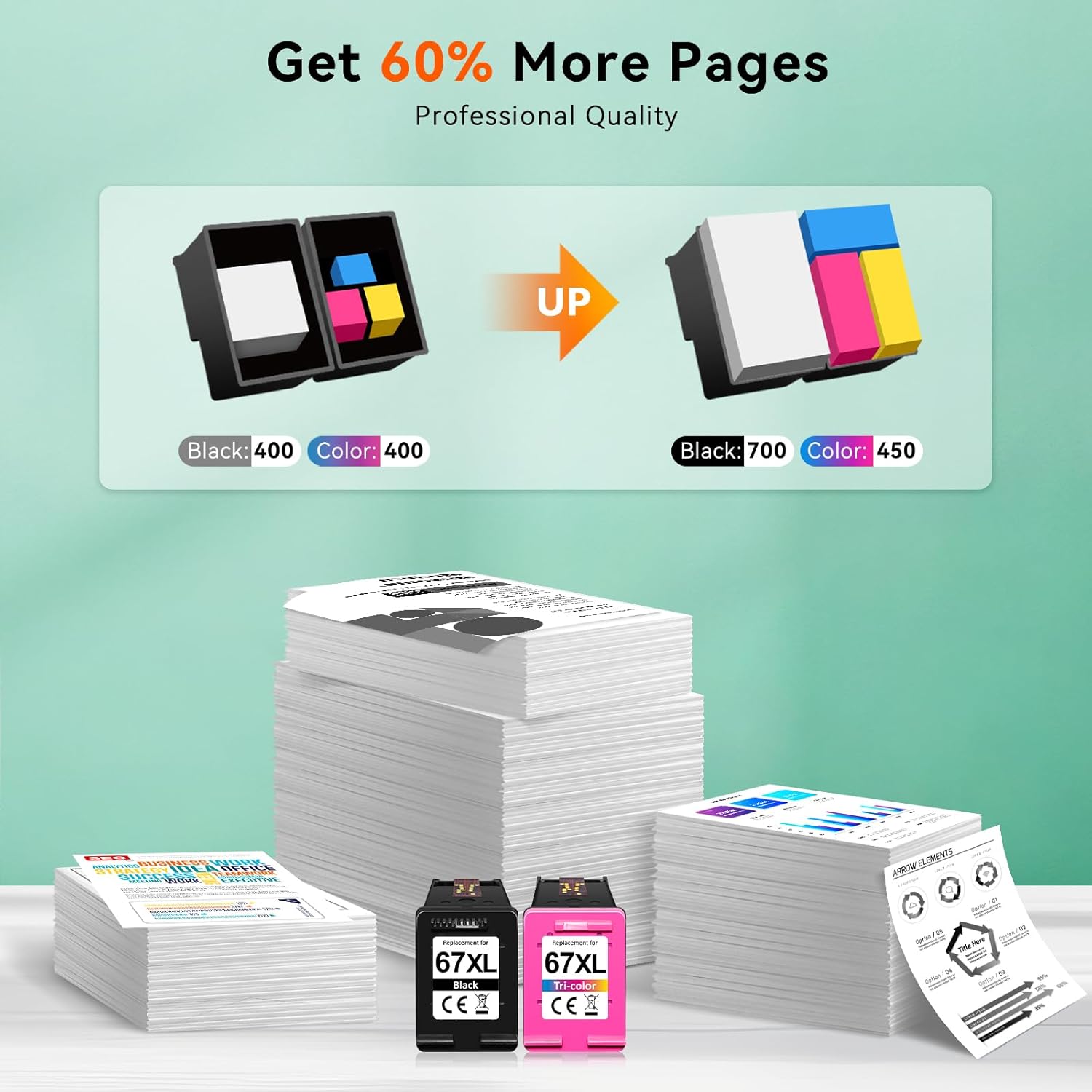
Image: This image illustrates the high page yield of InkID 67XL cartridges, showing that they produce more pages (700 for black, 450 for color) compared to standard cartridges.

Image: This image highlights the improved print quality with InkID cartridges, demonstrating crisper text and sharper details compared to other cartridges.
Maintenance
Proper care ensures optimal performance and longevity of your ink cartridges.
- Storage: Store unused ink cartridges in their original sealed packaging in a cool, dry place away from direct sunlight.
- Cleaning: If print quality issues arise, refer to your printer's manual for instructions on how to perform a print head cleaning cycle.
- Replacement: Replace cartridges when print quality degrades significantly or when your printer indicates low ink levels.
Troubleshooting
Here are solutions to common issues you might encounter:
- Cartridge Not Recognized: If your printer displays an error message indicating the cartridge is not recognized, remove the cartridge and gently wipe the golden contacts with a lint-free cloth. Reinsert the cartridge firmly until it clicks into place. Ensure the protective seal tape has been completely removed.
- Poor Print Quality (Streaks/Fades): This can often be resolved by performing a print head cleaning cycle through your printer's software settings. Also, ensure the cartridges are not empty.
- Paper Jams: Follow your printer's on-screen instructions or manual to clear any paper jams. Ensure paper is loaded correctly and not overfilled.
Product Specifications
| Feature | Detail |
|---|---|
| Package Dimensions | 4.41 x 2.83 x 1.57 inches |
| Item Weight | 3.84 ounces |
| Model Name | 67 Ink Cartridges Black/Color Combo Pack |
| Brand | InkID |
| Ink Color | Black/Color |
| Page Yield (Black) | Up to 700 Pages (at 5% coverage) |
| Page Yield (Color) | Up to 450 Pages (at 5% coverage) |
| Ink Base | Water |
Warranty and Support
For any questions, technical assistance, or warranty inquiries regarding your InkID 67XL compatible ink cartridges, please contact InkID customer support. Refer to the product packaging or the InkID official website for contact details.