
1. Introduction
1.1 Product Overview
The HISION A7 Max Cordless Robotic Pool Cleaner is designed to provide efficient and comprehensive cleaning for inground pools up to 2,000 sq.ft. Featuring powerful 180W suction and advanced SonarNav Pro navigation technology, it effectively removes leaves, dirt, hair, and debris from your pool's floor, walls, and waterline. Its cordless design ensures hassle-free operation and extended cleaning sessions.
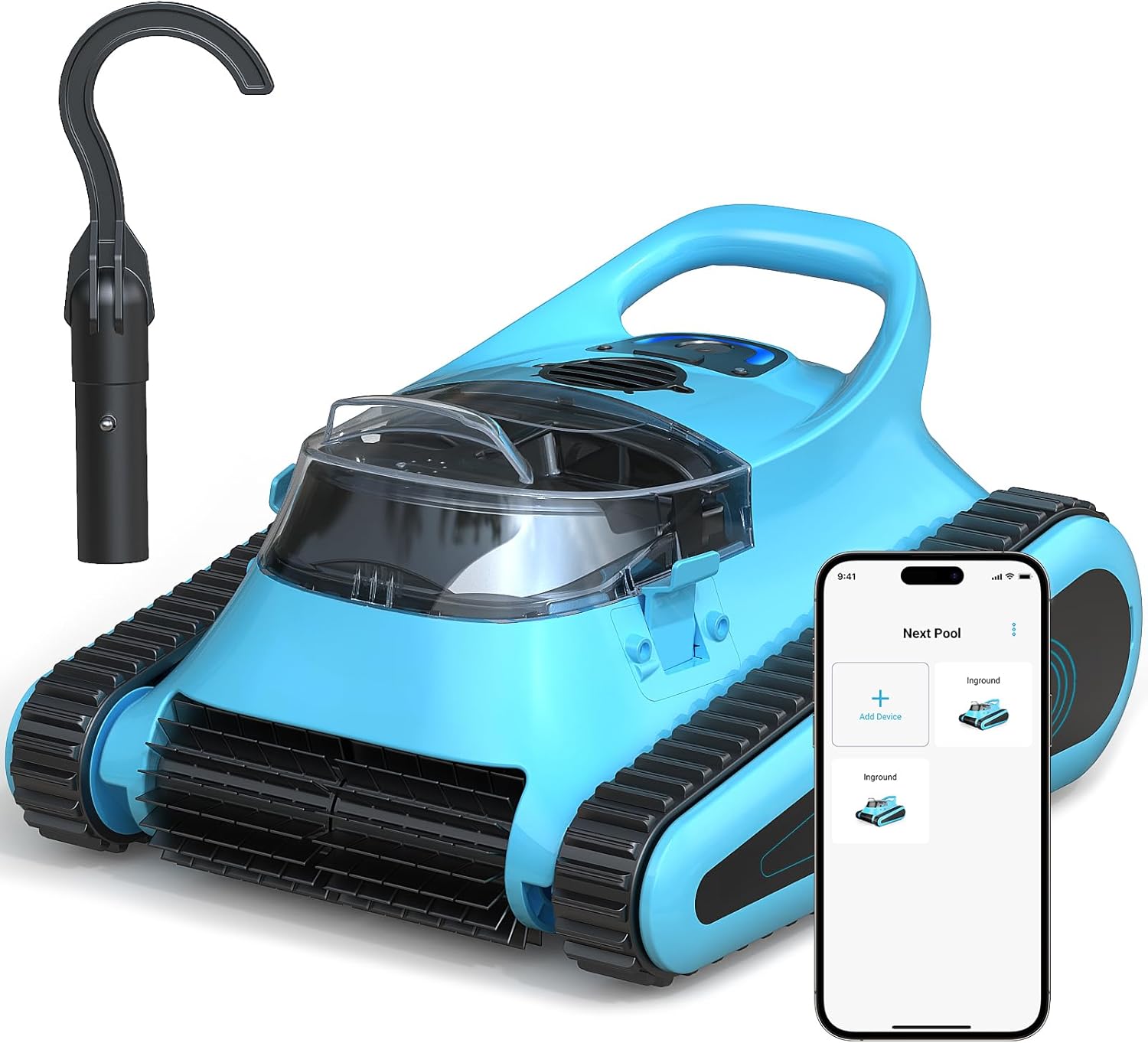
Figure 1: HISION A7 Max Robotic Pool Cleaner and its companion app.
1.2 Key Features
- Powerful 180W Suction: Ensures thorough removal of various debris including leaves, dirt, and hair.
- Extended Battery Life: Provides up to 150 minutes of uninterrupted cleaning on a single charge.
- Convenient Self-Parking: Automatically parks near the pool's edge when the battery is low for easy retrieval.
- Full Pool Cleaning Coverage: Cleans the pool floor, walls, and waterline, adapting to various pool shapes and surfaces.
- Intelligent SonarNav Pro Navigation: Maps and navigates the pool for comprehensive and efficient cleaning.
- User-Friendly Operation: Features audio and LED alerts for status updates and simple control via app or touch.
- Durable Design: Constructed from premium materials for longevity, backed by a 24-month protection plan.
2. Safety Information
Please read all safety instructions carefully before operating the HISION A7 Max Robotic Pool Cleaner to prevent injury or damage to the device.
- Always ensure the device is fully charged and the charging port is securely sealed before placing it in water.
- Keep people and animals out of the pool while the device is in operation. Do not leave children unsupervised near the pool when the cleaner is in use.
- Do not operate the cleaner if any part of it is damaged or if the charging cable is frayed.
- Only use the original charger provided with the device.
- Avoid exposing the charging port to water or moisture. Ensure it is completely dry before charging.
- Store the cleaner in a cool, dry place away from direct sunlight and extreme temperatures when not in use.
3. Setup
3.1 Unboxing and Initial Charge
Upon receiving your HISION A7 Max, carefully remove all components from the packaging. Verify that all parts are present as listed in the packing contents. Before first use, fully charge the robotic cleaner. The charging time is approximately 2.5 hours.

Figure 2: Packaging contents of the HISION A7 Max.

Figure 3: The HISION A7 Max charging, indicating rapid charging capability.
3.2 Placement in Pool
Once fully charged, ensure the charging port cover is securely in place. Gently lower the robotic cleaner into the pool. It will sink to the bottom and begin its cleaning cycle automatically or can be activated via the touch control or companion app.

Figure 4: Proper placement of the cleaner into the pool.
4. Operating Instructions
4.1 Control Methods
The HISION A7 Max can be operated using its integrated touch control button or through a dedicated smartphone application. The touch control allows for simple start/stop functionality, while the app provides more detailed control over cleaning modes and settings.

Figure 5: Cordless and easy-to-use design of the cleaner.
4.2 Cleaning Modes
The cleaner offers versatile cleaning modes to suit your pool's needs:
- Floor Cleaning: Focuses on cleaning the pool floor, ideal for general debris.
- Wall Cleaning: Specifically targets pool walls and the waterline for scrubbing algae and grime.
- All Coverage Cleaning: Combines both floor and wall cleaning for a comprehensive clean of the entire pool.

Figure 6: Visual representation of the cleaner's full cleaning coverage capabilities.

Figure 7: The cleaner performing waterline scrubbing and wall cleaning.
4.3 Smart Navigation and Self-Parking
The HISION A7 Max utilizes SonarNav Pro navigation technology to intelligently map your pool, ensuring comprehensive coverage and avoiding redundant cleaning paths. When the battery level is critically low, the cleaner will automatically navigate to the nearest pool wall for easy retrieval, indicated by an audio and LED alert.

Figure 8: The cleaner's smart self-parking feature.

Figure 9: Smart navigation ensures efficient cleaning paths.
4.4 Official Product Video
Video 1: Official HISION Cordless Robotic Pool Cleaner demonstration, showcasing its features and operation.
5. Maintenance
5.1 Filter Basket Cleaning
Regular cleaning of the filter basket is crucial for maintaining optimal suction performance. The HISION A7 Max features a 3.5L top-load filter basket for easy access and cleaning.
- Remove the cleaner from the pool.
- Open the top cover and lift out the filter basket.
- Empty any collected debris into a waste bin.
- Rinse the filter basket thoroughly with a garden hose to remove fine particles.
- Ensure the filter is completely clean before reinserting it into the cleaner.

Figure 10: Easy access to the 3.5L top-load filter basket for cleaning.
5.2 Battery Care
To maximize the lifespan of your robotic cleaner's battery:
- Always fully charge the battery before each use.
- Avoid leaving the battery completely discharged for extended periods.
- Store the cleaner with a partial charge (around 50%) if it will not be used for a long time.
- Charge the battery in a well-ventilated area.
6. Troubleshooting
If you encounter any issues with your HISION A7 Max, please refer to the common troubleshooting tips below:
| Problem | Possible Cause | Solution |
|---|---|---|
| Cleaner not moving or stuck. | Low battery; debris caught in brushes/tracks; suction port blocked. | Recharge battery; clear any obstructions from brushes/tracks; check and clear suction port. |
| Poor cleaning performance. | Full or dirty filter basket; low battery; improper cleaning mode selected. | Clean filter basket; fully charge battery; select appropriate cleaning mode (e.g., All Coverage). |
| Cleaner does not climb walls. | Low battery; dirty filter; air bubbles trapped inside; pool surface too slippery. | Ensure full charge; clean filter; gently shake cleaner to release air; ensure pool water chemistry is balanced. |
| App connectivity issues. | Bluetooth not enabled; cleaner not in pairing mode; app outdated. | Ensure Bluetooth is on; restart cleaner and app; update app to latest version. |
| Cleaner stops prematurely. | Low battery; internal error. | Recharge battery; if issue persists, contact customer support. |
For issues not listed above or if solutions do not resolve the problem, please contact HISION customer support.
7. Specifications
| Feature | Detail |
|---|---|
| Brand | HISION |
| Model Name | A7 Max pool vacuum for inground pools |
| Item Model Number | A7 Max-Blue |
| Item Weight | 19.8 Pounds |
| Product Dimensions | 15.1"L x 10.1"W x 16.8"H |
| Power Source | Battery Powered |
| Battery Type | Lithium-Ion (1 included) |
| Charging Time | 2.5 Hours |
| Run Time | Up to 150 Minutes |
| Suction Power | 180W |
| Cleaning Coverage | Floor, Walls, Waterline (up to 2,000 sq.ft) |
| Navigation Technology | SonarNav Pro |
| Control Method | App, Touch |
| Filter Basket Capacity | 3.5L |
8. Warranty and Support
The HISION A7 Max Robotic Pool Cleaner comes with a comprehensive 24-month protection plan, ensuring peace of mind and reliable service. This warranty covers manufacturing defects and malfunctions under normal use conditions.
For any questions, technical assistance, or warranty claims, please contact HISION customer support through the following channels:
- Online Support: Visit the official HISION website or your purchase platform for support resources.
- Email Support: Refer to your product packaging or purchase confirmation for the dedicated support email address.
Please have your model number (A7 Max-Blue) and proof of purchase ready when contacting support to expedite the process.