
1. Introduction
The Videojet V902-Q Cleaning Solution is specifically designed for use with Videojet 1000 Series Continuous Inkjet (CIJ) Printers. This solution is a consumable product intended for routine maintenance and cleaning of printer components to ensure optimal performance and longevity of your equipment. It is compatible with the specified printer series.
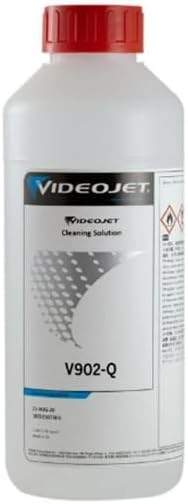
Image 1.1: Videojet V902-Q Cleaning Solution bottle. This solution is used for maintaining Continuous Inkjet Printers.
2. Safety Information
Always handle cleaning solutions with care. Refer to the product label and Safety Data Sheet (SDS) for complete safety information before use. The product label indicates potential hazards, including flammability and irritation. Adhere to the following general safety guidelines:
- Personal Protective Equipment (PPE): Always wear appropriate PPE, including safety glasses or goggles and chemical-resistant gloves, when handling the cleaning solution.
- Ventilation: Use in a well-ventilated area to avoid inhalation of vapors.
- Flammability: Keep away from open flames, sparks, and heat sources. Do not smoke while handling.
- Storage: Store in a cool, dry place, away from direct sunlight and incompatible materials. Keep container tightly closed when not in use.
- Disposal: Dispose of used solution and empty containers according to local environmental regulations. Do not pour down drains.
- First Aid: In case of contact with skin or eyes, rinse immediately with plenty of water. If swallowed, do not induce vomiting; seek immediate medical attention.
3. Setup and Preparation
Before using the V902-Q Cleaning Solution, ensure your workspace is prepared and you have all necessary tools and safety equipment.
- Ensure the printer is powered off and disconnected from the power source before beginning any cleaning procedures.
- Gather all required cleaning tools, such as lint-free cloths, brushes, and waste containers.
- Put on appropriate Personal Protective Equipment (PPE) as outlined in the Safety Information section.
- Place absorbent material around the printer area to catch any spills.
4. Operating Instructions (Cleaning Procedure)
The V902-Q Cleaning Solution is used to clean various components of the Videojet 1000 Series CIJ Printer. Specific cleaning procedures may vary depending on the printer model and the component being cleaned. Always refer to your printer's specific service manual for detailed cleaning instructions.
General Cleaning Steps:
- Identify Area to Clean: Determine which part of the printer requires cleaning (e.g., printhead, gutters, ink lines).
- Apply Solution:
- For surface cleaning: Moisten a lint-free cloth with the V902-Q solution and gently wipe the affected area.
- For flushing: Follow printer-specific instructions for flushing ink lines or printheads with cleaning solution. This often involves using a syringe or pump system.
- Allow to Dissolve: Allow the solution to sit for a short period (as specified by printer manual) to dissolve dried ink or contaminants.
- Wipe/Flush Clean: Wipe away dissolved residue with a clean, lint-free cloth. If flushing, ensure all dissolved contaminants are expelled.
- Dry: Allow the cleaned components to air dry completely before reassembling or powering on the printer.
Note: Never mix V902-Q Cleaning Solution with ink or other chemicals unless explicitly instructed by the printer manufacturer.
5. Maintenance and Storage
Proper storage of the V902-Q Cleaning Solution ensures its effectiveness and safety.
- Storage Conditions: Store the container upright in a cool, dry, well-ventilated area, away from direct sunlight, heat, and ignition sources.
- Container Integrity: Keep the original container tightly sealed when not in use to prevent evaporation and contamination.
- Shelf Life: Refer to the product's batch information or manufacturer's guidelines for recommended shelf life.
- Disposal: Dispose of expired or unused solution and empty containers in accordance with all applicable local, regional, national, and international regulations. Do not dispose of in general waste or pour down drains.
6. Troubleshooting
If you encounter issues related to cleaning or printer performance after using the V902-Q solution, consider the following:
| Problem | Possible Cause | Solution |
|---|---|---|
| Cleaning is ineffective. | Insufficient contact time; heavily dried ink; incorrect application method. | Increase contact time; repeat cleaning process; ensure proper application as per printer manual. |
| Residue remains after cleaning. | Not wiped thoroughly; lint from cloth. | Use a fresh, lint-free cloth; ensure complete drying. |
| Printer error after cleaning. | Components not fully dry; improper reassembly; solution residue. | Ensure all components are completely dry; recheck assembly; perform a final wipe with a dry, lint-free cloth. Consult printer manual for specific error codes. |
If problems persist, consult your Videojet printer's specific user manual or contact Cijprinter technical support.
7. Specifications
| Attribute | Detail |
|---|---|
| Product Name | Videojet V902-Q Cleaning Solution |
| Model Number | V902-Q |
| Brand | Cijprinter (Compatible with Videojet) |
| Product Type | Consumable Cleaning Solution |
| Compatibility | Videojet 1000 Series Continuous Inkjet Printers |
| Item Weight | 2.3 pounds (approx. 1.04 kg) |
| Product Dimensions | 8 x 4 x 4 inches (approx. 20.3 x 10.2 x 10.2 cm) |
| UPC | 609831492161 |
| Color | White (bottle color) |
8. Warranty and Support
For specific warranty information regarding the Videojet V902-Q Cleaning Solution, please refer to the terms and conditions provided by Cijprinter at the time of purchase. As a consumable item, warranty terms may differ from those for capital equipment.
For technical support, product inquiries, or assistance with troubleshooting, please contact Cijprinter customer service or your authorized distributor. Contact information can typically be found on the product packaging or the Cijprinter official website.


