
1. Introduction
This manual provides instructions for the proper installation, usage, and maintenance of your new Generic 2-in-1 Protective Phone Case. This case is specifically designed to be compatible with the Honor Magic V2 RSR Porsche Design 5G (VER-AN10) smartphone, offering enhanced protection through its dual-layer construction of PC (Polycarbonate) and PU leather grain materials.

Image 1.1: The 2-in-1 protective phone case in pink, fully installed on a compatible Honor Magic V2 RSR Porsche Design 5G phone.
2. Setup (Installation)
The protective case features a 2-in-1 design, consisting of a rigid PC frame and a separate PU leather-textured back panel. Follow these steps for proper installation:
- Prepare Your Device: Ensure your Honor Magic V2 RSR Porsche Design 5G phone is clean and free of dust or debris.
- Separate Case Components: Gently separate the PC frame from the PU leather back panel. The PC frame typically snaps onto the phone first.
- Install PC Frame: Carefully align your phone with the PC frame. Insert one side of the phone into the frame, then gently press the other side until the phone is securely seated within the frame. Ensure all cutouts align with your phone's ports and buttons.
- Attach Leather Back Panel: Once the PC frame is installed, align the PU leather back panel with the back of the PC frame. The back panel is designed to fit snugly over the frame, providing the outer layer of protection and aesthetic finish. Press firmly around the edges until it is securely attached.
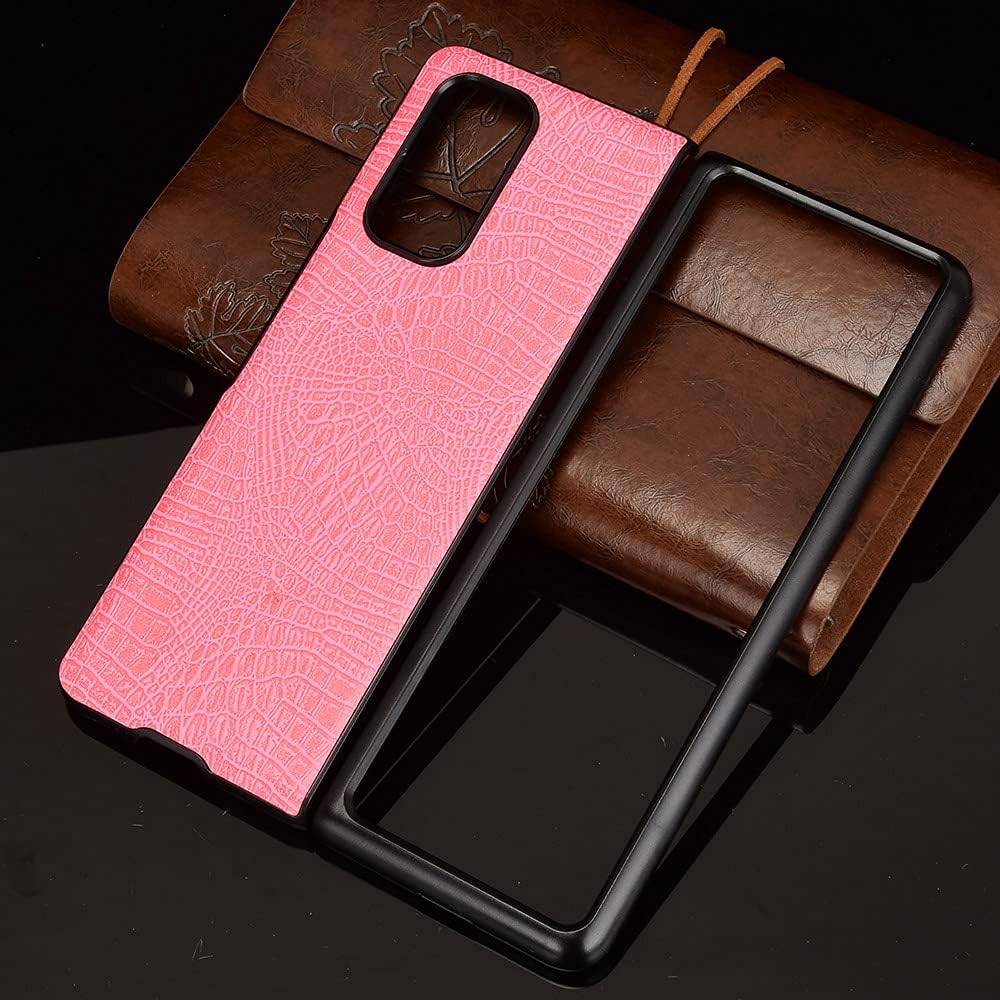
Image 2.1: The two main components of the protective case, illustrating the separate PC frame and the PU leather back panel.
To remove the case, reverse the installation steps: gently detach the leather back panel, then carefully unclip the PC frame from your phone.
3. Operating (Usage)
Once installed, your phone case provides protection while maintaining full functionality of your device.
- Access to Ports and Buttons: The case features precision cutouts for all ports, speakers, microphones, and the charging port. Buttons are designed to be accurate and responsive, allowing for easy operation without removing the case.
- Camera Protection: The case includes a raised bezel around the camera module to protect the lenses from scratches when placed on flat surfaces.
- Wireless Charging: The case is designed to be compatible with wireless charging. You can charge your phone wirelessly without needing to remove the case.

Image 3.1: A side profile view of the case, showcasing the textured leather finish and the slim fit.
4. Maintenance
To keep your phone case in optimal condition and extend its lifespan, follow these maintenance guidelines:
- Cleaning: For general cleaning, wipe the case with a soft, damp cloth. For the PU leather surface, use a mild soap solution if necessary, then wipe dry immediately. Avoid harsh chemicals, abrasive cleaners, or excessive moisture.
- Avoid Extreme Conditions: Do not expose the case to extreme temperatures, direct sunlight for prolonged periods, or sharp objects, as these can damage the material and finish.
- Regular Inspection: Periodically inspect the case for any signs of wear or damage. If the case becomes significantly damaged, consider replacing it to ensure continued protection for your device.

Image 4.1: An internal view of the PC frame, illustrating its structural design.
5. Troubleshooting
If you encounter any issues with your phone case, consider the following:
- Case Not Fitting Properly: Ensure you have the correct model case for your phone (Honor Magic V2 RSR Porsche Design 5G VER-AN10). Re-attempt installation, ensuring the phone is aligned correctly within the PC frame before attaching the back panel.
- Buttons Not Responsive: Check if the case is fully seated and aligned. Sometimes a slight misalignment can obstruct button presses. Remove and re-install the case carefully.
- Wireless Charging Issues: Ensure your phone is correctly positioned on the wireless charger. If issues persist, try removing the case to confirm it is not interfering with the charging process.
If problems persist after attempting these troubleshooting steps, please refer to the 'Warranty and Support' section for further assistance.
6. Specifications
| Feature | Detail |
|---|---|
| Compatible Phone Models | Honor Magic V2 RSR Porsche Design 5G VER-AN10 |
| Material | Polycarbonate (PC), PU Leather |
| Structure | 2-in-1 (PC frame + Leather back panel) |
| Special Features | Anti-drop Protective, Slim Fit, Vintage design |
| Item Weight | 2.46 ounces |
| Product Dimensions | 0.39 x 0.39 x 0.39 inches |
| Color | Pink |
| What's in the box | 1 x 2-in-1 (PC+Leather) Protective Phone Case |
7. Warranty and Support
For any questions regarding your Generic 2-in-1 Protective Phone Case, including inquiries about compatibility or product functionality, please contact the seller directly through the platform where the purchase was made. The seller is committed to resolving any issues you may encounter as quickly as possible.
Please retain your proof of purchase for any warranty or support claims.


