
Yoidesu Yoidesutp5sa3efxy
Yoidesu E Bike Motor Controller Kit (Model Yoidesutp5sa3efxy) - Instruction Manual
Comprehensive guide for installation, operation, and maintenance.
1. Introduction
This manual provides essential information for the proper installation, operation, and maintenance of your Yoidesu E Bike Motor Controller Kit. This kit is designed to enhance electric bicycles and scooters by providing efficient motor control, an LCD display for real-time data, and Bluetooth app connectivity for advanced settings and monitoring. Please read this manual thoroughly before installation and use to ensure optimal performance and safety.
2. Package Contents
The Yoidesu E Bike Motor Controller Kit includes the following components:
- 1 x Motor Controller (Aluminum Alloy)
- 1 Pair x Shifter/Throttle Grips
- 1 x Pedal Assist Sensor (PAS)
- 1 x LCD Display Panel (ABS)
- 1 x Bluetooth Module (integrated with controller)
- Instruction Manuals for Display and Controller (digital versions provided here)

Image: All components of the Yoidesu E Bike Motor Controller Kit, including the controller, display, shifters, and assist sensor.
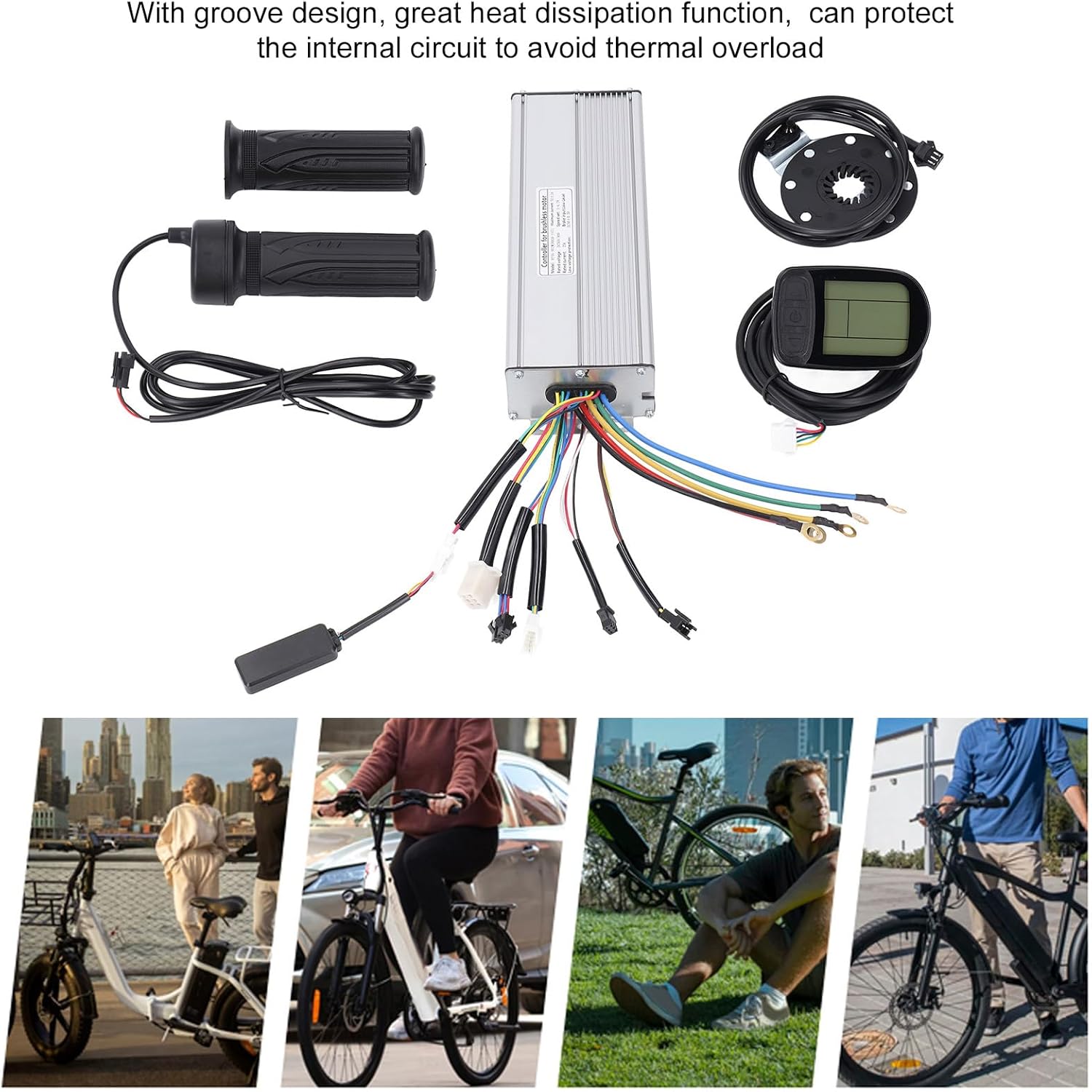
Image: The motor controller, display, shifters, and assist sensor. The controller features a grooved design for efficient heat dissipation.
3. Installation Guide
This section outlines the general steps for installing the Yoidesu E Bike Motor Controller Kit. Professional installation is recommended if you are unfamiliar with electric bicycle wiring.
3.1 Safety Precautions
- Ensure the e-bike battery is disconnected before starting any installation.
- Wear appropriate safety gear, including gloves and eye protection.
- Refer to your e-bike's original manual for specific component locations and wiring diagrams.
- Avoid exposing components to water or extreme temperatures during installation.
3.2 Component Installation Steps
- Mount the Controller: Secure the aluminum alloy controller to a suitable location on your e-bike frame, ensuring good airflow for heat dissipation. The grooved design aids in cooling.

Image: A close-up view of the wiring connections on the motor controller, showing various colored wires for different functions.
- Install Shifter/Throttle Grips: Replace your existing grips with the provided shifter/throttle grips on the handlebars. Connect the wiring to the controller as per the wiring diagram.

Image: The pair of shifter/throttle grips with their connecting cable.
- Attach Pedal Assist Sensor (PAS): Install the pedal assist sensor near the crank arm, ensuring it aligns correctly with the magnets. Connect its cable to the controller.

Image: The pedal assist sensor (PAS) with its magnetic ring and sensor unit.
- Mount LCD Display Panel: Secure the LCD display panel to your handlebars in a position that is easily visible and accessible. Connect the display cable to the controller.

Image: The Yoidesu LCD display panel with its control buttons and connecting cable.
- Connect Motor and Battery: Connect the motor phase wires and hall sensor wires from your e-bike motor to the controller. Finally, connect the battery power cables to the controller. Double-check all connections for security and correct polarity.
The controller's robust design and the display panel's durable ABS cover ensure protection for internal circuits, contributing to the kit's overall longevity.
4. Operating Instructions
4.1 Basic Operation
- Power On/Off: Press and hold the power button on the LCD display to turn the system on or off.
- Assist Level Adjustment: Use the up/down buttons on the display to cycle through different pedal assist levels (e.g., 0-5). Level 0 typically provides no assistance.
- Throttle Control: If equipped, gently twist the throttle grip to engage motor power directly, independent of pedaling.
- Display Information: The LCD display shows real-time data such as speed, battery level, assist level, trip distance, and total distance.
4.2 Bluetooth App Connectivity
The Yoidesu E Bike Motor Controller Kit features a dedicated Bluetooth APP for smartphones, allowing for advanced control and monitoring.
- Download the App: Search for the "Yoidesu E Bike" or similar app in your smartphone's app store (iOS/Android).
- Pairing: Ensure your e-bike system is powered on and Bluetooth is enabled on your smartphone. Open the app and follow the on-screen instructions to pair with your controller kit.
- App Functions: The app provides real-time communication with the Bluetooth module, enabling functions such as:
- Detailed ride data display (speed, distance, power consumption).
- Customization of assist levels and motor parameters.
- Diagnostic information and error codes.
- GPS tracking and route mapping (if supported by the app).
Image: The Yoidesu E Bike Motor Controller Kit components, representing the system that connects to the smartphone app for enhanced control and monitoring.
5. Maintenance
Regular maintenance ensures the longevity and optimal performance of your Yoidesu E Bike Motor Controller Kit.
- Cleaning: Wipe down the controller and display with a soft, damp cloth. Avoid using harsh chemicals or abrasive materials.
- Connections: Periodically check all electrical connections for tightness and corrosion. Ensure cables are not pinched or damaged.
- Heat Dissipation: Keep the controller's grooved casing free from dirt and debris to maintain effective heat dissipation.
- Software Updates: Check the Bluetooth app regularly for any available firmware updates for the controller or display.
- Storage: If storing the e-bike for an extended period, ensure the battery is partially charged (around 50-60%) and stored in a cool, dry place.
6. Troubleshooting
This section addresses common issues you might encounter with your Yoidesu E Bike Motor Controller Kit.
| Problem | Possible Cause | Solution |
|---|---|---|
| System does not power on. | Battery disconnected or low charge; loose power connection; faulty display. | Check battery connection and charge level. Verify all power cables are securely connected. Test with a known good display if possible. |
| Motor not providing assistance. | Pedal assist sensor (PAS) not installed correctly; motor cable loose; assist level set to 0; faulty motor or controller. | Ensure PAS is correctly aligned and connected. Check motor phase and hall sensor connections. Increase assist level on display. Consult a technician if motor or controller is suspected. |
| Bluetooth app cannot connect. | E-bike system not powered on; Bluetooth disabled on phone; app not updated; interference. | Power on the e-bike. Enable Bluetooth on your smartphone. Update the app to the latest version. Try connecting in an area with less wireless interference. |
| Display shows error code. | Specific component malfunction (e.g., motor, sensor, battery). | Refer to the display's instruction manual (or the app's diagnostic section) for the meaning of the specific error code and recommended actions. |
7. Specifications
| Feature | Detail |
|---|---|
| Item Type | Electric Controller Kit |
| Model Number | Yoidesutp5sa3efxy |
| Controller Material | Aluminum Alloy (with grooved heat dissipation design) |
| Display Panel Material | ABS (lightweight, sturdy, high toughness) |
| Connectivity | Bluetooth APP compatible with smartphones |
| Weight (Approx.) | 1521g / 3.34 lbs (Item Weight) |
| Package Dimensions (Approx.) | 10.63 x 7.48 x 6.3 inches |
| Application | DIY electric bikes, electric scooters, folding bikes, etc. |
8. Warranty Information
Yoidesu products typically come with a standard manufacturer's warranty covering defects in materials and workmanship. For specific warranty terms, duration, and claim procedures, please refer to the warranty card included with your purchase or contact Yoidesu customer support. Keep your proof of purchase for warranty claims.
The product has a return policy duration of 30 days for refund/replacement.
9. Customer Support
If you encounter any issues not covered in this manual or require further assistance, please contact Yoidesu customer support.
- Online Support: Visit the official Yoidesu website for FAQs, support resources, and contact forms.
- Email Support: Refer to your product packaging or the official website for the customer support email address.
- Retailer Support: For purchases made through Amazon, you may contact the seller "Hakeeta us" for assistance.
Ask a question about this manual
Ask about setup, troubleshooting, compatibility, parts, safety, or missing instructions. Manuals+ will review the question and use this page’s manual context to help answer it.