
1. Introduction
Thank you for choosing the QUOLIX Q668 Rechargeable Emergency Walkie Talkie. This device is designed to provide reliable two-way communication, emergency weather alerts, and versatile power options, making it an essential tool for outdoor activities and emergency preparedness. Please read this manual thoroughly to understand the features and proper operation of your new device.
2. Package Contents
Ensure all items are present in the package:
- QUOLIX Q668 Emergency Walkie Talkie (1 unit)
- 2000mAh Rechargeable Lithium-Ion Battery (pre-installed or separate)
- USB Charging Cable
- User Manual
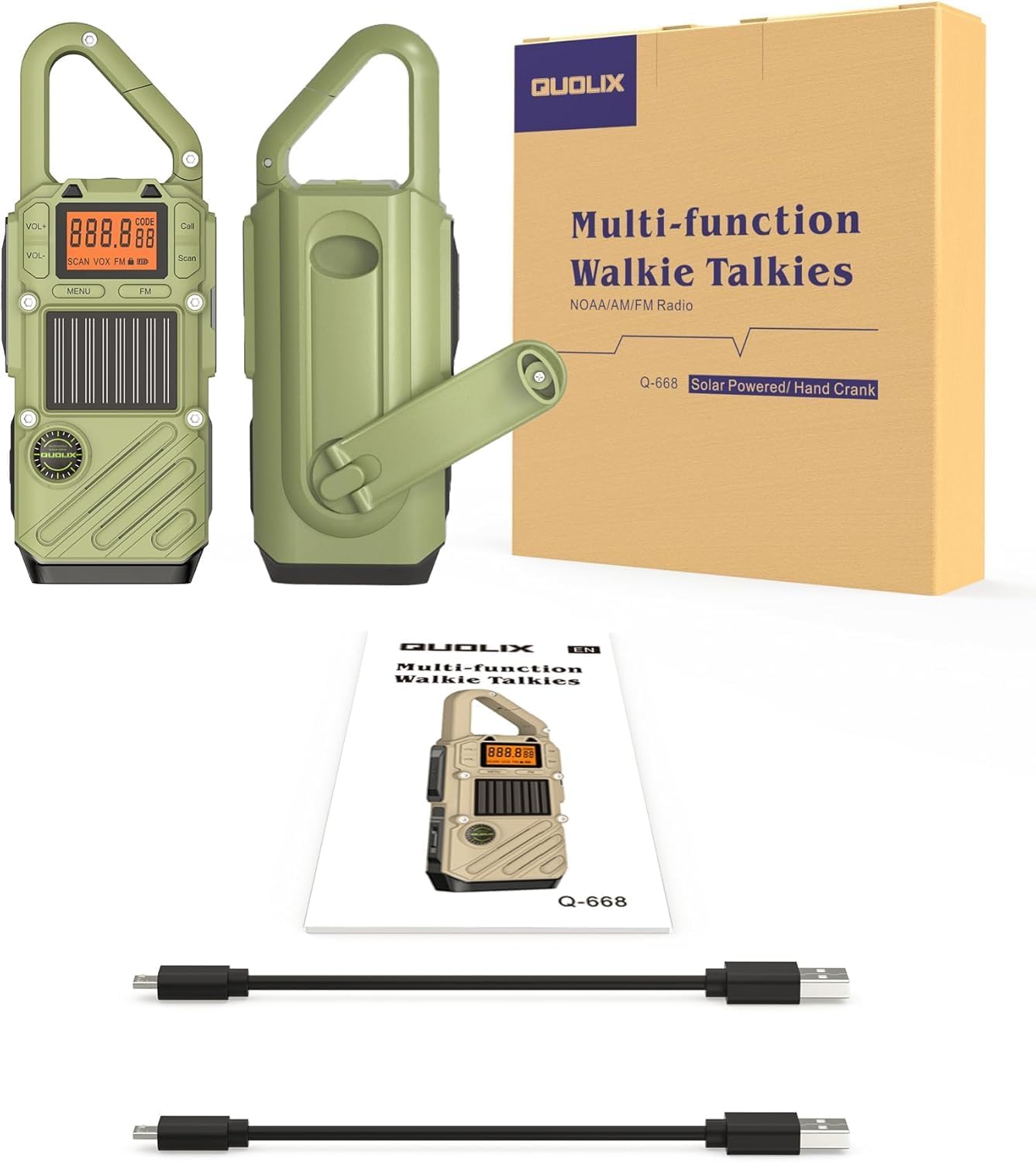
Image: QUOLIX Q668 Walkie Talkie and accessories including USB cable and manual. This image shows the walkie talkie, a USB cable, and the instruction manual, representing the typical package contents.
3. Product Overview
Familiarize yourself with the main components and controls of your QUOLIX Q668 Walkie Talkie.

Image: Front view of QUOLIX Q668 Rechargeable Emergency Walkie Talkie. This image displays the front of the walkie talkie, showing the display screen, solar panel, and control buttons.
Key Components:
- Display Screen: Shows channel, frequency, battery status, and other indicators.
- Volume Buttons (VOL+/-): Adjusts speaker volume.
- MENU Button: Accesses settings and features.
- WX/FM Button: Toggles between Weather (NOAA) and FM radio modes.
- Call Button: Initiates a call tone. Long press for SOS siren.
- Scan Button: Initiates channel or frequency scanning.
- PTT (Push-to-Talk) Button: Located on the side, used for transmitting voice.
- LED Flashlight: Integrated light source with multiple modes.
- Solar Charging Panel: Located on the front for emergency solar power.
- Hand Crank: Foldable crank on the back for manual power generation.
- USB Charging Port: For charging the device and external devices.
- Keychain Clip: For convenient attachment.

Image: Side view of QUOLIX Q668 Walkie Talkie demonstrating the hand crank for emergency power generation. This image shows the side of the device with the hand crank extended.
4. Setup
4.1 Initial Battery Charge
Before first use, fully charge the walkie talkie using the provided USB cable. Connect the USB cable to the device's charging port and a standard USB power adapter (not included) or computer USB port. The charging indicator will show progress, and the device is fully charged when the indicator changes or turns off.
4.2 Powering On/Off
To power on the device, press and hold the MENU button for approximately 3 seconds. The display will light up. To power off, press and hold the MENU button again for 3 seconds until the display turns off.
5. Charging the Device
The QUOLIX Q668 offers multiple charging methods to ensure power availability in various situations.
5.1 USB Charging
Connect the provided USB cable to the device and a USB power source. This is the primary and fastest charging method.
5.2 Solar Charging
Place the walkie talkie with its solar panel facing direct sunlight. This method is ideal for maintaining charge or providing supplemental power in outdoor environments. Charging efficiency depends on sunlight intensity.

Image: Top view of QUOLIX Q668 Walkie Talkie highlighting the integrated solar charging panel. This image shows the solar panel on the front of the device.
5.3 Hand Crank Charging
Extend the hand crank located on the back of the device. Rotate the crank clockwise or counter-clockwise at a steady pace to generate power. This method is for emergency power generation when other sources are unavailable.
Image: Side view of QUOLIX Q668 Walkie Talkie demonstrating the hand crank for emergency power generation. This image shows the side of the device with the hand crank extended.
5.4 Power Bank Function
The Q668 can act as a power bank to charge small USB electronic devices like cell phones. Connect your device to the walkie talkie's USB output port using your device's charging cable.
Image: QUOLIX Q668 Walkie Talkie connected via USB to charge a mobile phone. This image illustrates the walkie talkie charging a smartphone via its USB port.
6. Basic Operation
6.1 Adjusting Volume
Use the VOL+ and VOL- buttons to increase or decrease the speaker volume.
6.2 Selecting a Channel
The Q668 supports 22 FRS channels. To change channels, press the MENU button once. The channel number on the display will flash. Use the VOL+ or VOL- buttons to select your desired channel. Press MENU again to confirm or wait a few seconds for it to auto-confirm.
6.3 Transmitting and Receiving
To transmit, press and hold the PTT (Push-to-Talk) button on the side of the device. Speak clearly into the microphone. Release the PTT button to listen for a response. Ensure all communicating parties are on the same channel and privacy code (if used).
6.4 Keylock Feature
To prevent accidental changes to settings, the device features a keylock. Consult the on-screen prompts or specific button combinations (often a long press of the MENU button or a dedicated lock button) to activate or deactivate the keylock.
7. Advanced Features
7.1 NOAA Weather Alert & FM Radio
Press the WX/FM button to switch between standard walkie talkie mode, NOAA Weather Radio, and FM Radio. In NOAA mode, the device can receive 7 emergency weather alert channels, providing timely notifications for severe weather events. In FM mode, you can listen to local FM broadcasts.

Image: Close-up of QUOLIX Q668 Walkie Talkie display showing NOAA weather radio function. The display clearly indicates the weather alert mode.
7.2 LED Flashlight
The integrated LED flashlight has three modes: Low, High, and SOS Strobe. To activate, typically a short press of a dedicated light button or a specific combination (e.g., double-press MENU) is used. Cycle through modes with subsequent presses. The SOS strobe mode is designed for signaling in emergency situations.

Image: QUOLIX Q668 Walkie Talkie with LED flashlight illuminated. This image shows the device with its flashlight active, demonstrating its utility in low-light conditions.
7.3 SOS Siren
In an emergency, long-press the Call button to activate the SOS siren. This emits a loud, attention-grabbing sound to signal for help.
7.4 VOX (Voice Operated Exchange)
VOX allows for hands-free operation. When activated, the radio will transmit automatically when it detects your voice, without needing to press the PTT button. To enable/disable VOX and adjust sensitivity, navigate through the MENU settings.
8. Maintenance
- Keep the device dry. Do not expose it to rain or moisture.
- Clean the device with a soft, damp cloth. Do not use harsh chemicals or abrasive cleaners.
- Avoid extreme temperatures. Store the device in a cool, dry place.
- Do not attempt to disassemble or modify the device, as this will void the warranty.
9. Troubleshooting
| Problem | Possible Cause | Solution |
|---|---|---|
| No power | Battery is depleted. | Charge the battery using USB, solar, or hand crank. |
| Cannot transmit or receive | Incorrect channel or privacy code. Out of range. PTT button not pressed. | Ensure both radios are on the same channel/code. Move closer to the other radio. Press and hold PTT button firmly when speaking. |
| Poor audio quality | Low battery. Out of range. Obstructions. | Recharge the battery. Move closer to the other radio. Move to an open area. |
| Weather alert not working | Not in NOAA mode. Weak signal. | Press WX/FM button to enter NOAA mode. Move to an area with better reception. |
10. Specifications
- Model: Q668
- Item Weight: 15.5 ounces
- Package Dimensions: 7.01 x 6.42 x 1.54 inches
- Batteries: 1 Lithium Ion battery (included)
- Number of Channels: 22
- Frequency Range: 462 MHz - 467 MHz
- Talking Range Maximum: Up to 1000 Feet (actual range may vary based on terrain and conditions)
- Water Resistance Level: Not Water Resistant
- Included Components: 2000mAh mobile power supply, solar panels, rechargeable batteries, LED flashlight, keychain clip
- Compatible Devices: FRS walkie-talkies
11. Warranty & Support
11.1 Warranty
This QUOLIX Q668 Walkie Talkie comes with a 1 Year Manufacturer Warranty from the date of purchase. This warranty covers defects in materials and workmanship under normal use. It does not cover damage caused by misuse, accidents, unauthorized modifications, or natural disasters.
11.2 Customer Support
For technical assistance, warranty claims, or any questions regarding your QUOLIX Q668, please contact QUOLIX customer support through the retailer where the product was purchased or refer to the contact information provided on the product packaging or official QUOLIX website.