
1. Product Overview
The Enbrighten 24in. LED Wi-Fi Light Fixture (Model 58261-T1) is designed to provide versatile and controllable illumination for various indoor spaces such as kitchens, pantries, laundry rooms, and home offices. This fixture offers premium illumination with 1160 lumens and a 94 CRI rating, ensuring high-quality, soft white light. Its sleek white finish integrates seamlessly with diverse interior designs. The fixture is Wi-Fi compatible, allowing for comprehensive control via the Enbrighten mobile application.

The Enbrighten 24-inch LED Wi-Fi Light Fixture shown in its retail packaging alongside a smartphone displaying the control app.
2. Package Contents
Verify that all components are present before beginning installation:
- Enbrighten 24in. LED Wi-Fi Light Fixture
- 5ft. Power Cord with Flat Plug
- 18in. Linking Cord
- Mounting Hardware (screws, anchors)
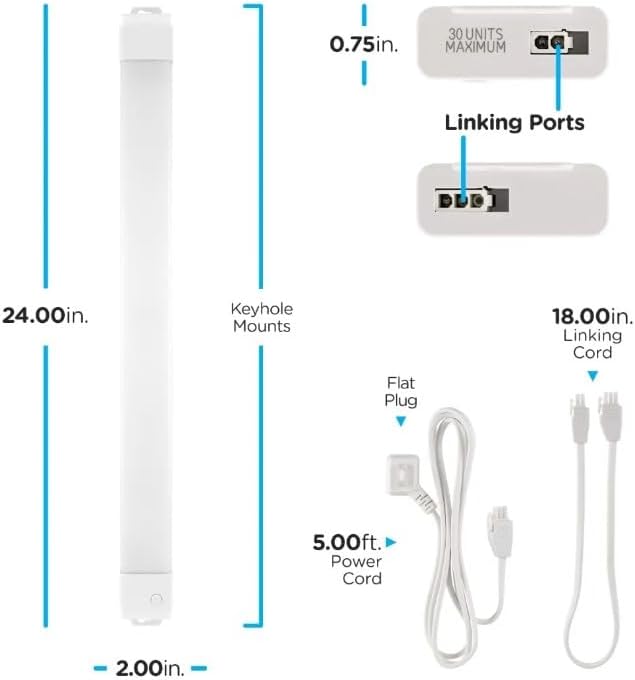
This diagram illustrates the physical dimensions of the 24-inch light fixture, measuring 24.00 inches in length, 2.00 inches in width, and 0.75 inches in height. It also highlights key components such as the keyhole mounts, linking ports (supporting up to 30 units), a 5.00ft power cord with a flat plug, and an 18.00in linking cord.
3. Safety Information
Please read and understand all safety instructions before installation and use. Failure to follow these instructions may result in electric shock, fire, or other hazards.
- Indoor Use Only: This fixture is designed for indoor use in dry locations. Do not expose to water or moisture.
- Electrical Safety: Ensure the power source is 120 Volts (AC). Do not attempt to modify the power cord or plug.
- Installation: Install the fixture securely using the provided mounting hardware. Ensure proper ventilation around the fixture.
- Linking: Do not exceed the maximum linking capacity of 20 fixtures. Use only Enbrighten linking cords.
- Cleaning: Disconnect power before cleaning. Use a soft, dry cloth. Do not use liquid cleaners or abrasive materials.
- Heat: While LED fixtures generate less heat than traditional lighting, ensure the fixture is not installed in an enclosed space that could trap heat.
4. Setup and Installation
The Enbrighten LED Wi-Fi Light Fixture is designed for easy installation. All necessary mounting hardware is included.
4.1 Mounting the Fixture
- Select Location: Choose a suitable indoor location, typically under cabinets, ensuring access to a power outlet.
- Mark Mounting Points: Use the keyhole mounts on the fixture to mark the drilling locations on the mounting surface.
- Install Hardware: Drill pilot holes if necessary and install the provided screws or anchors, leaving a small gap for the keyhole mounts.
- Secure Fixture: Align the keyhole mounts with the installed screws and slide the fixture into place until secure.
4.2 Power Connection
Connect the 5ft. power cord to the fixture and plug it into a standard 120V AC outlet. The flat plug design helps minimize clutter and allows access to out-of-the-way outlets.
4.3 Linking Multiple Fixtures
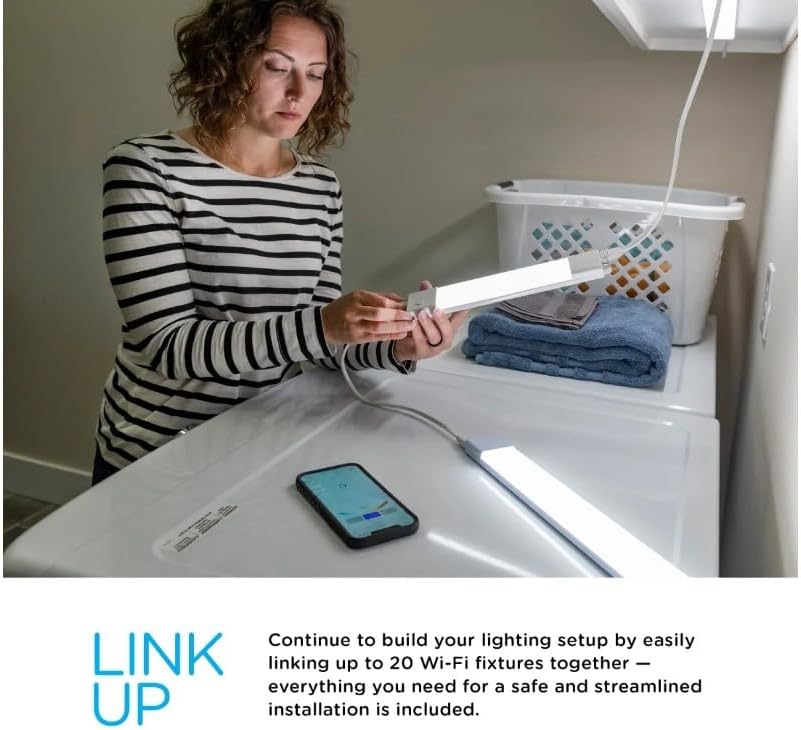
The fixture can be linked with up to 20 additional Enbrighten light fixtures to create a continuous lighting setup. Use the provided 18in. linking cord or optional longer linking cords (24in., 48in., 60in., 120in. sold separately) to connect fixtures via their linking ports.

The Enbrighten LED Wi-Fi Light Fixture supports linking up to 20 units, enabling users to create extended lighting systems. This image shows two fixtures connected, illustrating the expandability of the system.
5. Operating Instructions
This Enbrighten light fixture is primarily controlled via the Enbrighten mobile application, which offers full wireless control and advanced features. The fixture requires a 2.4GHz Wi-Fi network for full functionality.
5.1 Enbrighten App Download and Setup
- Download App: Download the free Enbrighten app from the Apple App Store or Google Play.
- Create Account: Open the app and follow the prompts to create a new account or log in.
- Pair Device: Plug in the light fixture. It will begin to blink, indicating it is in pairing mode. Follow the in-app instructions to add your device. The app uses Bluetooth for initial setup to simplify the pairing process.
- Connect to Wi-Fi: During pairing, you will be prompted to connect the fixture to your 2.4GHz Wi-Fi network.
The Enbrighten app is available for free download on both the Apple App Store and Google Play, facilitating easy control and setup of the light fixture via Bluetooth.
5.2 App Features and Control
Once connected, the Enbrighten app provides comprehensive control over your light fixture:
- ON/OFF Control: Turn the fixture on or off remotely.
- Dimming: Adjust the brightness level from 0% to 100%.
- White Select: Customize the white light temperature from 2000K (warm white) to 6500K (cool white).
- Scheduling: Set daily or weekly schedules for automatic ON/OFF times.
- Custom Countdown Timer: Program the light to turn off after a specified duration.
- Personal Light Cycle: Create custom lighting routines.
- Voice Activation: Integrate with Amazon Alexa or Google Home for voice control (no separate hub required).
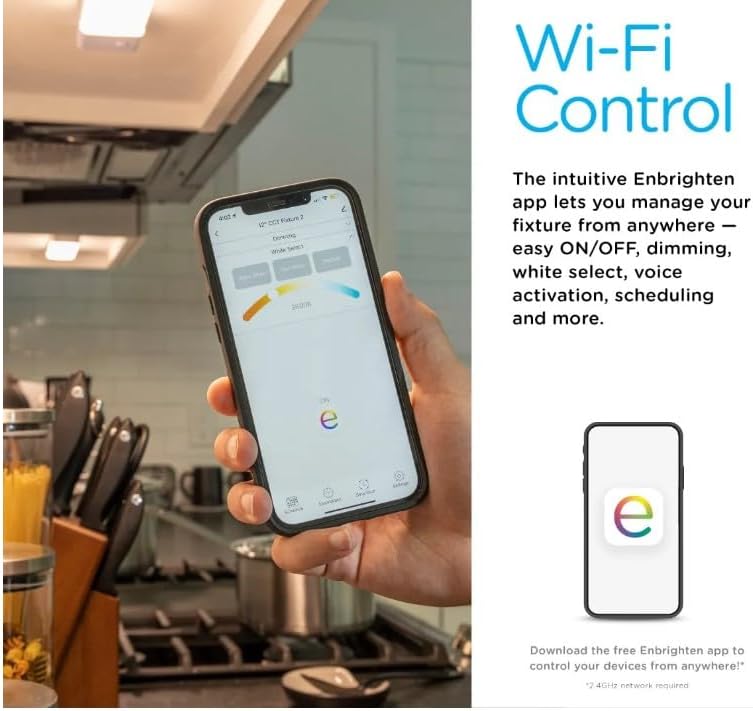
The Enbrighten app provides comprehensive Wi-Fi control over the light fixture, allowing users to manage settings such as ON/OFF, dimming, and white light selection from their mobile device.
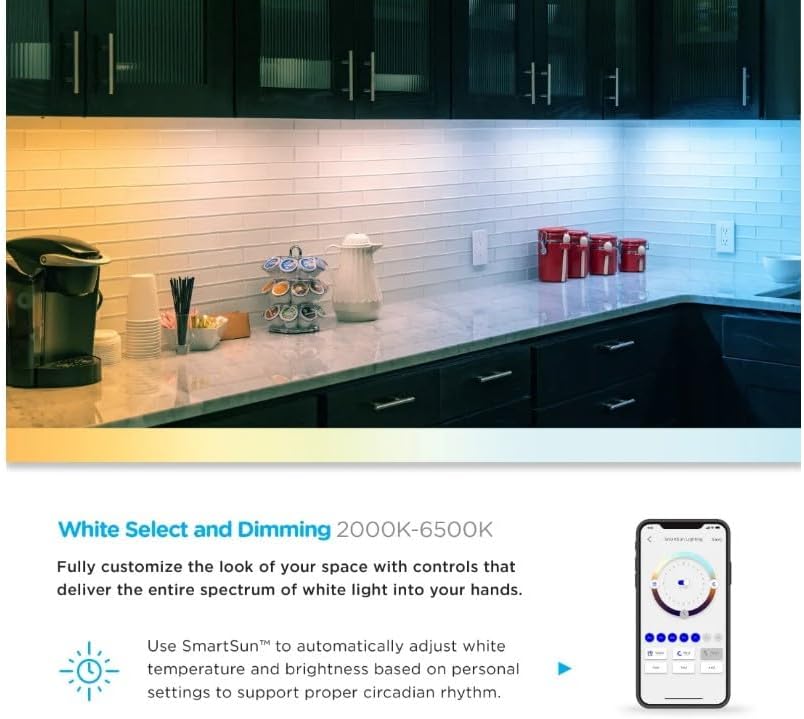
The Enbrighten LED Wi-Fi Light Fixture offers adjustable white light temperatures from 2000K to 6500K, allowing users to customize the ambiance. The image shows a kitchen counter with lighting transitioning from warm to cool tones.
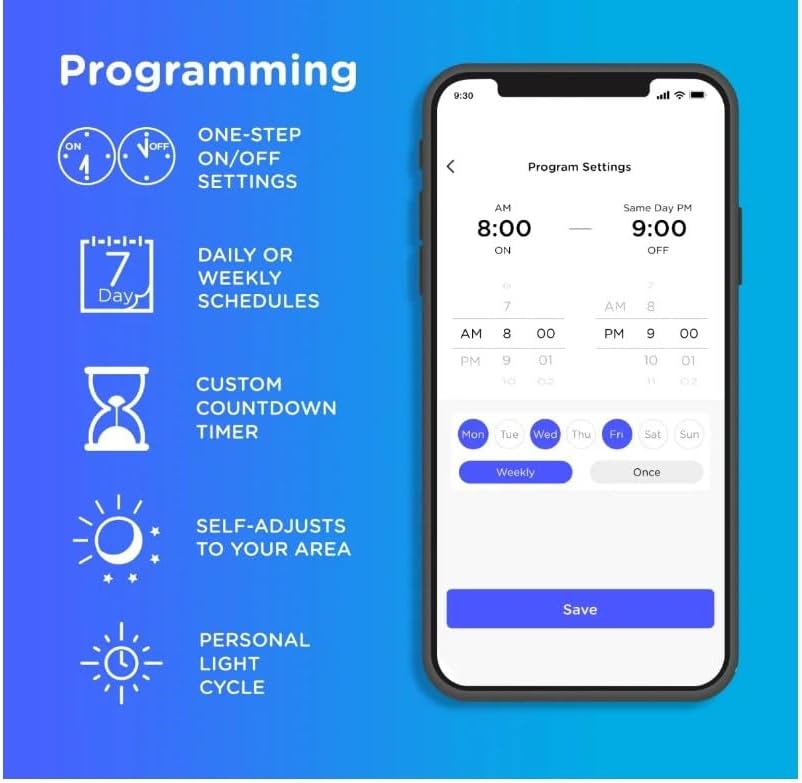
The Enbrighten app allows for advanced programming, including one-step ON/OFF settings, daily or weekly schedules, custom countdown timers, and personal light cycles that can self-adjust to your area.

The Enbrighten LED Wi-Fi Light Fixture supports voice control through Amazon Alexa and Google Home when connected via the Enbrighten app, eliminating the need for a separate hub.
6. Maintenance
The Enbrighten LED Wi-Fi Light Fixture requires minimal maintenance.
- Cleaning: Ensure the fixture is unplugged or power is disconnected before cleaning. Use a soft, dry, lint-free cloth to wipe the surface. Avoid using harsh chemicals, abrasive cleaners, or sprays directly on the fixture.
- LED Lifespan: The integrated LEDs are designed for a long lifespan and do not require replacement.
7. Troubleshooting
If you experience issues with your Enbrighten LED Wi-Fi Light Fixture, refer to the following common solutions:
| Problem | Possible Cause | Solution |
|---|---|---|
| Light fixture is blinking continuously. | Fixture is not paired with the Enbrighten app or has lost Wi-Fi connection. | Download the Enbrighten app and follow the pairing instructions. Ensure your Wi-Fi network is 2.4GHz and stable. |
| Cannot control the light via the app. | No Wi-Fi connection; App not properly set up; Incorrect Wi-Fi password. | Verify your device is connected to a 2.4GHz Wi-Fi network. Re-open the app or re-pair the device if necessary. Check Wi-Fi credentials. |
| Light does not turn on. | No power; Loose connection; Faulty outlet. | Ensure the power cord is securely plugged into a working outlet. Check if the outlet has power by testing with another device. |
| Voice control is not working. | Not linked to Alexa/Google Home; Incorrect voice commands. | Ensure the Enbrighten app is linked to your Amazon Alexa or Google Home account. Use correct voice commands as specified in the app. |
| Linked fixtures are not responding. | Exceeded maximum linking capacity; Loose linking cord. | Ensure no more than 20 fixtures are linked. Check that linking cords are securely connected between all fixtures. |
8. Specifications
| Feature | Detail |
|---|---|
| Model Number | 58261-T1 |
| Dimensions (L x W x H) | 25.7" x 3.8" x 1.4" |
| Weight | 16 ounces |
| Power Source | Corded Electric |
| Voltage | 120 Volts (AC) |
| Light Source Type | LED |
| Brightness | 1160 Lumens |
| Color Temperature | 2000K-6500K (Tunable White) |
| Color Rendering Index (CRI) | 94 |
| Connectivity | Wi-Fi (2.4GHz) |
| Control Method | App, Voice (Amazon Alexa, Google Home) |
| Installation Type | Surface Mount |
| Maximum Linked Fixtures | 20 |
| Indoor/Outdoor Usage | Indoor |
| Material | Plastic |
| UPC | 030878582612 |
9. Warranty and Support
This Enbrighten product is backed by a Limited-Lifetime Warranty. For detailed warranty information or technical support, please visit the official Enbrighten website or contact their customer service department. Keep your purchase receipt for warranty claims.