
Fitonme E05
Fitonme Women's Smart Watch User Manual
Model: E05
1. Introduction
Thank you for choosing the Fitonme Women's Smart Watch (Model E05). This smartwatch is designed to seamlessly integrate into your daily life, offering advanced features for communication, health monitoring, and fitness tracking. With its elegant design and comprehensive functionalities, it aims to provide a convenient and insightful experience. This manual provides detailed instructions on how to set up, operate, and maintain your new smartwatch. Please read it thoroughly before use to ensure optimal performance and longevity of your device.

Image Description: A rose gold Fitonme Women's Smart Watch with a mesh strap and a decorative watch face featuring a woman's profile and floral elements. A smaller image of the watch showing an incoming call notification is also visible.
2. Safety Information
To ensure safe and proper use of your Fitonme Smart Watch, please adhere to the following guidelines:
- Medical Disclaimer: This device is not a medical device and should not be used for diagnosis, treatment, or prevention of any disease. All health data provided is for reference only and should not replace professional medical advice.
- Charging: Use only the provided charging cable. Do not use damaged chargers or cables. Ensure the charging contacts are dry and clean before charging.
- Water Resistance: The watch is IP68 waterproof. This means it is resistant to dust and can withstand immersion in water up to 1.5 meters for 30 minutes. Avoid hot water, steam, or prolonged immersion. Do not operate buttons underwater.
- Temperature: Do not expose the watch to extreme temperatures (below -10°C or above 50°C) or direct sunlight for extended periods.
- Cleaning: Clean the watch and strap regularly with a soft, dry cloth. Avoid using harsh chemicals or abrasive materials.
- Disassembly: Do not attempt to disassemble, repair, or modify the watch yourself. This will void the warranty and may cause damage.
- Interference: Keep the watch away from strong magnetic fields or high-frequency devices, as they may interfere with its operation.
- Children: Keep the watch and its accessories out of reach of small children to prevent choking hazards.
3. Package Contents
Upon opening your Fitonme Smart Watch package, please verify that all the following items are included:
- Fitonme Smart Watch (Model E05)
- Magnetic Charging Cable
- User Manual (this document)
- Additional Silicone Strap (may vary by package)

Image Description: The white retail packaging box for the Fitonme Smart Watch, featuring an image of the watch on the front.
4. Product Overview
The Fitonme Smart Watch features a sleek design with a vibrant AMOLED display and intuitive controls.
4.1. Watch Components
- Display: 1.19-inch AMOLED full touch screen.
- Crown/Button: Located on the side, used for navigation and power.
- Sensors: Located on the back for heart rate, blood oxygen, and other health monitoring.
- Charging Contacts: Located on the back for magnetic charging.
- Speaker/Microphone: For Bluetooth call functionality.
- Strap: Interchangeable straps (mesh and silicone included).

Image Description: An image highlighting the 1.19-inch AMOLED display of the Fitonme Smart Watch, showing its 390*390 HD resolution and 95% viewing area. Insets show details of the crafted diamonds around the bezel and the precision-cut threaded crown.

Image Description: A diagram illustrating the dimensions of the Fitonme Smart Watch (50mm height, 45mm width) and the length of its straps (mesh strap 235mm, silicone strap 85mm and 125mm sections). It also shows the minimum and maximum wrist circumference (140mm-218mm).
5. Setup
5.1. Charging the Smart Watch
Before first use, fully charge your smartwatch.
- Connect the magnetic charging cable to the charging contacts on the back of the watch.
- Connect the USB end of the cable to a USB power adapter (5V/1A recommended) or a computer's USB port.
- The watch screen will display a charging indicator. A full charge typically takes about 2 hours.
Note: A full charge provides approximately 3-5 days of daily use or 7-10 days of standby time.

Image Description: An image showing the Fitonme Smart Watch with a charging icon, indicating its 170 mAh battery. Text overlays specify charging time (2 hours), daily use (2-3 days), and standby time (7-10 days).
5.2. Downloading the Companion App
To unlock the full potential of your smartwatch, download the dedicated companion application on your smartphone.
- Scan the QR code provided in the watch's packaging or on the watch screen (if available) to download the app.
- Alternatively, search for the app name (usually mentioned in the quick start guide or packaging) in your phone's app store (App Store for iOS, Google Play Store for Android).
- Install the app and grant necessary permissions for Bluetooth, notifications, and location services.
5.3. Pairing with Your Smartphone
Once the app is installed, pair your watch with your phone.
- Ensure Bluetooth is enabled on your smartphone.
- Open the companion app on your phone.
- Follow the in-app instructions to add a new device. The app will search for available smartwatches.
- Select "E05" or the corresponding device name from the list.
- Confirm the pairing request on both your phone and the watch if prompted.
- Once paired, the watch will synchronize time and data with your phone.
Compatibility: Compatible with smartphones running iOS 10.0 and above, or Android 5.0 and above.
6. Operating Instructions
6.1. Basic Navigation
- Touch Screen: Swipe left/right, up/down to navigate through menus and features. Tap to select.
- Crown/Button: Press to wake up the screen, return to the home screen, or access the app list. Rotate (if applicable) to scroll through lists.
- Power On/Off: Press and hold the crown/button to power on or off the watch.
6.2. Bluetooth Calls and Notifications
After successful Bluetooth pairing, your watch can handle calls and display notifications.
- Making Calls: Access the dial pad or contact list on your watch to initiate calls directly from your wrist.
- Receiving Calls: When a call comes in, the watch will display the caller ID. You can answer or reject the call directly from the watch.
- Notifications: Receive real-time alerts for SMS messages, WhatsApp, Facebook, and other social media apps. Ensure app notifications are enabled in your phone's settings and the companion app.

Image Description: An image illustrating the Bluetooth 5.2 connectivity of the Fitonme Smart Watch, showing a woman using the watch to make a call while cooking. Icons for various social media and messaging apps (Facebook, Messenger, Telegram, WhatsApp, LINE, Talk, Instagram, Gmail, Twitter, TikTok) are displayed, indicating notification support.
6.3. Health Monitoring
The Fitonme Smart Watch provides comprehensive health tracking features.
- Heart Rate: Continuous 24/7 heart rate monitoring. View real-time data on the watch or detailed trends in the app.
- Blood Oxygen (SpO2): Measure your blood oxygen saturation levels.
- Blood Pressure: Monitor your blood pressure (for reference only).
- Sleep Tracking: Automatically tracks your sleep patterns, including deep sleep, light sleep, and awake times.
- Women's Health: Features specifically designed for women, including menstrual period tracking, ovulation prediction, and pregnancy tracking with thoughtful reminders.

Image Description: An image showcasing the 24/7 smart health escort features of the Fitonme Smart Watch. It displays sleep tracking data (fall asleep time, sleep duration, light sleep, deep sleep, awake times) and icons for heart rate, blood oxygen, and blood pressure monitoring.
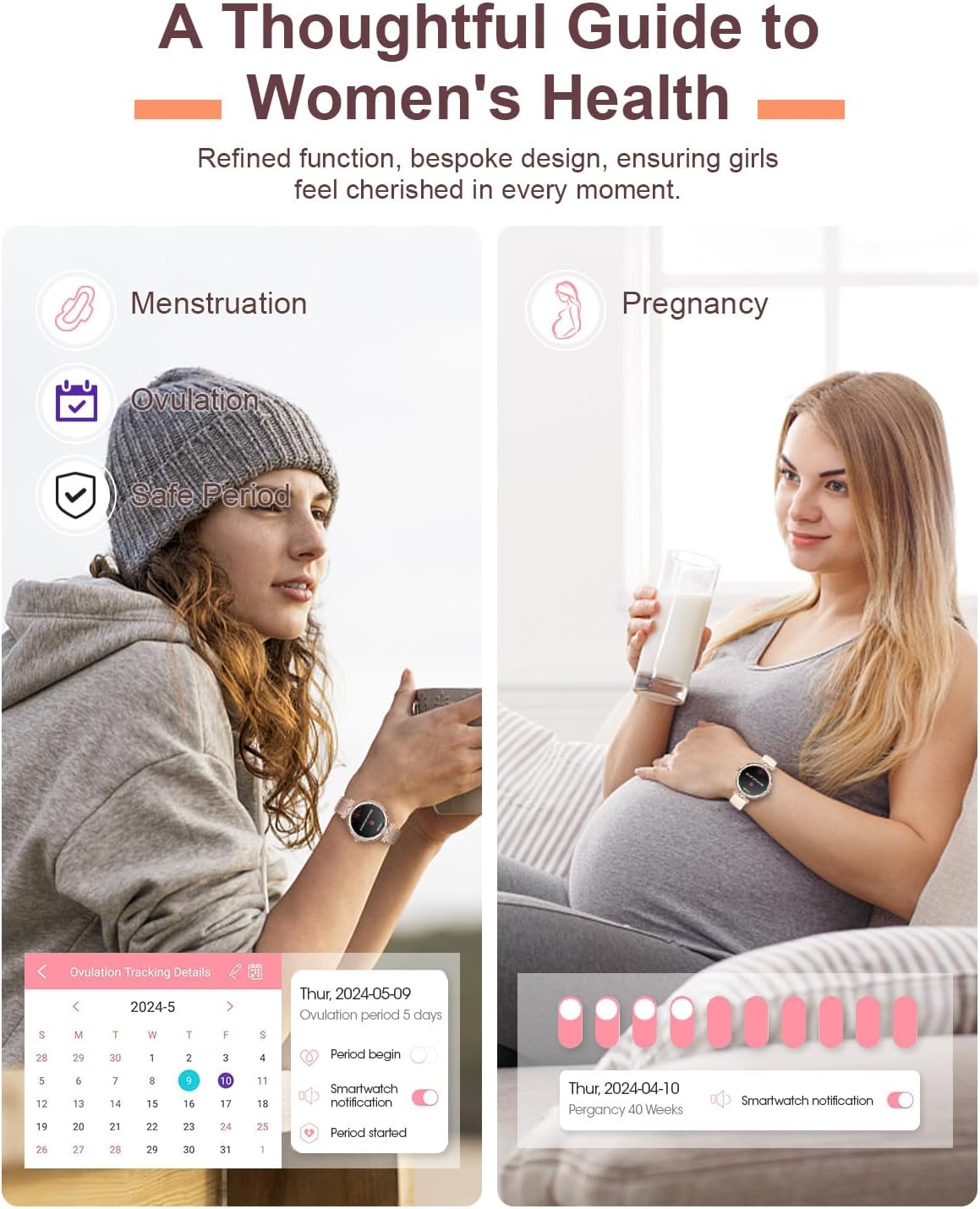
Image Description: An image detailing the women's health care features of the Fitonme Smart Watch, including menstruation, ovulation, and safe period tracking. It shows a woman checking her watch and a pregnant woman, with app interfaces displaying tracking details and reminders.
6.4. Sports Modes
The watch supports over 100 sports modes to track your physical activity.
- Select your desired sport from the watch's sports mode menu.
- The watch will track metrics such as steps, distance, calories burned, and heart rate during your workout.
- Connect the smartwatch to your phone to view detailed motion tracking graphs in the app.
Image Description: An image illustrating the diversified sports experience offered by the Fitonme Smart Watch, showing a woman exercising. Icons for various sports modes like Running, Walk, Cycling, Yoga, Skipping, Bouldering, Dance, Balls, and Elliptical Trainer are displayed, along with activity metrics such as calories, BPM, steps, and distance.
6.5. Customizing Watch Dials
Personalize your watch by changing the watch face.
- Access the watch face selection menu on the watch itself or through the companion app.
- Choose from over 100 exquisite watch wallpapers available in the app.
- You can also upload a photo from your phone's album to set as a custom watch wallpaper.
7. Maintenance
7.1. Cleaning Your Smart Watch
Regular cleaning helps maintain the appearance and functionality of your watch.
- Wipe the screen and watch body with a soft, lint-free cloth.
- For stubborn stains, slightly dampen the cloth with water. Avoid using soap or cleaning agents.
- Clean the charging contacts periodically to ensure proper charging.
- If the strap is removable, clean it separately according to its material.
7.2. Water Resistance (IP68)
The Fitonme Smart Watch is rated IP68, meaning it is dust-tight and protected against the effects of continuous immersion in water up to 1.5 meters for 30 minutes.
- It is suitable for daily use, such as hand washing, rain, and shallow swimming.
- Do not use the watch in hot showers, saunas, or steam rooms, as steam can penetrate the seals.
- Do not press any buttons while the watch is submerged in water.
- After exposure to water, especially saltwater, rinse the watch with fresh water and dry it thoroughly.
7.3. Battery Care
Proper battery care extends the lifespan of your device.
- Avoid completely draining the battery frequently.
- Store the watch in a cool, dry place if not used for extended periods, with the battery charged to about 50%.
- Do not expose the watch to extreme temperatures, as this can degrade battery performance.
8. Troubleshooting
If you encounter issues with your Fitonme Smart Watch, try the following solutions:
| Problem | Possible Cause | Solution |
|---|---|---|
| Watch won't turn on | Low battery; System crash | Charge the watch for at least 10 minutes. Press and hold the crown/button for 10-15 seconds to force restart. |
| Cannot pair with phone | Bluetooth off; App issue; Watch not discoverable | Ensure phone's Bluetooth is on. Restart both watch and phone. Reinstall the companion app. Ensure watch is in pairing mode. |
| No notifications | App permissions; Bluetooth disconnected; App settings | Check app notification permissions on your phone. Ensure Bluetooth is connected. Verify notification settings within the companion app. |
| Inaccurate health data | Improper fit; Sensor obstruction | Ensure the watch is worn snugly on your wrist, not too tight or too loose. Clean the sensor area on the back of the watch. |
| Short battery life | Frequent use of power-intensive features; High brightness | Reduce screen brightness. Limit continuous heart rate monitoring. Turn off unnecessary features. |
If the problem persists, please contact customer support.
9. Specifications
| Feature | Detail |
|---|---|
| Brand | Fitonme |
| Model | E05 |
| Display | 1.19-inch AMOLED Touch Screen |
| Resolution | 390*390 HD (implied from image) |
| Connectivity | Bluetooth 5.2 |
| Battery Capacity | 170 mAh Lithium Polymer |
| Charging Time | Approx. 2 hours |
| Daily Use Battery Life | 3-5 days |
| Standby Battery Life | 7-10 days |
| Memory Storage Capacity | 128 MB |
| Water Resistance | IP68 |
| Compatible OS | iOS 10.0+ / Android 5.0+ |
| Special Features | Bluetooth Calls, Message Notifications, 100+ Sports Modes, Heart Rate, SpO2, Sleep Tracking, Women's Health, Custom Dials, Respiratory Training, Alarm Clock, Chronograph, Climate, Camera Control, Music, Water Drink Reminder, Sedentary Reminder |
| Dimensions (Watch Face) | Approx. 50mm (H) x 45mm (W) |
| Weight | 170 g (Package dimensions indicate total package weight) |
10. Warranty and Support
10.1. Warranty Information
Your Fitonme Smart Watch is covered by a standard manufacturer's warranty against defects in materials and workmanship. The specific terms and duration of the warranty may vary by region and retailer. Please refer to the warranty card included in your product packaging or contact your point of purchase for detailed warranty information.
Note: The warranty typically does not cover damage caused by misuse, accidents, unauthorized repairs, or normal wear and tear.
10.2. Customer Support
For technical assistance, troubleshooting beyond this manual, or warranty claims, please contact Fitonme customer support.
- Online Support: Visit the official Fitonme website for FAQs, support articles, and contact forms.
- Email Support: Refer to your product packaging or the official website for the customer service email address.
- Retailer Support: If purchased from a specific retailer, they may offer direct support or guidance.
When contacting support, please have your product model (E05) and purchase information ready.
Ask a question about this manual
Ask about setup, troubleshooting, compatibility, parts, safety, or missing instructions. Manuals+ will review the question and use this page’s manual context to help answer it.