
BIAL RTX-DR08L
BIAL Unisex Electric Heated Slippers - Model RTX-DR08L Instruction Manual
Brand: BIAL | Model: RTX-DR08L

Image: BIAL Unisex Electric Heated Slippers, showcasing the product design and key features like the power button and battery.
1. Introduction
Welcome to your BIAL Electric Heated Slippers. These slippers are designed to provide warmth and comfort for your feet, especially in cold weather. Please read this manual carefully before use to ensure safe and optimal operation of your product.
Video: An overview of the BIAL Cordless Foot Warmer, highlighting its features and thermal performance.
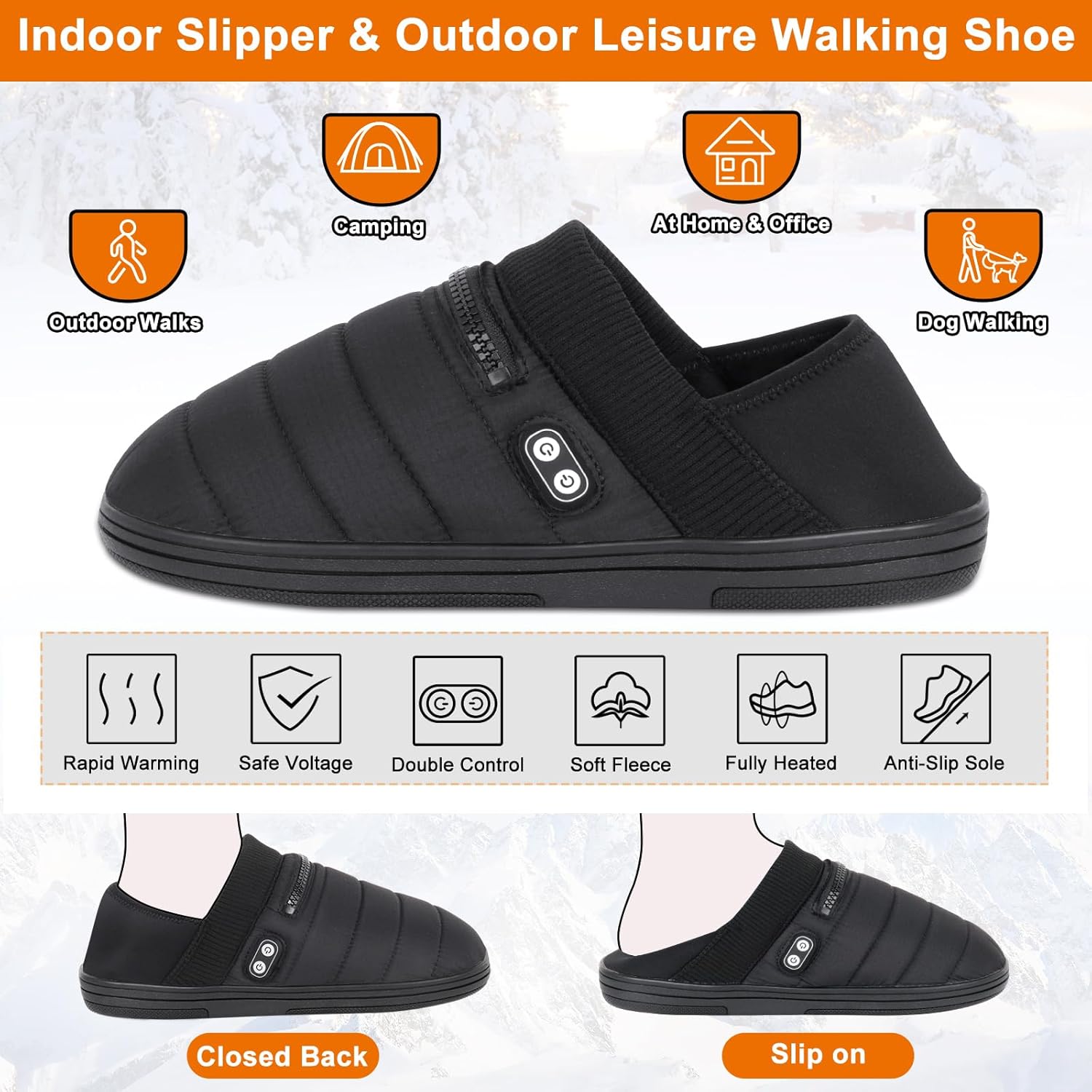
Image: The BIAL Heated Slippers are versatile for various indoor and outdoor activities, featuring rapid warming, safe voltage, dual control, soft fleece, full heating coverage, and an anti-slip sole.
2. Safety Information
- Avoid contact with water. Do not submerge the slippers or battery packs in water.
- Do not leave the product unattended while in use.
- Keep away from flammable materials.
- Wear socks with the slippers, especially on higher heat settings, to provide a barrier between your feet and the heating elements and prevent direct skin contact.
- Do not use if the product is damaged, if heating elements are exposed, or if the wiring is frayed.
- Consult a physician before use if you have circulatory problems, diabetes, or are pregnant.
- Do not puncture, disassemble, or modify the battery packs or heating elements.
- Use only the provided charging cable and compatible 5V/2A USB power adapter.

Image: The BIAL Heated Slippers are tested for UL 499 Certification, ensuring adherence to safety standards for electric heating appliances.
3. Package Contents
Your BIAL Heated Slippers package should include the following items:
- 1 Pair of BIAL Heated Slippers
- 2 Smart Li-Ion Battery Packs (5000mAh each)
- 1 Charging Cable
- 1 User Manual (this document)

Image: The package includes one pair of heated slippers, two 5000mAh smart Li-Ion battery packs, one charging cable, and this user manual.
4. Setup
4.1 Charging the Batteries
- Locate the two 5000mAh Li-Ion battery packs.
- Connect the charging cable to the battery packs and a 5V/2A USB power adapter (not included).
- Charge the batteries fully before first use. The indicator lights on the battery will show charging status.
4.2 Inserting Batteries into Slippers
- Locate the zippered pocket on the side of each slipper.
- Open the zipper and connect a fully charged battery pack to the internal cable.
- Carefully place the battery pack inside the pocket and close the zipper securely.
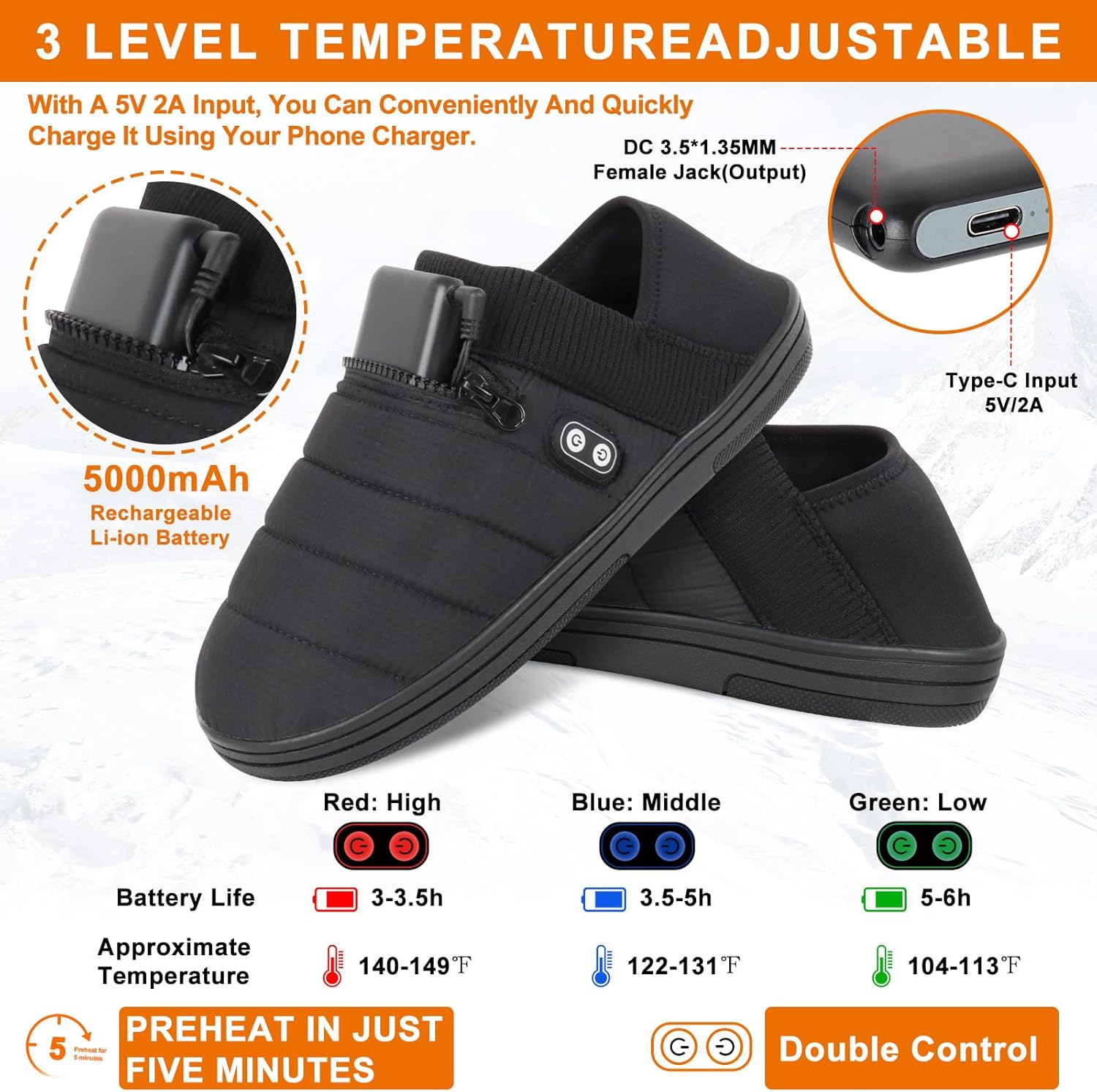
Image: The slippers are powered by a 5000mAh rechargeable Li-Ion battery, which can be charged via a Type-C 5V/2A input. The image also displays the three temperature levels: Red (High), Blue (Medium), and Green (Low).
5. Operating Instructions
5.1 Powering On and Temperature Adjustment
The BIAL Heated Slippers feature a dual-control switch, allowing independent temperature adjustment for different heating zones.
- Press and hold the power button on the slipper for 3 seconds to turn it on. The indicator light will illuminate.
- Briefly press the power button to cycle through the temperature settings:
- Red Light: (High) Approximately 140-149°F (60-65°C), lasts 3-3.5 hours.
- Blue Light: (Medium) Approximately 122-131°F (50-55°C), lasts 3.5-5 hours.
- Green Light: (Low) Approximately 104-113°F (40-45°C), lasts 5-6 hours.
- The slippers preheat in approximately five minutes.
- To power off, press and hold the power button for 3 seconds until the light turns off.
5.2 Dual-Control Feature
Each slipper has two control buttons, one for the forefoot/toe dorsum heating elements and one for the midfoot to heel heating element. This allows for customized warmth distribution across your foot.

Image: The unique heating system provides all-round warmth with elements strategically placed in the toe dorsum, forefoot, and heel regions.
Video: This video illustrates how to power on the BIAL Heated Slippers, select different heat levels, and utilize the dual-control switches for targeted warmth.
6. Maintenance
6.1 Cleaning
- Always remove battery packs before cleaning.
- The slippers are not machine washable.
- Wipe the exterior with a damp cloth and mild detergent.
- Allow to air dry completely before reinserting batteries or storing.
6.2 Storage
- Store the slippers in a cool, dry place when not in use.
- Ensure batteries are fully charged before long-term storage to maintain battery health.
7. Troubleshooting
- Slippers not heating:
- Check if the battery packs are fully charged.
- Ensure the battery packs are correctly connected to the internal cables within the slipper pockets.
- Verify that the power button has been pressed and the indicator light is on.
- Slippers feel too hot:
- Reduce the temperature setting to medium or low.
- Ensure you are wearing socks to provide a barrier between your feet and the heating elements.
- Turn off the slippers if discomfort persists.
- Short battery life:
- Ensure batteries are fully charged before each use.
- Higher heat settings consume battery faster. Use lower settings for extended warmth.
- Battery performance may decrease over time with repeated charging cycles.
8. Specifications
- Model Number: RTX-DR08L
- Battery Capacity: 5000mAh Lithium Ion (per battery)
- Input Voltage: 5V/2A (Type-C)
- Heating Elements: Carbon Fiber (forefoot, midfoot to heel, toe dorsum)
- Temperature Settings: High (140-149°F), Medium (122-131°F), Low (104-113°F)
- Material: Windproof and dust-resistant nylon upper, waterproof and slip-resistant natural rubber outsole, memory foam insole.
- Special Feature: Portable, Dual-Control Switches
- Manufacturer: Shenzhen R-TAX Technology Co.,ltd

Image: The slippers are crafted with high-quality materials including a windproof and dustproof upper, 12K carbon fiber heating elements, slow-rebound memory foam, moisture-wicking insole, cushioned padding, and a durable rubber sole.

Image: BIAL Size Chart for Heated Slippers, providing guidance on selecting the correct size based on US men's and women's sizes, EU sizes, and foot length in centimeters and inches.
9. Warranty and Support
BIAL offers a 60-day product replacement or refund for any quality concerns. For further assistance or inquiries, please contact BIAL customer support through the retailer where the product was purchased.
Legal Disclaimer: Statements regarding dietary supplements have not been evaluated by the FDA and are not intended to diagnose, treat, cure, or prevent any disease or health condition. (Note: This disclaimer was provided in the product information and is included for completeness, though it may not directly apply to heated slippers.)
Ask a question about this manual
Ask about setup, troubleshooting, compatibility, parts, safety, or missing instructions. Manuals+ will review the question and use this page’s manual context to help answer it.