
1. Introduction
Thank you for choosing the Y&H MPPT Solar Charge Controller 20A. This device is designed to efficiently manage power flow from your solar panels to your battery bank, ensuring optimal charging and extending battery life. It incorporates advanced Maximum Power Point Tracking (MPPT) technology for high efficiency and supports various battery types, including 12V, 24V, 36V, and 48V systems.

Image 1.1: The Y&H MPPT Solar Charge Controller 20A, highlighting its 100% MPPT technology, auto-switching for 12V/24V/36V/48V battery banks, 3-stage charging, built-in DSP controller, troubleshooting function, and compatibility with sealed lead acid, gel, and lithium batteries.
2. Safety Instructions
- Ensure all wiring is correctly connected before powering on the controller. Incorrect wiring can cause damage.
- Do not disassemble or attempt to repair the controller. Contact qualified personnel for service.
- Install the controller in a well-ventilated area, away from flammable materials and direct sunlight.
- Wear appropriate personal protective equipment (PPE) when working with batteries and solar panels.
- Ensure the battery voltage matches the controller's supported voltage range.
- Disconnect solar panels and batteries before performing any maintenance or wiring changes.
3. Product Overview
3.1 Features
- 100% MPPT (Maximum Power Point Tracking) technology for high tracking efficiency (not less than 99.5%).
- Automatic detection for 12V/24V/36V/48V battery systems.
- 3-stage charging algorithm to optimize battery performance and lifespan.
- Built-in DSP controller for high performance.
- Comprehensive electronic protection functions.
- Compatible with various battery types: sealed lead-acid, gel, flooded, and lithium batteries.
- Maximum PV input voltage up to 150VDC.
- Maximum charge current: 20A.
3.2 Components
The Y&H MPPT Solar Charge Controller 20A features an LCD display for monitoring system status, control buttons for settings, and clearly labeled terminals for solar panel, battery, and load connections.

Image 3.1: Front view of the Y&H MPPT Solar Charge Controller 20A, showing the display, buttons, and USB ports.

Image 3.2: Illustration of the advanced MPPT technology, demonstrating high tracking and conversion efficiencies, and compatibility with various battery types (FLD, SLD, GEL, LI, AGM, USER).

Image 3.3: Feature comparison highlighting the advantages of the Y&H Upgrade 20A MPPT controller, including 100% MPPT technology, auto battery bank detection, higher max PV input voltage (up to 160V), higher max input solar power (up to 960W), troubleshooting function, and terminal protection cover.
4. Setup
Follow these steps for proper installation and connection of the solar charge controller:
- Mounting: Mount the controller vertically on a wall or stable surface in a cool, dry, and well-ventilated area. Ensure sufficient clearance around the unit for heat dissipation.
- Battery Connection: Connect the battery to the controller's battery terminals first. Ensure correct polarity (+ to + and - to -). The controller will automatically detect the battery voltage.
- Solar Panel Connection: Connect the solar panels to the controller's PV terminals. Ensure correct polarity. The controller will begin charging the battery.
- Load Connection (Optional): Connect your DC loads to the controller's load terminals. Ensure correct polarity.
Important: Always connect the battery first, then the solar panels, and finally the load. Disconnect in the reverse order: load, then solar panels, then battery.
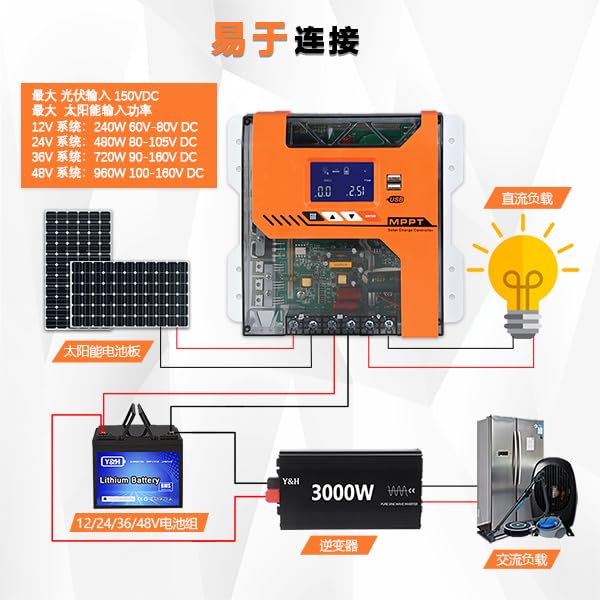
Image 4.1: Connection diagram showing solar panels, the MPPT controller, battery, inverter, and AC/DC loads. This illustrates the proper wiring sequence for a complete solar power system.
Maximum Input Power for MPPT-20A:
- 12V Battery System: Max 240W (PV input voltage range DC 60V-80V)
- 24V Battery System: Max 480W (PV input voltage range DC 80V-105V)
- 36V Battery System: Max 720W (PV input voltage range DC 90V-150V)
- 48V Battery System: Max 960W (PV input voltage range DC 100V-160V)
5. Operating Instructions
5.1 Screen Interface Cycle
The controller's LCD display cycles through various parameters, providing real-time information about your solar system. Use the buttons to navigate or adjust settings.
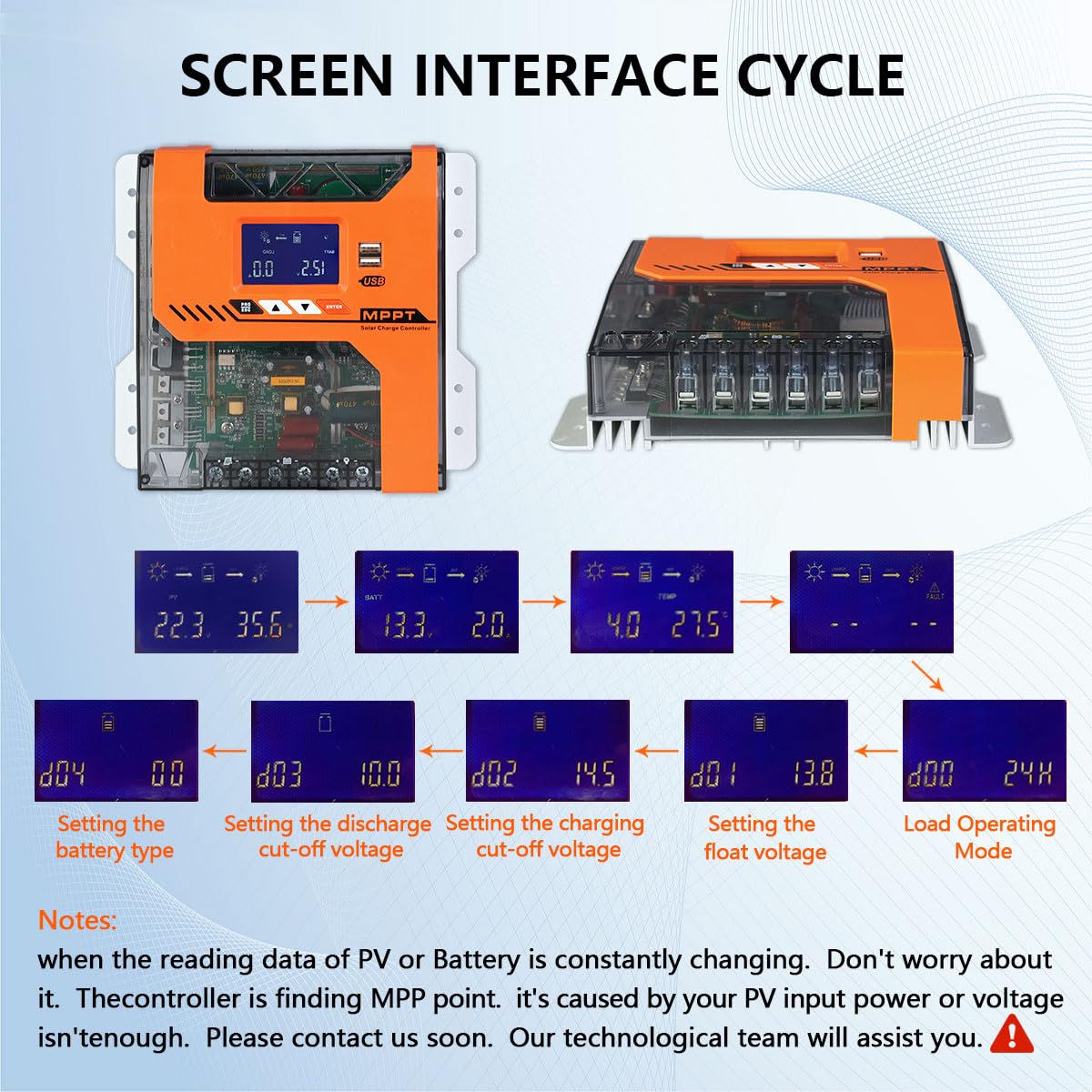
Image 5.1: The screen interface cycle, illustrating different display modes for battery voltage, charging current, temperature, and fault indicators. It also shows steps for setting battery type, discharge cut-off voltage, charging cut-off voltage, float voltage, and load operating mode.
Note: If the reading data for PV or Battery is constantly changing, the controller is actively finding the Maximum Power Point (MPP). This is normal operation. If the PV input power or voltage is insufficient, contact support.
5.2 Charging Modes
The controller utilizes a 3-stage charging process to optimize battery health and performance:
- Bulk Charge: Charges the battery at its maximum current until voltage rises to the absorption level.
- Constant Charging (Absorption): Maintains a constant voltage, allowing the current to gradually decrease as the battery approaches full charge.
- Float Charge: Once the battery is fully charged, the voltage is reduced to a lower level to maintain the battery at full capacity and prevent self-discharge.

Image 5.2: A graph depicting the 4-stage MPPT charging mode, including Bulk Charge, Constant Charging, and Float Charge, and how it improves battery life by preventing sulfation.
6. Protection Features
The Y&H MPPT Solar Charge Controller 20A includes multiple protection mechanisms to ensure safe and reliable operation of your solar power system:
- PV Over Current Protection: Prevents excessive current from solar panels.
- PV Short Circuit Protection: Protects against short circuits in the solar panel array.
- PV Reverse Polarity Protection: Safeguards against incorrect solar panel wiring.
- Battery Over Voltage Protection: Prevents battery overcharging.
- Battery Over Discharge Protection: Protects the battery from deep discharge.
- Load Over Current Protection: Prevents excessive current draw by connected loads.
- Load Short Circuit Protection: Protects against short circuits in the load circuit.
- Over Temperature Protection: Shuts down the controller if internal temperature exceeds safe limits.

Image 6.1: Visual representation of the 8 comprehensive protection features integrated into the controller.
7. Specifications
| Feature | Specification |
|---|---|
| Model | MPPT-20A |
| Rated Charge Current | 20A |
| Battery Voltage | 12V / 24V / 36V / 48V Auto |
| Max PV Input Voltage | 150VDC |
| Max PV Input Power (12V) | 240W |
| Max PV Input Power (24V) | 480W |
| Max PV Input Power (36V) | 720W |
| Max PV Input Power (48V) | 960W |
| Tracking Efficiency | ≥99.5% |
| Conversion Efficiency | Max 97% |
| Display Type | LCD |
| Dimensions (L x W x H) | 22 x 16 x 7.5 cm |
| Weight | 800 grams |
| Operating Temperature | 20 Degrees Celsius (Note: This seems to be a minimum or specific test temperature, typical operating range is wider) |
| Material | Plastic |

Image 7.1: Diagram showing the physical dimensions of the controller: 22cm (length), 16cm (width), and 7.49cm (height).
8. Troubleshooting
This section provides guidance for common issues. For problems not listed here, please contact customer support.
| Problem | Possible Cause | Solution |
|---|---|---|
| Controller not powering on | Battery not connected or low voltage; reverse polarity. | Check battery connections and voltage. Ensure correct polarity. Charge battery if too low. |
| No charging from solar panels | Solar panels not connected; insufficient sunlight; PV reverse polarity; PV over-voltage. | Verify solar panel connections and polarity. Check for adequate sunlight. Ensure PV voltage is within limits. |
| Load not working | Load not connected; load over current; load short circuit; battery low voltage. | Check load connections. Reduce load. Check for short circuits. Charge battery. |
| Error code on display | Specific system fault (e.g., over-temperature, battery over-voltage). | Refer to the controller's display for the specific error code and consult the manual for its meaning and resolution. Address the underlying issue. |
9. Maintenance
- Regular Inspection: Periodically check all wiring connections for tightness and corrosion.
- Cleaning: Keep the controller clean and free from dust and debris. Use a dry cloth for cleaning.
- Ventilation: Ensure the installation area remains well-ventilated to prevent overheating.
- Battery Health: Monitor battery voltage and performance regularly. Follow battery manufacturer's maintenance guidelines.
10. Warranty and Support
For warranty information or technical support, please refer to the documentation included with your purchase or contact Y&H customer service directly. Ensure you have your model number (MPPT-20A) and purchase details available when seeking support.
Manufacturer: Y&H


