
1. Introduction
This user manual provides essential information for the safe and effective operation, setup, maintenance, and troubleshooting of the XINCHENG PRECISION SFX 300W Portable Air-cooled Pulse Laser Cleaning Machine, Model AGC-300. Please read this manual thoroughly before operating the machine to ensure proper usage and to prevent injury or damage.
The AGC-300 is designed for high-efficiency removal of rust, paint, oil stains, and various coatings from metal, wood, and other surfaces using advanced pulse laser technology. Its portable, air-cooled design offers convenience and reliability for industrial applications.
2. Safety Information
WARNING: This product uses a high-power laser. Improper use can cause severe injury, including permanent eye damage, skin burns, and fire. Always follow safety guidelines.
2.1 General Safety Precautions
- Always wear appropriate laser safety glasses (OD 6+ for 1070nm wavelength) when operating the machine.
- Ensure the work area is clear of flammable materials.
- Do not point the laser at people or animals.
- Keep unauthorized personnel away from the operating area.
- Ensure proper ventilation in the work area.
- Never attempt to disassemble or modify the laser head or machine components.
- Use the emergency stop button in case of any malfunction or hazard.
2.2 Electrical Safety
- Connect the machine to a grounded power outlet with the correct voltage (AC110-220V).
- Do not operate the machine with wet hands or in damp conditions.
- Inspect power cords and plugs for damage before each use.
3. Product Overview
The SFX 300W Portable Air-cooled Pulse Laser Cleaning Machine (AGC-300) is designed for efficient and non-contact surface cleaning. Key features include:
- High-Efficiency Cleaning: Removes rust, paint, coatings, and oil stains quickly and effectively.
- Portable Design: Compact and lightweight (approximately 67kg), making it easy to transport and maneuver.
- Air-cooled System: Ensures continuous operation without the need for external water cooling.
- Double-Wobble Cleaning Head: Offers a wide scanning width of up to 190mm for fast and precise cleaning.
- Environmentally Friendly: Non-contact cleaning process requires no chemical reagents, consumables, or water, preventing secondary pollution.
- Anti-High Reflection Technology: Capable of cleaning highly reflective materials like copper, aluminum, and gold without damaging the laser.

Figure 3.1: Front view of the SFX 300W Portable Air-cooled Pulse Laser Cleaning Machine (Model AGC-300).

Figure 3.2: Side view of the machine, illustrating the power input and gas input ports.
3.1 Cleaning Capabilities

Figure 3.3: Visual representation of the laser cleaning machine's capabilities, including rust, paint, oil stain, and coating removal.

Figure 3.4: Cleaning effect display showing before and after results on rusted metal, painted surfaces, and oil-stained components.
3.2 Double-Wobble Cleaning Head
The machine features a double-wobble cleaning head that allows for a broad scanning width, enhancing cleaning efficiency and speed.

Figure 3.5: The double-wobble cleaning head provides a scanning width of up to 190mm for efficient coverage.
3.3 Anti-High Reflection Technology
This technology enables the safe cleaning of highly reflective materials without causing damage to the laser source, expanding the range of applications.
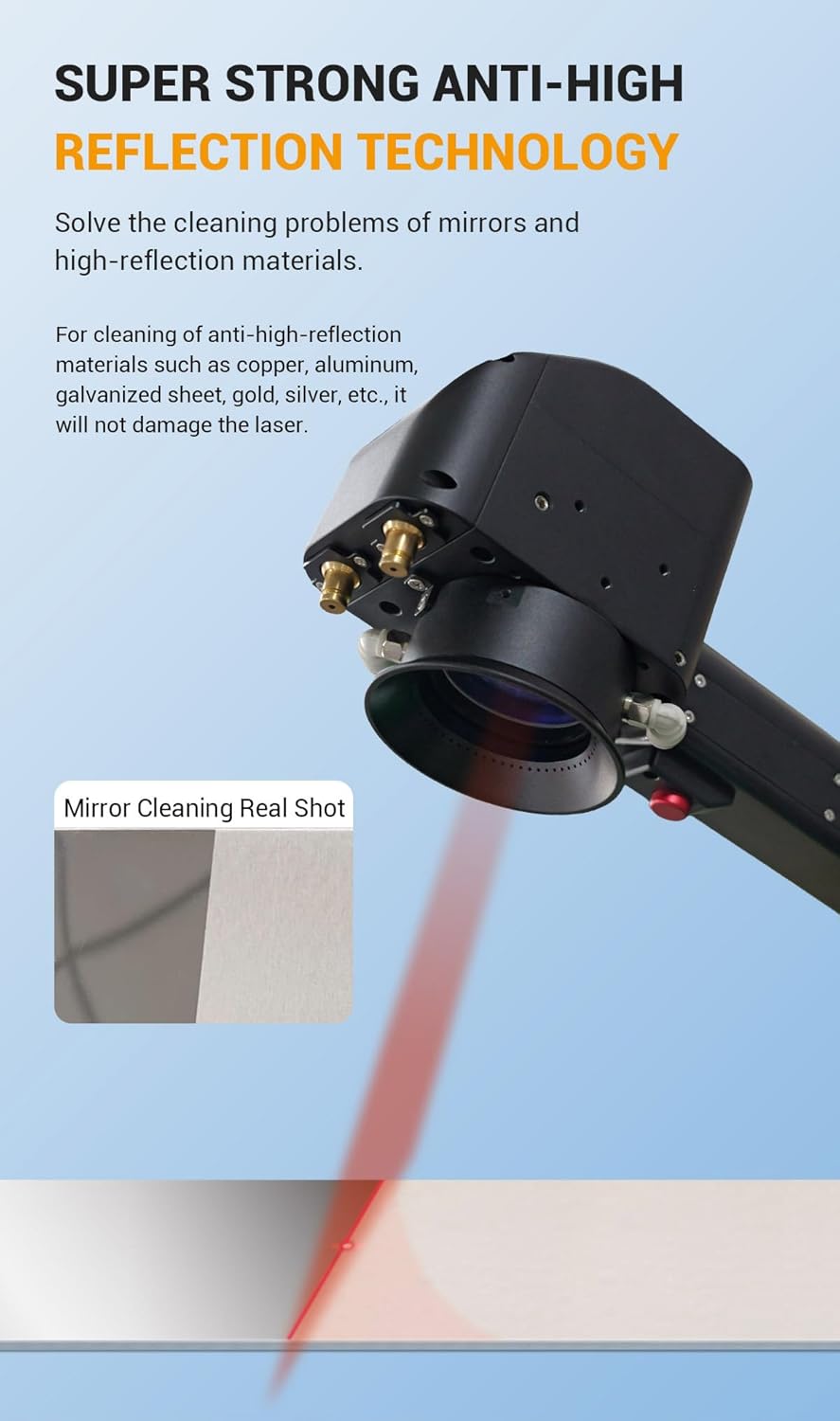
Figure 3.6: The laser head utilizing anti-high reflection technology for cleaning mirrors and other reflective materials.
4. Specifications
The following table details the technical specifications for the AGC-300 model, alongside other available models for comparison.
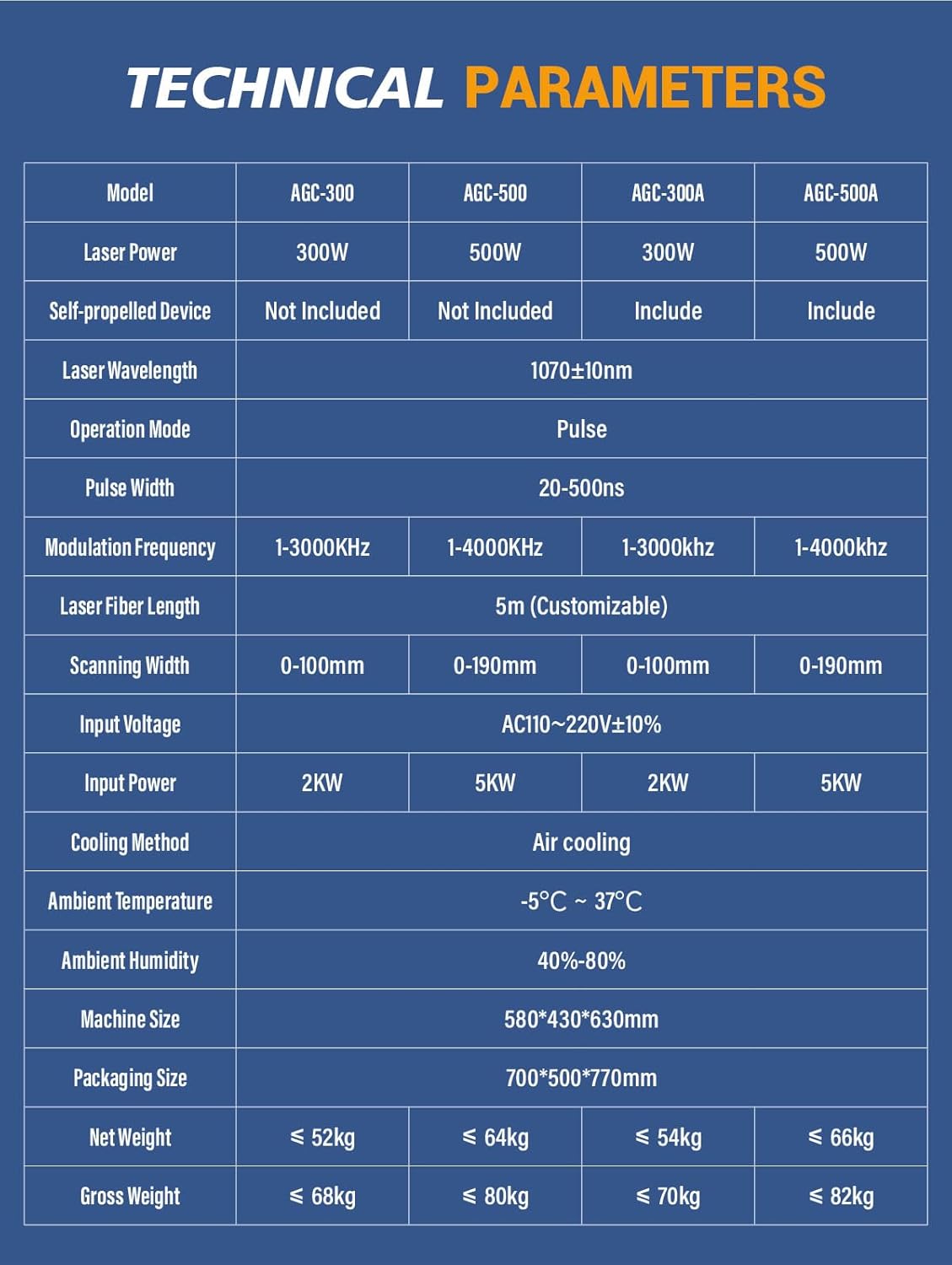
Figure 4.1: Technical Parameters for AGC-300 and other models.
| Parameter | Value (AGC-300) |
|---|---|
| Model | AGC-300 |
| Laser Power | 300W |
| Self-propelled Device | Not Included |
| Laser Wavelength | 1070±10nm |
| Operation Mode | Pulse |
| Pulse Width | 20-500ns |
| Modulation Frequency | 1-3000KHz |
| Laser Fiber Length | 5m (Customizable) |
| Scanning Width | 0-100mm |
| Input Voltage | AC110-220V±10% |
| Input Power | 2KW |
| Cooling Method | Air cooling |
| Ambient Temperature | -5°C ~ 37°C |
| Ambient Humidity | 40%-80% |
| Machine Size | 580*430*630mm |
| Net Weight | ≤ 52kg |
| Gross Weight | ≤ 68kg |
5. Setup
Follow these steps to set up your laser cleaning machine:
- Unpacking: Carefully remove the machine and all accessories from the packaging. Inspect for any shipping damage.
- Placement: Place the machine on a stable, level surface in a well-ventilated area. Ensure adequate space around the machine for air circulation.
- Power Connection: Connect the power cable to the machine's power input port (refer to Figure 3.2) and then to a grounded AC110-220V power outlet.
- Laser Head Connection: Securely connect the laser cleaning head to the machine's fiber optic output port. Ensure all connections are tight.
- Safety Gear: Always wear the provided laser safety glasses before powering on the machine.
- Initial Check: Before turning on, ensure the emergency stop button is disengaged (pulled out) and the key switch is in the OFF position.
6. Operation
Operating the AGC-300 involves several key steps to ensure effective and safe cleaning.
6.1 Powering On
- Insert the key into the key switch and turn it to the ON position.
- Press the main power switch (usually indicated by a green button or switch).
- The control panel will illuminate, and the system will initiate. Allow a few moments for the system to boot up.
6.2 Selecting Cleaning Modes
The machine offers preset cleaning processes and customizable settings. Refer to the control panel interface for navigation.
- Preset Modes: Select from 6 pre-configured cleaning modes optimized for common applications.
- Custom Modes: Adjust parameters such as laser power, pulse width, modulation frequency, and scanning width to create up to 3 custom cleaning processes.
6.3 Cleaning Process
- Ensure the workpiece is stable and positioned correctly.
- Hold the laser cleaning head firmly, maintaining a consistent distance from the surface.
- Press the trigger on the laser head to activate the laser.
- Move the laser head smoothly and evenly across the surface to be cleaned. Observe the cleaning effect and adjust speed or parameters as needed.
- Release the trigger to stop the laser.

Figure 6.1: The laser cleaning machine in operation, demonstrating its use on different materials and settings.
6.4 Powering Off
- Release the laser head trigger.
- Press the main power switch to turn off the machine.
- Turn the key switch to the OFF position and remove the key for security.
- Disconnect the power cable from the outlet.
7. Maintenance
Regular maintenance ensures the longevity and optimal performance of your laser cleaning machine.
- Cleaning: Regularly clean the exterior of the machine and the laser head with a soft, dry cloth. Ensure no dust or debris accumulates on the laser output window.
- Air Vents: Keep the air vents clear of obstructions to ensure proper air cooling. Periodically clean the vents to prevent overheating.
- Cable Inspection: Inspect all cables, especially the fiber optic cable and power cord, for any signs of wear, cuts, or damage. Replace damaged cables immediately.
- Storage: When not in use, store the machine in a clean, dry environment, protected from dust and extreme temperatures.
- Professional Service: For internal cleaning or complex issues, contact qualified service personnel. Do not attempt internal repairs yourself.
8. Troubleshooting
This section addresses common issues you might encounter with the AGC-300 laser cleaning machine.
| Problem | Possible Cause | Solution |
|---|---|---|
| Machine does not power on | Power cable disconnected; Emergency stop engaged; Key switch off; Power outlet issue. | Check power cable connection; Disengage emergency stop; Turn key switch to ON; Test power outlet. |
| Laser does not activate | Trigger not pressed; Safety interlock engaged; Fiber optic cable loose/damaged; System error. | Ensure trigger is fully pressed; Check all safety interlocks; Inspect fiber optic connection; Restart machine. |
| Poor cleaning effect | Incorrect parameters; Laser head too far/close; Surface too reflective; Lens dirty. | Adjust laser power, pulse width, frequency; Maintain optimal working distance; Clean laser lens; Use anti-reflection mode if applicable. |
| Overheating warning | Blocked air vents; High ambient temperature; Continuous operation beyond limits. | Clear air vents; Ensure adequate ventilation; Allow machine to cool down; Operate within specified ambient temperature range. |
If the problem persists after attempting these solutions, please contact customer support.
9. Warranty and Support
The XINCHENG PRECISION SFX 300W Portable Air-cooled Pulse Laser Cleaning Machine (Model AGC-300) is manufactured by Luoyang Xincheng Precision Machinery Co.,Ltd.
For warranty information, technical support, or service inquiries, please contact your authorized dealer or the manufacturer directly. Ensure you have your product model number (AGC-300) and purchase date available when contacting support.
The manufacturer provides professional technical support and customer service to assist with any product-related questions or issues.


