
1. Important Safety Information
Please read all instructions carefully before using this appliance. Keep this manual for future reference.
- This device is intended for adult use only.
- Consult a healthcare professional before use if you have any medical conditions, especially oral or dental conditions.
- Keep the device away from water sources while charging to prevent electrical hazards.
- Do not use the device near children.
- Ensure the charging port's silicone cover is fully closed during use and storage to maintain IPX7 waterproof rating and prolong product lifespan.
- Do not use the device while it is charging.
- Be cautious when using the device near electrical outlets, especially in wet environments.
2. Product Overview
The Bezvoi Mini Cordless Portable Water Flosser (Model Y825) is designed for effective oral hygiene, offering portability and multiple cleaning modes.
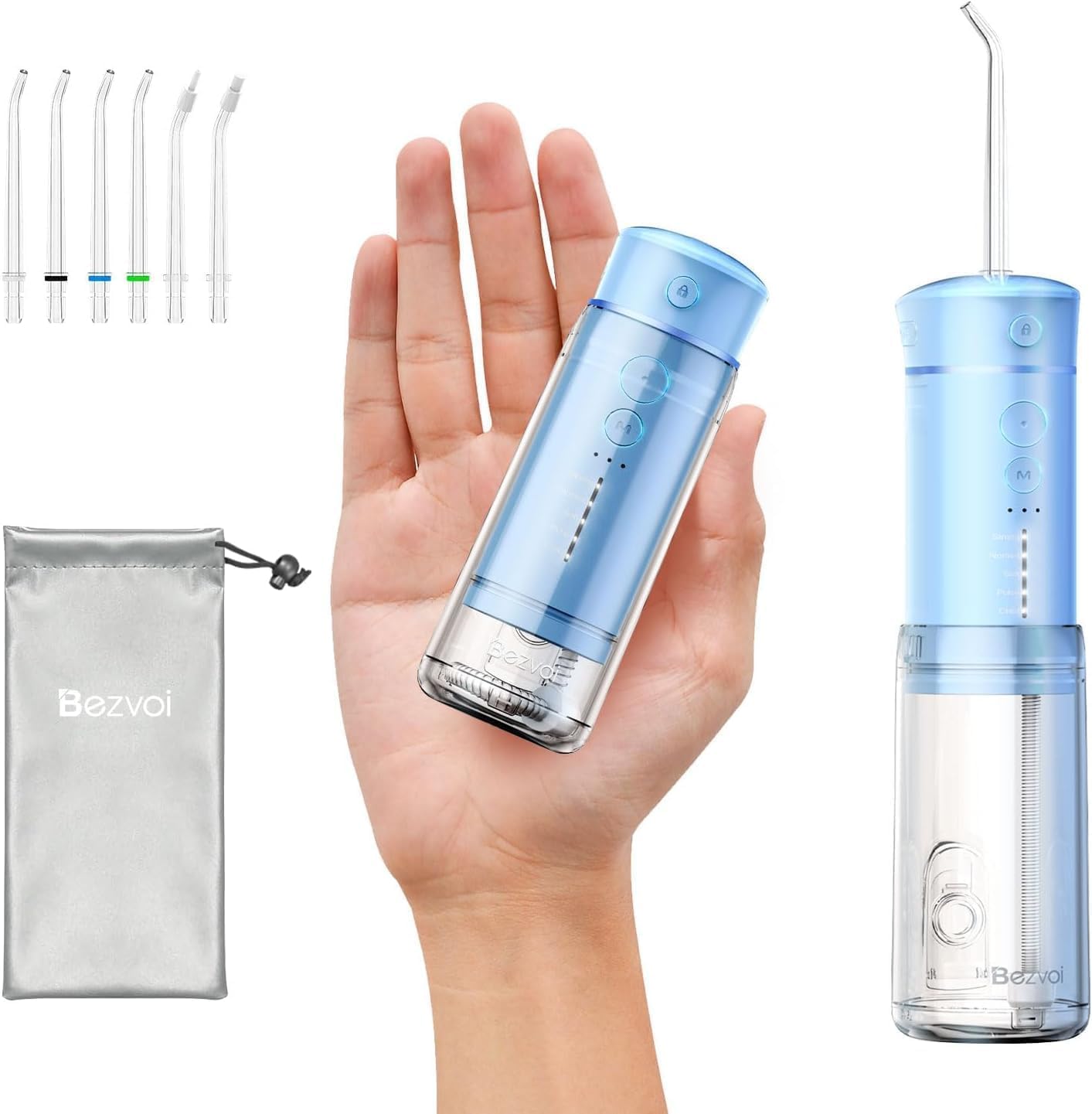
Image: The Bezvoi Mini Cordless Portable Water Flosser shown with its included accessories, including multiple jet tips and a travel bag.
Key Features:
- Ultra-Portable Design: Retractable water tank for compact storage, ideal for travel.
- 5 Pressure Modes: Includes Soft, Child, Normal, Strong, and Pulse modes for diverse oral care needs.
- Long Battery Life: Up to 30 days of use on a single charge with USB-C charging.
- 180ml Retractable Tank: Balances portability with sufficient water capacity.
- IPX7 Waterproof: Suitable for use in the shower or bath.
- 6 Replaceable Nozzles: Includes 4 standard jet tips, 1 orthodontic nozzle, and 1 periodontal nozzle.
- 360-Degree Rotating Nozzle: Allows for thorough cleaning in hard-to-reach areas.
3. Components and Accessories
The Bezvoi Water Flosser package includes the following items:
- 1 x Portable Mini Travel Water Flosser (Model Y825)
- 6 x Replacement Nozzles (4 Standard, 1 Orthodontic, 1 Periodontal)
- 1 x Travel Waterproof Bag
- 1 x User Manual (this document)
- 1 x Type-C Charging Cable (Note: Adapter not included)

Image: A close-up view of the six interchangeable jet tips, including standard, orthodontic, and periodontal tips.
4. Setup and Initial Use
4.1 Charging the Device
Before first use, fully charge the water flosser. A full charge provides approximately 30 days of use.
- Locate the USB-C charging port on the device.
- Connect the provided Type-C charging cable to the device and a compatible USB power source (e.g., laptop, power bank, car charger, or a USB wall adapter - not included).
- The charging indicator lights will show the charging status. Once fully charged, disconnect the cable.
- Ensure the silicone cover for the charging port is securely closed after charging.

Image: Visual guide illustrating the five steps for using the water flosser, from adding water to turning it off.
4.2 Attaching a Nozzle
- Select the desired nozzle (e.g., standard, orthodontic, periodontal).
- Insert the nozzle completely into the slot on the top of the machine body.
- Ensure that the colored rubber ring on the nozzle is in full contact with the base of the slot to prevent water leakage.
- The nozzle can rotate 360 degrees for optimal cleaning angles.

Image: A detailed view demonstrating how to correctly insert the jet tip into the water flosser.
4.3 Filling the Water Tank
- Extend the retractable water tank by pulling it downwards.
- Open the water tank cap.
- Fill the tank with lukewarm water. The tank has a capacity of 180ml.
- Close the water tank cap securely.
5. Operating Instructions
5.1 Selecting a Mode
The device features 5 cleaning modes to suit various needs:
- Strong Mode (120psi): For deep cleaning.
- Normal Mode (80psi): For daily oral hygiene.
- Soft Mode (50psi): For sensitive gums and first-time users.
- Pulse Mode (100psi): For gum massage and improved circulation.
- Child Mode (30psi): Gentle care for children and very sensitive users.
To select a mode, press the "M" (Mode) button repeatedly until the desired mode indicator light illuminates. The device will remember the last selected mode for subsequent uses.

Image: A visual representation of the five distinct cleaning modes available on the water flosser, detailing their respective pressure levels.
5.2 Flossing Procedure
- Lean over a sink.
- Place the irrigator tip into your mouth, aiming it at a 90-degree angle to your gumline.
- Press the power switch to turn on the device.
- Start with your back teeth and work your way forward. Glide the tip along the gumline and briefly pause between teeth.
- Allow the water to flow out of your mouth into the sink.
- Continue until you have cleaned all areas of your mouth.
- Press the power switch again to turn off the device.
6. Maintenance and Storage
6.1 Cleaning the Device
Regular cleaning ensures optimal performance and hygiene.
- After each use, empty any remaining water from the tank.
- Detach the nozzle and rinse it under running water.
- The retractable water tank is designed with a wide mouth (2.17 inches) for easy cleaning. It can be removed for thorough cleaning to prevent dirt buildup. Rinse the tank with water and mild soap if necessary.
- Wipe the main body of the flosser with a soft, damp cloth. Do not immerse the main body in water unless the charging port cover is fully sealed.
- Allow all parts to air dry completely before reassembling or storing.

Image: A visual demonstrating the wide-mouth, removable water tank, highlighting its ease of cleaning compared to non-removable designs.
6.2 Storage
- For travel, compress the water tank into the main body.
- The built-in top storage compartment securely holds one nozzle during travel.
- Store the device and remaining nozzles in the provided travel waterproof bag to keep them clean and organized.
- Store in a cool, dry place away from direct sunlight.
7. Troubleshooting
| Problem | Possible Cause | Solution |
|---|---|---|
| Device does not turn on. | Low battery. | Charge the device fully. |
| Water leakage from nozzle connection. | Nozzle not fully inserted or rubber ring not seated correctly. | Insert the nozzle completely into the slot and ensure the colored rubber ring is in full contact with the base. |
| Weak water pressure. | Low battery or incorrect mode selected. | Charge the device. Select a stronger mode (e.g., Strong or Normal). |
| Device stops working during use. | Water tank empty or battery depleted. | Refill the water tank or recharge the device. |
8. Specifications
| Feature | Detail |
|---|---|
| Model Number | Y825 |
| Dimensions | 2.43 x 1.98 x 5.7 inches |
| Weight | 11.68 ounces |
| Water Tank Capacity | 180ml |
| Pressure Settings | 5 modes (30-120 PSI) |
| Water Pulses | 1,400-1,800 pulses per minute |
| Battery Life | Up to 30 days per charge |
| Charging Port | USB-C |
| Waterproof Rating | IPX7 |
| Included Batteries | 1 A battery (included) |
9. Warranty and Support
For warranty information and customer support, please refer to the contact details provided with your purchase or visit the official Bezvoi website. Keep your purchase receipt as proof of purchase.
Statements regarding dietary supplements have not been evaluated by the FDA and are not intended to diagnose, treat, cure, or prevent any disease or health condition.
