
Introduction
This manual provides detailed instructions for the installation, operation, and maintenance of your Hodozzy 9-inch Android Car Stereo. This unit is designed for Audi A4, S4, and RS4 models manufactured between 2000 and 2009. It features an 8-core processor, 2GB RAM, 64GB ROM, and a 1280x720 resolution touch screen, offering a stable and responsive user experience.
Please read this manual thoroughly before installation and use to ensure proper functionality and to avoid any damage to the unit or your vehicle.
Product Overview
The Hodozzy Car Stereo is an advanced infotainment system for your vehicle, integrating modern features such as wireless CarPlay, Android Auto, GPS navigation, Bluetooth 5.0, FM/RDS radio, and a Digital Sound Processor (DSP). Its 9-inch touch screen provides a clear and intuitive interface for all functions.

Image: Hodozzy 9-inch Android Car Stereo installed in an Audi A4 dashboard, showing the sleek integration and large display.
Package Contents
Please verify that all items listed below are included in your package:
- 1 x Radio Housing
- 1 x Power Cable
- 1 x Canbus Decoder
- 1 x Radio Antenna
- 1 x Car Player Unit
- 1 x GPS Antenna
- 1 x Rear Camera Input Cable
- 1 x RCA Cable
- 2 x USB Cables
- 1 x Instruction Manual
- 1 x Rear Camera
- 1 x Microphone

Image: A visual representation of all components included in the Hodozzy car stereo package, including the main unit, cables, antennas, and accessories.
Setup and Installation
This unit is specifically designed for Audi A4 B6 B7 S4 RS4 models from 2000-2009. Ensure your vehicle's interfaces are compatible before proceeding. Professional installation is recommended.
1. Pre-Installation Check
- Verify all package contents against the list above.
- Ensure the vehicle's ignition is off and the battery is disconnected before starting installation.
- Confirm compatibility with your specific Audi A4/S4/RS4 model (2000-2009).
2. Wiring Diagram
Refer to the provided wiring diagrams for correct connections. Improper wiring can damage the unit or vehicle electronics.

Image: Detailed wiring diagram illustrating connections for the power cable, GPS antenna, and rear camera cable.

Image: CANBUS wiring diagram, highlighting the specific connector for CANBUS integration. Ensure this connector is used correctly to avoid startup issues.
Important: The CANBUS connector is specific. Do not plug it into the radio if it is not intended for CANBUS, as this may prevent the radio from starting.
3. Physical Installation
- Carefully remove the original car stereo unit from your Audi A4/S4/RS4.
- Connect the Hodozzy unit's power cable, CANBUS decoder, radio antenna, GPS antenna, and other necessary cables according to the wiring diagrams.
- If installing the rear camera, route the camera cable to the rear of the vehicle and connect it to the unit. Ensure the camera is mounted securely and provides a clear view.
- Mount the new Hodozzy car stereo into the dashboard opening.
- Reconnect the vehicle's battery and test the unit's functionality.

Image: A side-by-side comparison showing the car dashboard before and after the Hodozzy car stereo installation, demonstrating the integrated appearance.
Operating Instructions
1. Initial Power On and Setup
- Upon first power-on, the system may guide you through initial setup steps, including language selection and time zone.
- Connect to a Wi-Fi network to enable online features and download map data or applications.
2. Wireless CarPlay and Android Auto
The unit supports both wireless CarPlay and Android Auto for seamless smartphone integration.
- Connection: Connect your Apple (iOS 5-17) or Android (Android 4-14) phone via Bluetooth, Wi-Fi, or a USB data cable.
- Functionality: Access phone applications such as navigation, contacts, messages, music, and more directly from the car stereo screen.
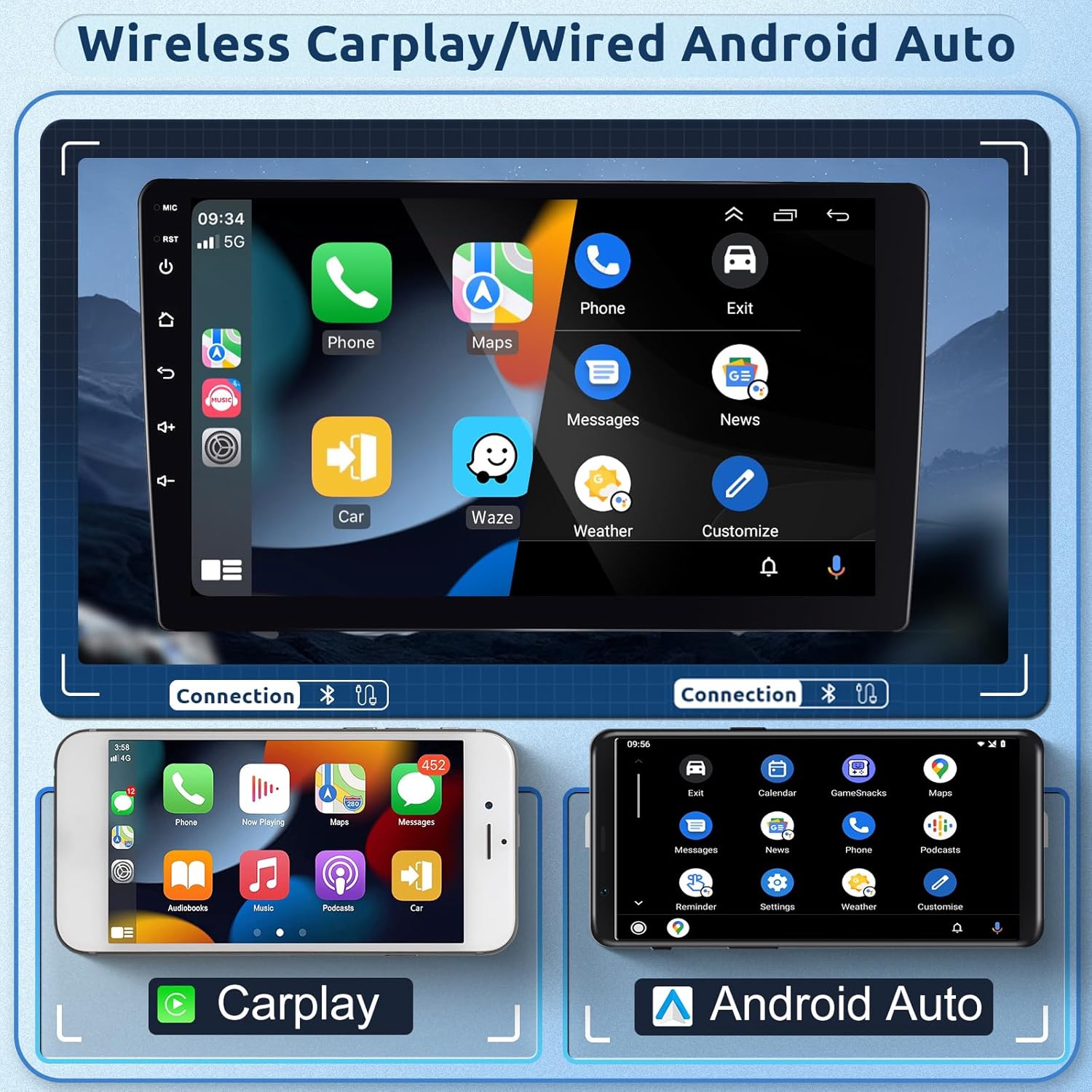
Image: Display of the car stereo screen showing both Wireless CarPlay and Wired Android Auto interfaces, demonstrating app access and connectivity options.
3. Bluetooth 5.0
- Hands-Free Calling: Pair your phone via Bluetooth for hands-free calls using the built-in microphone. Supports contact synchronization.
- Bluetooth Music: Stream audio from your phone to the car stereo.

Image: The car stereo display showing the Bluetooth interface for calls and music, alongside the FM/RDS radio tuner.
4. GPS Navigation and Wi-Fi
- GPS: The integrated GPS receiver allows for precise navigation. Download free offline maps via the "Here We Go" app or use other online navigation applications.
- Wi-Fi: Connect to Wi-Fi or a mobile hotspot to download additional apps, stream content, and access online services.

Image: The car stereo screen showing GPS navigation in action and the Wi-Fi connection interface.
5. FM/RDS Radio and DSP
- FM/RDS: The radio receiver supports automatic station search and preset functions (87.5 MHz - 107.5 MHz). RDS provides additional station information.
- DSP: The integrated Digital Sound Processor enhances audio quality by reducing noise, distortion, and interference, offering a customizable 32-band EQ.

Image: The car stereo display showing the FM radio interface and the detailed 32-band DSP equalizer for sound customization.
6. Split Screen and Mirror Link
- Split Screen: Use two applications simultaneously, such as navigation and music playback.
- Mirror Link: Synchronize your phone's screen with the car stereo display via USB or Wi-Fi. Android phones support two-way control, while iOS phones support one-way control.
Image: The car stereo screen showing the Mirror Link feature, displaying a smartphone screen mirrored onto the larger car stereo display.
7. Steering Wheel Control
The unit supports steering wheel controls for convenient and safe operation of audio functions.
- Configuration: Access the steering wheel control settings in the unit's menu to map your vehicle's steering wheel buttons to specific functions (e.g., volume, track skip, mode).

Image: The car stereo interface for configuring steering wheel controls, showing options to assign functions to physical buttons.
8. Rear Camera Function
The included AHD rear camera provides a clear view when reversing, enhancing safety.
- Automatic Display: The unit automatically switches to the rear camera view when the vehicle is put into reverse.
- Features: The camera offers 140° view angle, AHD night vision, and IP69 waterproof rating.

Image: The car stereo screen displaying the rear camera feed with parking guidelines, along with an illustration of the AHD camera's features.
Maintenance
- Screen Cleaning: Use a soft, lint-free cloth to clean the touch screen. Do not use abrasive cleaners or solvents.
- Software Updates: Periodically check for software updates through the unit's settings menu to ensure optimal performance and access to new features.
- General Care: Avoid exposing the unit to extreme temperatures, direct sunlight for prolonged periods, or excessive moisture.
Troubleshooting
Common Issues and Solutions:
| Problem | Possible Cause | Solution |
|---|---|---|
| Unit does not power on. | Incorrect wiring, blown fuse, disconnected battery. | Check power cable connections, inspect vehicle fuses, ensure battery is connected. Verify CANBUS connection is correct. |
| No sound from speakers. | Speaker wiring issues, incorrect audio settings, amplifier problem. | Check speaker connections, verify audio output settings, ensure external amplifier (if used) is powered. |
| Bluetooth connection issues. | Phone not discoverable, incorrect pairing process, interference. | Ensure phone's Bluetooth is on and discoverable. Delete previous pairings and re-pair. Move phone closer to the unit. |
| GPS signal lost or inaccurate. | GPS antenna obstruction, poor satellite reception, outdated map data. | Ensure GPS antenna has a clear view of the sky. Update map data if necessary. |
| Rear camera not displaying. | Camera wiring issue, camera malfunction, incorrect settings. | Check rear camera input cable connection. Ensure the camera is powered. Verify reverse gear signal connection. |
| Screen freezing or unresponsive. | Software glitch, excessive background applications. | Perform a soft reset (refer to the unit's specific reset procedure). Close unnecessary applications. |
If you encounter issues not listed here or if the suggested solutions do not resolve the problem, please contact Hodozzy customer support for assistance.
Specifications
| Feature | Detail |
|---|---|
| Model Number | be1bbbce-45dc-4228-88d7-8ec8dd016dbe |
| Compatibility | Audi A4 B6 B7 S4 RS4 (2000-2009) |
| Screen Size | 9 inches |
| Screen Resolution | 1280x720 |
| Processor | 8-Core |
| RAM | 2GB |
| ROM | 64GB |
| Connectivity Technology | Bluetooth 5.0, USB, Wi-Fi, Wireless CarPlay |
| Special Features | Android Auto, Apple CarPlay, GPS Navigation, RDS, Integrated Wi-Fi, DSP |
| Compatible Devices | Android phones (4-14), iPhones (iOS 5-17) |
| Audio Output Mode | Stereo |
| Surround Sound Channel Configuration | 4.1 |
| Output Power | 45 Watts (per channel, 4 channels) |
| Video Encoding | H.264, H.265/HEVC, VP9, MPEG-4, others |
| Rear Camera | AHD, 140° View Angle, Night Vision, IP69 Waterproof |
Warranty and Support
Information regarding specific warranty terms and duration is not available in the provided product details. Please refer to the product packaging or contact Hodozzy customer service for warranty information.
For technical support, troubleshooting assistance, or any questions regarding your Hodozzy car stereo, please contact the manufacturer directly or the retailer from whom you purchased the product.
You can often find contact information on the manufacturer's official website or through your purchase platform.