1. Introduction
Thank you for choosing the HXSJ V700BW+X100 Wired Keyboard and Mouse Combo. This product is designed to provide a reliable and responsive experience for both office work and gaming. This manual will guide you through the setup, operation, and maintenance of your new device.

Figure 1: HXSJ V700BW+X100 Wired Keyboard and Mouse Combo. The image displays the compact 61-key keyboard with RGB backlighting and the ergonomic gaming mouse with 7-color breathing light.
2. Setup Instructions
The HXSJ V700BW+X100 combo is a plug-and-play device, requiring no additional driver installation for basic functionality on compatible operating systems.
2.1 System Compatibility
This device is compatible with IBM PC systems running the following operating systems:
- Windows 98SE
- Windows Me
- Windows 2000
- Windows XP
- Windows Vista
- Windows 7
- Windows 10

Figure 2: USB 2.0 Plug & Play functionality. The image shows the keyboard and mouse connected via USB, with icons representing compatibility with Windows 7, 8, 10, XP, and Vista.
2.2 Connecting the Devices
- Locate an available USB 2.0 port on your computer.
- Plug the USB connector of the keyboard into the USB port.
- Plug the USB connector of the mouse into another available USB port.
- Your operating system will automatically detect and install the necessary drivers. This process may take a few moments.
- Once installation is complete, the keyboard and mouse are ready for use.
3. Operation
3.1 Keyboard Functions
The HXSJ V700BW+X100 keyboard features a 61-key layout with various multimedia and backlight control functions accessible via the FN key.
- Backlight Adjustment: The keyboard features RGB cool horse racing effects with 6 backlight effects and 8 backlight color switching options. Specific key combinations for these adjustments are typically found in the product's quick start guide or through experimentation with FN key combinations.
- Compound Function Keys: The FN key combined with the first line of keyboard keys (1-0, -, =) provides access to F1-F12 functions, ESC, and Delete.
- Volume Control:
- FN + R key: Volume Reduction
- FN + T key: Volume Increase
- FN + Y key: Mute
- Game Arrow Keys: FN + W/A/S/D can be used as arrow keys for gaming.
- Win Lock: FN + WIN key to lock the Windows key, preventing accidental presses during gaming.

Figure 3: Keyboard Compound Function Key Switch. This image illustrates the FN key combinations for multimedia control (volume up/down/mute), game arrow keys (W/A/S/D), and Windows key lock.
3.2 Mouse Functions
The HXSJ X100 mouse is equipped with an optical gaming engine and adjustable DPI settings for precise control.
- Buttons: The mouse features Left Click, Right Click, Middle Click (scroll wheel), Forward, Back, DPI+ and DPI- buttons.
- DPI Adjustment: The mouse has 4 adjustable DPI settings: 1200, 1800, 2400, and 3600 DPI. Use the DPI+ and DPI- buttons to cycle through these settings to match your preference for speed and precision.
- 7-Color Breathing Light: The mouse features a dynamic 7-color breathing light effect, cycling through Red, Yellow, Green, Light Blue, Dark Blue, Pink, and Purple.
- Switching Light Mode:
- Method 1: Press the DPI- button for 3 seconds to turn the LED light on or off.
- Method 2: Use the Forward / Back button + DPI- button combination to switch light modes.

Figure 4: Mouse Button Layout. This image labels the Left Click, Right Click, Middle Click, Forward, Backward, DPI+ and DPI- buttons on the mouse, along with the transparent logo area.

Figure 5: Mouse Light Mode Switching. The image shows a hand interacting with the mouse, highlighting the DPI- button for turning the light on/off and the Forward/Back + DPI- combination for switching light modes.

Figure 6: X100 Cool Glowing Gaming Mouse with 7-Color Breathing Light Effect. This image displays multiple mice, each showcasing a different color from the 7-color cycle breathing effect (Red, Yellow, Green, Light Blue, Dark Blue, Pink, Purple).
4. Specifications
4.1 Keyboard Specifications
| Feature | Detail |
|---|---|
| Interface Type | USB |
| Product Solution | SK9708 |
| Number of Keys | 61 KEY |
| Multimedia Keys | Yes |
| Button Life | 10 million times or more |
| Operating Voltage | 5.0V + 5% DC |
| Working Current | 150mA (MAX) |
| Keycap Material | ABS two-color injection |
| Cable Length | 1.7M |
| Keyboard Size (L*W*H) | 29.2 * 10.2 * 4.0 cm (11.5 * 4 * 1.6 in) |
| Keyboard Weight | 359.3g (12.7 oz) |

Figure 7: Keyboard Dimensions. The image shows the top and side views of the keyboard with measurements: 292mm (length), 102mm (width), and 40mm (height).
4.2 Mouse Specifications
| Feature | Detail |
|---|---|
| Color Options | Black / White / Pink (Optional) |
| Tracking Method | Optical Sensor Technology |
| Connection | USB 2.0 |
| Cable Length | 1.5M with Toroidal ring braided cable |
| Material | ABS |
| Button Life | 10 million clicks |
| LED Backlight | 7 Colours breathing light |
| Buttons | Left, Right, Middle, Forward, Back, DPI+, DPI- |
| DPI Settings | 1200-1800-2400-3600 DPI (4 stages) |
| Input Power | 5V |
| Power Consumption | 100mA |
| Polling Rate | 125Hz |
| FPS | Max. 4000Fps |
| Accelerated Speed | 8G |
| IPS | 30 inch/sec |
| Item Size (L*W*H) | 12.4 * 7.1 * 3.9 cm (4.88 * 2.8 * 1.54 in) |
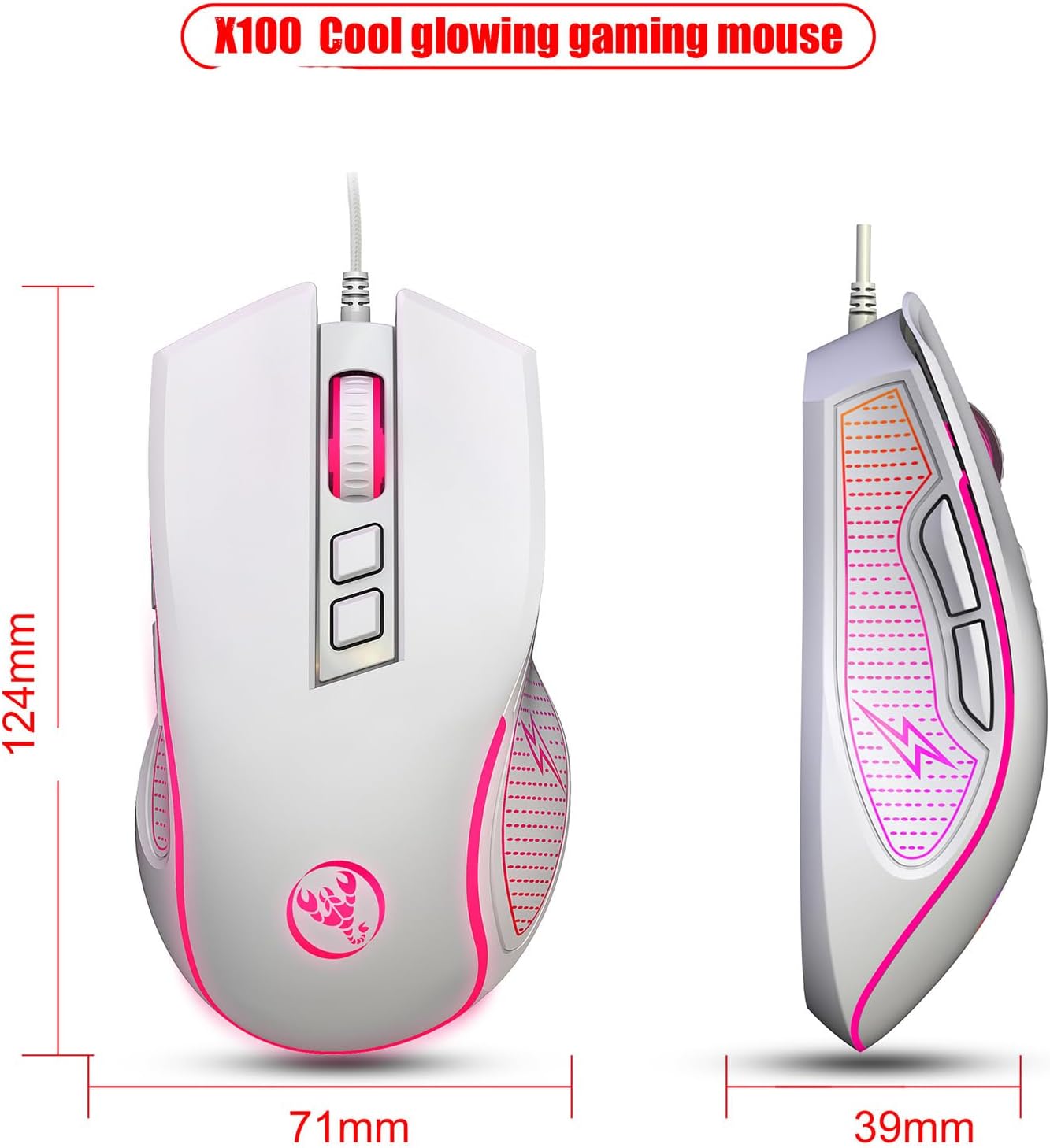
Figure 8: Mouse Dimensions. The image shows the top and side views of the mouse with measurements: 124mm (length), 71mm (width), and 39mm (height).

Figure 9: Mouse Durability and Ergonomic Design. This image highlights the mouse's 10,000,000 click test for durability and its ergonomic design for comfortable, stress-free use.
5. Troubleshooting
If you encounter issues with your HXSJ V700BW+X100 combo, please refer to the following common solutions:
- Device Not Responding:
- Ensure both the keyboard and mouse USB cables are securely plugged into your computer's USB ports.
- Try plugging the devices into different USB ports on your computer.
- Restart your computer.
- Check Device Manager (Windows) to see if the devices are recognized and if there are any driver issues.
- Backlight Not Working (Keyboard):
- Ensure the keyboard is properly connected.
- Check if the backlight has been turned off using a FN key combination. Refer to the "Keyboard Functions" section for backlight adjustment.
- Mouse Cursor Jumps or is Erratic:
- Ensure the optical sensor on the bottom of the mouse is clean and free of dust or debris.
- Use the mouse on a clean, non-reflective, and uniform surface (e.g., a mouse pad).
- Adjust the DPI setting using the DPI buttons on the mouse.
- Keys or Buttons Not Registering:
- Ensure the USB connection is stable.
- Test the devices on another computer to rule out a system-specific issue.
6. Maintenance and Care
Proper care will extend the lifespan of your keyboard and mouse combo:
- Cleaning:
- Disconnect the devices from your computer before cleaning.
- Use a soft, slightly damp cloth to wipe down the surfaces. Avoid harsh chemicals or abrasive cleaners.
- For the keyboard, use compressed air to remove dust and debris from between the keys.
- For the mouse, ensure the optical sensor area on the bottom is kept clean.
- Storage: Store the devices in a cool, dry place away from direct sunlight and extreme temperatures.
- Handling: Avoid dropping the devices or exposing them to excessive force, liquids, or dust.
7. Warranty and Support
This product is manufactured by Generic. For specific warranty information and technical support, please refer to the documentation included with your purchase or contact the retailer where the product was acquired. Keep your purchase receipt as proof of purchase for warranty claims.
For further assistance, you may also visit the manufacturer's official website or contact their customer service if available.


