
Umeiga H1906LED-20
Umeiga Vanity H1906LED-20 User Manual
Brand: Umeiga
Model: H1906LED-20
1. Introduction
Thank you for choosing the Umeiga Vanity H1906LED-20. This modern vanity desk is designed to enhance your daily routine with its integrated LED mirror, ample storage solutions, and sleek design. This manual provides detailed instructions for assembly, operation, maintenance, and troubleshooting to ensure you get the most out of your new vanity.

Figure 1.1: The Umeiga Vanity H1906LED-20, a white vanity with an illuminated mirror and side shelving.
2. Safety Information
Please read all safety instructions carefully before assembly and use. Keep this manual for future reference.
- Ensure all parts are present and undamaged before beginning assembly.
- Assemble the vanity on a soft, clean surface to prevent scratches.
- Do not overtighten screws during assembly to avoid damaging the material.
- Keep small parts and packaging materials away from children and pets.
- Ensure the vanity is placed on a stable, level surface to prevent tipping.
- For the LED mirror, ensure the power cord is not pinched or damaged. Do not expose electrical components to water.
- Only use the vanity for its intended purpose.
3. Package Contents
Before assembly, verify that all components are included in your package. While specific part names may vary, the package typically includes:
- Vanity Desk Frame Components (panels, supports)
- LED Illuminated Mirror
- Drawer Components (fronts, sides, bottoms, back)
- Drawer Sliding Rails
- Drawer Knobs
- Assembly Hardware (screws, dowels, cam locks, etc.)
- Assembly Tools (e.g., Allen wrench, if provided)
- Stool (if included in your specific model variant)

Figure 3.1: The vanity and stool, ready for assembly.
4. Setup and Assembly
Assembly is required for this product. Follow the steps below carefully. It is recommended to have two people for assembly.
- Unpack and Identify Parts: Lay out all components on a clean, soft surface. Refer to the included parts list (if provided) to identify each piece.
- Assemble the Main Frame: Begin by connecting the main desk panels using the provided hardware (e.g., cam locks, dowels, screws). Ensure all connections are secure.
- Install Drawer Rails: Attach the smooth sliding rails to the designated sections of the vanity frame and to the drawer boxes. Ensure they are aligned correctly for smooth operation.
- Assemble Drawers: Construct the drawer boxes by connecting the side, front, and back panels. Insert the drawer bottoms. Attach the decorative knobs to the drawer fronts.
- Insert Drawers: Carefully slide the assembled drawers onto their respective rails.
- Attach Mirror and Shelving Unit: Secure the LED mirror and the integrated shelving unit to the main vanity frame. Ensure all mounting points are firm and stable.
- Connect LED Power: Plug the LED mirror's power cord into a suitable power outlet.
- Assemble Stool: If a stool is included, assemble its components according to its specific instructions.
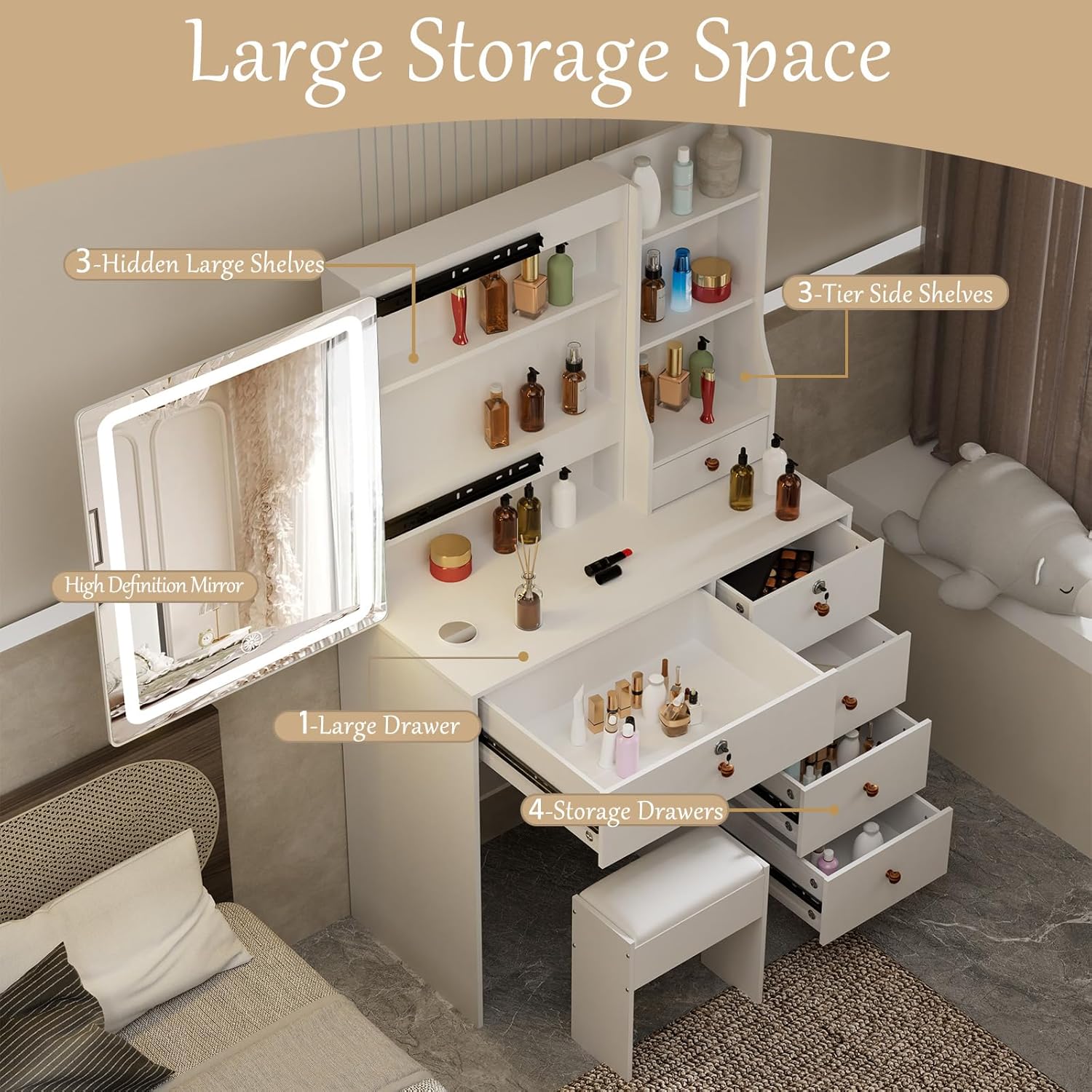
Figure 4.1: Overview of the vanity's storage compartments, including hidden and open shelves, and multiple drawers.

Figure 4.2: Dimensional diagram of the vanity and stool for planning placement.
5. Operating Instructions
5.1. LED Mirror Operation
The integrated LED mirror features touch controls for illumination and color temperature adjustment.
- Power On/Off: Gently touch the designated sensor on the mirror surface to turn the LED lights on or off.
- Adjust Brightness: Press and hold the touch sensor to cycle through brightness levels. Release when the desired brightness is achieved.
- Change Light Color: Briefly touch the sensor repeatedly to switch between the three available light colors: Cold White, Neutral White, and Warm White.

Figure 5.1: The three distinct light color temperatures available on the LED mirror.
5.2. Storage Utilization
The vanity offers various storage options to organize your cosmetics and accessories:
- Large Drawer: A spacious central drawer provides ample room for larger items.
- Storage Drawers: Multiple side drawers offer organized storage for smaller items.
- Hidden Shelves: Behind the mirror, discover hidden shelves for discreet storage of valuables or frequently used items.
- Side Shelves: Open shelves on the side provide easy access and display space for decorative items or frequently used products.

Figure 5.2: Close-up of the drawers, highlighting their smooth operation and design.

Figure 5.3: All drawers extended, demonstrating the full storage potential.

Figure 5.4: The vanity top and open storage areas, organized with personal items.
6. Maintenance
Proper care will extend the life and appearance of your Umeiga Vanity.
- Cleaning Surfaces: Wipe all surfaces with a soft, damp cloth. Avoid abrasive cleaners or harsh chemicals that could damage the finish.
- Mirror Cleaning: Use a glass cleaner specifically designed for mirrors and a lint-free cloth. Spray cleaner onto the cloth, not directly onto the mirror, to prevent liquid from seeping into the electrical components.
- Drawer Rails: Periodically check drawer rails for debris and clean as needed to ensure smooth operation. A silicone-based lubricant can be applied if drawers become stiff.
- Electrical Components: Ensure the LED mirror's power cord and connections are free from damage. Do not attempt to repair electrical components yourself.
- Tighten Hardware: Periodically check and retighten all assembly hardware to maintain stability.
7. Troubleshooting
If you encounter issues with your vanity, refer to the following common problems and solutions:
| Problem | Possible Cause | Solution |
|---|---|---|
| LED mirror does not light up. | Power cord unplugged; power outlet not working; touch sensor malfunction. | Ensure the power cord is securely plugged into a working outlet. Test the outlet with another device. If the issue persists, contact customer support. |
| Drawers are difficult to open/close. | Rails are dirty or misaligned; hardware loose; drawer overloaded. | Clean the drawer rails. Check if the rails are properly aligned and secured. Ensure drawers are not overloaded. Tighten any loose hardware. |
| Vanity feels unstable or wobbly. | Loose assembly hardware; uneven floor. | Check and tighten all assembly screws and connections. Ensure the vanity is placed on a level surface. Use furniture pads if necessary to level. |
8. Specifications
| Feature | Detail |
|---|---|
| Brand | Umeiga |
| Model Number | H1906LED-20 (vanity desk with LED lights) |
| Colour | White |
| Material | Engineered Wood |
| Frame Material | Engineered Wood |
| Furniture Finish | Chrome |
| Style | Modern |
| Product Dimensions (D x W x H) | 39.9D x 89.9W x 139.7H Centimetres (approx. 39.88 x 89.92 x 139.7 cm) |
| Item Weight | 34.93 kg (approx. 34.9 kg) |
| Number of Drawers | 5 |
| Assembly Required | Yes |
| Seat Height (Stool) | 15.6 Inches |
9. Warranty and Support
For warranty information or technical support, please refer to the documentation included with your purchase or contact Umeiga customer service through the retailer where the product was purchased. Please have your model number (H1906LED-20) and purchase date ready when contacting support.