
1. Product Overview
The CAMWAY Battery Monitor with Shunt is a comprehensive device designed to track the performance and status of your battery system. It provides real-time data on State of Charge (%), remaining capacity (up to 999AH), charge/discharge current (A), and voltage (V). Equipped with a low voltage alarm and data storage capabilities, this monitor helps optimize battery usage and extend battery life. Its waterproof design ensures reliable performance in various environments.

The CAMWAY Battery Monitor with Shunt, displaying its main unit, shunt, and connecting cables.
2. Package Contents
Verify that all the following items are included in your package:
- 1 x Battery Monitor
- 1 x Current Sampler/Shunt (500A shunt for 600A peak value)
- 1 x 2.5m Shielded Wire
- 1 x Base Holder
- 1 x 1m 20awg Ground Loop Positive Wire
- 1 x Bracket Panel
- 1 x English Manual

An overview of the items included in the package: 1 Battery Monitor, 1 Current Sampler/Shunt (500A shunt for 600A peak value), 1 2.5m Shielded Wire, 1 Base Holder, 1 1m 20awg Ground Loop Positive Wire, 1 Bracket Panel, and 1 English Manual.
3. Product Specifications
| Specification | Value |
|---|---|
| Brand | CAMWAY |
| Model Number | CAM034USV |
| Power Source | Battery Powered |
| Style | Battery Monitor with Shunt 10-100V, up to 600A |
| Color | Black |
| Min. Operating Voltage | 10 Volts |
| Max. Operating Voltage | 100 Volts |
| Measurement Type | Battery Capacity, Charge and discharge current (A), Voltage (V), State of Charge (%) |
| Specification Met | High Precision, IP67 (implied) |
| Upper Temperature Rating | 60 Degrees Celsius |
| Cable Length | 2.5M / 8.2FT (Shielded Wire) |
4. Installation and Wiring
Proper installation is crucial for accurate readings and safe operation. Follow these steps carefully:
- Identify Components: Familiarize yourself with the battery monitor, shunt (sampler), shielded wire, and other accessories. The shunt is made of pure copper for low resistance and supports up to 600A current.
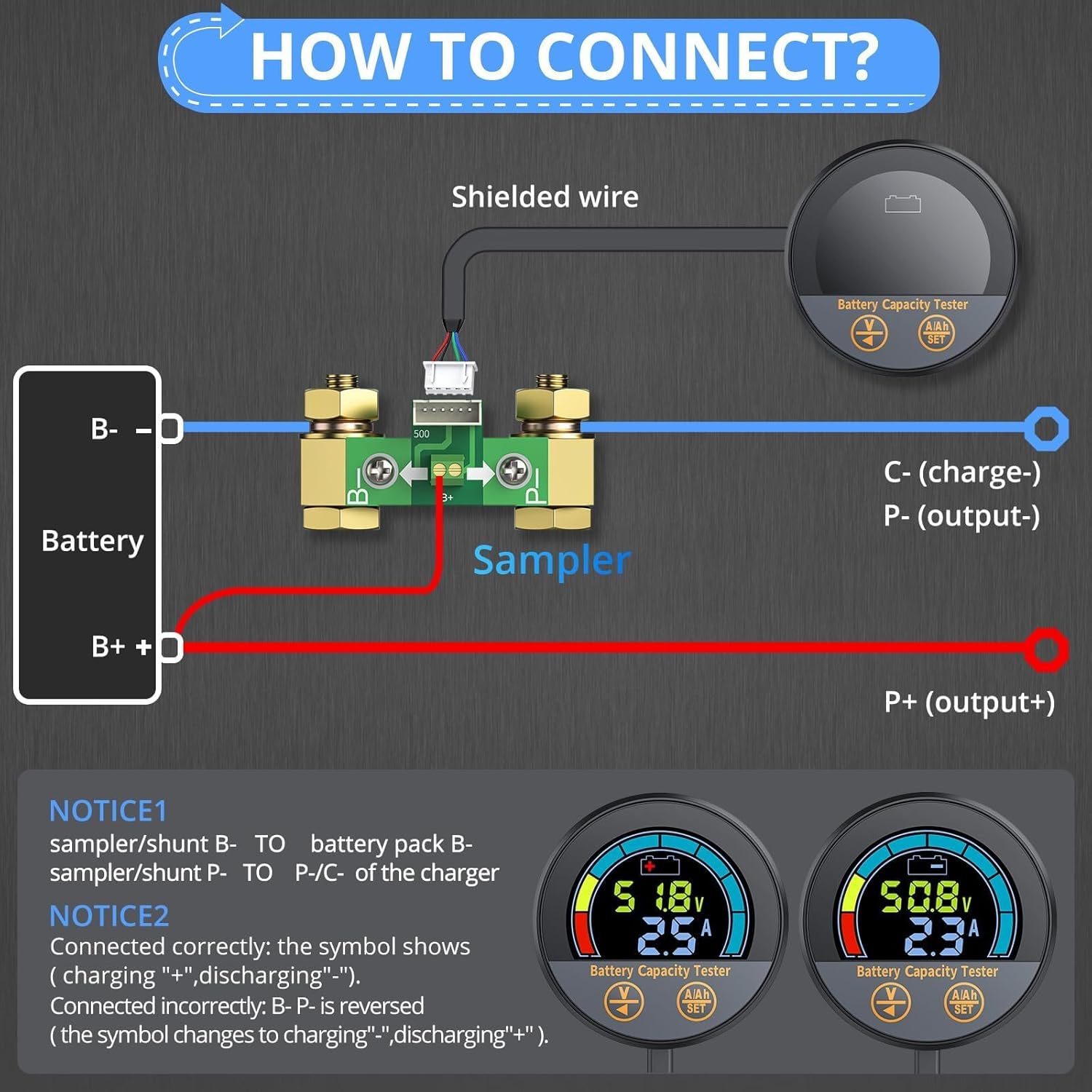
- Connect the Shunt: Connect the B- terminal of the shunt to the negative terminal of your battery pack. Connect the P- terminal of the shunt to the negative terminal of your charger or load.
- Connect the Ground Wire: Attach the red M8 ground wire from the shunt to the positive terminal of your battery.
- Connect the Monitor: Use the 2.5M shielded wire to connect the battery monitor unit to the shunt. This shielded wire improves signal stability and prevents interference.
- Secure Mounting: Use the provided base holder and bracket panel to securely mount the battery monitor in your desired location.
Detailed view of the kit components: the base mount and sampler/shunt (pure copper, low resistance, up to 600A), a red M8 ground wire for easy battery connection, the CAMWAY Battery Monitor unit, and a 2.5M shielded wire for stable signal transmission.

A clear wiring diagram showing how to connect the battery, shunt (sampler), and monitor. It highlights the B- to battery pack B-, sampler/shunt P- to P-/C- of the charger, and P+ (output+) connections. Important notices regarding correct and incorrect connections are also provided.
Installation Video Guide
This video demonstrates the setup and initial configuration of the CAMWAY Shunt Battery Monitor, including connecting the shunt, setting battery capacity, and adjusting low voltage protection reminders. It provides a visual guide to ensure correct installation and optimal performance.
5. Operation
The CAMWAY Battery Monitor features a large, arc-shaped screen for clear display of critical battery information.
Display Features
- State of Charge (SOC): Shown as a percentage and an 8-grid power display (12.5% per grid).
- Voltage (V): Real-time battery voltage.
- Current (A): Real-time charge (+) or discharge (-) current.
- Capacity (AH): Remaining battery capacity in Ampere-hours.
- Indicators: Shows charging ("+") and discharging ("-") status.

A close-up of the battery monitor's large, arc-shaped screen, indicating voltage, current, and battery capacity percentage. The display features 8 grids, each representing 12.5% of power.
Settings and Adjustments
Refer to the included English Manual for detailed instructions on setting the zero capacity voltage, total battery capacity (AH), and configuring the low voltage alarm thresholds. The monitor automatically saves the last testing data when the system shuts off, ensuring data retention.
6. Maintenance
To ensure the longevity and optimal performance of your CAMWAY Battery Monitor, follow these maintenance guidelines:
- Cleaning: Wipe the display and unit with a soft, dry cloth. Avoid using abrasive cleaners or solvents.
- Waterproof Design: The monitor features a waterproof design, making it suitable for various environments. However, avoid submerging the unit in water.
- Connection Check: Periodically inspect all wiring connections to ensure they are secure and free from corrosion.
- Storage: If storing the unit for an extended period, ensure it is clean and dry.

The battery monitor is shown with water droplets on its surface, emphasizing its waterproof and durable design suitable for various environments.
7. Troubleshooting
If you encounter issues with your CAMWAY Battery Monitor, refer to the following common problems and solutions:
- Inaccurate Readings:
- Ensure all wiring connections are tight and correctly installed according to the diagram.
- Verify that the battery capacity (AH) setting in the monitor matches your actual battery capacity.
- Check for any loose or corroded terminals on the battery or shunt.
- Display Not Working:
- Confirm that the monitor is receiving power through the shielded wire.
- Check the connection of the red M8 ground wire to the battery's positive terminal.
- If the display is blank, ensure the battery has sufficient charge to power the monitor.
- Low Voltage Alarm Issues:
- Review the low voltage alarm settings in the monitor to ensure they are configured to your desired thresholds.
- The alarm will activate when the battery voltage drops below the set limit.
- Data Not Storing:
- The monitor is designed with power failure memory. If data is not retained, ensure the unit is properly powered and check for any intermittent power loss.
For further assistance, please consult the detailed English Manual or contact customer support.
8. Warranty and Support
CAMWAY products are designed for reliability and performance. For any warranty claims or technical support, please refer to the contact information provided in your product packaging or visit the official CAMWAY website. Keep your purchase receipt as proof of purchase for warranty purposes.