
WOBSION BM-2320B-2-Black
WOBSION Rechargeable Lighted Travel Makeup Mirror
Model: BM-2320B-2-Black
1. Introduction
Thank you for choosing the WOBSION Rechargeable Lighted Travel Makeup Mirror. This compact and portable mirror is designed to provide optimal lighting and magnification for your beauty needs, whether at home or on the go. It features dual-sided mirrors with 1x and 10x magnification, adjustable LED lighting, and a long-lasting rechargeable battery.

The WOBSION Rechargeable Lighted Travel Makeup Mirror, showcasing its open design with both 1x and 10x magnification mirrors, alongside the included USB charging cable.
2. Important Safety Information
- When using the 10x magnifying mirror, maintain a distance of less than 10 cm (approximately 4 inches) from your face. Failure to do so may result in normal dizziness or distorted imaging.
- Do not expose the mirror to direct sunlight or extreme temperatures.
- Keep out of reach of children.
- Do not disassemble or attempt to repair the mirror yourself. Contact customer support for assistance.
- Use only the provided or a certified USB Type-C cable for charging.
3. Package Contents
Please verify that all items are present in the package:
- WOBSION Rechargeable Lighted Travel Makeup Mirror
- USB Type-C Charging Cable
- User Manual (this document)
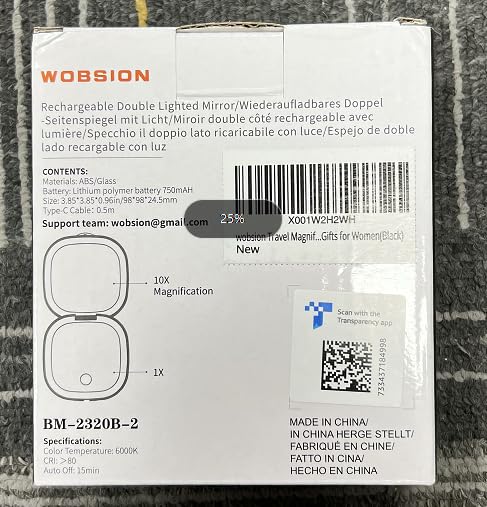
The back of the product packaging, detailing contents and key specifications.
4. Product Overview
The WOBSION mirror features a compact, clamshell design with two illuminated mirrors. One side provides 1x magnification for general viewing, while the other offers 10x magnification for detailed tasks.
Key Features:
- Dual-Sided Magnification: 1x HD mirror and 10x magnifying mirror.
- Double-Sided LED Lights: 12 LED lights on each side for even illumination.
- Touch Dimmable: Adjustable brightness from 10% to 100%.
- Memory Function: Remembers the last brightness setting used.
- Smart Switch: Lights automatically turn on when opened and off when closed.
- Energy Saving Mode: Automatically turns off after 15 minutes of inactivity.
- Magnetic Closure: Securely holds the mirror closed.
- Portable Design: Compact and lightweight for easy travel.

The mirror's compact size (3.9 inches diameter, 0.98 inches thick) makes it ideal for carrying in a handbag or pocket.
5. Setup
Initial Charging:
Before first use, it is recommended to fully charge the mirror. This ensures optimal battery performance.
- Connect the provided USB Type-C cable to the charging port on the side of the mirror.
- Connect the other end of the USB cable to a compatible USB power source (e.g., computer USB port, wall adapter, power bank).
- The charging indicator light will illuminate (typically red) to show that the mirror is charging.
- Once fully charged (approximately 1.5 hours), the indicator light will change color (typically green).
6. Operating Instructions
Turning On/Off and Smart Switch:
The mirror features a smart switch function. Simply open the mirror to turn on the lights, and close it to turn them off. This is facilitated by a magnetic sensor.

The mirror's smart switch automatically activates lights upon opening and deactivates them upon closing. It also features an energy-saving auto-off and a magnetic closure.
Adjusting Brightness:
Each side of the mirror has a touch sensor for light control.
- Single Click: Tap the touch sensor to cycle through lighting options: turn on only side A, turn on only side B, or turn on both sides A and B.
- Long Press: Press and hold the touch sensor to continuously adjust the brightness level from 10% to 100%. Release when the desired brightness is reached.

The mirror offers flexible lighting options, allowing users to illuminate one side, the other, or both, with adjustable brightness via a long press on the touch sensor.
Magnification Use:
- 1x HD Mirror: Provides a true-to-life reflection, ideal for general makeup application and hair styling.
- 10x Magnifying Mirror: Designed for detailed tasks such as eyebrow plucking, eyeliner application, or contact lens insertion. Remember to keep your face within 10 cm of the 10x mirror for clear, undistorted imaging.

The mirror features both 1x and 10x magnification. For optimal clarity with the 10x mirror, maintain a distance of less than 10 cm.
Memory Function:
The mirror will automatically remember the last brightness setting you used. When you open the mirror again, the lights will illuminate at the previously set brightness level.
Energy Saving Mode:
To conserve battery life, the mirror's lights will automatically turn off after 15 minutes of continuous use if no interaction is detected.
7. Charging the Mirror
When the battery is low, the lights may dim or not turn on. Recharge the mirror using the provided USB Type-C cable.
- Charging Indicator: A red light indicates the mirror is charging.
- Fully Charged Indicator: A green light indicates the mirror is fully charged.
- Charging Time: Approximately 1.5 hours for a full charge.
- Battery Life: Up to 15 hours of use on the darkest brightness setting.

The mirror's charging process, showing red for charging and green for full charge, with a 1.5-hour charging time and up to 15 hours of use on the lowest setting.
8. Maintenance
Cleaning:
To clean the mirror surfaces and body:
- Ensure the mirror is turned off and disconnected from any charging source.
- Gently wipe the mirror surfaces with a soft, lint-free cloth. For stubborn smudges, a small amount of glass cleaner can be applied to the cloth (not directly to the mirror).
- Wipe the body of the mirror with a soft, damp cloth. Do not use abrasive cleaners or solvents.
Storage:
Store the mirror in a cool, dry place away from direct sunlight and extreme temperatures when not in use. Keep it closed to protect the mirror surfaces.
9. Troubleshooting
| Problem | Possible Cause | Solution |
|---|---|---|
| Lights do not turn on. | Battery is depleted. | Charge the mirror fully. |
| Mirror is not fully opened. | Ensure the mirror is fully opened to activate the smart switch. | |
| Lights are dim. | Low battery. | Recharge the mirror. |
| Brightness setting is low. | Long press the touch sensor to increase brightness. | |
| 10x mirror causes dizziness/distortion. | Too far from the mirror. | Maintain a distance of less than 10 cm from the 10x mirror. |
| Mirror does not hold charge. | Battery degradation or faulty unit. | Contact customer support for assistance. |
10. Specifications
| Feature | Detail |
|---|---|
| Model Number | BM-2320B-2-Black |
| Product Dimensions (L x W) | 3.9" x 0.98" (9.9 cm x 2.5 cm) |
| Weight | 4.64 ounces (131.5 g) |
| Magnification | 1x HD / 10x Magnifying |
| Light Source | LED (12 LEDs per side) |
| Color Temperature | 6000K |
| Color Rendering Index (CRI) | >83 |
| Battery Type | 1 Lithium Ion (included) |
| Battery Capacity | 750 mAh |
| Charging Time | Approx. 1.5 hours |
| Usage Time (Darkest Mode) | Up to 15 hours |
| Auto-off Feature | After 15 minutes of inactivity |
| Frame Material | Acrylonitrile Butadiene Styrene (ABS) |
| Manufacturer | Shenzhen Wobsion Technology Co.,Ltd |
11. Warranty and Support
WOBSION is committed to providing high-quality products and excellent customer service. If you encounter any problems with your WOBSION Rechargeable Lighted Travel Makeup Mirror, please do not hesitate to contact our professional after-sales team.
We aim to provide the most effective solution within 24 hours.
Customer Support Email: wobsion@gmail.com
Ask a question about this manual
Ask about setup, troubleshooting, compatibility, parts, safety, or missing instructions. Manuals+ will review the question and use this page’s manual context to help answer it.