
1. Introduction
This manual provides instructions for the K KAMOER KPMP10 miniature peristaltic pump. This pump is designed for precise liquid dosing in laboratory and DIY applications, featuring a low flow rate and an adjustable speed stepper motor. It is suitable for various fluid transfer tasks requiring accuracy and reliability.
Key Features
- Low flow rate: 0-5.9 ml/min
- 24V operating voltage, 10W power consumption
- High-precision stepper motor with an estimated 6000-hour lifespan
- Planetary friction reduction drive with 4 rotors for smooth operation
- Easy installation and maintenance with a quick-change pump tube mechanism
- Flip design for effective dust prevention
- Pump head is easy to disassemble for thorough cleaning and high-temperature sterilization

Figure 1: Kamoer KPMP10 peristaltic pump with its overall dimensions: 73.9mm in length, 31mm in width, and 48.2mm in height. This highlights the compact design of the pump.
2. Technical Specifications
| Feature | Value |
|---|---|
| Model | KPMP10-ST-P60 |
| Motor Type | Stepping motor |
| Flow Range | 0-5.9 ml/min |
| Power | 10W |
| Control Mode | Stepper driver (requires external driver) |
| Weight | 145g |
| Rated Voltage | 24V |
| Pump Tube Lifespan | Depending on actual working conditions and media |
| Motor Lifespan | 6000 hours |
| Standard Pump Tube Material | Perx P60 |
| Standard Pump Tube Size | 1.52mm ID x 3.22mm OD |
| Motor Speed | 100 rpm |
| Number of Rotors | 4 |
| Noise | Less than 55dB |

Figure 2: Detailed table of technical specifications for the KPMP10 pump, including its model, motor type, flow range, power, control mode, weight, voltage, and lifespan details. A dimension diagram is also included.

Figure 3: This graph illustrates the relationship between the pump's rotational speed (RPM) and the resulting flow rate in milliliters per minute (ml/min) for different pump tube inner and outer diameters.
3. Setup
3.1 Mounting
The Kamoer KPMP10 peristaltic pump is designed for fixed-through-plate installation. Ensure a stable and level surface for mounting to prevent vibration and ensure accurate operation.

Figure 4: This diagram shows the recommended fixed-through-plate installation method for the pump, detailing how it can be securely mounted.
3.2 Electrical Connection and Wiring
The KPMP10 features a stepper motor and requires an external driver for operation. Connect the pump to a compatible 24V power supply and a stepper motor driver. Optional MODBUS-RTU driver boards or 2802 + KMD-42B-P driver boards can be used to achieve advanced functions such as speed control, RS485 communication, and external analog control. Refer to your chosen driver's manual for specific wiring and configuration instructions.

Figure 5: This image displays the wiring connections for the stepper motor, indicating the color-coded wires (black, green, red, blue) and their corresponding pin assignments for the PH2.0-4P connector.
4. Operation
4.1 Initial Use and Priming
Before initial use, ensure all tubing connections are secure and free from leaks. Carefully insert the pump tube into the pump head, ensuring it is seated correctly. Prime the pump by running it with the intended liquid to remove any trapped air from the system. This ensures accurate and consistent flow.
4.2 Flow Rate Control
The KPMP10 pump provides a flow range of 0-5.9 ml/min. The flow rate is controlled by adjusting the speed of the stepper motor via the external driver. Consult your stepper motor driver's manual for detailed instructions on how to set and adjust the motor speed. The pump's motor operates at a nominal speed of 100 RPM.
Video 1: This video provides a visual demonstration of the Kamoer KPMP10 peristaltic pump's operation, including how to install the tubing, disassemble the pump head, and observe liquid transfer.
5. Maintenance and Care
5.1 Pump Head Disassembly and Sterilization
The pump head is designed for easy disassembly, allowing for thorough cleaning and high-temperature sterilization. To disassemble, gently unclip or unscrew the pump head from the motor assembly. Clean all components with appropriate sterilizing agents. Ensure all parts are dry before reassembly.
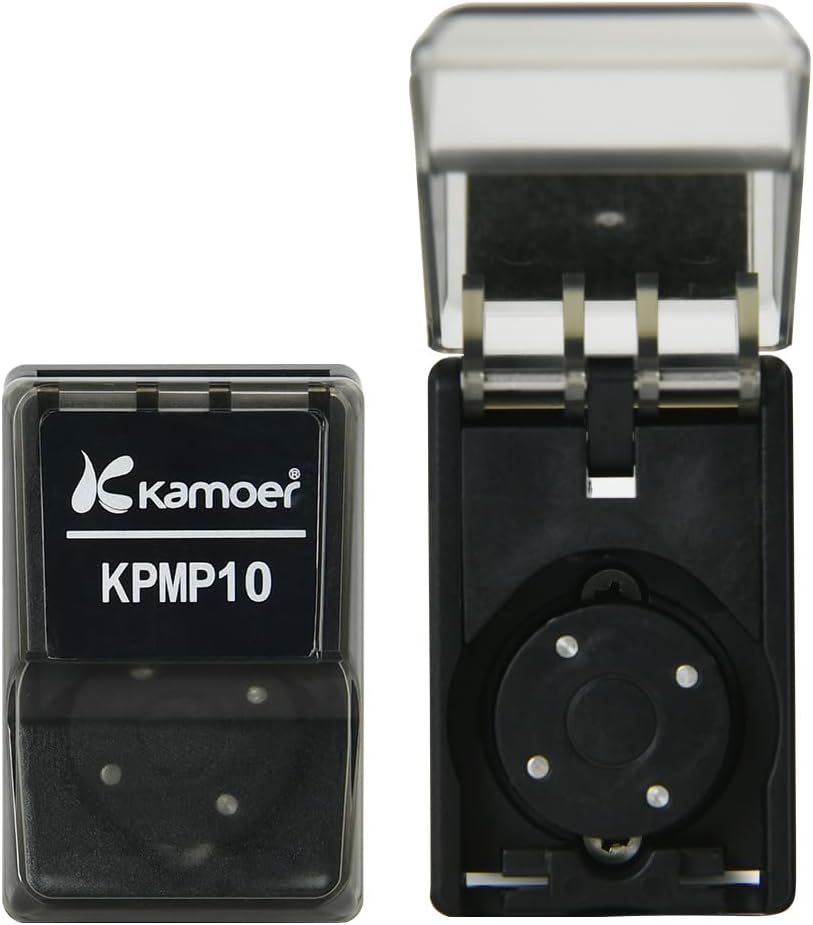
Figure 6: This image shows the pump head detached from the motor, demonstrating the ease with which it can be disassembled for cleaning or sterilization.
5.2 Pump Tube Replacement
The pump features a quick-change tube design for easy replacement. To replace the tube, open the flip cover, remove the old tube, and carefully insert the new tube, ensuring it is properly seated around the rollers. Always use the correct tube size (P60, 1.52mm ID x 3.22mm OD) for optimal performance and compatibility.

Figure 7: This image shows the pump with its protective flip cover open, revealing the internal mechanism and the point where the pump tube is inserted. The flip design helps prevent dust accumulation.
5.3 Dust Prevention
The pump's flip design helps protect the internal components from dust and environmental contaminants. Keep the cover closed when the pump is not in use or during storage to maintain cleanliness and prolong component life.
6. Troubleshooting
6.1 No Flow or Inconsistent Flow
- Check power supply: Ensure the 24V power supply is correctly connected and functional.
- Verify driver connection: Confirm the stepper motor driver is properly connected and configured according to its manual.
- Inspect tubing: Check for kinks, blockages, or damage in the pump tube. Ensure the tube is correctly installed and seated within the pump head.
- Air in system: Prime the pump by running it with liquid to remove any trapped air that may be causing inconsistent flow.
6.2 Unusual Noise
- Check mounting: Ensure the pump is securely mounted to a stable surface to prevent vibrations that can cause noise.
- Inspect pump head: Verify that the pump head is correctly assembled and the rollers are moving freely without obstruction.
- Tube condition: A worn, stiff, or improperly installed tube can cause increased noise. Replace the pump tube if necessary.
7. Warranty Information
For detailed warranty information regarding your K KAMOER KPMP10 peristaltic pump, please refer to the official Kamoer Fluid Tech (Shanghai) Co., Ltd. website or contact their customer support directly. Keep your purchase receipt as proof of purchase for any warranty claims.
8. Customer Support
For technical assistance, spare parts, or any inquiries regarding your K KAMOER KPMP10 peristaltic pump, please contact the manufacturer:
Manufacturer: Kamoer Fluid Tech (Shanghai) Co., Ltd.
Email: daijing@kamoer.com