
1. Introduction
Thank you for choosing the TOPDON TS001 Thermal Imaging Camera. This manual provides essential information for the proper setup, operation, and maintenance of your device. The TS001 is a versatile thermal camera designed for Android devices, offering high-resolution infrared imaging for various applications, from circuit board inspection to outdoor observation.
Please read this manual thoroughly before using the product to ensure safe and effective operation.
2. Product Overview
The TOPDON TS001 is a compact and powerful thermal imaging camera featuring an adjustable 9mm lens, a 256x192 IR resolution, and a wide temperature measurement range. It is designed for easy integration with Android smartphones and PC platforms, providing detailed thermal insights.
2.1 Key Features
- Manual Focusing: Adjustable 9mm lens for clear imaging from 0.1 to 500 meters.
- High IR Resolution: 256x192 infrared resolution for clear thermal images.
- Wide Temperature Range: Capable of capturing temperatures from -20°C to 550°C.
- Fast Refresh Rate: 25Hz refresh rate for smooth thermal video.
- Dynamic Detection: Automatically annotates moving objects.
- Target Mode: Measures distance between objects and the lens (10 to 120 meters).
- Hot/Cold Source Marking: Automatically detects and marks the 3 highest/lowest temperature sources.
- Pseudo-Color Modes: Supports 10 customizable pseudo-color palettes.
- Low Power Consumption: Operates at 0.35W for extended observation.
- Connectivity: Compatible with Android and PC platforms via the Top-Infrared app.
2.2 Product Components
The TS001 package includes the following items:
- TOPDON TS001 Thermal Imaging Camera
- EVA Carrying Case
- Cleaning Cloth
- Quick Guide
- Mobile Phone Holder
- 50 cm Extension Cable

Figure 2.1: TOPDON TS001 Thermal Imaging Camera and included accessories.
3. Setup
3.1 Connecting to an Android Device
- Download and install the Top-Infrared application from the Google Play Store on your Android smartphone.
- Connect the TS001 camera to your Android phone's USB-C port. You may use the provided 50 cm extension cable and mobile phone holder for more flexible positioning.
- Ensure your phone's OTG (On-The-Go) function is enabled if prompted or if the camera is not detected. This setting is usually found in your phone's system settings under 'Connected devices' or 'Additional settings'.
- Launch the Top-Infrared app. The app should automatically detect the camera and display the thermal image.
3.2 Connecting to a PC
- Download the PC software from the official TOPDON website.
- Connect the TS001 camera to your PC's USB port.
- Install and launch the PC software. The software should recognize the camera and allow you to view and analyze thermal data.
4. Operating Instructions
4.1 Manual Focusing
The TS001 features a manual focusing lens. To adjust the focus, gently rotate the lens ring until the image appears sharp and clear for your desired observation distance. This allows for precise imaging from 0.1 meters up to 500 meters.

Figure 4.1: Adjustable 9mm lens for varying observation distances.
4.2 Understanding Thermal Resolution and Sensitivity
The TS001 provides a 256x192 IR resolution. For enhanced clarity, the device may utilize TISR technology. Higher sensitivity (lower mK value) indicates the camera's ability to detect smaller temperature differences.

Figure 4.2: Thermal image resolution comparison.

Figure 4.3: Enhanced sensitivity for detecting subtle temperature variations.
4.3 Dynamic Detection and Target Mode
- Dynamic Detection: The camera can automatically annotate moving objects within the thermal view. This is particularly useful for tracking wildlife or moving components.
- Target Mode: Use this mode to roughly measure the distance to objects, with a range of 10 to 120 meters. The app provides 3 selectable target options for different scenarios.
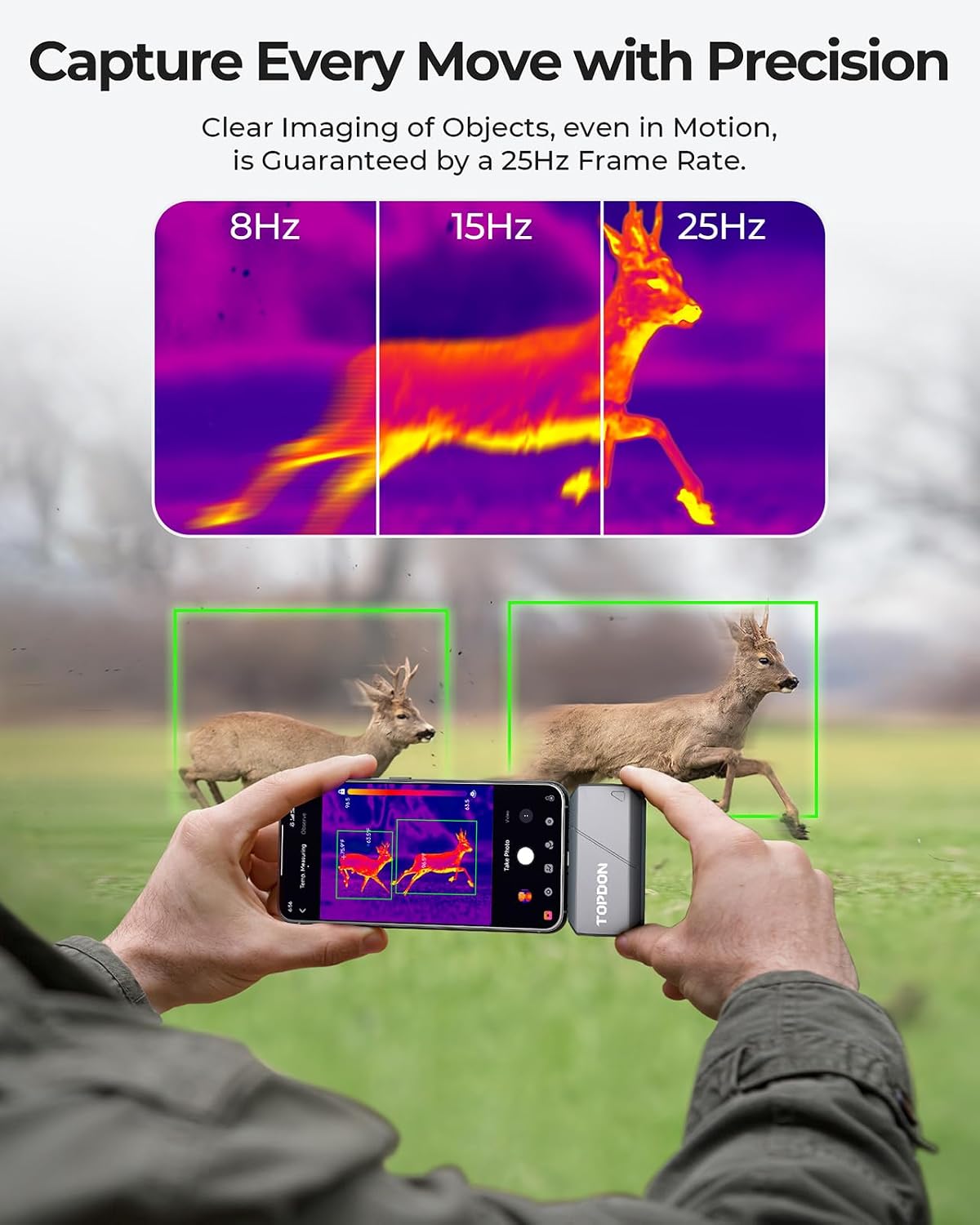
Figure 4.4: Capturing moving objects with a 25Hz frame rate.

Figure 4.5: Using target mode for distance detection.
4.4 Hot and Cold Source Marking
The high & low temperature source mode automatically identifies and marks the 3 highest and 3 lowest temperature points within the image. This feature is invaluable for quickly pinpointing anomalies, such as overheating components or areas of heat loss.
4.5 Customizing Your Thermal View
The Top-Infrared app allows you to customize the visual representation of thermal data:
- Pseudo-Color Modes: Choose from 10 different pseudo-color palettes to best visualize temperature differences for your specific application.
- Temperature Waveforms: Generate real-time temperature waveforms for detailed analysis of thermal changes over time.
- Thermal Image Reports: Export personalized thermal image reports for documentation and sharing.

Figure 4.6: Diverse applications of the TS001 thermal camera.
5. Maintenance
Proper maintenance ensures the longevity and optimal performance of your TOPDON TS001.
5.1 Cleaning the Lens
Use the provided cleaning cloth to gently wipe the lens. Do not use abrasive materials or harsh chemicals, as they can damage the lens coating. Ensure the lens is free of dust and smudges for clear thermal imaging.
5.2 Storage
When not in use, store the TS001 in its EVA carrying case to protect it from dust, moisture, and physical damage. Store in a cool, dry place away from direct sunlight and extreme temperatures.
5.3 General Care
- Avoid dropping the device or subjecting it to strong impacts.
- Do not expose the device to water or other liquids.
- Keep the device away from strong electromagnetic fields.
6. Troubleshooting
If you encounter issues with your TOPDON TS001, please refer to the following common troubleshooting tips:
6.1 Camera Not Detected by Smartphone
- Check OTG Setting: Ensure your Android phone's OTG (On-The-Go) function is enabled. This is crucial for the phone to recognize external USB devices.
- Verify App Installation: Make sure the official Top-Infrared app is correctly installed and updated to the latest version.
- Test USB Port/Cable: Try connecting the camera to a different USB-C port on your phone or using a different USB-C cable (if applicable) to rule out port or cable issues.
- Restart Phone: Sometimes, a simple phone restart can resolve connectivity issues.
- Check Phone Compatibility: Ensure your Android phone meets the minimum system requirements for the Top-Infrared app and supports USB OTG.
6.2 Blurry or Unclear Images
- Adjust Focus: Rotate the manual focusing lens ring to achieve a clear image for your specific distance.
- Clean Lens: Use the provided cleaning cloth to gently clean the lens surface. Dust or smudges can significantly affect image clarity.
- Environmental Factors: Extreme humidity, fog, or smoke can affect thermal image quality.
6.3 Inaccurate Temperature Readings
- Ensure Proper Focus: An out-of-focus image can lead to inaccurate temperature readings.
- Consider Emissivity: Different materials have different emissivities, which affect how they radiate infrared energy. Adjust the emissivity setting in the app if available for more accurate readings on specific surfaces.
- Distance to Target: While the camera has a wide range, very long distances or very small targets can impact accuracy.
If the problem persists after trying these steps, please contact TOPDON customer support for further assistance.
7. Specifications
| Feature | Specification |
|---|---|
| Model Number | TS001-UK |
| IR Resolution | 256 x 192 pixels |
| Lens | 9mm Adjustable Lens |
| Observation Range | 0.1 to 500 meters |
| Temperature Range | -20°C to 550°C (-4°F to 1022°F) |
| Refresh Rate | 25Hz |
| Power Consumption | 0.35W |
| Dimensions (Parcel) | 16.6 x 16.6 x 6.9 cm |
| Weight (Parcel) | 430 g |
| Connectivity | USB-C (for Android devices and PC) |
8. Warranty and Support
TOPDON offers a one-year quality warranty for the TS001 Thermal Imaging Camera, covering manufacturing defects and malfunctions under normal use. Additionally, lifetime technical support is provided to assist you with any questions or issues you may encounter.
For warranty claims, technical assistance, or any inquiries, please contact TOPDON customer support through their official website or the contact information provided in your product packaging.
Please retain your proof of purchase for warranty purposes.