
1. Product Overview
The Honeywell HWT-H2 Sunturalux LED Desk Lamp is designed to provide versatile and eye-caring illumination for various environments. Featuring full-spectrum LED technology, multiple color modes, stepless dimming, and convenient USB charging ports, this foldable lamp is ideal for reading, working, studying, and relaxation.

Figure 1: Honeywell HWT-H2 Sunturalux LED Desk Lamp in its extended position.
2. What's in the Box
Upon opening the package, ensure all the following components are present:
- 1 x Honeywell HWT-H2 Desk Lamp
- 1 x 24W Power Adapter
- 1 x User Manual

Figure 2: Included components of the Honeywell HWT-H2 Desk Lamp.
3. Setup Instructions
- Unpack the Lamp: Carefully remove the desk lamp and all accessories from the packaging.
- Unfold the Lamp: The lamp features a flexible folding design. Gently unfold the lamp head (90° rotation left/right, 136° folding up/down) and the base (90° folding) to your desired position.
- Connect Power: Insert the 24W power adapter into the power input port located at the back of the lamp base. Plug the adapter into a standard electrical outlet.

Figure 3: Adjustable and foldable design for optimal positioning.
Video 1: Demonstration of the Honeywell HWT-H2 Desk Lamp's modern design and adjustability for various work and office settings.
4. Operating Instructions
The Honeywell HWT-H2 Desk Lamp features intuitive touch controls on its base.
- Power On/Off: Touch the power symbol (⏻) to turn the lamp on or off.
- Color Temperature Adjustment: Touch the color temperature symbol (☀) to cycle through 4 color modes: 2700K (Warm White), 4000K (Natural White), 5000K (Cool White), and 5700K (Daylight).
- Brightness Adjustment: Slide your finger along the brightness adjustment slider (marked with '-' and '+') to achieve 10%-100% stepless dimming.
- Working Mode: Press the working mode key (👤) for a professional work lighting setting.
- 30-Minute Timer: Activate the 30-minute auto-timer by touching the timer symbol (⏲). The lamp will automatically turn off after 30 minutes.
- Memory Function: The lamp retains your last brightness and color temperature settings when turned off and on again.
- USB Charging Ports: Use the integrated USB-A and USB-C ports (5V/2A) on the base to charge compatible devices such as mobile phones, speakers, and tablets.

Figure 4: Touch control panel and dual charging ports on the lamp base.

Figure 5: Stepless brightness adjustment.

Figure 6: Four selectable color temperature modes.
Video 2: Overview of the Honeywell LED Desk Lamp's dimmable features and various light settings.
5. Maintenance
- Cleaning: Ensure the lamp is unplugged before cleaning. Use a soft, dry cloth to wipe the surface. Avoid abrasive cleaners or solvents.
- Storage: When not in use, fold the lamp into its compact position for easy storage and to protect it from damage.
6. Troubleshooting
- Lamp not turning on:
- Check if the power adapter is securely plugged into both the lamp and the electrical outlet.
- Ensure the power outlet is functional.
- Brightness or color temperature not changing:
- Ensure you are using the correct touch controls for adjustment.
- Try turning the lamp off and on again to reset.
- Devices not charging via USB ports:
- Verify that the USB cable is properly connected to both the device and the lamp's USB port.
- Confirm that your device is compatible with 5V/2A charging.
7. Specifications
| Feature | Detail |
|---|---|
| Model Name | HWT-H2B |
| Light Source Type | LED (48 full Spectrum Light Beads, Sunturalux Chips) |
| Brightness | 550 Lumens |
| Color Temperature | 2700K-5700K (4 modes) |
| Color Rendering Index (CRI) | ≥94 |
| Brightness Adjustment | 10%-100% Stepless Dimmable |
| Special Features | Touch control, Brightness Memory, Timer Function (30-minute), USB A+C Charging Port, Folding and Rotating Design |
| USB Output | 5V/2A (USB A and C) |
| Wattage | 24 watts |
| Average Life | >30,000 hours |
| Material | ABS Plastic |
| Product Dimensions | 14.37"D x 4.5"W x 15.35"H |
| Item Weight | 1.83 pounds (0.83 Kilograms) |
| Included Components | 1*24W Power Adapter, 1*Honeywell HWT-H2 Desk Lamp, User Manual |
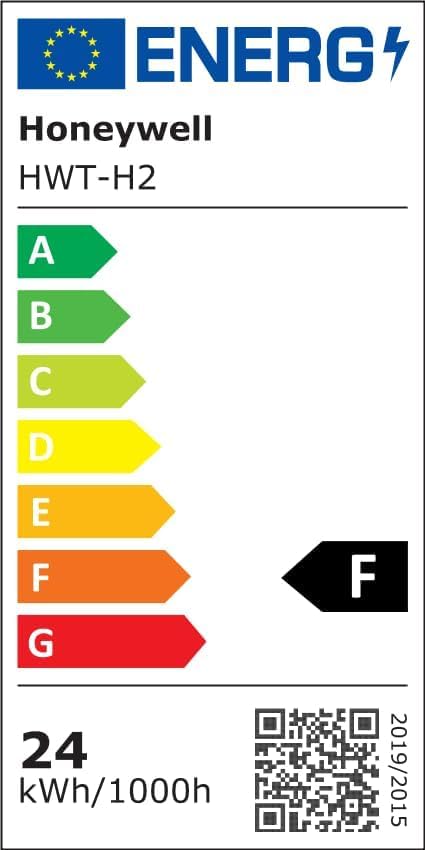
Figure 7: Energy efficiency rating for the HWT-H2 model. For more details, visit EPREL Database.
8. Warranty and Support
This Honeywell HWT-H2 Sunturalux LED Desk Lamp comes with a 2-year limited warranty. For warranty claims, technical support, or any inquiries regarding your product, please contact Honeywell Smart Lighting customer service. Refer to the contact information provided in the included User Manual or visit the official Honeywell website.


