
1. Introduction
This manual provides detailed instructions for the VINABTY RC833 GUB1 Voice Remote Control. This remote is designed as a replacement for various Smart TV models, offering convenient control and voice command capabilities. Please read this manual thoroughly before using your new remote control to ensure proper setup and operation.
Compatible TV Models:
- 65C845, 85C645, 43C645, 55C645, 65C645, 85C845
- 98X955, 98P745, 98C809, 75C809, 65C809
- 98C655, 85C655, 75C655, 65C655, 55C655, 50C655, 43C655
- 98P755, 75P755, 65P755, 55P755, 50P755, 43P755
- 85P655, 75P655, 65P655, 58P655, 55P655, 50P655, 43P655
- 98C805, 85C805, 75C805, 65C805, 55C805, 50C805, 55C649

Figure 1.1: Front view of the VINABTY RC833 GUB1 Voice Remote Control, showcasing its ergonomic design and button layout.
2. Setup
2.1 Battery Installation
- Locate the battery compartment on the back of the remote control.
- Slide the battery cover downwards or press the latch and lift to open.
- Insert two AAA batteries (not included), ensuring the positive (+) and negative (-) terminals match the diagrams inside the compartment.
- Close the battery cover securely.

Figure 2.1: Rear view of the remote control, indicating the battery compartment for AAA batteries.
2.2 Pairing the Remote Control (for Voice Functionality)
For basic TV control, the remote may work directly without pairing. However, to utilize voice control features, pairing with your Smart TV is typically required. The exact pairing process may vary slightly depending on your TV model. Refer to your TV's user manual for specific instructions if these steps do not work.
- Ensure your TV is powered on.
- Point the remote control towards the TV.
- On most compatible Smart TVs, you can initiate pairing by navigating to the TV's settings menu:
Settings > Remotes & Accessories (or similar) > Add Accessory (or Pair Remote). - Follow the on-screen prompts. You may need to press and hold specific buttons on the remote (e.g., the Voice button and OK button simultaneously) until an indicator light flashes or a message appears on the TV screen confirming pairing.
- Once paired, test the voice control by pressing the Voice button and speaking a command.
Note: If the remote does not pair, ensure there are no obstructions between the remote and the TV, and that the batteries are fresh.
3. Operation
The VINABTY RC833 GUB1 remote control features an intuitive layout for easy navigation and control of your Smart TV. Below is a general overview of key buttons and their functions.
3.1 Button Functions
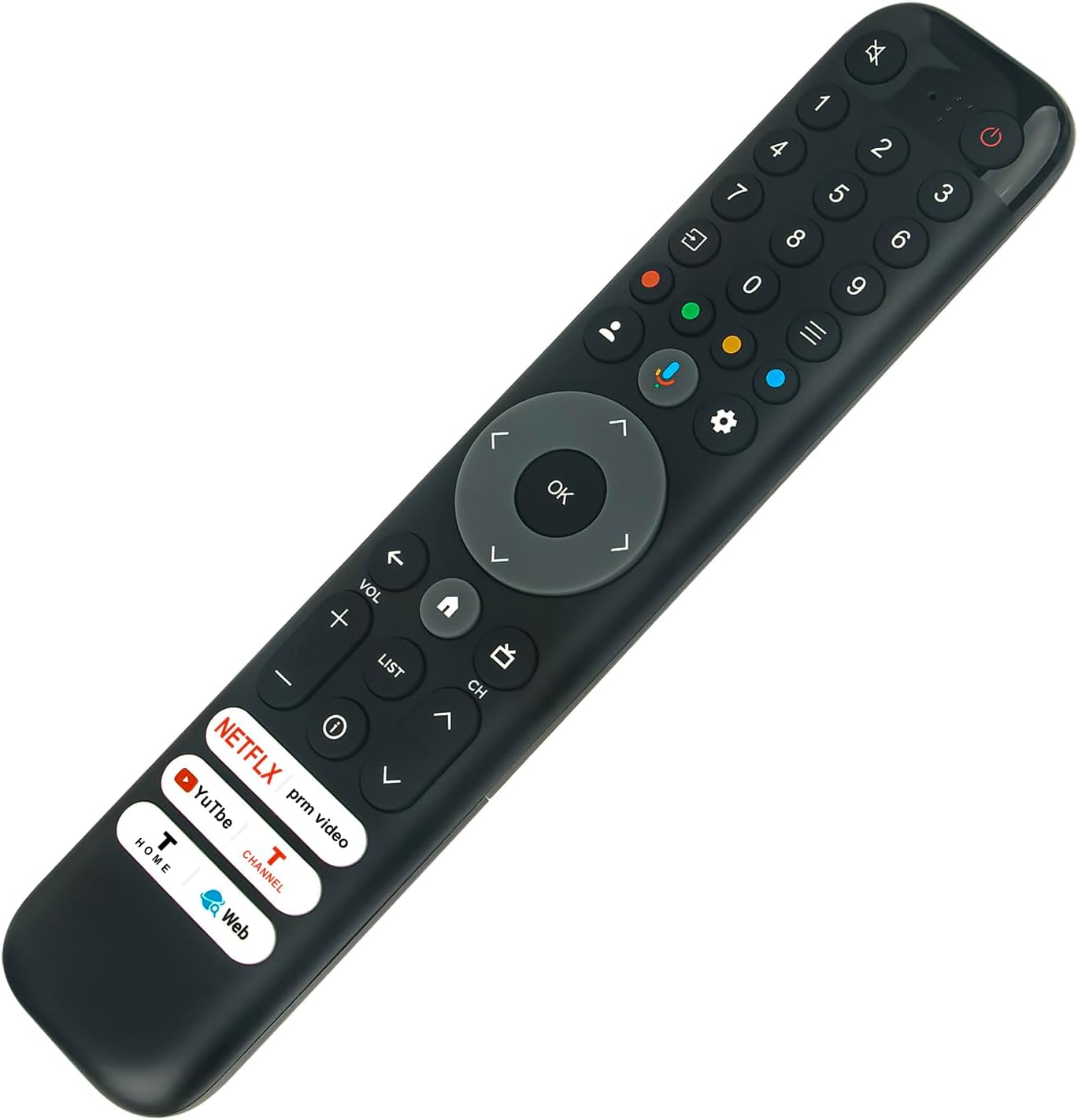
Figure 3.1: Angled view of the remote control, providing a clear perspective of the button arrangement.
| Button | Function |
|---|---|
| Power (red circle) | Turns the TV on or off. |
| Mute (crossed-out speaker) | Mutes or unmutes the TV sound. |
| Number Buttons (0-9) | Direct channel selection or inputting numbers. |
| Navigation Pad (Up, Down, Left, Right, OK) | Navigates menus and confirms selections. |
| Voice (microphone icon) | Activates voice control for commands and searches (requires pairing). |
| Home (house icon) | Returns to the TV's home screen or smart hub. |
| Volume (+/-) | Adjusts the TV volume up or down. |
| Channel (CH Up/Down) | Changes TV channels up or down. |
| Netflix, Prime Video, YouTube, T-Channel, Home, Web | Direct access buttons for popular streaming services and TV functions. |
| Settings (gear icon) | Accesses the TV's settings menu. |
| Back (left arrow) | Returns to the previous screen or menu. |
| List | Displays the channel list or other relevant lists. |

Figure 3.2: The remote control in use, demonstrating its ergonomic fit for comfortable operation while viewing television.
4. Maintenance
4.1 Cleaning
- Wipe the remote control with a soft, dry cloth.
- For stubborn dirt, slightly dampen the cloth with water or a mild, non-abrasive cleaner.
- Do not use harsh chemicals, solvents, or abrasive cleaning pads, as these can damage the remote's surface or internal components.
- Ensure no liquid enters the remote control through button gaps or openings.
4.2 Battery Care
- Replace batteries when the remote's performance degrades or if the indicator light (if present) signals low battery.
- Always replace both batteries at the same time with new ones of the same type (AAA).
- Do not mix old and new batteries, or different types of batteries.
- Remove batteries if the remote control will not be used for an extended period to prevent leakage and damage.
- Dispose of used batteries according to local regulations.
4.3 Storage
- Store the remote control in a cool, dry place away from direct sunlight and extreme temperatures.
- Avoid dropping the remote or exposing it to excessive shock.
5. Troubleshooting
| Problem | Possible Cause | Solution |
|---|---|---|
| Remote not responding to TV. |
|
|
| Voice control not working. |
|
|
| Buttons are sticky or unresponsive. |
|
|
6. Specifications
| Feature | Detail |
|---|---|
| Model Number | RC833 GUB1 |
| Brand | VINABTY |
| Compatible Devices | Television (Specific Smart TV models listed in Section 1) |
| Max Number of Supported Devices | 1 |
| Special Feature | Ergonomic, Voice Control |
| Color | Black |
| Product Dimensions | 7.9 x 2 x 0.7 inches (20.07 x 5.08 x 1.78 cm) |
| Item Weight | 2.6 ounces (73.7 grams) |
| Power Source | 2 x AAA Batteries (not included) |

Figure 6.1: Dimensions of the remote control, showing its length of 21 cm (8.27 in) and width of 4 cm (1.57 in).
7. Warranty and Support
This product is covered by a standard manufacturer's warranty. For specific warranty details, return policies, or technical support, please refer to the documentation provided with your purchase or contact the seller directly.
For further assistance, you may also visit the VINABTY official website or contact their customer service department.