
Introduction
This manual provides detailed instructions for the JurwheeR Exercise Bike Monitor Speedometer, Model 9828933345. This monitor is designed to track various exercise metrics for stationary bikes and elliptical machines, helping users monitor their workout progress effectively. Please read this manual thoroughly before use to ensure proper installation and operation.

Image: The JurwheeR Exercise Bike Monitor Speedometer shown installed on a stationary exercise bike, displaying workout data.
Product Features
- Multiple Functions: Tracks scan, time, speed, calories, mileage, total mileage, and heart rate (heart rate sensor not included).
- Clear Display: Easy-to-read LCD screen for viewing workout data.
- Accurate Measurement: Provides precise data for various exercise parameters.
- Durable Construction: Made from sturdy materials for long-lasting performance.
- User-Friendly Design: Simple operation for quick setup and data tracking.
Package Contents
The package includes the following items:
- 1 x JurwheeR Exercise Bike Monitor Speedometer
- 1 x User Manual (this document)
Note: Sensors, magnets, and CR2032 button battery are not included and must be purchased separately or reused from existing equipment.
Setup
- Battery Installation:
Locate the battery compartment on the back of the monitor. Insert one CR2032 button battery (not included), ensuring correct polarity. Close the battery compartment securely.
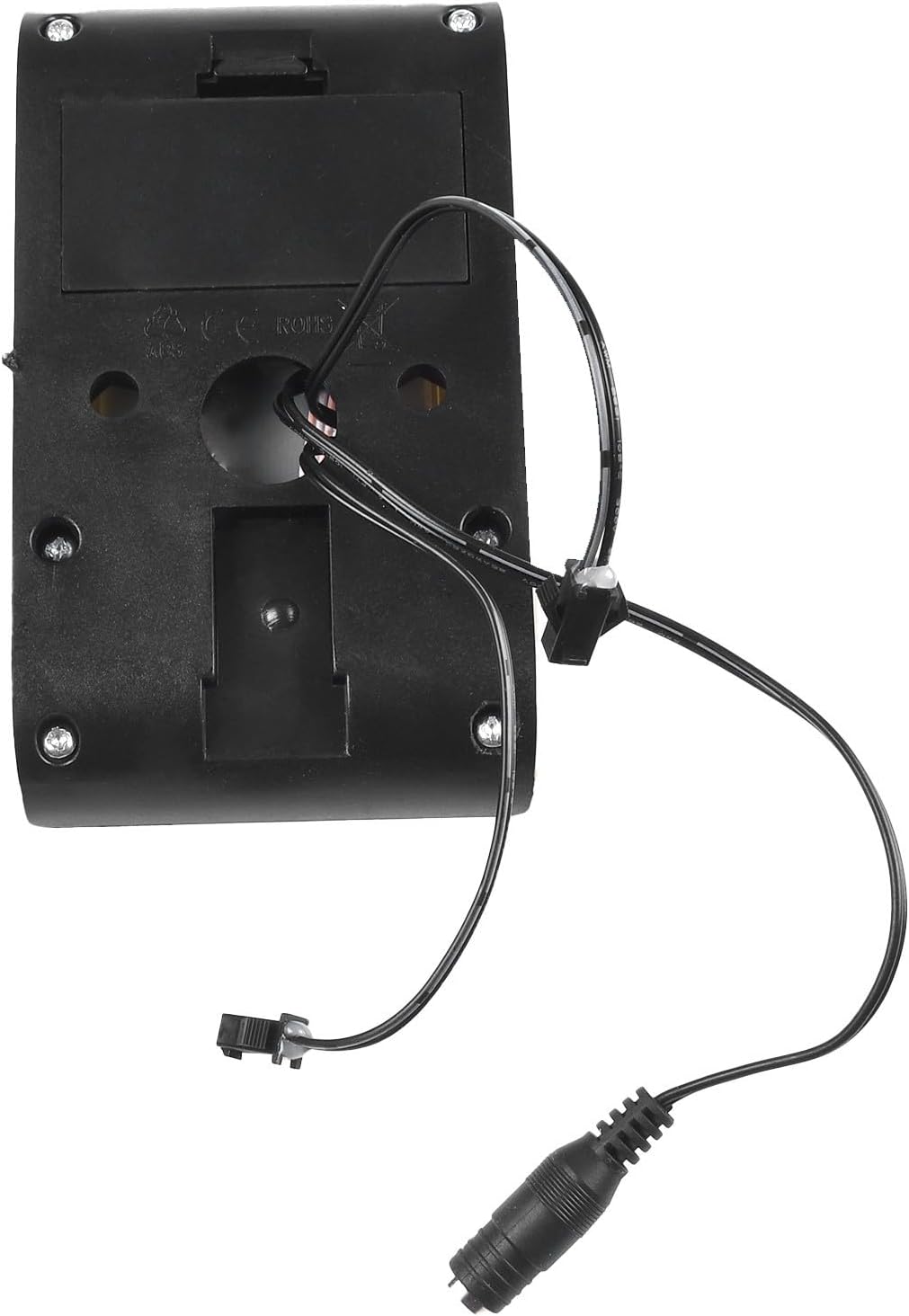
Image: Rear view of the monitor, highlighting the battery compartment and connection ports for sensors.
- Sensor Connection:
- The middle port (headphone jack style) is for connecting the speed sensor cable. Ensure your existing rowing machine or exercise equipment uses an SM# connector for compatibility.
- The two ports on either side of the speed sensor port are for connecting heart rate sensors (if applicable and purchased separately).

Image: Front view of the monitor with its wired connections, illustrating the ports for speed and heart rate sensors.
- Mounting:
Mount the monitor securely on your exercise bike or elliptical machine's handlebar or designated display area. Ensure it is stable and visible during your workout.
Operating Instructions
The monitor features three buttons: UP, ENTER, and DOWN for navigation and selection. The display shows various metrics:

Image: A detailed view of the monitor's LCD screen, displaying workout metrics such as RPM, Calories, Distance, and Time.
- SCAN: Automatically cycles through and displays all function values (Time, Speed, Calories, Mileage, Total Mileage) in sequence.
- TIME: Measures the duration of your exercise session from start to stop.
- SPEED: Displays your instantaneous exercise speed.
- CALORIES (CAL): Calculates the estimated calories burned during your workout.
- MILEAGE (DIST): Measures the distance traveled during the current exercise session.
- TOTAL MILEAGE: Accumulates the total distance traveled across all exercise sessions.
- HEART RATE (PULSE): Displays your heart rate if a compatible heart rate sensor is connected.
Use the UP and DOWN buttons to navigate between functions or adjust settings. Press ENTER to confirm selections or reset values as needed (refer to specific equipment manual for reset procedures).
Maintenance
- Cleaning: Wipe the monitor screen and body with a soft, dry cloth. Do not use abrasive cleaners or solvents.
- Battery Replacement: Replace the CR2032 button battery when the display becomes dim or unresponsive. Ensure proper disposal of old batteries.
- Storage: Store the monitor in a cool, dry place away from direct sunlight and extreme temperatures when not in use for extended periods.
Troubleshooting
| Problem | Possible Cause | Solution |
|---|---|---|
| Monitor does not power on. | Dead or incorrectly installed battery. | Check battery polarity or replace the CR2032 battery. |
| No speed/distance data displayed. | Speed sensor not connected or faulty; magnet not properly aligned. | Ensure speed sensor cable is securely plugged into the middle port. Verify sensor and magnet placement on your exercise equipment. |
| Heart rate not displayed. | Heart rate sensor not connected or faulty. | Ensure heart rate sensor cables are securely plugged into the side ports. Confirm sensor is worn correctly. |
| Inaccurate readings. | Loose sensor connections; incorrect settings on the exercise equipment. | Check all cable connections. Consult your exercise equipment's manual for calibration or settings adjustments. |
Specifications

Image: Product dimensions diagram, indicating the monitor's length as 137mm (5.4 inches) and width as 80mm (3.1 inches).
- Product Name: Exercise Bike Monitor Speedometer
- Brand: JurwheeR
- Model Number: 9828933345
- Material: Plastic
- Dimensions: Approximately 137mm x 80mm (5.4 x 3.1 inches)
- Weight: Approximately 120g
- Display Type: LCD
- Screen Size: 3.1 Inches
- Sensor Type: Speed Sensor (external, not included)
- Connectivity Technology: Wired
- Battery: 1 x CR2032 Button Battery (not included)
- Compatibility: Exercise bikes, elliptical machines (requires SM# connector for speed sensor)
Warranty and Support
This product is covered by a standard manufacturer's warranty. For specific warranty details, please refer to the purchase documentation or contact your retailer. For technical support or inquiries, please reach out to JurwheeR customer service through the platform where the product was purchased.