
1. Introduction
The NEEWER TL97C Magnetic Handheld Light Wand is a versatile and compact RGB mini LED video light stick designed for various photography and videography applications. Featuring APP control, a wide color temperature range, high CRI, and multiple scene effects, it offers flexible lighting solutions for content creators.
2. What's in the Box
- Mini LED Video Light Stick (TL97C)
- USB Type-C Charging Cable
- User Manual
3. Product Overview
The NEEWER TL97C is a compact and lightweight light wand, measuring approximately 4.3"L x 1.6"W x 1.7"H and weighing 4.7oz/134g. It features an OLED display and physical buttons for intuitive control, along with a USB Type-C charging port.

Image: Detailed diagram of the NEEWER TL97C light wand, highlighting its components including the 1/4" thread, light panel, power button, up/down buttons, mode button, OLED display, and Type-C charging port.

Image: A person holding the compact NEEWER TL97C light stick, demonstrating its handheld use and small form factor. The image emphasizes its portability.
4. Setup
4.1 Initial Charging
Before first use, fully charge the device using the provided USB Type-C cable. Connect the cable to the Type-C port on the light wand and a compatible 5V 2A power source. The OLED display will indicate charging status. A full charge takes approximately 120 minutes.

Image: The NEEWER TL97C light wand connected to a power bank via a USB Type-C cable, illustrating the charging process. The OLED screen shows battery status.
4.2 App Download and Connection
Download the "NEEWER" app from your device's app store. Enable Bluetooth on your smartphone and open the NEEWER app. Follow the in-app instructions to connect to your TL97C light wand. The app allows wireless control from up to 164’/50m.
5. Operating Instructions
5.1 Power On/Off
Press and hold the Power Button on the light wand to turn it on or off.
5.2 Manual Controls
Use the physical buttons and OLED display to adjust settings directly on the device:
- Mode Button: Cycle through CCT, HSI, and FX modes.
- Up/Down Buttons: Adjust parameters (e.g., brightness, color temperature, hue, saturation, effect speed) within the selected mode.
5.3 App Control
The NEEWER app provides comprehensive wireless control over the light wand:
- Brightness: Adjust from 0% to 100%.
- Color Temperature (CCT Mode): Adjust from 2500K to 8500K with GM adjustment for color calibration.
- Hue, Saturation (HSI Mode): Fine-tune 360° hue and 0-100 saturation.
- FX Modes: Select from 17 built-in scene effects (e.g., cop/police car, lightning, fireworks).
- Presets: Save multiple custom presets for quick access.
- RGB Color Wheel: Pick any color with a single tap.

Image: Screenshot of the NEEWER app interface, displaying an RGB color wheel for precise color selection, along with sliders for brightness, color temperature, hue, and saturation adjustments.
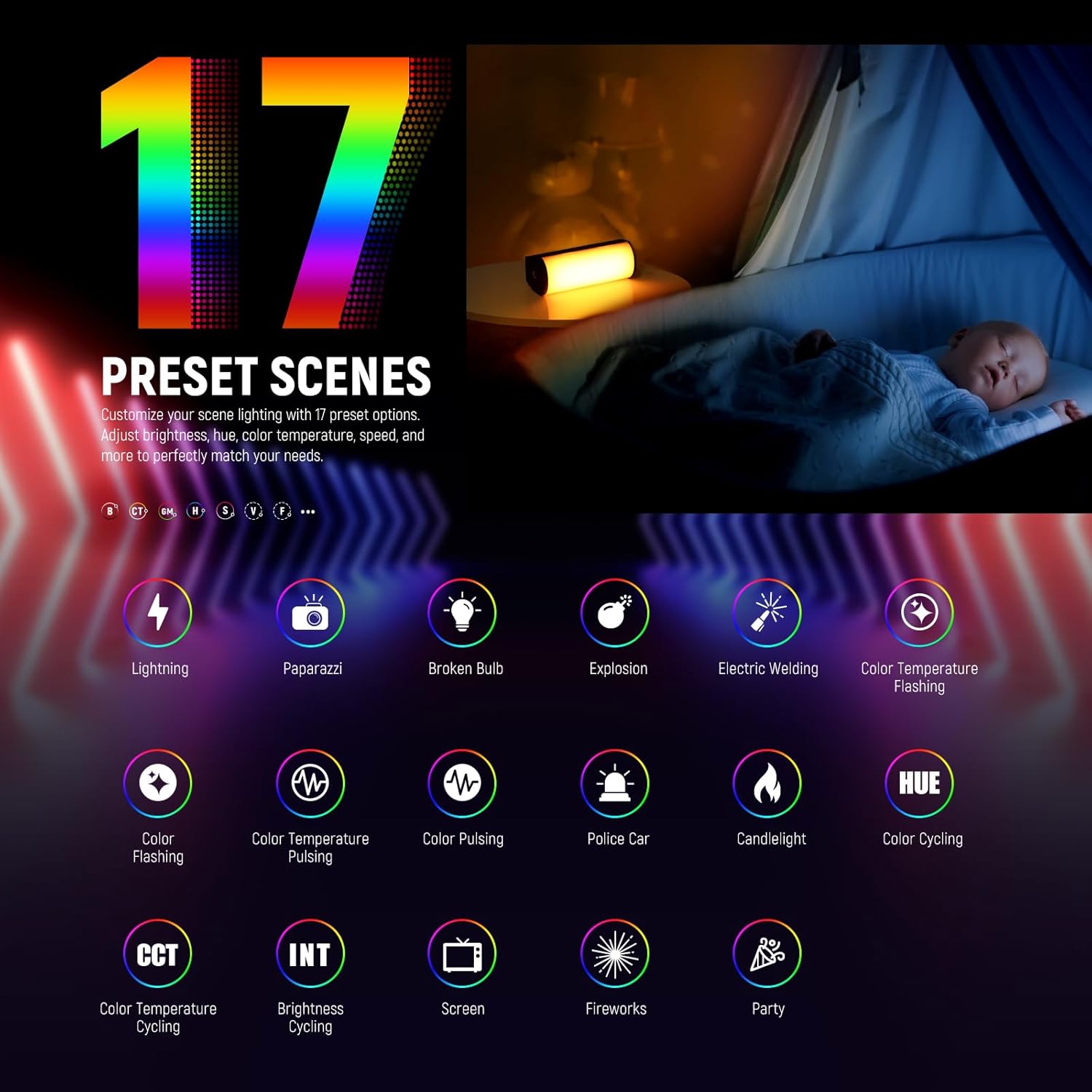
Image: The NEEWER app interface showcasing 17 different preset lighting scenes, including effects like lightning, paparazzi, broken bulb, explosion, and police car, allowing for creative lighting setups.

Image: A visual comparison demonstrating the impact of different Color Rendering Index (CRI) values on subject appearance and color accuracy, highlighting the TL97C's high CRI 97+ for rich color rendering.
5.4 Mounting Options
The TL97C offers flexible mounting options:
- Magnetic Attachment: The light wand features magnetic sides, allowing it to be securely attached to any metal surface for various angles (high angle, low angle, overhead shots).
- 1/4" Threaded Holes: With 1/4" threaded screw holes on both ends, the light stick can be mounted on tripods, desktop stands, or other compatible accessories.

Image: The NEEWER TL97C light wand demonstrating its magnetic attachment feature, shown adhering to a metal grid and a car roof, providing versatile placement options.

Image: A close-up of the NEEWER TL97C light wand highlighting its 1/4" screw hole, indicating its compatibility with various tripods and mounting accessories for expanded creative use.
6. Maintenance
6.1 Battery Care
The light wand is equipped with a 3.7V 2500mAh lithium battery. For optimal battery longevity, ensure the device is fully charged before its first use. Avoid completely draining the battery frequently. The device supports seamless charging while in use.
6.2 Cleaning
Wipe the light wand with a soft, dry cloth. Do not use harsh chemicals or abrasive materials that could damage the surface or light panel.
7. Troubleshooting
- Light not turning on: Ensure the battery is charged. Connect to a power source and try again.
- App connection issues: Ensure Bluetooth is enabled on your device and the light wand is within range (164’/50m). Restart both the app and the light wand.
- Inconsistent light output: Check battery level. If issues persist, contact customer support.
8. Specifications
| Model | TL97C |
| Item Type | RGB Light Stick |
| LEDs Quantity | 36 Cool White, 33 Warm White, 24 RGB |
| Maximum Power | 4.5W |
| Maximum Illumination | 360lux at 0.5m |
| Color Temperature | 2500K-8500K |
| Color Mode | HSI/CCT/FX |
| CRI/TLCI | 97 |
| Dimming | 0-100% |
| Saturation | 0-100% |
| Hue | 0-360° |
| Special Scene Effects | 17 |
| Control Method | Button / APP Wireless Control |
| Input | 5V 2A |
| Battery Capacity | 3.7V 2500mAh |
| Runtime (100% brightness) | 150 minutes |
| Charging Time | 120 minutes |
| Dimensions | 4.3"x1.6"x1.7" / 10.8x4.0x4.4cm |
| Weight | 4.7oz / 134g |
9. Warranty and Support
9.1 Warranty Information
This NEEWER product comes with a 1-Year Manufacturer Warranty. Please retain your proof of purchase for warranty claims.
9.2 Customer Support
For technical assistance, troubleshooting, or warranty inquiries, please visit the official NEEWER website or contact their customer service directly.
10. Product Videos
Video: Official NEEWER product video showcasing the Magnetic Handheld Light Wand with APP Control, demonstrating its features and various lighting effects in action.
Video: A detailed review of the NEEWER Light Wand, providing insights into its functionality and practical use for content creation.