
Introduction
The Dual Electronics DCPA1013 is a 1-DIN digital multimedia receiver featuring a 10.1-inch capacitive touchscreen. This unit supports wireless Apple CarPlay and Android Auto, providing seamless smartphone integration for navigation, communication, and entertainment. It also includes Bluetooth connectivity for hands-free calling and audio streaming, along with various audio processing features for an enhanced in-car audio experience.
What's in the Box
The package includes the DCPA1013 multimedia receiver and its standard accessories as provided by the manufacturer. This typically covers necessary wiring harnesses, mounting hardware, and an external microphone.

Image: Included accessories such as the wiring harness, GPS antenna, external microphone, and various mounting screws and tools.
Setup and Installation
The DCPA1013 is designed for single-DIN (1-DIN) openings, with a slim mount chassis depth of 4.5 inches. Professional installation is recommended due to the complexity of vehicle wiring and connections.
Mounting
- Ensure the vehicle's dashboard opening is compatible with a single-DIN unit.
- Secure the receiver chassis into the mounting kit or dashboard opening using the provided screws and brackets.
- The screen offers height, pivot, and tilt adjustments for optimal viewing angle after installation.
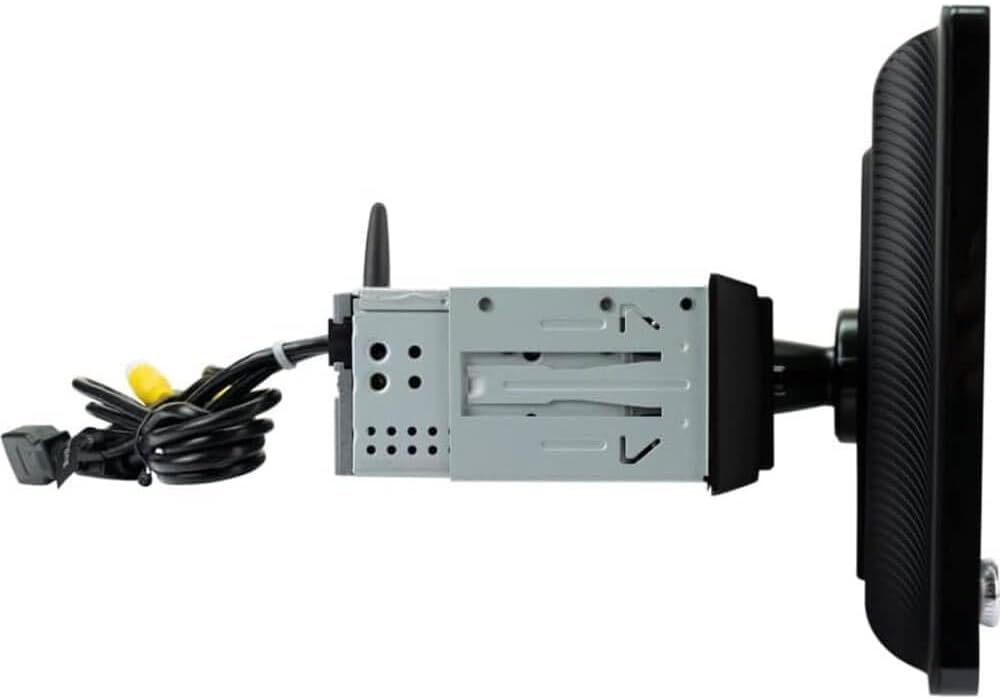
Image: Side profile of the receiver, illustrating the 1-DIN chassis and the adjustable screen mounting.
Wiring Connections
Connect the wiring harness to the vehicle's electrical system. Ensure all connections are secure and correctly matched to avoid damage to the unit or vehicle. Key connections include:
- Power/Ground: Connect to the vehicle's constant power, accessory power, and ground.
- Speaker Outputs: Connect to vehicle speakers (60W x 4 MOSFET peak power output).
- RCA Outputs: 3 pairs (Front + Rear + Sub) for external amplifiers.
- USB Inputs: Two rear USB ports with 2.1A charging capability.
- Audio/Video Inputs: Rear A/V input for external sources.
- Camera Inputs: Dedicated inputs for front and backup cameras.
- External Microphone: Connect the included microphone for optimal hands-free calling.
- Steering Wheel Control: An adapter (sold separately) is required for compatibility with vehicle steering wheel controls.
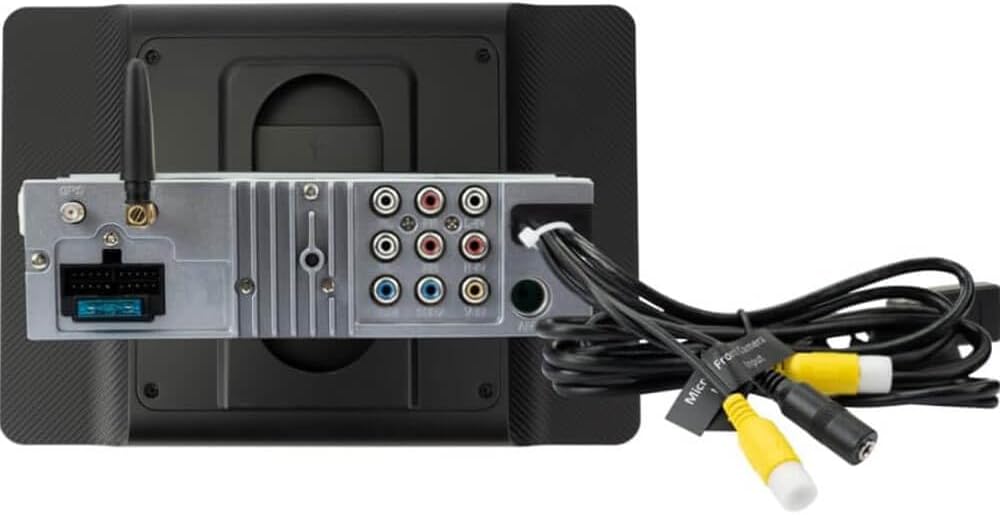
Image: Rear panel of the receiver displaying the array of connection ports, including RCA outputs, USB inputs, and camera inputs.
Operating Instructions
Power On/Off
Press the power button to turn the unit on or off. The unit will typically power on with the vehicle's ignition.
Touchscreen Interface
The 10.1-inch capacitive touchscreen allows for intuitive control of all functions. Navigate menus, select options, and control media playback by touching the screen. The unit features 3 selectable wallpapers and 6 preset illumination colors for customization.

Image: The receiver's screen displaying the Apple CarPlay interface, featuring common applications like Phone, Music, Maps, and Messages.
Apple CarPlay and Android Auto
Connect your compatible iPhone or Android smartphone wirelessly to access Apple CarPlay or Android Auto. This allows for integrated use of navigation, music, messaging, and other supported applications directly on the receiver's screen. Follow the on-screen prompts for initial setup and pairing.

Image: The multimedia receiver integrated into a vehicle's dashboard, demonstrating the Apple CarPlay interface in use by a driver.
Bluetooth Connectivity
Pair your smartphone via Bluetooth for wireless audio streaming and hands-free calling. The external microphone ensures clear voice transmission during calls. Access your phonebook and manage calls directly from the receiver.
Audio Features
- Equalizer: Utilize the 10-band EQ or select from 7 preset EQ curves to tailor the sound to your preference.
- Subwoofer Control: Adjust subwoofer gain and crossover settings (Off/50Hz/80Hz/120Hz/160Hz) for optimized bass response.
- File Playback: Supports FLAC and MP3 audio formats via USB.
- AM/FM Tuner: Access 30 station presets (18 FM / 12 AM).
Maintenance
To ensure optimal performance and longevity of your DCPA1013 receiver, follow these maintenance guidelines:
- Screen Cleaning: Use a soft, lint-free cloth to gently wipe the touchscreen. Avoid abrasive cleaners or solvents that could damage the screen surface.
- Connection Checks: Periodically inspect all wiring connections to ensure they remain secure and free from corrosion.
- Software Updates: Check the Dual Electronics website for any available firmware updates to improve performance and add new features.
- Environmental Care: Avoid exposing the unit to extreme temperatures, direct sunlight for prolonged periods, or excessive moisture.
Troubleshooting
If you encounter issues with your DCPA1013, refer to the following common troubleshooting steps:
- No Power: Check the vehicle's fuse box and the receiver's power connections. Ensure the constant and accessory power wires are correctly connected.
- No Sound: Verify speaker connections and ensure the volume is not muted or set too low. Check amplifier connections if external amplifiers are used.
- Bluetooth Pairing Issues: Ensure Bluetooth is enabled on both the receiver and your smartphone. Delete previous pairings and attempt to re-pair.
- CarPlay/Android Auto Not Connecting: Confirm your smartphone is compatible and that the wireless connection is active. Try restarting both the receiver and your phone.
- Screen Unresponsive: Perform a soft reset of the unit (refer to the full manual for specific instructions, usually a small reset button).
- Poor Radio Reception: Check the antenna connection. Ensure the antenna is properly extended or installed.
For more detailed troubleshooting, consult the comprehensive manual provided with your product or visit the Dual Electronics support website.
Specifications
| Model Number | DCPA1013 |
| Screen Size | 10.1 inches |
| Screen Type | Capacitive Touchscreen |
| Chassis Depth | Slim Mount (4.5 inches) |
| Peak Power Output | 240W (60W x 4) MOSFET |
| Phone Connectivity | Wireless Apple CarPlay, Wireless Android Auto, Bluetooth |
| Bluetooth Features | Phonebook Support, Audio Streaming, External Microphone, Hands-free Calling |
| Inputs | Audio/Video (Rear), USB (Rear, 2.1A Charging), Front Camera, Backup Camera |
| File Playback | FLAC, MP3 |
| RCA Outputs | 3 Pair (Front + Rear + Sub) |
| Audio Processing | 10 Band EQ, 7 EQ Presets, Subwoofer Gain Control, Built-In Subwoofer Crossover |
| Illumination | 6 Preset Colors |
| AM/FM Receiver | 30 Station presets (18FM/12AM) |
| Product Dimensions | 11.1"D x 11.7"W x 7"H |
| Item Weight | 5 pounds |
Warranty and Support
Warranty Information
The warranty for the Dual Electronics DCPA1013 is provided as per Amazon's policy. Please refer to your purchase documentation or Amazon's website for specific warranty terms and conditions.
Customer Support
For technical assistance, product inquiries, or service requests, please contact Dual Electronics customer support. Contact information can typically be found on the official Dual Electronics website or in the full product manual.


