Introduction
Thank you for choosing the Generic LY02 Wireless Mini-in-Ear Earbuds. These earbuds feature advanced Bluetooth 5.3 technology, delivering a stable, low-latency wireless connection for high-quality audio. Designed for comfort and convenience, they offer Hi-Fi stereo sound, noise reduction, and intuitive touch controls. This manual provides detailed instructions to help you set up, operate, and maintain your earbuds for optimal performance.
Package Contents
- LY02 Wireless Mini-in-Ear Earbuds (Left and Right)
- Charging Case
- USB Charging Cable
- User Manual
Product Overview
The LY02 earbuds are designed for a comfortable and secure fit, ideal for various activities. They come with a compact charging case for portability and extended use.

Image: The LY02 Wireless Mini-in-Ear Earbuds (white) shown with their charging case, illustrating their compact design. The image also indicates speaker size (10mm/13mm) and Wireless Version 5.3.
The earbuds are available in two color options: black and white, allowing users to choose according to their preference.
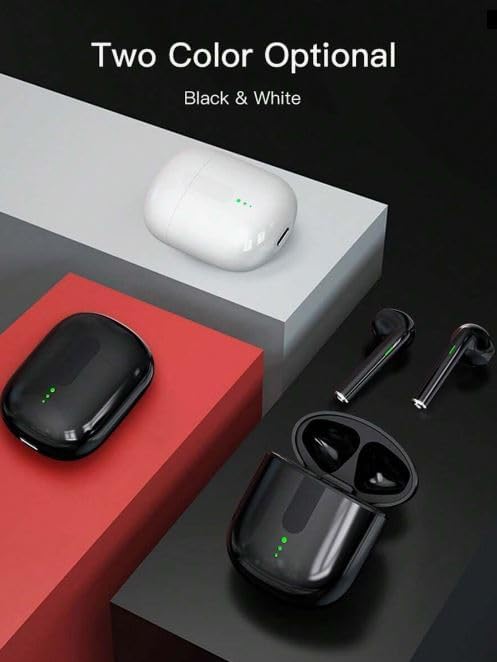
Image: A display of the LY02 Wireless Mini-in-Ear Earbuds and their charging cases in both black and white, indicating the available color options.
Setup
1. Charging the Earbuds and Case
Before first use, fully charge the earbuds and the charging case. The charging case features a display to indicate battery levels.
- Charging the Earbuds: Place the earbuds into the charging case. They will automatically begin charging.
- Charging the Case: Connect the charging case to a USB power source using the provided USB cable. The indicator lights or display on the case will show the charging status.
2. Pairing with Your Device
The LY02 earbuds utilize Bluetooth 5.3 for a quick and stable connection.
- Initial Pairing:
- Open the charging case and take out both earbuds. They will automatically enter pairing mode.
- On your device (smartphone, tablet, etc.), go to the Bluetooth settings and ensure Bluetooth is enabled.
- Search for available devices and select "LY02" from the list.
- Once connected, you will hear a confirmation tone, and the earbuds will be ready for use.
- Automatic Reconnection: After the initial pairing, the earbuds will automatically connect to the last paired device when taken out of the charging case, provided the device's Bluetooth is active and within range.
Operating Instructions
The LY02 earbuds feature intuitive touch controls for managing audio playback and calls.
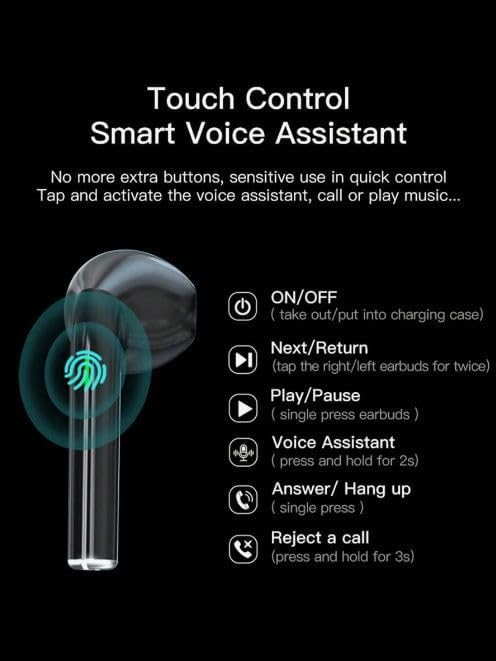
Image: A visual guide detailing the touch control functions of the LY02 earbuds, including power, track navigation, play/pause, voice assistant, and call management.
- Power ON/OFF: Take out of the charging case to power ON. Put into the charging case to power OFF.
- Play/Pause Music: Single press either earbud.
- Next Track: Double tap the right earbud.
- Previous Track: Double tap the left earbud.
- Activate Voice Assistant: Press and hold either earbud for 2 seconds.
- Answer/End Call: Single press either earbud during an incoming call or active call.
- Reject Call: Press and hold either earbud for 3 seconds during an incoming call.
Maintenance
Proper maintenance ensures the longevity and optimal performance of your earbuds.
- Cleaning: Use a soft, dry, lint-free cloth to clean the earbuds and charging case. Do not use liquids or abrasive cleaners.
- Storage: When not in use, store the earbuds in their charging case to protect them from dust and damage.
- Avoid Water: The earbuds are not waterproof. Avoid exposure to water, moisture, or extreme humidity.
- Temperature: Do not expose the earbuds or charging case to extreme temperatures (hot or cold).
Troubleshooting
If you encounter issues with your LY02 earbuds, refer to the following common solutions:
| Problem | Solution |
|---|---|
| Earbuds not pairing with device. |
|
| No sound from one or both earbuds. |
|
| Charging case not charging. |
|
| Earbuds not charging in the case. |
|
Specifications
- Model: LY02
- Connectivity: Wireless, Bluetooth 5.3
- Form Factor: In-Ear
- Special Features: Fast Charging, Microphone Included
- Material: Plastic
- Earbud Weight: Approximately 3g (ultra-light)
- Speaker Size: 13mm drivers
- Package Weight: 113 g
- Package Dimensions: 10 x 7 x 4 cm
Warranty and Support
Warranty Information: Specific warranty details for the Generic LY02 Wireless Mini-in-Ear Earbuds may vary by region and retailer. Please refer to the warranty card included with your purchase or contact your point of sale for detailed warranty terms and conditions.
Customer Support: For technical assistance, troubleshooting beyond this manual, or inquiries regarding your product, please contact the seller or manufacturer directly. Their contact information can typically be found on the product packaging or the retailer's website.