
1. Introduction
The Brilagi VELVET SMART LED Ceiling Light is a high-efficiency, dimmable LED lighting solution designed for indoor use. With 24 watts of power and 230 volts, it offers significant energy savings. Its modern black and gold design complements various interior styles. Featuring Wi-Fi Tuya technology, this ceiling light allows remote control of brightness and color temperature (2700-6500K) via an application, and also includes a remote control for convenience. The light has a 45 cm diameter and comes with mounting hardware.
2. Important Safety Instructions
- Read all instructions carefully before installation and use.
- Ensure the power supply is disconnected at the main circuit breaker before installation or maintenance.
- Installation should be performed by a qualified electrician if you are unsure.
- Do not modify the product in any way.
- This product is designed for indoor use only. Do not expose to moisture or extreme temperatures.
- Keep packaging materials out of reach of children.
3. Package Contents
Verify that all components are present before beginning installation.
- Brilagi VELVET SMART LED Ceiling Light (1 unit)
- Remote Control (1 unit)
- Mounting Hardware (screws, anchors)
- User Manual (this document)
4. Setup & Installation
The Brilagi VELVET SMART LED Ceiling Light is designed for flush ceiling mounting and does not require assembly.
4.1. Mounting the Ceiling Light
- Turn off power: Before starting, ensure the power supply to the installation area is completely off at the main circuit breaker.
- Prepare mounting surface: Mark the drilling points on the ceiling using the light fixture's mounting bracket as a template.
- Drill holes: Drill holes at the marked points and insert appropriate wall anchors if necessary.
- Connect wiring: Connect the household electrical wires to the light fixture's wires according to local electrical codes (Live to Live, Neutral to Neutral, Ground to Ground). Ensure connections are secure.
- Secure fixture: Attach the light fixture to the ceiling using the provided mounting hardware. Ensure it is securely fastened.
- Restore power: Once installation is complete, restore power at the main circuit breaker.

Image: The Brilagi VELVET SMART LED Ceiling Light seamlessly integrated into a modern living room setting, showcasing its aesthetic appeal when installed.
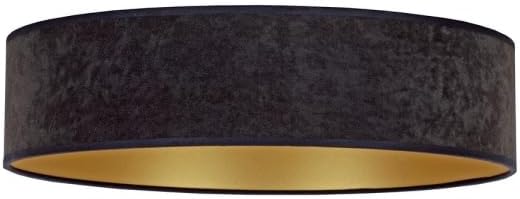
Image: A detailed view of the Brilagi VELVET SMART LED Ceiling Light, highlighting its black exterior finish and the contrasting gold interior, which enhances light reflection.
4.2. Remote Control Pairing
The remote control is typically pre-paired. If not, or if you need to re-pair:
- Ensure the light is powered on.
- Within 5 seconds of turning on the light, press and hold the "ON/OFF" button on the remote control until the light flashes, indicating successful pairing.

Image: The included white remote control, featuring buttons for power, brightness adjustment, color temperature control, and preset scene selections for convenient operation.
4.3. Wi-Fi (Tuya App) Setup
- Download Tuya Smart App: Download and install the "Tuya Smart" app from your smartphone's app store (iOS or Android).
- Register/Login: Open the app and register for a new account or log in if you already have one.
- Add Device: Tap the "+" icon in the top right corner of the app to add a new device.
- Select Lighting: Choose "Lighting" or "Light Source (Wi-Fi)" from the device categories.
- Enter Wi-Fi details: Ensure your phone is connected to a 2.4GHz Wi-Fi network. Enter your Wi-Fi password in the app.
- Reset Light for Pairing Mode: Turn the light ON-OFF-ON-OFF-ON (with 2-second intervals) until the light starts blinking rapidly. This indicates it's in pairing mode.
- Confirm Blinking: In the app, confirm that the indicator light is blinking rapidly.
- Connect: The app will search for and connect to the light. Once connected, you can rename the device.
5. Operating Instructions
5.1. Using the Remote Control
The remote control provides convenient access to the light's primary functions:
- ON/OFF: Press the central button to turn the light on or off.
- Brightness Adjustment: Use the "+" and "-" buttons to increase or decrease the light intensity.
- Color Temperature: Adjust the color temperature from warm white (2700K) to cool white (6500K) using the dedicated buttons.
- Preset Scenes: Select from various pre-programmed lighting scenes (e.g., night mode, reading mode) using the scene buttons.
Image: The remote control layout, illustrating the functions of each button for controlling the ceiling light's features.
5.2. Using the Tuya Smart App
The Tuya Smart app offers advanced control and customization options:
- Remote ON/OFF: Control the light from anywhere with an internet connection.
- Stepless Dimming: Precisely adjust brightness levels.
- Color Temperature Control: Fine-tune the color temperature across the 2700K-6500K range.
- Scene Customization: Create and save your own custom lighting scenes.
- Scheduling: Set timers and schedules for the light to turn on/off or change settings automatically.
- Voice Control: Integrate with voice assistants like Amazon Alexa or Google Assistant (requires compatible device and setup within the Tuya app).
6. Maintenance
- Cleaning: Ensure the power is off before cleaning. Wipe the light fixture with a soft, dry cloth. Do not use abrasive cleaners or solvents.
- LEDs: The integrated LED light source is designed for long-term use and is not user-replaceable.
- Remote Control: Replace batteries (type not specified, assume standard AAA or button cell) when the remote's range decreases or it stops responding.
7. Troubleshooting
| Problem | Possible Cause | Solution |
|---|---|---|
| Light does not turn on. | No power supply; loose wiring; faulty switch. | Check circuit breaker. Verify wiring connections. Test with another switch if possible. |
| Remote control not working. | Batteries depleted; remote not paired. | Replace remote control batteries. Re-pair the remote control (see Section 4.2). |
| Cannot connect to Wi-Fi (Tuya app). | Incorrect Wi-Fi password; 5GHz Wi-Fi network; light not in pairing mode; network interference. | Ensure correct 2.4GHz Wi-Fi network and password. Reset light to pairing mode (Section 4.3). Move closer to router. |
| Light flickers or dims unexpectedly. | Unstable power supply; loose connection; incompatible dimmer (if external). | Check power supply stability. Verify wiring. This light is internally dimmable; do not use with external dimmers. |
8. Product Specifications
| Feature | Detail |
|---|---|
| Brand | Brilagi |
| Model Name | VELVET |
| Model Number | BG0436 |
| Dimensions | 45L x 45W x 10H cm |
| Color | Black, Gold |
| Material | Glass (Shade) |
| Light Source Type | LED |
| Wattage | 24 watts |
| Voltage | 230 Volts |
| Color Temperature | 2700K - 6500K (Adjustable) |
| Connectivity | Wi-Fi (Tuya Smart App), Remote Control |
| Mounting Type | Flush Mount, Ceiling Mount |
| Energy Efficiency Label | High / Excellent (EU Label) |
| Assembly Required | No |
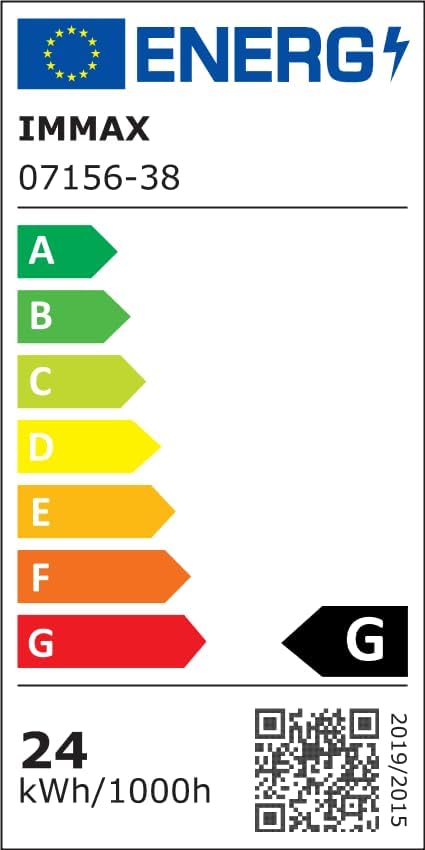
Image: The EU Energy Efficiency Label, indicating the product's energy consumption and efficiency class. For more details, refer to the official EPREL database via the QR code or link.
Official EPREL Database Link: https://eprel.ec.europa.eu/qr/1294167
9. Warranty & Support
For warranty information and customer support, please refer to the documentation provided with your purchase or contact Brilagi customer service. Keep your proof of purchase for warranty claims.


