
1. Introduction
This manual provides essential information for the proper installation, operation, and maintenance of your CHENGHEM Model KH888 2-in-1 Combustible Gas and Carbon Monoxide Detector. This device is designed to detect both combustible gases (such as natural gas, propane, and methane) and carbon monoxide (CO) to enhance safety in your home or RV. Please read this manual thoroughly before use and retain it for future reference.
2. Important Safety Information
WARNING: This device is a safety alarm and should not be used as a substitute for proper installation, use, and maintenance of fuel-burning appliances, including appropriate ventilation and exhaust systems. This detector is designed to alert you to the presence of combustible gas and carbon monoxide. It is not designed to detect smoke or fire.
- Do not paint the detector. Paint can clog the sensor openings and prevent the unit from functioning properly.
- Do not block the air intake vents on the device.
- Do not install in areas with high humidity, excessive dust, or extreme temperatures.
- Regularly test the detector as instructed in this manual.
- In case of an alarm, follow the emergency procedures outlined in this manual immediately.
3. Product Features
- Dual Sensor Technology: Equipped with a catalytic combustion sensor for combustible gas and an electrochemical sensor for carbon monoxide.
- LED Digital Display: Shows real-time gas concentration levels (PPM for CO, LEL for combustible gas).
- Voice and Light Warning: Provides clear audible (85dB) and visual alerts during an alarm.
- Plug-in Design: Easy installation directly into a standard electrical outlet.
- Test/Reset Button: Allows for manual testing of the alarm and silencing during an event.

Image 3.1: Front view of the CHENGHEM 2-in-1 Gas and Carbon Monoxide Detector.
4. Package Contents
Verify that all items are present in the package:
- 1 × CHENGHEM 2-in-1 Gas and Carbon Monoxide Detector (Model KH888)
- 1 × User Manual
- 1 × Protection Cotton (for sensor protection during shipping)
5. Installation
5.1 Choosing a Location
Proper placement is crucial for effective detection. Consider the following guidelines:
- Carbon Monoxide (CO) Detection: CO is slightly lighter than air and mixes readily with air. Install CO detectors at least 5 feet (1.5 meters) from the floor. For optimal detection, place detectors in or near sleeping areas and living areas.
- Combustible Gas Detection: Natural gas (methane) is lighter than air and rises. Propane (LPG) is heavier than air and sinks. For natural gas, install the detector within 12 inches (30 cm) of the ceiling. For propane, install the detector within 12 inches (30 cm) of the floor. If both types of gas are a concern, consider placing detectors at both high and low levels, or choose a central height.
- General Placement: Avoid placing the detector directly above sinks, near windows or doors, in direct sunlight, or in areas with strong air currents (e.g., near fans, vents). Keep it away from areas where it might be exposed to steam, grease, or chemical fumes.
5.2 Plugging in the Detector
The CHENGHEM KH888 is a plug-in unit. Simply insert the detector into a standard 120V AC electrical outlet. Ensure the outlet is not controlled by a switch that could accidentally turn off power to the detector.
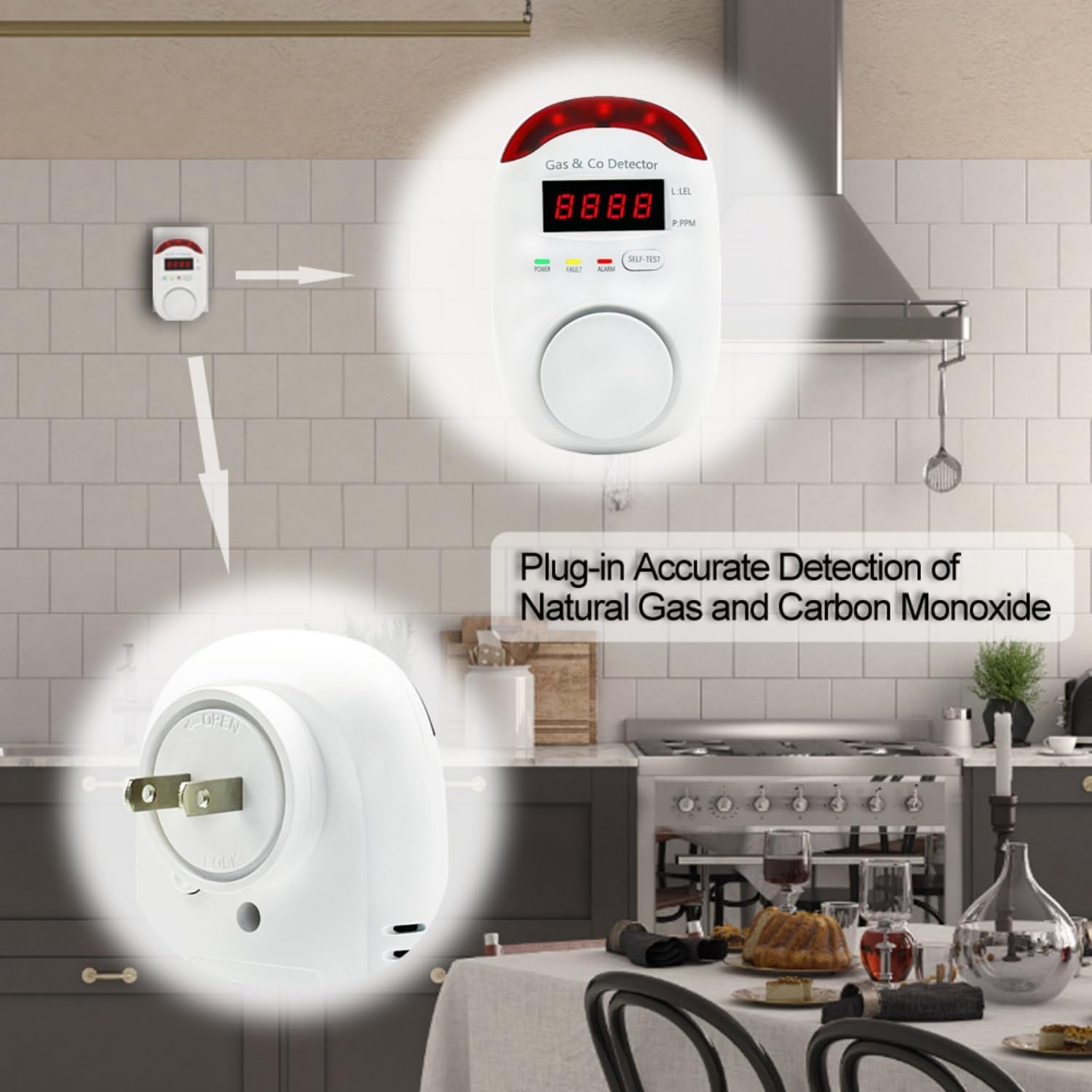
Image 5.1: The detector is designed for direct plug-in installation into a wall outlet.
6. Operation
6.1 Power-Up and Self-Test
Upon plugging in the detector, it will initiate a self-test sequence. The LED display will show a countdown or a series of numbers, and the alarm may sound briefly. This indicates the unit is powering on and checking its internal components. Once the self-test is complete, the detector will enter normal monitoring mode.
6.2 Normal Monitoring Mode
In normal operation, the green 'POWER' indicator light will be on. The LED display will typically show '0' or '---' indicating no detectable gas or CO levels. If low levels of gas or CO are detected, the display may show the concentration in PPM (parts per million) for CO or LEL (lower explosive limit) for combustible gas.

Image 6.1: Front panel showing LED display, power, fault, and alarm indicators, and the self-test button. The back shows the plug and air intake.
7. Alarm Indications
The detector provides distinct alarms for different conditions:
- Combustible Gas Alarm: When combustible gas reaches a dangerous level (e.g., 6% LEL), the red 'ALARM' light will flash, the LED display will show the LEL concentration, and a loud audible alarm will sound. The voice prompt may announce "Gas Leak!"
- Carbon Monoxide (CO) Alarm: When CO reaches a dangerous level (e.g., 50 PPM for a sustained period), the red 'ALARM' light will flash, the LED display will show the CO concentration in PPM, and a loud audible alarm will sound. The voice prompt may announce "Carbon Monoxide Alarm!"
- Fault Alarm: If the detector experiences a malfunction, the yellow 'FAULT' light will illuminate, and the unit may emit a specific fault tone. The LED display might show an error code. Refer to the Troubleshooting section for common fault codes.
7.1 Emergency Procedures (In Case of Alarm)
If the alarm sounds:
- Do not panic. Remain calm.
- Evacuate immediately. Move everyone, including pets, to fresh air outdoors.
- Do not re-enter the premises until emergency services (fire department or gas company) have confirmed it is safe.
- Call emergency services from a safe location.
- Do not use phones or electrical appliances inside the building if a gas leak is suspected, as this could create a spark.
8. Maintenance
8.1 Regular Testing
Test the detector weekly by pressing and holding the 'SELF-TEST' button until the alarm sounds. This confirms the alarm circuit and horn are functioning. If the alarm does not sound, refer to the Troubleshooting section.
8.2 Cleaning
Clean the exterior of the detector regularly with a soft, damp cloth. Do not use cleaning agents, waxes, or polishes as they can damage the sensor or casing. Do not spray cleaning products directly onto the detector.
8.3 Sensor Lifespan
Gas and CO sensors have a limited lifespan. The detector is designed for a typical operational life of several years. Refer to the product label for specific replacement recommendations. Replace the unit after its recommended lifespan or if a permanent fault is indicated.
9. Troubleshooting
| Problem | Possible Cause | Solution |
|---|---|---|
| Detector does not power on. | No power to the outlet; faulty outlet. | Check the power outlet with another appliance. Try a different outlet. |
| Alarm sounds without apparent gas/CO. | False alarm; residual fumes; sensor contamination. | Ventilate the area. Press the 'SELF-TEST' button to reset. If alarms persist, treat as a real alarm. |
| Yellow 'FAULT' light is on. | Internal sensor fault or malfunction. | Unplug the detector for 30 seconds and plug it back in. If the fault persists, the unit may need replacement. |
| Test button does not trigger alarm. | Faulty alarm circuit or horn. | Ensure the unit is powered. If the test still fails, the unit is defective and must be replaced. |
10. Specifications
- Model: KH888
- Power Source: Plug-in (120V AC)
- Sensor Type: Catalytic (Combustible Gas), Electrochemical (Carbon Monoxide)
- Alarm Volume: >85dB at 1 meter
- Operating Humidity: ≤95% RH (non-condensing)
- Product Dimensions: Approximately 2.5"D x 3"W x 4.5"H
- Material: ABS
- Detection Gases: Natural Gas (Methane), Propane, Carbon Monoxide
11. Warranty and Customer Support
For warranty information or technical support, please refer to the contact details provided with your purchase or visit the official CHENGHEM website. Keep your purchase receipt as proof of purchase.