
Introduction
This instruction manual provides comprehensive guidance for the use and maintenance of your SANDY remote control. Designed for compatibility with specific LG CRT TV models, this remote offers a straightforward and reliable way to control your television. Please read this manual thoroughly to ensure optimal performance and longevity of your device.
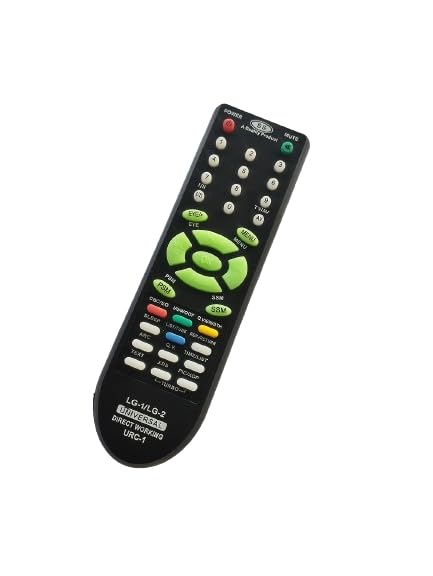
Image: Angled view of the SANDY remote control, showcasing its ergonomic design.
Setup
1. Battery Installation
Before using the remote control, new batteries must be installed. This remote typically requires two AAA batteries (not included).
- Locate the battery compartment on the back of the remote control.
- Slide the battery cover downwards or press the latch to open it.
- Insert two AAA batteries, ensuring the positive (+) and negative (-) terminals align correctly with the markings inside the compartment.
- Close the battery cover securely until it clicks into place.
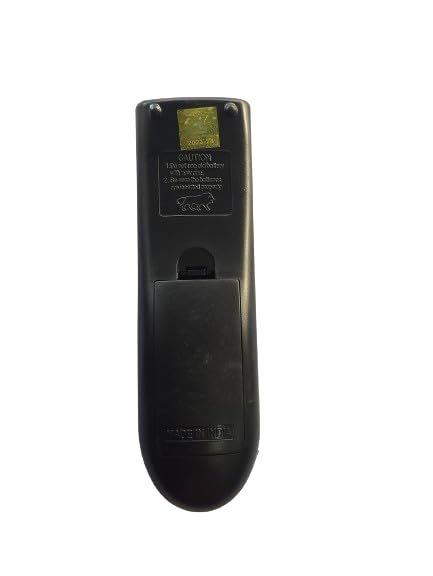
Image: Back view of the SANDY remote control, illustrating the battery compartment location.
2. Compatibility Check
This SANDY remote control is designed to be compatible with LG CRT TV models LG1, LG2, 6710V00124X, and 6710V00124Y. No programming is required for these specific models. Simply insert batteries and begin use.
It is recommended to compare the appearance of this remote with your original or existing remote control to confirm visual compatibility before use.
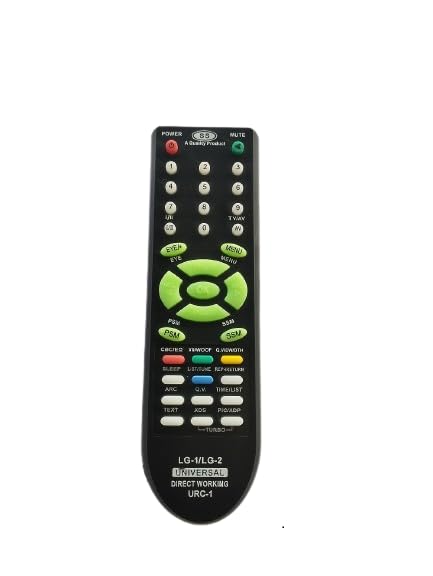
Image: Front view of the SANDY remote control, displaying its button layout.
Operating Instructions
The SANDY remote control provides intuitive access to your LG CRT TV's functions. Point the remote directly at your television's infrared receiver for optimal performance.
Key Functions:
- POWER: Turns the television on or off.
- MUTE: Mutes or unmutes the television's audio.
- Number Buttons (0-9): Directly select channels.
- CH +/- (Channel Up/Down): Changes channels sequentially.
- VOL +/- (Volume Up/Down): Adjusts the audio volume.
- MENU: Accesses the television's main menu.
- Navigation Buttons (Up, Down, Left, Right, OK): Navigate through menu options and confirm selections.
- TV/AV: Switches between TV and AV input modes.
- PSM/SSM: Picture Sound Mode selection.
- SLEEP: Sets the sleep timer.
- TEXT: Activates or deactivates Teletext.
- PIC/XDP: Picture mode selection.
- TURBO: Specific function, refer to your TV manual for details.
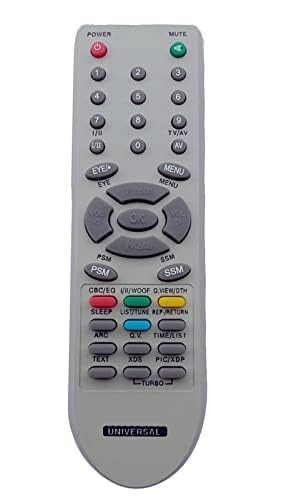
Image: Detailed view of the SANDY remote control's button layout for operational reference.
Maintenance
Cleaning the Remote Control
To maintain the appearance and functionality of your remote control, follow these cleaning guidelines:
- Use a soft, dry cloth to wipe the surface of the remote.
- For stubborn dirt, slightly dampen the cloth with water or a mild, non-abrasive cleaner. Avoid excessive moisture.
- Do not use harsh chemicals, solvents, or abrasive cleaning pads, as these can damage the remote's finish or internal components.
Battery Replacement
Replace batteries when the remote's response becomes sluggish or stops working. Always replace both batteries at the same time with new ones of the same type (AAA). Do not mix old and new batteries, or different types of batteries.
Dispose of used batteries responsibly according to local regulations.
Troubleshooting
If you experience issues with your SANDY remote control, refer to the following common problems and solutions:
| Problem | Possible Cause | Solution |
|---|---|---|
| Remote not working at all. | Dead or incorrectly installed batteries. | Check battery orientation. Replace with new AAA batteries. |
| Buttons are unresponsive or require multiple presses. | Low battery power; remote sensor blocked; dirty contacts. | Replace batteries. Ensure no obstructions between remote and TV. Clean remote surface. |
| Remote only works at close range. | Weak batteries; interference; remote sensor on TV is dirty. | Replace batteries. Remove any objects blocking the signal path. Clean the TV's IR sensor. |
| Remote does not control the TV. | Incorrect TV model; remote not compatible. | Verify your TV model matches the compatible models (LG1, LG2, 6710V00124X, 6710V00124Y). |
Specifications
- Brand: SANDY
- Compatible Devices: LG CRT Television
- Compatible Models: LG1, LG2, 6710V00124X, 6710V00124Y
- Connectivity Technology: Infrared (IR)
- Special Feature: No Programming Required
- Power Source: 2 x AAA Batteries (not included)
- Body Material: High-Quality Plastic
- Keypad Material: Soft Rubber
Warranty and Support
Product Quality Assurance
All SANDY remote controls undergo electronic testing before shipment to ensure functionality and quality. The product features a durable plastic body and soft rubber keypad designed for longevity.
Returns Policy
For information regarding returns, please refer to the retailer's specific returns policy where the product was purchased. This information is typically available on the purchase platform or receipt.
Customer Support
For further assistance or inquiries, please contact the SANDY customer support channel provided by your retailer or refer to the contact information available on the product packaging.


