1. Introduction
The FNIRSI DSO153 is a compact, high-performance handheld digital oscilloscope and signal generator designed for a wide range of applications in electronics, maintenance, and education. This device offers a faster sampling rate of 5MSa/s and a 1MHz analog bandwidth, making it suitable for both periodic analog and non-periodic digital signals. Its user-friendly interface and robust features ensure efficient and accurate measurements.
This manual provides detailed instructions on how to set up, operate, and maintain your DSO153 oscilloscope, ensuring you get the most out of its capabilities.

2. What's in the Box
Upon opening the package, please verify that all the following components are included:

- Host device (FNIRSI DSO153 Oscilloscope)
- Alligator clip probe
- Charging cable (Type-C)
- Lanyard
- User Manual
- Adapter (for High Standard version)
- P6100 High Voltage Probe (for High Standard version)
3. Product Overview
The DSO153 features a clear 2.8-inch HD LCD display (320*240 resolution) for waveform visualization and settings. It is equipped with intuitive controls for easy operation.
3.1. Controls and Ports

- Signal Input Probe (BNC/MCX interface): Connects the measurement probe.
- Signal Generator Output Port: For outputting test signals (DSO153 exclusive).
- Trackwheel Buttons (Left, OK, Right): Used for navigation and selection within menus.
- AUTO Button: Automatically adjusts parameters for optimal waveform display.
- MODE Button: Switches between different operating modes.
- Up/Down Buttons: For adjusting values or navigating menus.
- RUN Button: Starts or stops waveform acquisition.
- Charging Indicator Light: Red when charging, green when fully charged.
- Type-C Charging Interface (5V/1A): For charging and data transfer.
- Switch Button: Power on/off.
- Reset Hole: For device reset if needed.
3.2. Design Features

- Foldable Stand: Allows for hands-free operation by propping up the device at a convenient angle.
- Gear Toggle Button: Provides a convenient way to switch and adjust settings.
4. Setup
4.1. Charging the Device
Before first use, fully charge the DSO153. Connect the provided Type-C charging cable to the device's Type-C port and the other end to a 5V/1A USB power adapter (not included). The charging indicator light will be red during charging and turn green when fully charged. A full charge typically provides approximately 4 hours of continuous use.
4.2. Power On/Off
Press and hold the power switch button located on the side of the device to turn it on or off.
4.3. Probe Connection
Connect the alligator clip probe or the P6100 high voltage probe (if applicable) to the signal input probe port on the device. Ensure a secure connection for accurate measurements.
5. Operating Instructions
5.1. Basic Waveform Measurement
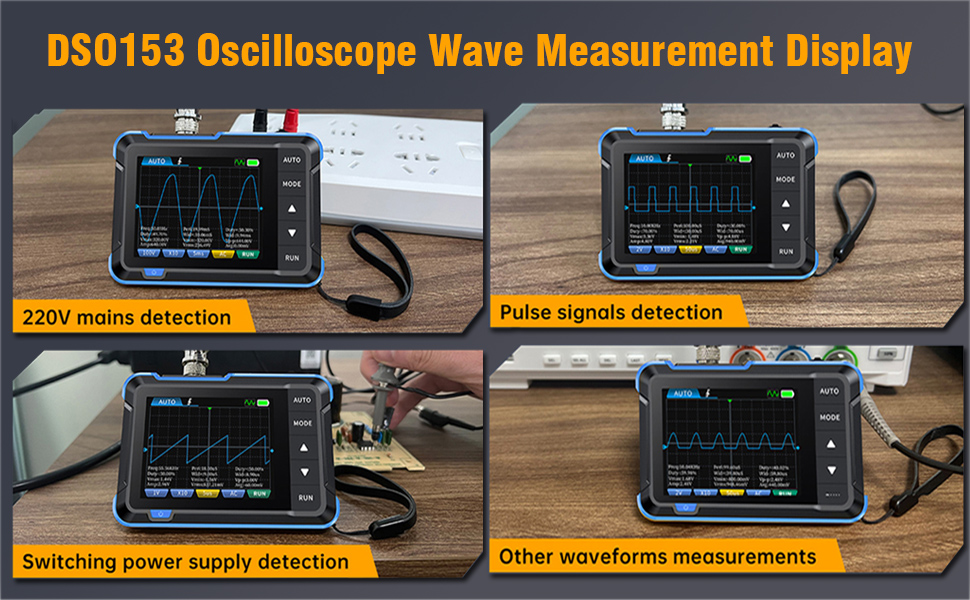
The DSO153 simplifies waveform measurement with its efficient one-button AUTO setup.
- Connect the probe to the circuit or signal source you wish to measure.
- Press the AUTO button. The oscilloscope will automatically adjust the vertical sensitivity, time base, and trigger settings to display a stable waveform.
- Observe the waveform on the 2.8-inch HD LCD screen. Key parameters such as frequency, duty cycle, Vmax, Vmin, Vpp, and average voltage will be displayed on the screen.
5.2. Trigger Functions
The DSO153 offers full trigger functions to capture specific parts of a waveform:
- Auto Trigger: Continuously captures and displays waveforms, even if the trigger conditions are not met. Ideal for observing general signal behavior.
- Normal Trigger: Captures and displays a waveform only when the trigger conditions are met. Useful for stable display of repetitive signals.
- Single Trigger: Captures and displays a single waveform when the trigger conditions are met, then stops. Ideal for capturing non-repetitive or transient events.
Use the MODE button to cycle through trigger modes and the trackwheel buttons to adjust trigger level or edge (rising/falling).
5.3. Signal Generator
The DSO153 includes a built-in multi-function signal generator, capable of outputting various waveforms up to 10KHz.
- Connect the signal generator output port to the circuit or device requiring a test signal.
- Navigate to the signal generator settings (refer to the on-screen menu, accessible via MODE or trackwheel).
- Select the desired waveform type (e.g., sine, square, sawtooth), frequency, duty cycle, and amplitude.
- The device also supports 1KHz square wave calibration for precise adjustments.
5.4. Waveform Analysis
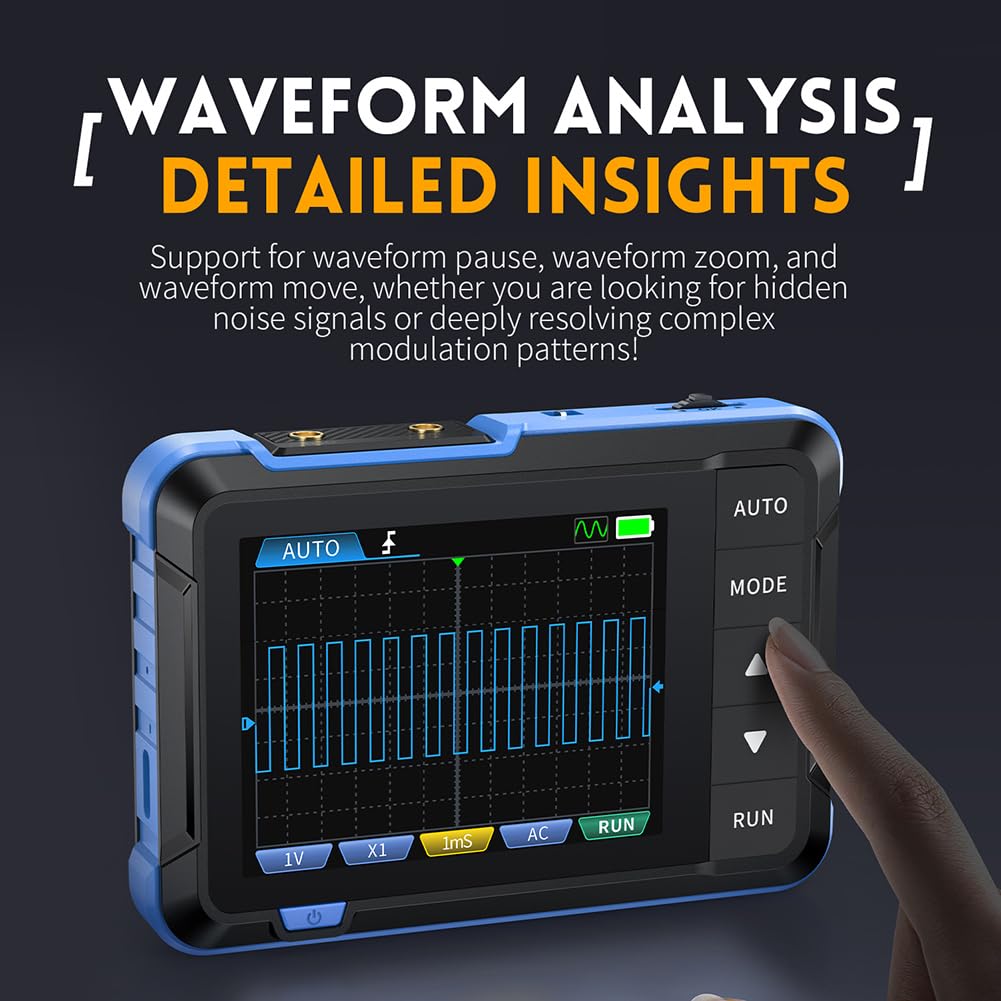
The DSO153 supports waveform pause, zoom, and move functions for detailed analysis.

- Press the RUN button to pause the waveform acquisition (it will change to STOP).
- Use the trackwheel to select the parameter you wish to adjust (e.g., voltage or time base).
- Press the Up/Down buttons to enlarge or reduce the vertical sensitivity (voltage per division) or to reduce/enlarge the time base (time per division). This allows for closer inspection of specific waveform features.
- To resume live acquisition, press the RUN button again.
5.5. Automatic Shutdown
To conserve battery life and enhance efficiency, the DSO153 features an automatic shutdown function.
You can configure the shutdown timer in the device settings. Options typically include OFF, 15 minutes, 30 minutes, and 1 hour. The device will automatically power off after the selected period of inactivity.
6. Maintenance
To ensure the longevity and optimal performance of your FNIRSI DSO153, follow these maintenance guidelines:
- Cleaning: Use a soft, dry cloth to clean the device. For stubborn dirt, a slightly damp cloth with mild detergent can be used, but ensure no liquid enters the device. Do not use abrasive cleaners or solvents.
- Storage: Store the oscilloscope in a cool, dry place away from direct sunlight, extreme temperatures, and high humidity. When not in use for extended periods, ensure the battery is partially charged (around 50%) to preserve battery health.
- Handling: Avoid dropping the device or subjecting it to strong impacts. Handle probes and cables carefully to prevent damage.
- Firmware Updates: The device supports firmware updates via its Type-C interface. Check the manufacturer's website for the latest firmware versions and instructions to ensure your device has the most up-to-date features and bug fixes.
7. Troubleshooting
If you encounter issues with your DSO153, try the following basic troubleshooting steps:
- Device not powering on: Ensure the battery is sufficiently charged. Connect the device to a power source using the Type-C cable and try again.
- No waveform displayed: Check that the probe is securely connected to both the device and the circuit. Ensure the signal source is active. Try pressing the AUTO button to automatically adjust settings. Verify the trigger mode and level are appropriate for the signal.
- Unstable waveform: Adjust the trigger level and trigger mode (Normal or Single) to stabilize the waveform. Ensure the time base and vertical sensitivity are set appropriately for the signal's characteristics.
- Screen frozen or unresponsive: Try pressing the RUN button to pause/resume. If unresponsive, use a small pin to press the reset hole.
- Inaccurate readings: Ensure the probe compensation is correctly set (if applicable to your probe). Verify the input coupling (AC/DC) is appropriate for the signal being measured.
For persistent issues, refer to the detailed troubleshooting section in the full user manual or contact OUGETHER customer support.
8. Specifications
The following table outlines the key technical specifications of the FNIRSI DSO153 Handheld Digital Oscilloscope:

| Category | Parameter | Value |
|---|---|---|
| Oscilloscope Parameters | Sampling Rate | 5MS/s |
| Bandwidth | 1MHz | |
| Vertical Sensitivity | 10mV/Div - 10V/Div | |
| Time Base Range | 500ns - 20S | |
| Voltage Range | X1: ±40V (Vpp: 80V), X10: ±400V (Vpp: 800V) | |
| Trigger Mode | Automatic/Normal/Single | |
| Trigger Edge | Rising edge/Falling edge | |
| Coupling | AC/DC | |
| Square Wave Calibration | Frequency: 1KHz; Duty cycle: 50%; Amplitude: 3.3V | |
| Signal Generator Parameters | Frequency | 0-10KHz |
| Duty Cycle | 0-100% (rectangular and sawtooth waves) | |
| Amplitude | 0.1-3.3V | |
| Waveforms | Sine wave, rectangular wave, sawtooth wave, half wave, full wave, step wave, anti step wave, noise wave, exponential rise, exponential drop, DC signal, multi tone, Sink pulse, Lorentz wave. | |
| General Parameters | Display | 2.8 inches / PPI: 320*240 |
| USB Charging | 5V/1A | |
| Lithium Battery Capacity | 1000mAh | |
| Size | 99 x 68 x 19.5mm | |
| Weight | 100g |
*Note: The size and weight are both manually measured, with slight errors. Please refer to the actual product for accuracy.
9. Warranty and Support
This product is manufactured by OUGETHER. For any warranty claims, technical support, or service inquiries, please refer to the contact information provided in the physical user manual included with your product or visit the official OUGETHER website.
Please retain your purchase receipt as proof of purchase for warranty purposes.