
isheep K35282C
ISHEEP K35282C Dual Bay 3.5 inch SATA RAID Enclosure
User Instruction Manual
1. Introduction
Thank you for choosing the ISHEEP K35282C Dual Bay 3.5 inch SATA RAID Enclosure. This device provides a robust and high-performance storage solution for your data, supporting various RAID modes and offering high-speed data transfer. This manual will guide you through the setup, operation, and maintenance of your new enclosure to ensure optimal performance and longevity.
The K35282C is designed for reliability and efficiency, featuring computer-synchronized power, intelligent temperature sensing, and comprehensive data protection. Please read this manual carefully before using the product.
2. Package Contents
Please verify that all items are present in your package:
- ISHEEP K35282C 2-Bay 3.5 inch SATA RAID Enclosure
- Power Adapter
- USB-C to USB-C Data Cable
- USB-C to USB-A Data Cable
- Screws for HDD installation
- Screwdriver
- User Manual (this document)
3. Product Features
- Robust Storage Solution: Supports up to 36TB capacity with RAID 0/1/LARGE/JBOD/Normal modes.
- Computer-Synchronized Operation: Automatically starts and shuts down with your computer.
- High-Speed Data Transfer: USB 3.1 Type-C port with up to 10Gbps transfer speed and UASP acceleration.
- Efficient Heat Dissipation: Built-in cooling fan and honeycomb holes for stable operation.
- Broad Compatibility: Compatible with Windows, Linux, and Mac OS, supporting 3.5" SATA hard disks.
- Power Protection: Features short circuit, overcurrent, overvoltage, and leakage protection.
- LED Indicator: Monitors hard drive status and operational mode.
- Power Saving: Enters sleep mode after 10 minutes of inactivity.
4. Product Overview
Familiarize yourself with the components and ports of your ISHEEP K35282C enclosure.
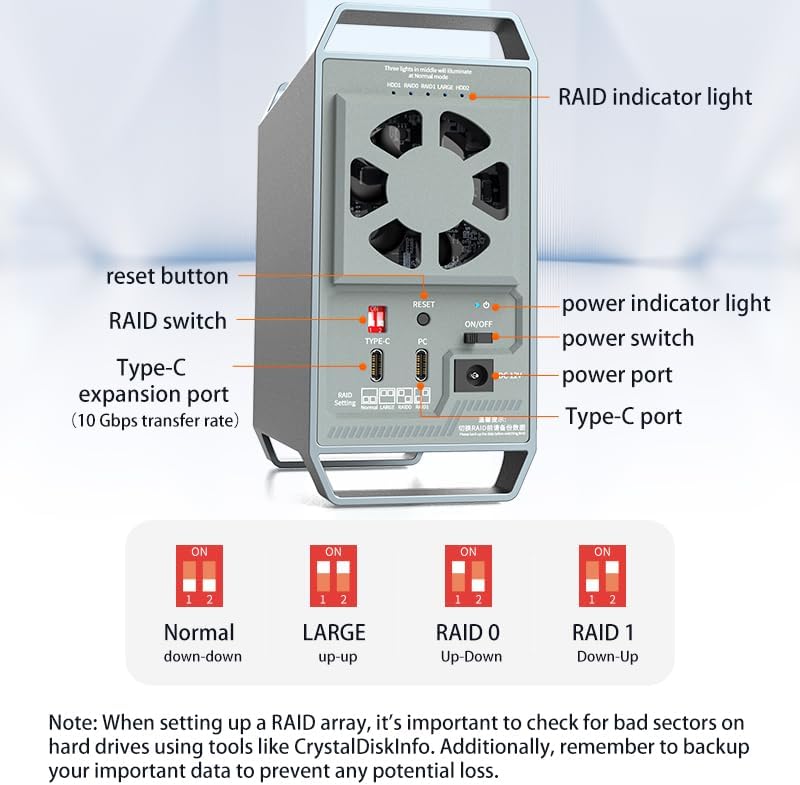
Figure 4.1: Rear Panel Overview with Labeled Components
This image displays the rear panel of the ISHEEP K35282C enclosure, highlighting key components such as the reset button, RAID switch, Type-C expansion port (10 Gbps transfer rate), power indicator light, power switch, power port, and Type-C port. It also shows the RAID indicator lights and the fan exhaust.
- RAID Indicator Lights: Located at the top, these lights indicate the status of HDD1, RAID0, RAID1, LARGE, and HDD2. In Normal mode, the three middle lights illuminate.
- Reset Button: Used to reset the device, often in conjunction with RAID mode changes.
- RAID Switch: A set of two switches (1 and 2) used to select the desired RAID mode.
- Type-C Expansion Port (PC): Main data connection to your computer, supporting 10Gbps transfer rate.
- Type-C Port (TYPE-C): Additional Type-C port for other connections.
- Power Indicator Light: Shows the power status of the enclosure.
- On/Off Switch: Main power switch for the device.
- DC 12V Power Port: Connects to the provided power adapter.
- Cooling Fan: Located on the rear panel for heat dissipation.
5. Setup and Installation
5.1 Hard Drive Installation
The K35282C is not a tool-free design and requires screws for secure hard drive installation. This ensures greater stability for your drives.
- Carefully open the enclosure to access the drive bays.
- Slide your 3.5 inch SATA hard drives into the designated bays. Ensure they are seated firmly.
- Secure each hard drive using the provided screws and screwdriver. Each hard drive is secured with an independent bracket and screws for safety and stability.
- Close the enclosure securely.
5.2 Connecting to Your Computer
- Connect the power adapter to the DC 12V power port on the enclosure and plug it into a power outlet.
- Connect one end of the provided USB-C data cable (or USB-C to USB-A cable, depending on your computer's port) to the 'PC' Type-C port on the enclosure.
- Connect the other end of the data cable to an available USB 3.1 Type-C (or USB 3.0/3.1 Type-A) port on your computer.
- Flip the On/Off switch on the enclosure to the 'On' position. The power indicator light should illuminate.
- Your operating system should detect the new hardware. For new hard drives, you may need to initialize and format them through Disk Management (Windows) or Disk Utility (macOS) before use.

Figure 5.1: Enclosure Connected to Computer
This image shows the ISHEEP K35282C enclosure connected to a laptop, demonstrating its computer-synchronized power function. The green indicator signifies startup with the computer, and the red indicator signifies shutdown with the computer. Ensure the data cable is connected and main power is on for this feature to work.
6. Operating Modes (RAID Configuration)
The ISHEEP K35282C supports four RAID modes: Normal, LARGE, RAID 0, and RAID 1. Please note that RAID modes require two or more HDDs. Always back up all files before setting or changing the RAID mode. Avoid moving the HDD while in RAID mode. Switch to Normal mode first before setting a different RAID mode to prevent any product invalidation.
Figure 6.1: RAID Switch Settings
This diagram illustrates the positions of the two RAID switches (1 and 2) for each supported mode: Normal (down-down), LARGE (up-up), RAID 0 (Up-Down), and RAID 1 (Down-Up). A critical note advises checking for bad sectors and backing up data before setting up a RAID array.
To change the RAID mode:
- IMPORTANT: Back up all data on your hard drives before proceeding. Changing RAID modes will erase all data.
- Power off the enclosure using the On/Off switch.
- Adjust the RAID switches (1 and 2) on the rear panel according to the desired mode as shown in Figure 6.1.
- Press and hold the 'RESET' button while powering on the enclosure. Continue holding the 'RESET' button for approximately 5-10 seconds until the new RAID mode is confirmed by the LED indicators.
- Release the 'RESET' button. The enclosure will now operate in the selected RAID mode.
- For new RAID configurations, you will need to initialize and format the new volume through your operating system's disk management utility.
6.1 Normal Mode
In Normal mode, all hard drives work independently. Each drive will appear as a separate volume on your computer. This is the default and safest mode for individual drive access.
- Switch Setting: Switch 1: Down, Switch 2: Down
6.2 LARGE Mode (JBOD)
LARGE mode (also known as JBOD - Just a Bunch Of Disks) combines the capacity of all HDDs into a single, large volume. Data is written sequentially across the drives. This mode offers easier management without performance upgrade or data redundancy.
- Switch Setting: Switch 1: Up, Switch 2: Up
6.3 RAID 0 Mode (Striping)
RAID 0 merges all HDD's capacity for improved performance. Data is striped across both drives, allowing for faster read/write speeds. However, RAID 0 offers no data redundancy; if one drive fails, all data in the array is lost.
- Switch Setting: Switch 1: Up, Switch 2: Down
6.4 RAID 1 Mode (Mirroring)
RAID 1 provides backup for two HDDs with a self-restoration function. Data is mirrored identically on both drives. This offers excellent data redundancy; if one drive fails, your data is still safe on the other drive. The usable capacity is limited to the size of the smallest drive.
- Switch Setting: Switch 1: Down, Switch 2: Up
7. Advanced Features
7.1 Computer-Synchronized Power Function
The ISHEEP K35282C is designed to identify your computer's power status. It will automatically start up when your computer powers on and shut down when your computer powers off. This feature eliminates the need for frequent manual power adjustments, saving time and boosting efficiency. Ensure the data cable is properly connected for this function to operate.
Figure 7.1: Computer-Synchronized Power
This image visually explains the computer-synchronized power feature, showing that the enclosure starts up with the computer and shuts down with the computer. A note emphasizes the importance of connecting the data cable and ensuring main power is on for proper functionality.
7.2 High-Speed Data Transfer
Equipped with a USB 3.1 Type-C port, this enclosure offers a blazing transfer speed of up to 10Gbps. The UASP (USB Attached SCSI Protocol) acceleration protocol further enhances data transfer speed, making it ideal for large file transfers, video editing, and data backup.

Figure 7.2: 10Gbps Transfer Rate
This graphic highlights the 10Gbps transfer rate capability of the enclosure, indicating its suitability for quickly transferring large files such as movies and photos.
7.3 Intelligent Temperature Sensing and Heat Dissipation
The K35282C features an intelligent temperature sensing design and a dual heat dissipation system. It includes a built-in cooling fan and honeycomb holes to ensure stable operation and longevity of your hard drives.
- Below 48°C: The fan operates quietly or remains off, providing an environmentally friendly and low-noise experience.
- Reaches 48°C: The cooling system automatically activates to dissipate heat and maintain optimal operating temperature.
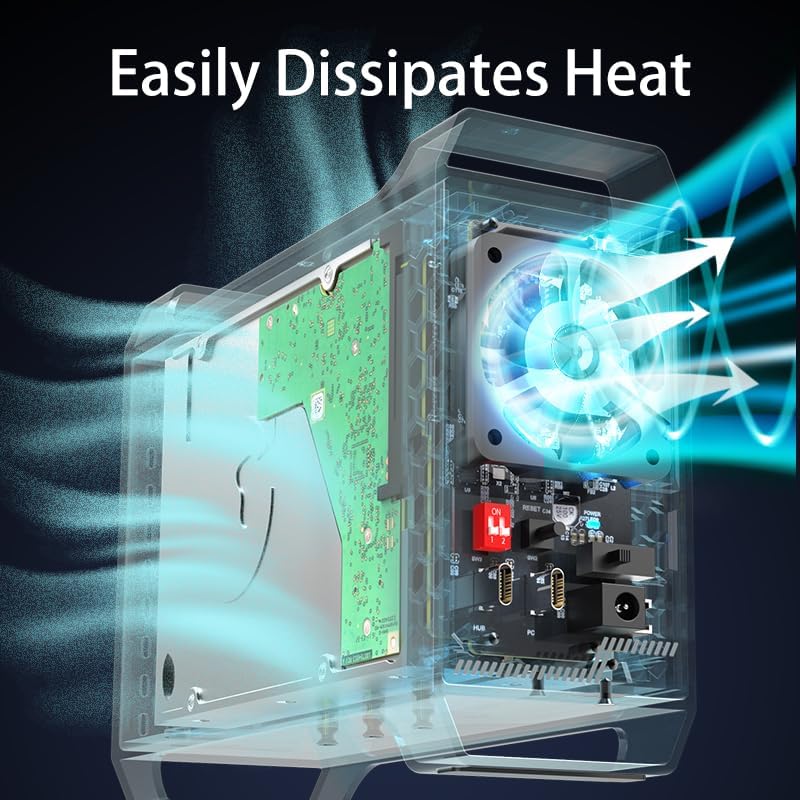
Figure 7.3: Intelligent Temperature Sensing
This diagram illustrates the intelligent temperature sensing design, showing that the fan remains off below 48°C for quiet operation and activates when the temperature reaches 48°C to start the cooling system.
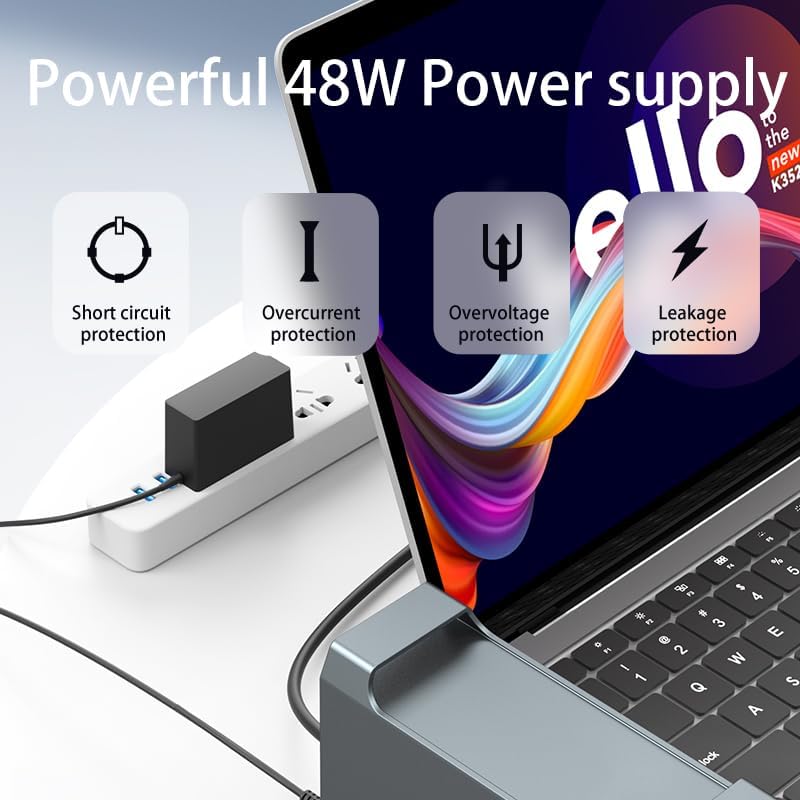
Figure 7.4: Efficient Heat Dissipation
This image provides an internal view of the enclosure, demonstrating how air flows through the system to effectively dissipate heat from the hard drives and internal components, ensuring stable and cool operation.
7.4 Powerful 48W Power Supply with Protection
The enclosure is powered by a robust 48W power supply, designed to provide stable and reliable power to your hard drives. It incorporates multiple protection mechanisms to safeguard your data and the device itself:
- Short Circuit Protection: Prevents damage from electrical shorts.
- Overcurrent Protection: Protects against excessive current flow.
- Overvoltage Protection: Shields the device from voltage spikes.
- Leakage Protection: Enhances electrical safety.
Figure 7.5: Power Supply Protections
This diagram illustrates the various protection features of the 48W power supply, including safeguards against short circuits, overcurrent, overvoltage, and leakage, ensuring the safety and stability of the device.
7.5 LED Indicators
The LED indicators on the front and rear of the enclosure provide visual feedback on the device's status:
- Power Indicator Light: Illuminates when the device is powered on.
- RAID Indicator Lights (HDD1, RAID0, RAID1, LARGE, HDD2): Indicate the status of individual drives and the active RAID mode. For example, in Normal mode, the three middle lights will illuminate.
8. Maintenance
- Cleaning: Use a soft, dry cloth to clean the exterior of the enclosure. Do not use liquid cleaners or aerosols.
- Ventilation: Ensure the cooling fan and honeycomb vents are not obstructed to allow for proper airflow.
- Firmware Updates: Check the official ISHEEP website periodically for any firmware updates that may improve performance or address issues.
- Data Backup: Regularly back up important data from your enclosure to another storage device, especially if not using RAID 1.
- Safe Removal: Always safely eject or unmount the enclosure from your operating system before disconnecting the USB cable or powering off the device to prevent data corruption.
9. Troubleshooting
If you encounter issues with your ISHEEP K35282C enclosure, please refer to the following common solutions:
| Problem | Possible Cause | Solution |
|---|---|---|
| Enclosure not detected by computer. | Loose cable connection, insufficient power, driver issue, or incorrect RAID mode setup. |
|
| Drives not appearing or data inaccessible after RAID mode change. | RAID mode change erases data; drives need re-initialization/formatting. |
|
| Enclosure frequently disconnects or drops offline. | Faulty USB cable, power supply issue, or unstable USB port on computer. |
|
| Slow data transfer speeds. | Connected to a slower USB port (e.g., USB 2.0), UASP not active, or drive performance issues. |
|
10. Specifications
| Feature | Detail |
|---|---|
| Model Number | K35282C |
| Brand | ISHEEP |
| Compatible Drive Type | 3.5 inch SATA HDD |
| Number of Bays | 2 |
| Max Capacity | Up to 36TB (18TB per drive) |
| RAID Modes Supported | Normal, LARGE (JBOD), RAID 0, RAID 1 |
| Interface | USB 3.1 Type-C (10Gbps) |
| UASP Support | Yes |
| Operating System Compatibility | Windows, Linux, Mac OS |
| Cooling System | Built-in fan, Intelligent Temperature Sensing |
| Power Supply | 48W External Power Adapter |
| Power Protection | Short circuit, Overcurrent, Overvoltage, Leakage |
| Sleep Mode | Automatic after 10 minutes of inactivity |
| Dimensions | 9.84 x 7.48 x 2.76 inches (Package Dimensions) |
| Item Weight | 1.54 pounds (0.7 Kilograms) |
| Color | Grey |
11. Warranty and Customer Support
The ISHEEP K35282C 2-Bay 3.5-Inch SATA RAID Enclosure comes with a warranty to ensure your peace of mind. For specific warranty terms and conditions, please refer to the warranty card included in your package or visit the official ISHEEP website.
If you require technical assistance, have questions about product functionality, or need to claim warranty service, please contact ISHEEP customer support through the following channels:
- Official Website: www.isheep.com (Please check for the most current contact information)
- Email Support: Refer to your product packaging or official website for email contact.
- Amazon Store: You can also visit the ISHEEP Store on Amazon for product information and support options.
When contacting support, please have your product model number (K35282C) and purchase information readily available.
Ask a question about this manual
Ask about setup, troubleshooting, compatibility, parts, safety, or missing instructions. Manuals+ will review the question and use this page’s manual context to help answer it.