
HOMERECOMMEND 1013
HOMERECOMMEND Full Size Bed Frame Instruction Manual
Model: 1013
Introduction
This manual provides detailed instructions for the assembly, operation, and maintenance of your HOMERECOMMEND Full Size Bed Frame with Storage Headboard and Charging Station. Please read this manual thoroughly before assembly and use to ensure proper setup and safe operation. Keep this manual for future reference.
Safety Information
Adhere to the following safety guidelines to prevent injury or damage to the product:
- Keep the power cord for the charging station away from water and heat sources to prevent electrical hazards.
- Exercise caution during assembly to avoid personal injury.
- Be mindful of sharp edges on metal components to prevent cuts or injuries.
- Ensure all connections are securely tightened before use.
- Do not exceed the recommended weight capacity of the bed frame.
Package Contents
Verify that all components are present before beginning assembly. If any parts are missing or damaged, contact customer support.
- Bed Frame Components (Side rails, support legs, metal slats)
- Upholstered Headboard with Integrated Charging Station
- Assembly Hardware (Screws, bolts, washers, nuts)
- Assembly Tools (Hex key, wrench)
- Installation Manual
Specifications
| Size | Full |
| Product Dimensions (L x W x H) | 81.5" x 54.53" x 43.31" |
| Under-bed Clearance | 10.63 Inches |
| Color | Black+Grey |
| Material | Heavy-duty steel, Upholstered fabric |
| Charging Station | 2 AC outlets (125V/12A), 1 USB port (5V/2A), 1 Type-C port (15V) |
| Power Cord Length | 6.5 ft (UL certified) |
| Assembly Required | Yes |
Note: All dimensions are approximate.
Setup and Assembly
Assembly is required for this bed frame. Follow the included illustrated installation manual and these general steps:
- Unpack and Identify Parts: Lay out all components on a clean, soft surface (e.g., a rug or blanket) to prevent scratches. Refer to the parts list in your installation manual to identify each piece and ensure nothing is missing.
- Assemble the Headboard: Begin by attaching the headboard frame components. Secure the upholstered panel and the storage shelf to the main headboard structure using the provided hardware. Ensure the charging station is correctly oriented.
- Construct the Side Rails: Attach the side rails to the headboard and footboard (if separate). Ensure all bolts are finger-tightened initially.
- Install Center Support: Place any central support beams and legs as indicated in the manual. These are crucial for stability.
- Attach Metal Slats: Secure the metal slats to the side rails. Many designs involve snapping or screwing the slats into place. Ensure even spacing and secure attachment for mattress support.
- Final Tightening: Once all components are in place, systematically tighten all bolts and screws using the provided tools. Do not overtighten.
- Connect Power: Plug the UL certified power cord from the headboard's charging station into a wall outlet.

Image: The bed frame structure without a mattress, highlighting the metal slats and the headboard's design.

Image: Diagram illustrating the full dimensions of the bed frame, including length, width, height, and under-bed clearance.
Operating Instructions
Storage Headboard
The integrated headboard features a two-tier storage shelf. This area can be used to store small items such as books, glasses, remote controls, or decorative objects. Ensure items are placed securely to prevent them from falling.

Image: A close-up view of the headboard's storage shelves, showing various items and charging cables connected to devices.
Charging Station
The headboard includes a built-in charging station with 2 AC outlets (125V/12A), 1 USB port (5V/2A), and 1 Type-C port (15V). To use:
- Ensure the bed frame's power cord is firmly plugged into a functional wall outlet.
- Connect your electronic devices (e.g., smartphones, tablets, lamps) to the appropriate AC, USB, or Type-C ports on the headboard.
- The charging station is designed for convenient access to power while in bed.

Image: A detailed illustration of the charging station, highlighting the AC outlets, USB port, and Type-C port with their respective power specifications.
Under-Bed Storage
The bed frame provides 10.63 inches of clearance underneath, offering additional storage space for boxes, bins, or other items. This space can be utilized to keep your bedroom organized.
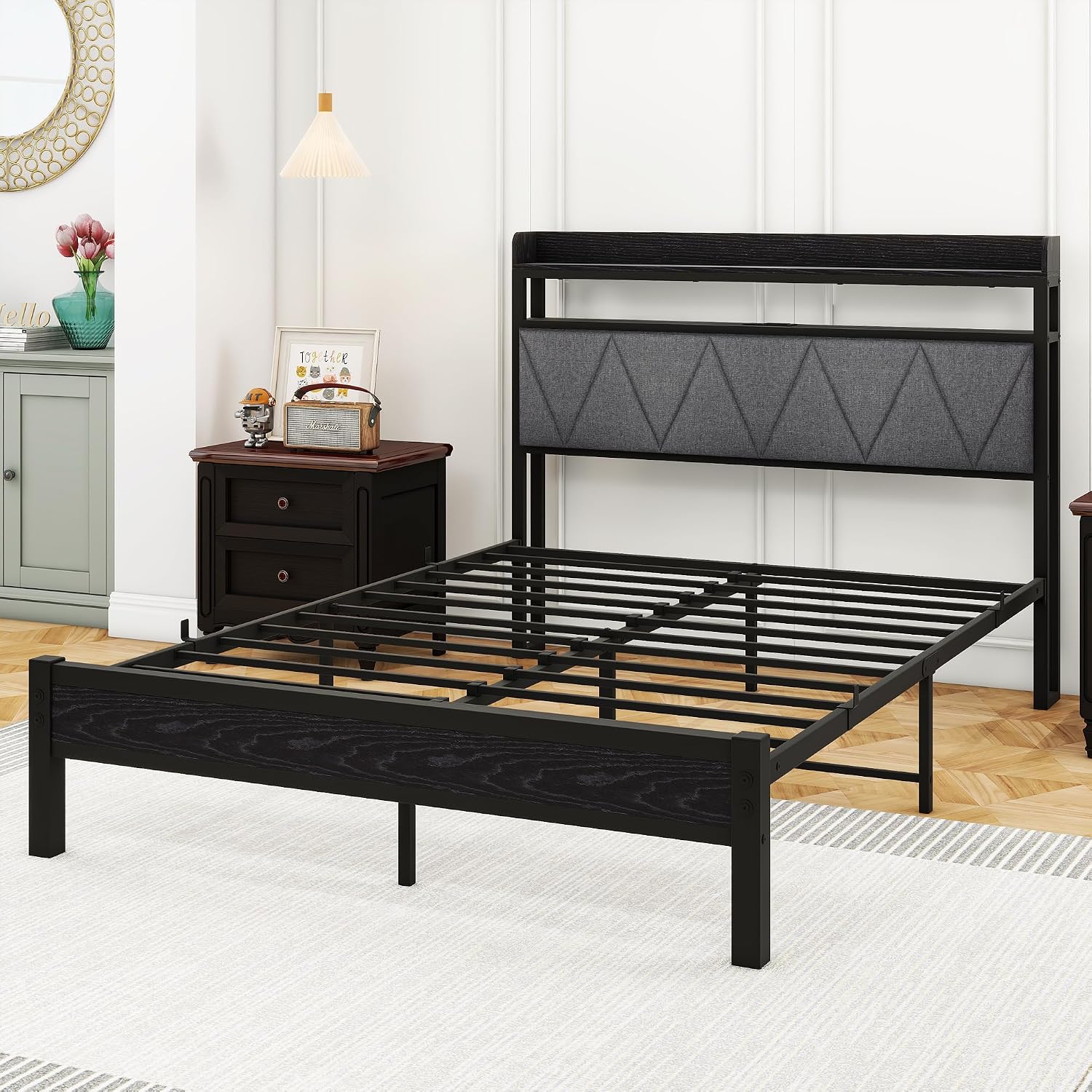
Image: A visual representation of the under-bed storage area, indicating the 10.6-inch clearance for storing various items.
Maintenance
Regular maintenance helps prolong the life of your bed frame:
- Cleaning: Wipe the metal and wooden surfaces with a dry cloth. For the upholstered headboard, use a soft, damp cloth and mild soap if necessary, then wipe dry. Avoid harsh chemicals.
- Hardware Check: Periodically check all bolts and screws to ensure they remain tight. Retighten as needed to maintain stability and prevent squeaking.
- Power Cord Inspection: Regularly inspect the power cord for any signs of damage or fraying. Discontinue use and contact support if damage is found.
Troubleshooting
Refer to these common issues and solutions:
- Squeaking Noises:
- Ensure all assembly bolts and screws are securely tightened.
- Check that the metal slats are properly seated and not rubbing against the frame.
- Charging Station Not Working:
- Verify that the bed frame's main power cord is firmly plugged into a functional wall outlet.
- Check if the device you are trying to charge is properly connected to the correct port (AC, USB, or Type-C).
- Test the charging station with a different device or cable to rule out device-specific issues.
- Bed Frame Feels Unstable:
- Re-check all connections and ensure they are tightened.
- Confirm that all support legs are making full contact with the floor.
- Ensure the bed frame is placed on a level surface.
If you encounter issues not listed here or if troubleshooting steps do not resolve the problem, please contact HOMERECOMMEND customer support.
Warranty and Support
Warranty: This HOMERECOMMEND bed frame comes with a 12-month warranty from the date of purchase. This warranty covers manufacturing defects and issues arising from normal use.
Customer Support: For any questions, concerns, or warranty claims, please do not hesitate to contact HOMERECOMMEND customer support. We aim to resolve your problem within 24 hours.
You can typically find contact information on the HOMERECOMMEND official website or through your purchase platform.
Ask a question about this manual
Ask about setup, troubleshooting, compatibility, parts, safety, or missing instructions. Manuals+ will review the question and use this page’s manual context to help answer it.