
1. Introduction
The YONHAN Intelligent Battery Charger is a versatile 6A 12V device designed for maintaining and repairing various types of vehicle batteries, including lead-acid, LiFePO4, GEL, and AGM. It features an LED display for monitoring charging status and an automatic repair function. This manual provides essential information for safe and effective operation.

Figure 1: YONHAN Intelligent Battery Charger with battery clamps.
2. Important Safety Instructions
Please read and understand all safety information before using this product. Failure to follow these instructions may result in electric shock, fire, or serious injury.
- DO NOT use this charger with lithium batteries other than LiFePO4. Using it with other lithium battery types is strictly prohibited and may cause damage or fire.
- Ensure proper ventilation during charging. Do not operate in a confined area.
- Avoid sparks and flames near the battery. Batteries can produce explosive gases.
- Wear eye protection and protective clothing when working with batteries.
- Keep out of reach of children.
- Disconnect the power supply before making or breaking connections to the battery.
- Do not charge a frozen battery.
- If the charger or cables are damaged, do not use the product. Contact support.
- This charger is equipped with reverse connection protection. However, always ensure correct polarity when connecting.
3. Product Features
- Wide Compatibility: Supports 6A 12V current output for lead-acid, LiFePO4, GEL, and AGM batteries. Suitable for cars, motorcycles, off-road vehicles, and pickups.
- LED Display: Features an LCD display showing voltage, current, internal temperature, and battery charge status. Touch screen controls allow for easy mode switching.
- Effective Pulse Repair: Detects and addresses battery acidification and stratification to recover lost energy, potentially extending battery life. Note: This function cannot activate or recharge completely empty batteries.
- Multiple Protections: Includes short circuit protection, over current protection, overheat protection, low voltage protection, and electric shock protection for safe operation.
- Durable Construction: Made with a high-quality fireproof ABS housing, providing corrosion and electricity resistance.

Figure 2: The charger offers multiple charging modes for different battery types and vehicles.

Figure 3: One-click repair function to activate and restore battery performance.

Figure 4: The charger features a fireproof and sturdy ABS flame-retardant shell for enhanced safety.

Figure 5: The intelligent charging system automatically stops when the battery is fully charged.
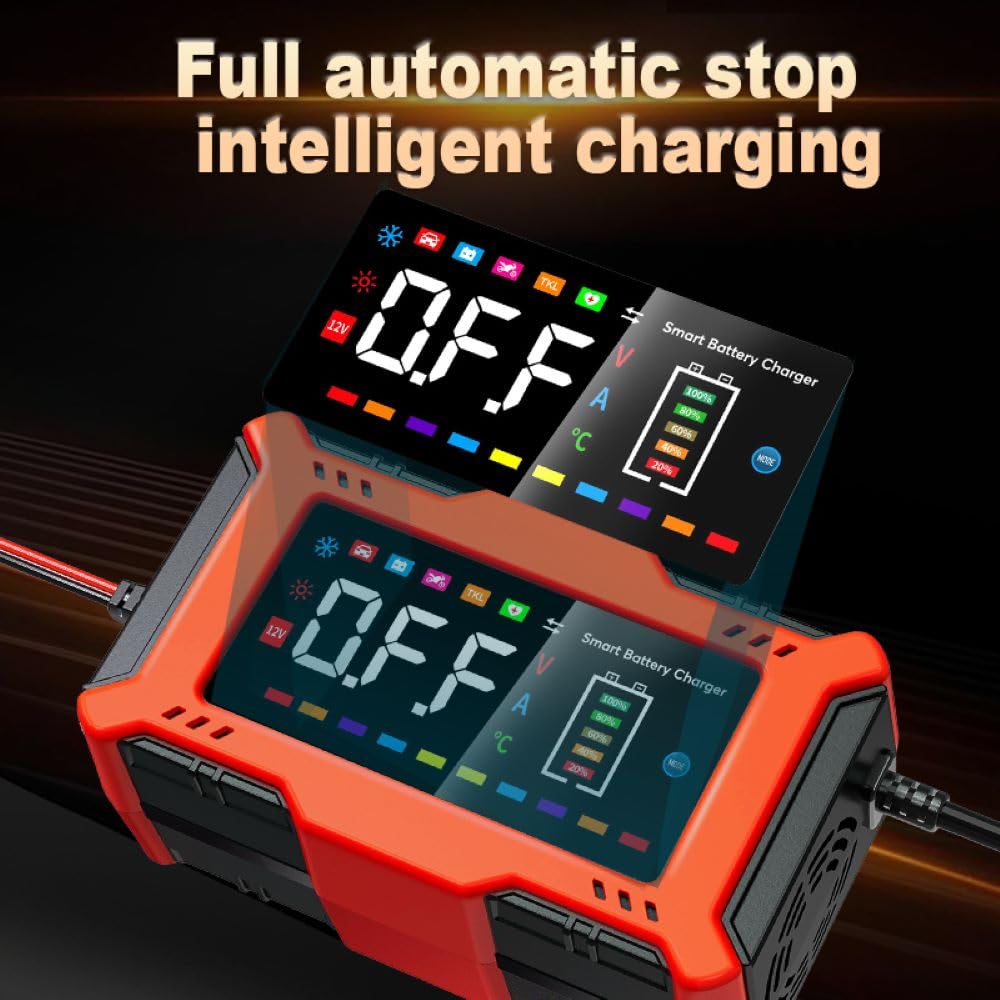
Figure 6: The charger is suitable for a wide range of 12V vehicles, including cars, motorcycles, SUVs, and trucks.
4. Setup and Connection
Follow these steps to safely connect the charger to your battery:
- Ensure the charger is unplugged from the power outlet.
- Identify the positive (+) and negative (-) terminals on your battery. The positive terminal is usually marked with a plus sign and is larger. The negative terminal is marked with a minus sign.
- Connect the red positive (+) clamp of the charger to the positive (+) terminal of the battery.
- Connect the black negative (-) clamp of the charger to the negative (-) terminal of the battery.
- Once the clamps are securely connected, plug the charger into a suitable AC power outlet.
- The charger's LED display will illuminate, indicating it is ready for operation.
Video 1: This video demonstrates the physical components of the charger, its multi-mode selection, reverse connection protection, supported battery types, temperature operation, undervoltage repair capabilities, and various vehicle applications. It also shows the connection process to a battery.
5. Operating Instructions
5.1 Mode Selection
After connecting the charger and plugging it in, the LED display will show the current battery status. Use the touch screen control to cycle through the available charging modes:
- Car Mode: For standard car batteries.
- Motorcycle Mode: For motorcycle batteries.
- Battery Start-Stop Mode: For vehicles equipped with start-stop technology.
- Lithium Battery Mode (TKL): Specifically for LiFePO4 batteries (14.6V).
- The charger automatically detects ambient temperature and adjusts charging parameters for optimal performance in both winter (-20°C) and summer (32°C) conditions.
5.2 LED Display Information
The LCD display provides real-time information:
- Voltage (V): Current battery voltage.
- Current (A): Charging current.
- Temperature (°C): Internal temperature of the charger.
- Battery Charge Level: Visual indicator of battery charge percentage.
- Mode Indicator: Icon representing the selected charging mode.
5.3 Automatic Charging and Repair
Once a mode is selected, the charger will begin the charging process. It will automatically detect the battery's condition and apply the appropriate charging current. The pulse repair function will engage if needed to address battery issues. The charger will automatically stop charging when the battery reaches full capacity.
6. Maintenance
- Cleaning: Disconnect the charger from power and the battery. Wipe the exterior with a soft, dry cloth. Do not use harsh chemicals or abrasives.
- Storage: Store the charger in a cool, dry place when not in use. Ensure cables are neatly coiled and not kinked.
- Cable Inspection: Periodically inspect the charging cables and clamps for any signs of damage, wear, or corrosion. Replace if necessary.
7. Troubleshooting
| Problem | Possible Cause | Solution |
|---|---|---|
| Charger does not turn on. | No power from outlet; loose connection; charger fault. | Check power outlet; ensure secure connections; contact support if problem persists. |
| Battery not charging. | Incorrect mode selected; battery completely dead; poor connection; battery fault. | Select appropriate mode; note that completely empty batteries cannot be activated; check connections; have battery tested. |
| Reverse connection warning. | Battery clamps connected incorrectly. | Immediately disconnect from power, then reconnect clamps with correct polarity (red to positive, black to negative). |
| Charger gets hot. | Normal during operation; poor ventilation; internal fault. | Ensure adequate ventilation; if excessively hot or smoking, disconnect immediately and contact support. |
8. Product Specifications
| Specification | Value |
|---|---|
| Brand | YONHAN |
| Output Voltage | 12 Volts |
| Output Current | 6 Amps |
| Compatible Battery Types | Lead-acid, LiFePO4, GEL, AGM |
| Product Dimensions (LxWxH) | 15.2 cm x 8.6 cm x 6.5 cm |
| Item Weight | 445 g |
| Operating Temperature | -20°C to 38°C (approx.) |
9. Warranty and Support
For warranty information or technical support, please refer to the documentation included with your purchase or contact YONHAN customer service. Keep your purchase receipt as proof of purchase.