
Introduction
This manual provides essential information for the safe and effective installation, operation, and maintenance of the Generic Trane X13270383-05 Time Delay Relay. This component is designed for use in HVAC systems, specifically compatible with Trane RAUCC204B103 series, providing a 5-minute time delay function.
Please read this manual thoroughly before attempting to install or operate the device. Keep this manual for future reference.
Safety Information
WARNING: Risk of electric shock. Disconnect power before installation or servicing.
- Installation should only be performed by qualified personnel.
- Ensure all local and national electrical codes are followed.
- Do not operate the device if it appears damaged.
- Wear appropriate personal protective equipment (PPE) during installation and maintenance.
Product Overview
The Generic Trane X13270383-05 is a 5-minute time delay relay. It is a critical component for controlling specific sequences in HVAC systems, ensuring proper timing for operations such as fan delays or compressor protection. This relay is a direct fit for Trane X13270383-05 and APS00C9X300-AN1700, and is compatible with RAUCC204B103 series units.
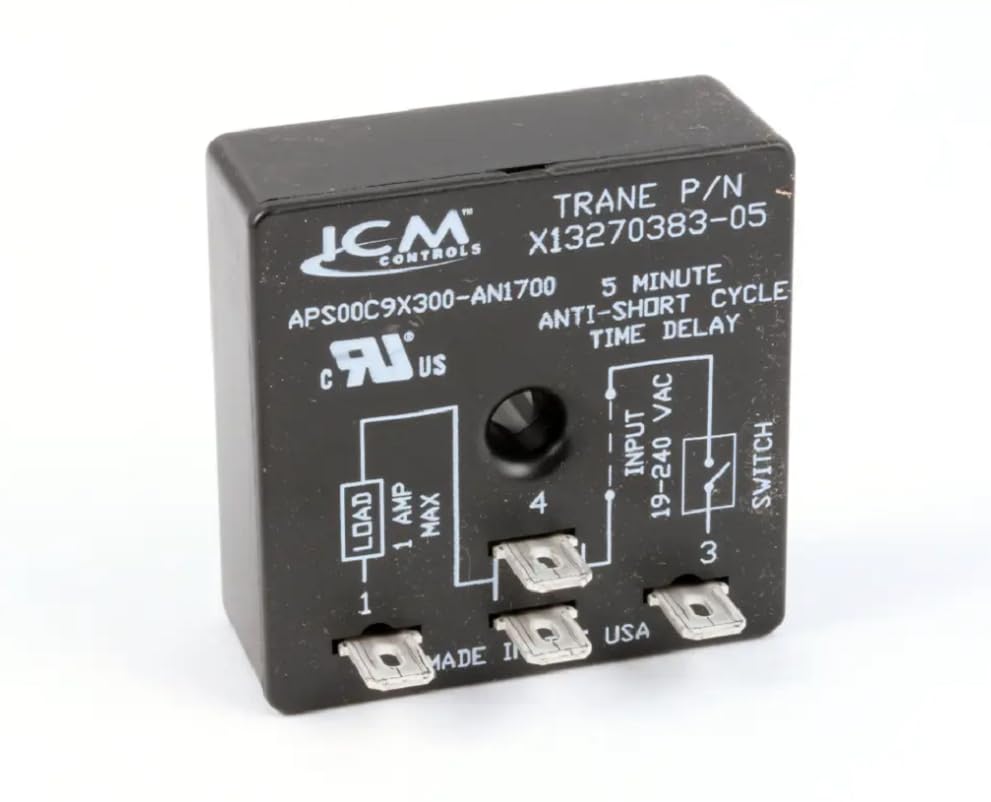
Figure 1: Front view of the Generic Trane X13270383-05 Time Delay Relay. The relay is a black rectangular component with a central mounting hole and the number '3111' embossed on its surface.
Setup and Installation
- Power Disconnection: Before beginning any installation, ensure that the main power supply to the HVAC unit is completely disconnected at the circuit breaker or fuse box. Verify with a voltage tester.
- Locate Existing Relay: Identify the existing time delay relay within the HVAC system. Note its position and wiring connections. It is recommended to take a photograph of the existing wiring for reference.
- Remove Old Relay: Carefully disconnect the wires from the old relay. Note the terminal markings and corresponding wire colors. Remove any mounting screws or clips securing the old relay.
- Install New Relay: Position the new Generic Trane X13270383-05 time delay relay in the same location as the old one. Secure it using the appropriate mounting hardware.
- Wire Connections: Connect the wires to the new relay's terminals, ensuring they match the original configuration. Refer to the wiring diagram of your HVAC unit if available, or the photograph taken in step 2.
- Verify Connections: Double-check all wire connections for tightness and correct placement. Ensure no bare wires are exposed.
- Restore Power: Once installation is complete and verified, restore power to the HVAC unit.
Consult your HVAC system's specific service manual for detailed wiring diagrams and safety precautions.
Operating Instructions
The Generic Trane X13270383-05 time delay relay operates automatically within the HVAC system. Its function is to introduce a fixed 5-minute delay in a specific circuit, typically for fan operation or compressor protection cycles.
- Upon receiving a signal (e.g., thermostat call for heat/cool), the relay will initiate its 5-minute countdown.
- After the 5-minute delay, the relay will close or open its contacts as designed, allowing the next stage of the HVAC sequence to proceed (e.g., turning on the indoor fan after the furnace ignites, or delaying compressor restart).
- There are no user-adjustable settings on this specific time delay relay. Its operation is fixed at 5 minutes.
If the HVAC system is not functioning as expected after installation, refer to the Troubleshooting section.
Maintenance
The Generic Trane X13270383-05 time delay relay is a sealed, solid-state component and generally requires no routine maintenance. However, periodic inspection of its connections and surrounding area is recommended as part of overall HVAC system maintenance.
- Annual Inspection: During routine HVAC system checks, visually inspect the relay for any signs of physical damage, discoloration, or loose wiring connections.
- Cleaning: If dust or debris accumulates on the relay, gently clean it with a soft, dry brush or compressed air. Ensure power is disconnected before cleaning.
- Replacement: If the relay fails to operate correctly (e.g., incorrect delay timing, no operation), it should be replaced. Do not attempt to repair the unit.
Troubleshooting
If your HVAC system is not operating correctly after installing the time delay relay, consider the following common issues:
| Problem | Possible Cause | Solution |
|---|---|---|
| HVAC unit does not start or cycle correctly. | No power to the relay or unit. Incorrect wiring. Faulty relay. |
|
| Delay time is incorrect or inconsistent. | Faulty relay. | The relay has a fixed 5-minute delay. If timing is off, the relay is likely defective and requires replacement. |
| Relay appears physically damaged. | Impact, overheating, or electrical surge. | Disconnect power immediately and replace the relay. Investigate the cause of damage to prevent recurrence. |
If troubleshooting steps do not resolve the issue, contact a qualified HVAC technician.
Specifications
| Model Number: | X13270383-05 |
| Brand: | Generic |
| Manufacturer: | Fits Trane |
| Time Delay: | 5 Minutes |
| Compatibility: | Trane X13270383-05, APS00C9X300-AN1700, RAUCC204B103 series |
| Color: | Black |
| Number of Settings: | 1 (Fixed) |
Warranty and Support
For information regarding warranty coverage, please refer to the terms and conditions provided at the point of purchase or contact the retailer directly. As this is a Generic brand product, specific warranty details may vary.
For technical support or further assistance, please contact your supplier or a qualified HVAC professional.