
Introduction
This manual provides comprehensive instructions for installing and operating the YEABRICKS LED Light Kit, specifically designed for the 76271 DC Batman: The Animated Series Gotham City building blocks model. This light kit is intended to enhance the visual display of your model by adding illumination to various sections of the cityscape.
Important Note: The building blocks model itself is NOT included with this LED light kit. This product contains only the lighting components and associated accessories.
Package Contents
Please verify that all components listed below are present in your package before beginning installation. If any parts are missing or damaged, please contact customer support.
- LED Light Kit (various light strips, individual LEDs, and connecting wires)
- Battery Box (requires 3 AA batteries, not included)
- User Guide (physical copy, or QR code for digital access)
- Connection Cables and Expansion Boards

This image displays the contents of the YEABRICKS LED light kit package, including the light components, battery box, and user guide. The building model is shown for illustrative purposes only and is not included.
Setup and Installation
Detailed, step-by-step installation instructions are provided digitally. Please follow these instructions carefully to ensure proper setup and functionality of your LED light kit.
- Access Instructions: Locate the QR code provided in your package or on the product listing. Scan the QR code with your smartphone or tablet to access the digital instruction manual, which includes both PDF and video guides.
- Prepare Your Model: Ensure your 76271 DC Batman: The Animated Series Gotham City building model is fully assembled and stable before beginning the light kit installation.
- Install Batteries: Open the battery box and insert 3 AA batteries (not included), ensuring correct polarity.
- Follow Step-by-Step Guide: Refer to the digital instructions for precise placement of each LED light and routing of wires. The guide will illustrate how to integrate the lights into your model without damaging the structure.
- Connect Components: Connect the LED lights to the expansion boards and then to the battery box as indicated in the instructions. Ensure all connections are secure.
- Test Functionality: Before finalizing the installation, turn on the lights to confirm all LEDs are working correctly.
For detailed visual guidance, please visit the official instruction page: YEABRICKS Instruction PDF
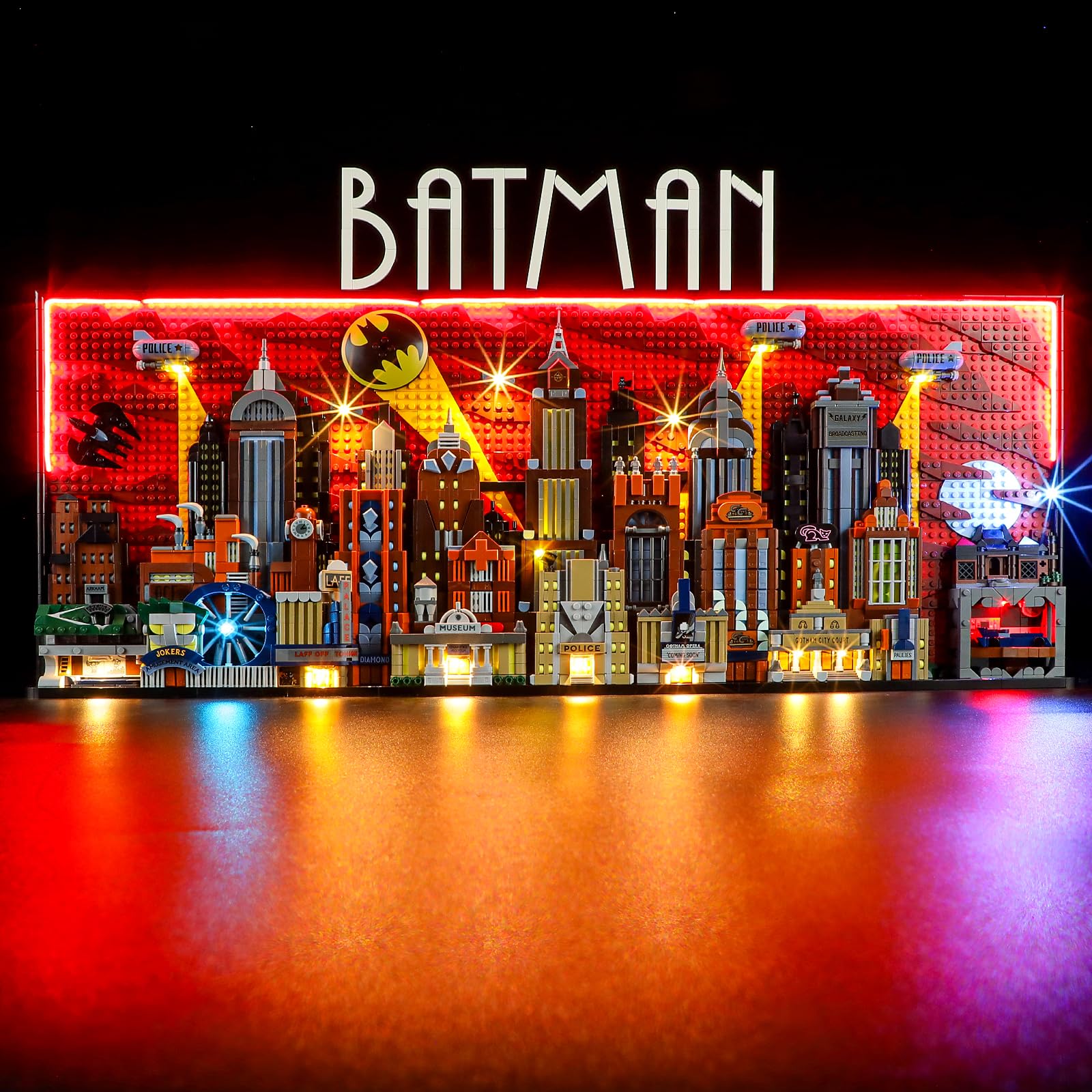
The 76271 DC Batman Gotham City model illuminated by the YEABRICKS LED light kit, demonstrating the final appearance after installation.
Official product video demonstrating the YEABRICKS LED light kit installed on the 76271 DC Batman: The Animated Series Gotham City model, showcasing various illuminated details and effects.
Operating Instructions
Once the LED light kit is fully installed and connected to the battery box with fresh batteries, operation is straightforward:
- Power On/Off: Use the switch on the battery box to turn the LED lights on or off.
- Display: The lights will illuminate various sections of your Gotham City model, highlighting architectural details and creating an immersive display.

Close-up views of the illuminated Gotham City model, highlighting details such as the museum entrance, police station, and the iconic Batman signal.
Maintenance
To ensure the longevity and optimal performance of your YEABRICKS LED Light Kit, consider the following maintenance tips:
- Cleaning: Gently dust the LED lights and wires with a soft, dry cloth. Avoid using liquid cleaners directly on the electrical components.
- Battery Replacement: When the lights dim or stop working, replace the 3 AA batteries in the battery box. Always use new batteries and dispose of old ones responsibly.
- Wire Management: Ensure all wires are neatly tucked away and not pinched or strained, which could lead to damage.
- Storage: If storing the model for an extended period, remove the batteries from the battery box to prevent leakage.
Troubleshooting
If you encounter issues with your LED light kit, please refer to the following common troubleshooting steps:
| Problem | Possible Cause | Solution |
|---|---|---|
| Lights do not turn on. |
|
|
| Some lights are not working. |
|
|
| Lights are dim. | Low battery power. | Replace batteries with new ones. |
If these steps do not resolve the issue, please contact YEABRICKS customer support for further assistance.
Specifications
- Product Dimensions: 6.3 x 4.3 x 1.18 inches
- Item Weight: 6.3 ounces
- Compatible Model: 76271 (DC Batman: The Animated Series Gotham City Building Blocks Model)
- Power Source: 3 AA Batteries (not included)
- Manufacturer: YEABRICKS
- Recommended Age: 6 years and up
Warranty and Support
YEABRICKS is committed to providing high-quality products and customer satisfaction. We offer the following support:
- Free Replacement: We provide complimentary replacements for any quality issues, such as missing parts or non-functional lights.
- Customer Service: For any questions, concerns, or assistance with your product, please do not hesitate to contact our customer support team. Contact information is typically provided on the service card included in your package.

This image outlines the support services offered by YEABRICKS, including access to comprehensive instructions, a free replacement policy for product defects, and dedicated customer assistance.
We are dedicated to assisting you and ensuring a positive experience with your YEABRICKS LED Light Kit.