
1. Introduction
The TESSAN Universal Travel Adapter is a versatile and powerful charging solution designed for global travelers. This 140W GaN international plug adapter features multiple USB-C and USB-A charging ports, along with a universal AC outlet, allowing you to charge up to five devices simultaneously across over 200 countries. Its compact and lightweight design makes it an essential companion for your worldwide adventures.
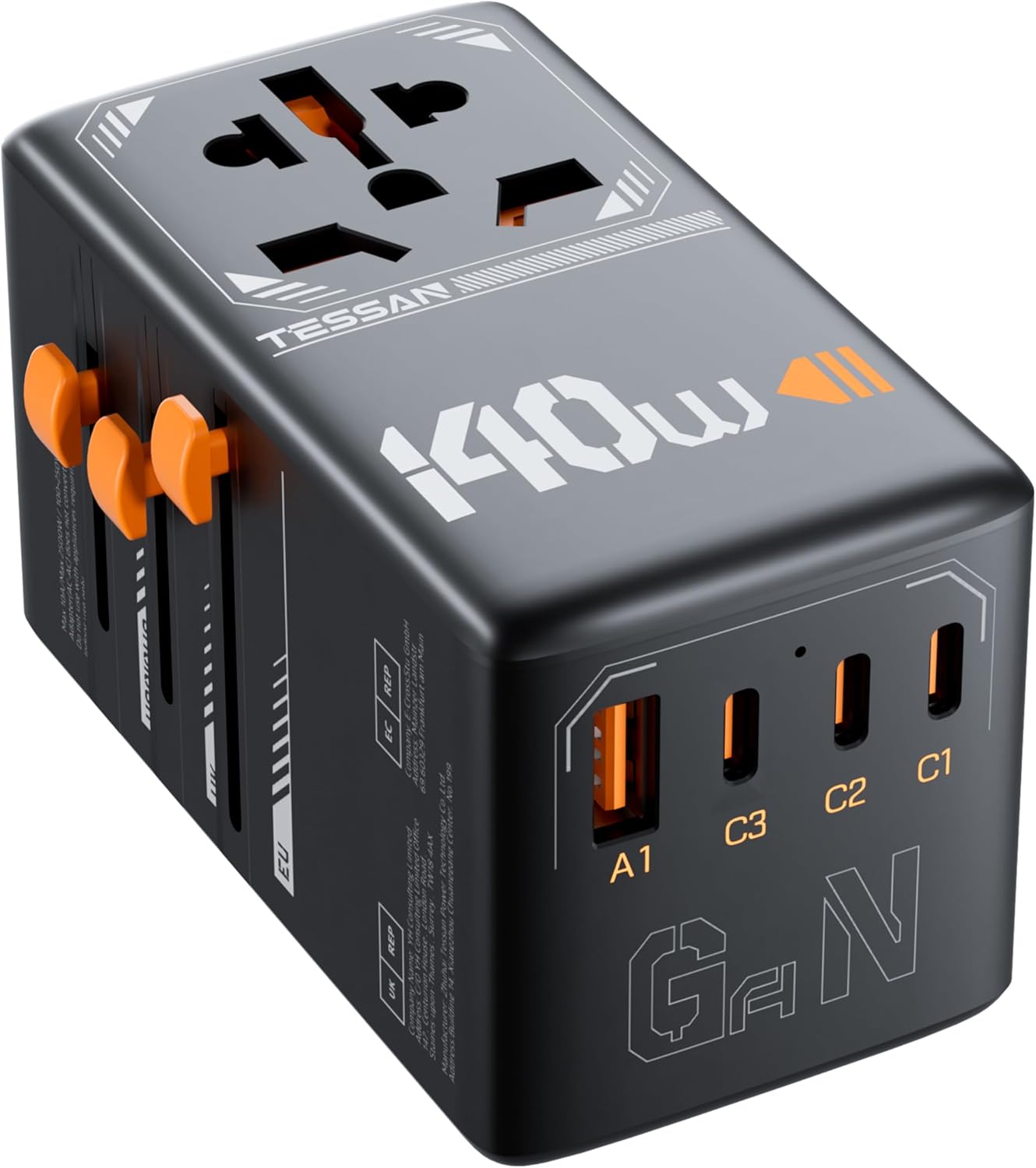
This image shows the TESSAN Universal Travel Adapter in black and orange, highlighting its compact form factor and the various charging ports on its side, including USB-A and multiple USB-C ports.
2. Key Features
- International Compatibility: Supports plug types for over 200 countries, including Type C (Europe), Type G (UK), Type I (Australia/China), and Type A (USA/Japan).
- High-Speed Charging: Equipped with 3 USB-C ports (C1/C2 up to 140W MAX total, C3 18W max) and 1 USB-A port (18W max), providing efficient charging for various devices.
- 5-in-1 Charging: Features 1 universal AC outlet and 4 USB ports, allowing simultaneous charging of up to 5 devices.
- Safety Protection: Includes double fuse protection to safeguard your devices.
- Portable Design: Lightweight (0.62lb) and compact, ideal for travel.

This image illustrates the 140W fast charging capability of the adapter, showing a comparison of charging speed for a MacBook Air, highlighting the efficiency of the USB-C ports.
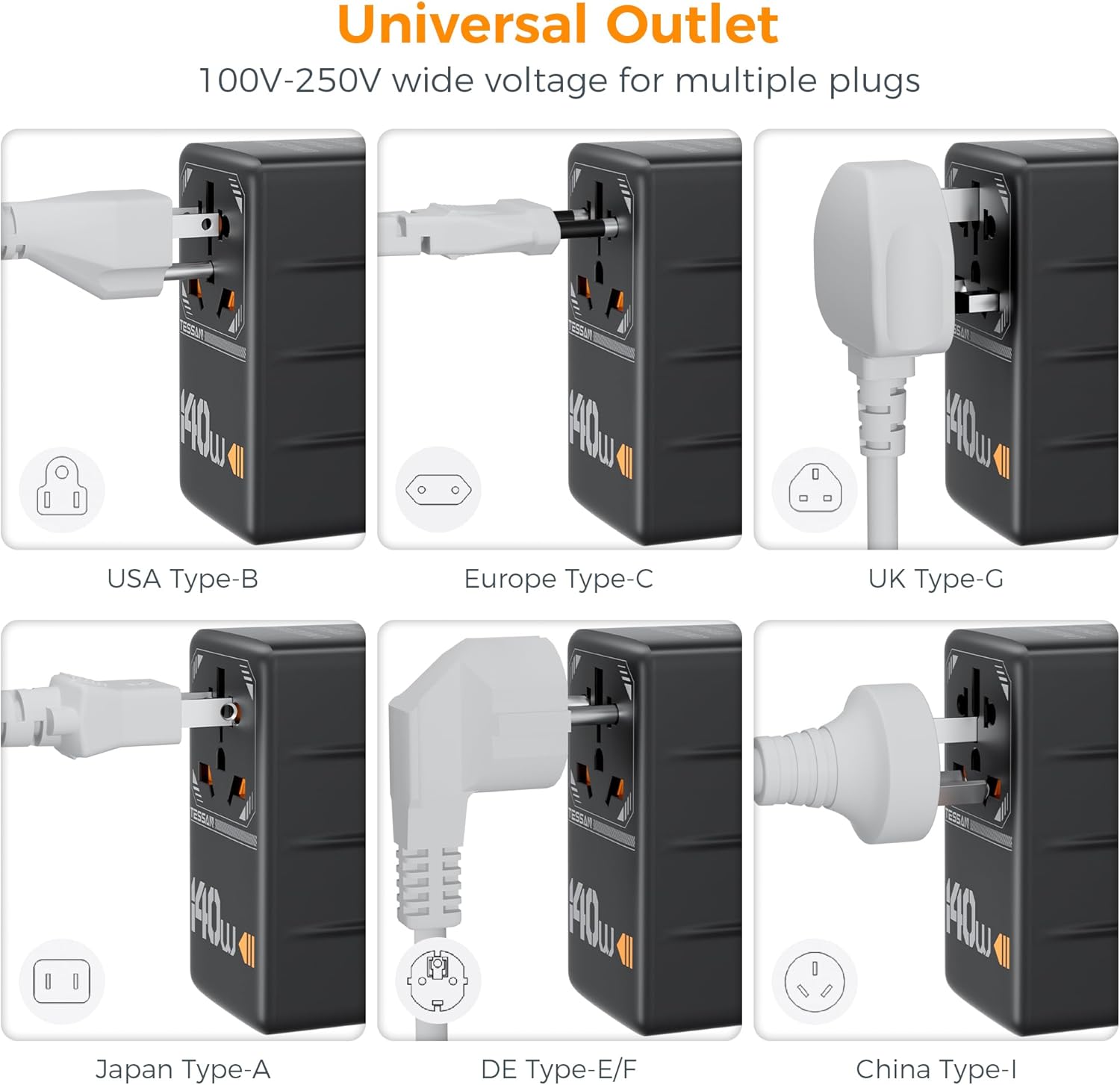
This image displays the universal AC outlet's compatibility with various plug types, including USA Type-B, Europe Type-C, UK Type-G, Japan Type-A, DE Type-E/F, and China Type-I, demonstrating its wide applicability.
3. Setup
The TESSAN Universal Travel Adapter is designed for ease of use. To set up your adapter:
- Identify the Correct Plug: The adapter features retractable pins for different regions. Locate the sliders on the side of the adapter corresponding to the region you are in (e.g., EU, UK, AUS, USA).
- Extend the Plug: Gently slide the appropriate button to extend the required plug pins. Ensure the pins are fully extended and locked into place before inserting into an outlet.
- Connect Devices: Once the adapter is securely plugged into a wall outlet, you can connect your devices to the universal AC outlet or any of the available USB-C or USB-A ports.

This image shows the adapter with its different retractable plug types (Type C for EU, Type G for UK, Type I for AU, Type A for US) extended, illustrating how to select the correct plug for various countries.
4. Operating Instructions
The TESSAN Universal Travel Adapter allows you to power and charge multiple devices efficiently.
- Charging Multiple Devices: You can charge up to five devices simultaneously using the universal AC outlet and the four USB ports (3x USB-C, 1x USB-A).
- Optimal Charging: For fastest charging, utilize the USB-C1 and USB-C2 ports, which support up to 140W total output. The USB-A1 and USB-C3 ports provide up to 18W each.
- Voltage Compatibility: This adapter works with devices operating on 100V to 250V. IMPORTANT: This product is NOT a voltage converter. Ensure your devices (e.g., hair dryers, straighteners, curlers) support wide voltage input (100V-250V) before plugging them into the AC outlet. Using devices that do not support the local voltage can cause damage to the device or the adapter.

This image demonstrates the adapter's ability to charge multiple devices concurrently, showing a laptop, smartphone, and headphones connected to its various ports while plugged into a wall outlet.
5. Maintenance
To ensure the longevity and optimal performance of your TESSAN Universal Travel Adapter, follow these simple maintenance guidelines:
- Cleaning: Disconnect the adapter from the power outlet and all devices before cleaning. Use a soft, dry cloth to wipe the exterior. Do not use liquid cleaners or abrasive materials.
- Storage: When not in use, retract all plug pins and store the adapter in a cool, dry place away from direct sunlight and moisture.
- Handling: Avoid dropping the adapter or subjecting it to strong impacts. Do not force the plug pins when extending or retracting them.
6. Troubleshooting
If you encounter issues with your TESSAN Universal Travel Adapter, refer to the following common problems and solutions:
| Problem | Possible Cause | Solution |
|---|---|---|
| No power output from adapter. | Adapter not fully inserted into wall outlet; Blown fuse; Wall outlet is not active. | Ensure adapter is fully inserted. Check and replace the fuse if necessary (refer to Figure 6). Test the wall outlet with another device. |
| Device not charging or charging slowly. | Device not compatible with adapter's output; Cable issue; Device requires higher power than port provides; Overloaded ports. | Ensure your device's charging requirements match the adapter's output. Try a different charging cable. Use the higher wattage USB-C ports (C1/C2) for power-hungry devices. Reduce the number of devices charging simultaneously. |
| Adapter feels warm during use. | Normal operation under heavy load. | A slight warmth is normal. If it becomes excessively hot or emits smoke/smell, immediately unplug and discontinue use. |
| Plug pins do not extend/retract smoothly. | Debris in mechanism; Misalignment. | Do not force. Check for any visible obstructions. Ensure you are sliding the correct button for the desired plug type. |

This image illustrates the double fuse protection mechanism within the adapter, showing how to access and replace the fuses for continued safe operation.
Note: This product is not a voltage converter. It only adapts the plug shape.
7. Specifications
| Attribute | Value |
|---|---|
| Model Number | TS-WTA05 |
| Input Voltage | 100V-250V AC, 50/60Hz |
| Max Power Rating | 2500W (at 250V) |
| USB-C1/C2 Output | Up to 140W MAX (total) |
| USB-A1/C3 Output | 18W MAX (each) |
| Dimensions (L x W x H) | 3.65 x 2.17 x 2.1 inches |
| Weight | 9.9 ounces (0.28 kg) |
| Fuse Rating | 10A |
8. Warranty and Support
For warranty information and customer support, please refer to the official TESSAN brand store or contact TESSAN customer service directly. Specific warranty terms may vary by region and retailer.
Visit the official TESSAN Store: TESSAN Store on Amazon