
1. Introduction
Thank you for purchasing the Yinker 4K@60Hz HDMI Splitter 1 in 2 Out. This device allows you to connect a single HDMI source to two HDMI displays, duplicating the video and audio signal to both screens simultaneously. It is designed for ease of use, providing a reliable solution for mirroring high-resolution content without signal degradation.
Please read this manual thoroughly before operation to ensure proper setup and optimal performance.
2. Product Overview
The Yinker 4K@60Hz HDMI Splitter is a compact and efficient device that takes one HDMI input signal and distributes it to two identical HDMI outputs. It supports resolutions up to 4K@60Hz, ensuring a clear and vibrant picture on all connected displays. Its slim design makes it easy to integrate into any setup.

Image: The Yinker 4K@60Hz HDMI Splitter, showcasing its compact size and connectivity to multiple displays.

Image: A close-up view of the Yinker HDMI Splitter, highlighting its power indicator light.
3. Features
- 4K@60Hz Resolution: Supports maximum 4Kx2K@60Hz resolution, providing ultra-high-definition video output.
- HDMI 2.0 & HDCP 2.2: Compatible with HDMI 2.0 and HDCP 2.2 standards, ensuring broad compatibility with modern devices and content.
- 18Gbps Bandwidth: High bandwidth support for smooth and uncompressed video transmission.
- Mirror/Duplicate Mode Only: Designed specifically for mirroring or duplicating screens (A→A+A mode), not for extending displays.
- Long Distance Transmission: Supports up to 50ft transmission distance in 4K and 130ft in 1080P.
- Daisy Chain Support: Allows for cascading multiple splitters to share content with more monitors.
- Wide Compatibility: Works with various HDMI input devices such as DVD players, Xbox, PlayStation consoles, Blu-ray players, Fire Sticks, laptops, and PCs. Compatible with HD TVs, monitors, and projectors as output devices.
- Compact Design: Small and portable, measuring approximately 3.5(L) x 2(W) x 0.6(H) inches.

Image: Demonstrates the crystal clear picture quality supported by the splitter at 4K@60Hz.

Image: Diagram illustrating the wide compatibility of the HDMI splitter with various input and output devices.

Image: Illustration of how the splitter can copy the same screen to different rooms, along with cable length recommendations for 4K and 1080P resolutions.

Image: Diagram demonstrating the cascade feature, allowing multiple splitters to be connected for more displays.
4. Package Contents
Please check the package contents upon opening to ensure all items are present:
- 1 x Yinker 4K@60Hz HDMI Splitter 1 in 2 Out
- 1 x USB C Power Cable
- 1 x User Manual
Note: A 5V 1A power adapter is not included and must be supplied by the user.
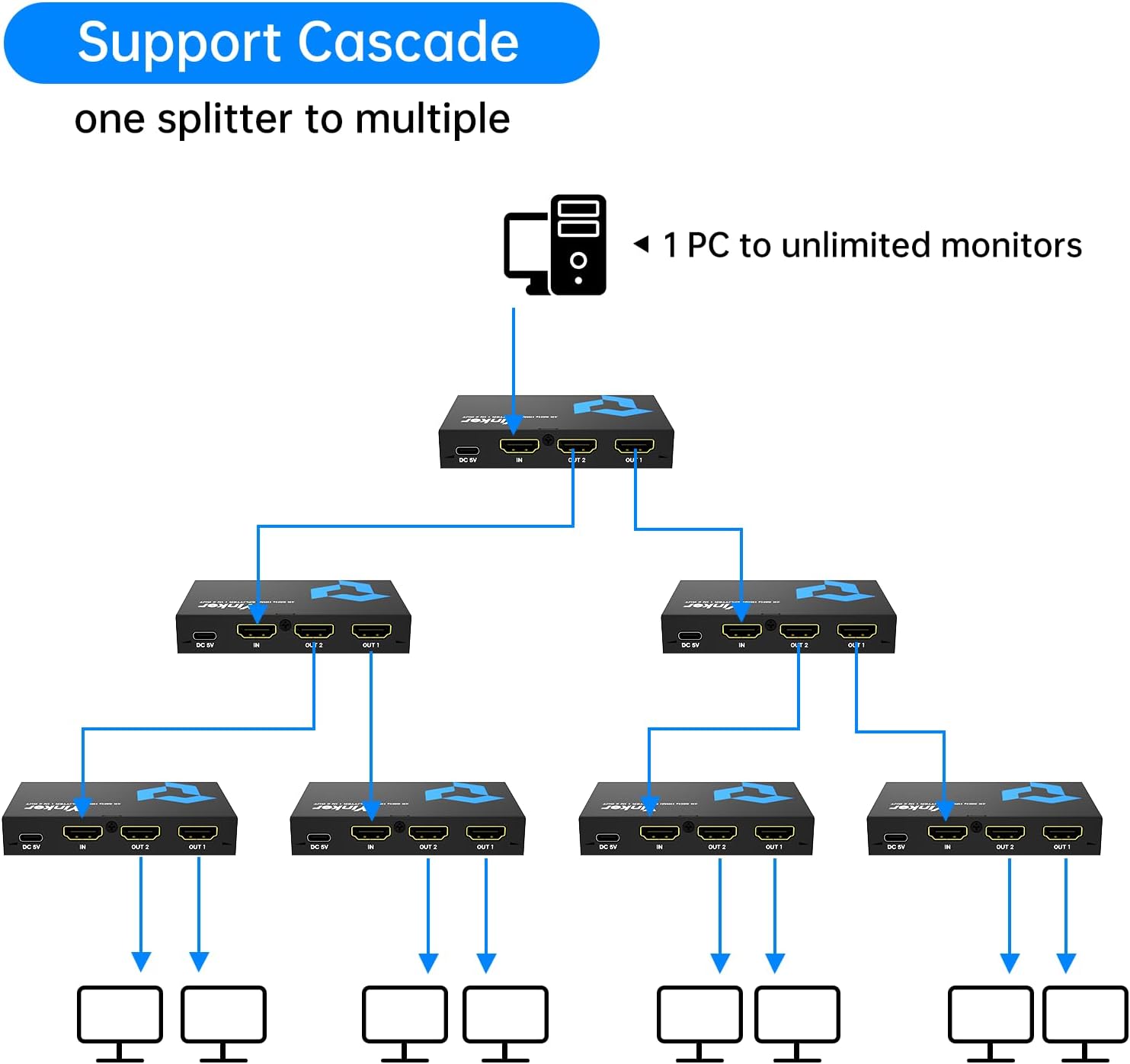
Image: The package contents, including the HDMI splitter, USB-C power cable, and user manual.
5. Setup Instructions
Follow these steps to set up your Yinker HDMI Splitter:
- Connect HDMI Source: Plug one end of an HDMI cable (not included) into the HDMI output port of your source device (e.g., PC, game console, Blu-ray player).
- Connect to Splitter Input: Connect the other end of this HDMI cable to the IN port on the Yinker HDMI Splitter.
- Connect HDMI Displays: Plug one end of an HDMI cable into the OUT 1 port of the splitter and the other end into the HDMI input of your first display (e.g., TV, monitor). Repeat this step for the OUT 2 port and your second display.
- Connect Power: Connect the provided USB C power cable to the DC 5V port on the splitter. Plug the USB-A end of the cable into a 5V 1A USB power adapter (not included) or a powered USB port. The power indicator light on the splitter will illuminate.
- Power On Devices: Power on your HDMI source device and both connected displays. The splitter will automatically detect the signals and duplicate the image to both screens.

Image: A close-up of an HDMI cable being connected to the input port of the splitter.

Image: A visual guide demonstrating the connection of the HDMI splitter with a PlayStation 5 and two displays.
6. Operating Instructions
The Yinker HDMI Splitter operates automatically once connected and powered. It functions in a mirror/duplicate mode only.
- Mirror Mode (A→A+A): The splitter will display the exact same content from your single HDMI source onto both connected displays. This is the only supported display mode.
- No Extended Display: This splitter does not support extended display modes (e.g., A→B+C or A→A+B), where each display shows different content or extends the desktop.

Image: Visual representation of the supported mirror mode (A→A+A) and unsupported extender modes (A→B+B, A→A+B).
Applications: This splitter is suitable for various environments where identical content needs to be displayed on multiple screens, such as:
- Conference rooms
- Shopping malls for advertising
- Home theater systems
- Gaming setups

Image: Examples of common applications for the HDMI splitter, including conference rooms, shopping malls, advertising displays, and home theaters.
7. Maintenance
To ensure the longevity and optimal performance of your HDMI splitter, please follow these maintenance guidelines:
- Cleaning: Use a soft, dry cloth to clean the exterior of the device. Do not use liquid or aerosol cleaners.
- Storage: Store the device in a cool, dry place away from direct sunlight and extreme temperatures.
- Handling: Avoid dropping or subjecting the device to strong impacts.
- Ventilation: Ensure the device has adequate ventilation and is not covered, to prevent overheating.
- Cable Management: Avoid bending HDMI cables sharply or placing heavy objects on them, which can damage the cables or ports.
8. Troubleshooting
If you encounter issues with your Yinker HDMI Splitter, refer to the following common problems and solutions:
| Problem | Possible Cause | Solution |
|---|---|---|
| No picture on displays. | No power to splitter; Loose HDMI cables; Incorrect input selection on TV; Incompatible resolution. | Ensure power cable is securely connected and power adapter is working. Check all HDMI cable connections. Select the correct HDMI input on your TV/monitor. Try a lower resolution from the source device. |
| Flickering or unstable picture. | Poor quality HDMI cables; Cable length too long; Signal interference. | Use high-quality HDMI 2.0 certified cables. Ensure cable lengths are within recommended limits (50ft for 4K, 130ft for 1080P). Try different HDMI ports or cables. |
| Audio issues (no sound or distorted sound). | HDMI cable issue; Display audio settings; Splitter not compatible with ARC/eARC. | Check HDMI cable connections. Verify audio settings on your displays. Note that this splitter does not support ARC or eARC. |
| Displays show different colors or resolutions. | Display capabilities differ; EDID issues. | Ensure both displays support the same resolution and refresh rate. The splitter will typically output the lowest common resolution supported by all connected displays. |
If the problem persists after trying these solutions, please contact Yinker customer support for further assistance.
9. Specifications
| Attribute | Value |
|---|---|
| Model Number | 4K@60Hz 1 in 2 out |
| Input Port | 1 x HDMI |
| Output Ports | 2 x HDMI |
| Max Resolution | 4Kx2K@60Hz |
| HDMI Version | HDMI 2.0 |
| HDCP Version | HDCP 2.2 |
| Bandwidth | 18Gbps |
| Color Depth | 4:4:4 30/36 bit RGB |
| Power Supply | DC 5V (via Type-C interface) |
| Dimensions (L x W x H) | 3.5 x 2 x 0.6 inches |
| Item Weight | 6.7 ounces |
| Material | Metal |
| Country of Origin | China |
10. Warranty and Support
For information regarding product warranty, please refer to the warranty card included with your purchase or contact Yinker customer support directly. Yinker is committed to providing high-quality products and excellent customer service.
If you have any questions, require technical assistance, or need to report an issue, please contact the seller or manufacturer through the platform where you purchased the product. Please have your model number and purchase details ready when contacting support.