
1. Product Overview
The Woodskil Digital Display 8 Inch Variable Speed Bench Grinder (Model: TDS-G200VLGA) is designed for precision grinding and sharpening tasks. It features a robust motor, variable speed control, and integrated safety features to enhance user experience and safety.
- Advanced Digital Display: Provides real-time speed readings for precise control and adjustment.
- Variable Speed: Equipped with a 5 Amp 3/4HP motor, offering speeds from 2000-3450RPM (±5%) for diverse grinding needs.
- Work Light: A built-in 2W work light illuminates the workspace, improving visibility and precision.
- Stable Design: Features non-slip rubber pads and a pre-drilled rigid cast iron base to reduce vibration and ensure stability during operation.

Image 1.1: The Woodskil Digital Display 8 Inch Variable Speed Bench Grinder, showcasing its main components including the digital display, work light, and grinding wheels.
2. Safety Instructions
Always prioritize safety when operating power tools. Read and understand all instructions before use.
- Eye Protection: Always wear safety glasses or a face shield to protect against flying debris.
- Stable Mounting: Securely mount the grinder to a workbench to prevent movement during operation.
- Work Area: Keep the work area clean, well-lit, and free from obstructions.
- Clothing: Avoid wearing loose clothing, gloves, neckties, jewelry, or anything that could get caught in moving parts.
- Tool Rests: Adjust tool rests to within 1/16 inch (1.5 mm) of the grinding wheel to prevent workpieces from jamming.
- Eye Shields: Ensure eye shields are properly positioned and secured.
- Unplug Before Adjustments: Always unplug the grinder from the power source before making any adjustments, changing wheels, or performing maintenance.
- Ventilation: Operate in a well-ventilated area to disperse dust and sparks.
3. Package Contents
Verify that all items are present upon unpacking:
- Woodskil Digital Display 8 Inch Variable Speed Bench Grinder
- Eye Shield (2)
- Tool Rest (2)
- Grinding Wheels (pre-installed, typically 36# and 60# grit)
- Spark Deflectors
- Mounting Hardware
- Instruction Manual
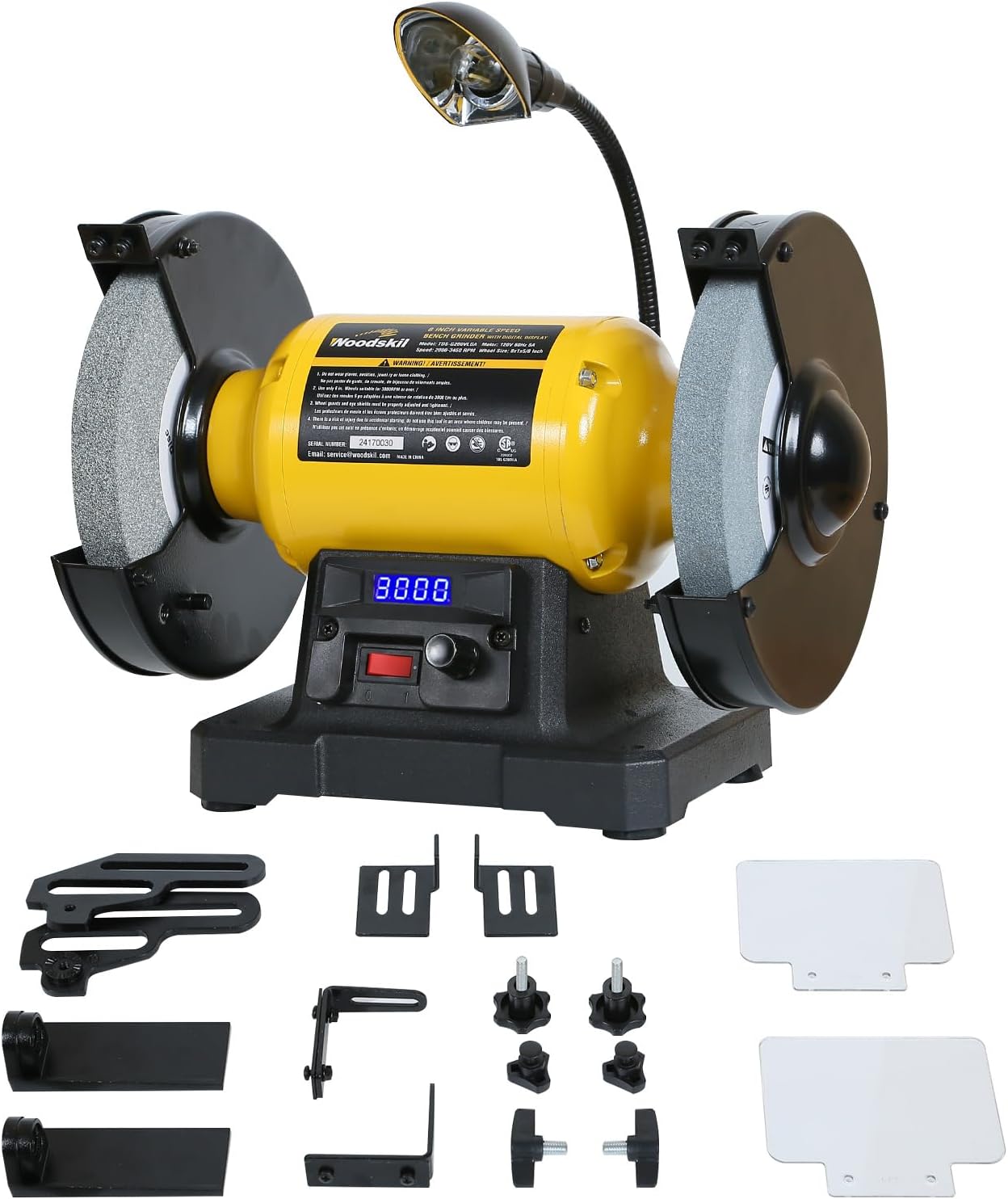
Image 3.1: All components included with the Woodskil Bench Grinder, laid out for inspection.
4. Setup and Assembly
Follow these steps to assemble your bench grinder:
- Mounting the Grinder: Secure the grinder to a sturdy workbench using appropriate bolts and washers through the pre-drilled holes in the base.
- Attaching Tool Rests: Install the tool rests onto their respective brackets. Ensure they are securely fastened and can be adjusted.
- Installing Eye Shields: Attach the eye shields to the grinder. These are adjustable for optimal protection.
- Positioning Spark Deflectors: Install the spark deflectors, ensuring they are positioned to catch sparks effectively.
Video 4.1: This video demonstrates the unboxing and assembly process for a similar 8-inch bench grinder, including attaching tool rests and eye shields.

Image 4.1: The bench grinder with key specifications like motor power, wheel size, and grit types highlighted.
5. Operating Instructions
Familiarize yourself with the controls and features before operating the grinder.
5.1 Power and Speed Control
- Power Switch: Locate the main power switch on the front of the unit.
- Variable Speed Dial: Use the rotary dial to adjust the grinding speed. The digital display will show the current RPM.
- Digital Display: The digital display provides real-time feedback on the wheel's rotational speed, allowing for precise control.

Image 5.1: A detailed view of the digital display and variable speed control dial on the Woodskil bench grinder.
5.2 Work Light Operation
- The integrated 2W work light can be switched on/off to illuminate your workpiece, improving visibility.

Image 5.2: The 2W work light providing illumination on the grinding area of the Woodskil bench grinder.
5.3 Adjusting Tool Rests and Eye Shields
- Tool Rests: Loosen the adjustment knobs to position the tool rests. Ensure they are within 1/16 inch (1.5 mm) of the grinding wheel and at the desired angle for your workpiece. Tighten securely before use.
- Eye Shields: Adjust the clear eye shields to provide maximum protection without obstructing your view of the workpiece.
Video 5.3: This video demonstrates the adjustment of the tool rest and eye shield on a bench grinder, highlighting tool-free adjustments and a magnifying glass feature.

Image 5.4: The adjustable tool rest feature of the Woodskil bench grinder, allowing for precise angle adjustments.
5.4 Grinding and Sharpening
- Select the appropriate grinding wheel (coarse for rough shaping, fine for sharpening/finishing).
- Turn on the grinder and allow it to reach the desired speed.
- Gently bring the workpiece into contact with the grinding wheel, maintaining a consistent angle and light pressure.
- Move the workpiece across the face of the wheel to ensure even wear and prevent grooving.
Video 5.5: A short demonstration of a bench grinder in use, showing sparks generated during grinding.
Video 5.6: This video illustrates sharpening a chisel on an 8-inch bench grinder, demonstrating proper technique.
6. Maintenance
Regular maintenance ensures optimal performance and extends the life of your grinder.
- Cleaning: Keep the grinder clean and free of dust and debris. Use a brush or compressed air.
- Wheel Inspection: Regularly inspect grinding wheels for cracks, chips, or excessive wear. Replace damaged wheels immediately.
- Wheel Dressing: Use a wheel dresser to keep the grinding wheels true and sharp.
- Motor Ventilation: Ensure motor ventilation openings are clear to prevent overheating.
7. Troubleshooting
If you encounter issues, refer to the following common troubleshooting tips:
- Grinder Not Starting: Check power connection, ensure the power switch is ON, and verify the circuit breaker.
- Excessive Vibration: Ensure the grinder is securely mounted. Check if grinding wheels are properly balanced and tightened. Dress or replace wheels if necessary.
- Poor Grinding Performance: Check if the grinding wheels are worn or glazed. Dress the wheels or replace them. Ensure correct speed setting for the task.
- Overheating: Ensure motor ventilation is clear. Avoid excessive pressure on the grinding wheels.
8. Specifications
| Manufacturer | Woodskil |
| Model Number | TDS-G200VLGA |
| Product Dimensions | 43.99 x 26.01 x 34.01 cm |
| Item Weight | 19.23 kg |
| Size | 8” Variable Speed Grinder |
| Color | Yellow |
| Material | Cast Iron |
| Power Source | Corded Electric |
| Voltage | 120 Volts |
| Wattage | 559.5 watts |
| Horsepower | 0.75 Horsepower |
| Maximum Rotational Speed | 3450 RPM |
| Included Components | Eye Shield*2, Motor, Tool rest*2 |
9. Warranty and Support
The Woodskil Digital Display 8 Inch Variable Speed Bench Grinder comes with a two-year warranty. For technical support, parts, or warranty claims, please contact Woodskil customer service.
- Email: service@woodskil.com
Please retain your proof of purchase for warranty validation.