1. Introduction and Overview
The EF ECOFLOW DELTA Pro 3 is a powerful and versatile portable power station designed to provide reliable energy for home use, camping, emergencies, power outages, and RVs. With a substantial 4096Wh LFP battery capacity and a robust 4000W AC output (expandable to 6000W with X-Boost), it can power a wide range of essential appliances. This manual provides comprehensive instructions for setting up, operating, maintaining, and troubleshooting your DELTA Pro 3.

Image: The DELTA Pro 3 Power Station shown with its accompanying 400W portable solar panel, highlighting its comprehensive power solution.
2. Key Features
- High Power Output: Supports 120V/240V voltage with a 4000W AC output, scalable up to 12000W with X-Boost, capable of powering heavy-duty appliances.
- Expandable Capacity: Features a 4096Wh LFP battery, expandable to 48kWh with extra batteries or smart generators for extended backup power.
- Multiple Charging Methods: Offers 7 unique and 18 combo charging methods, including AC wall outlets, solar panels, gas generators, EV charging piles, and the EcoFlow Smart Home Panel 2.
- Uninterrupted Power Supply (UPS): Ultra-fast 10 ms switch-over capability for instant backup, protecting sensitive electronics.
- Quiet Operation: X-Quiet technology ensures operation as low as 30 dB for minimal disturbance.
- Durable and Safe: Automotive-grade LFP cells and IP65-rated CTC battery pack technology for enhanced safety and longevity.
- Portability: Designed with a portable handle and wheels for easy transport.
3. Setup Guide
3.1 Unboxing and Initial Inspection
Upon receiving your DELTA Pro 3, carefully unbox the unit and the 400W solar panel (note: these may ship separately). Inspect all components for any signs of damage. Ensure all listed accessories are present. The unit is designed for plug-and-play operation, requiring no complex installation.

Image: The DELTA Pro 3 demonstrating its portability with an extendable handle and wheels, making it easy to move.
3.2 Initial Charging
Before first use, it is recommended to fully charge your DELTA Pro 3. You can use various methods:
- AC Wall Charging: Connect the provided AC charging cable to a standard wall outlet. The unit supports fast charging from 0% to 80% in approximately 50 minutes.
- Solar Charging: Connect the 400W portable solar panel to the unit's solar input ports. The DELTA Pro 3 supports up to 2600W dual-PV fast charging.
- EV Charging Piles: Utilize public EV charging stations for quick and efficient charging.
- Gas Generator: Pair with a third-party gas generator or the EcoFlow Smart Generator 4000 for up to 3200W DC charging.
- RV/Van Alternator Charger: Charge using your vehicle's alternator with an EcoFlow Alternator Charger.
- Cigarette Lighter Charging: Use your car's cigarette lighter port for on-the-go charging.

Image: Visual representation of the seven diverse methods available to recharge the DELTA Pro 3.
3.3 Connecting Devices
The DELTA Pro 3 offers various output ports:
- AC Outlets: Multiple 120V and 240V AC outlets are available for household appliances.
- USB Ports: USB-C (100W) and Fast Charge USB-A ports for mobile devices and laptops.
- RV/Travel Trailer Outlet: A dedicated 120V 30A Max outlet for RVs.
- DC Outputs: Various DC outputs for specific low-voltage devices.

Image: Diagram illustrating the 120V/240V 4000W Max Output capabilities of the DELTA Pro 3, showing how it can power multiple high-demand appliances simultaneously.
3.4 EcoFlow App Setup
Download the EcoFlow app from your device's app store. Follow the in-app instructions to connect your DELTA Pro 3 via Wi-Fi or Bluetooth. The app allows you to monitor real-time energy insights, manage power remotely, customize settings, and receive updates for an optimal user experience.

Image: A user interacting with the EcoFlow App on a smartphone, demonstrating effortless all-in-one command and monitoring of the DELTA Pro 3.
4. Operating Instructions
4.1 Powering On/Off
To power on the DELTA Pro 3, press and hold the main power button located on the display panel. The LCD screen will illuminate, showing input/output wattage, battery percentage, and remaining charge time. To power off, press and hold the main power button again until the display turns off.
4.2 Display Usage
The large display provides real-time information. You can toggle AC and DC outputs on or off using the dedicated buttons next to the respective port sections. The display also indicates active charging methods and any warnings.
4.3 X-Boost Technology
The X-Boost feature allows the DELTA Pro 3 to power appliances with a higher rated power than its nominal output (up to 12000W). This is achieved by reducing the voltage and current to safely operate high-wattage devices without triggering an overload. This feature is particularly useful for appliances with high startup power requirements.
4.4 X-Stream Fast Charging
X-Stream technology enables ultra-fast AC charging, allowing the unit to charge from 0% to 80% in just 50 minutes. This rapid charging capability minimizes downtime and ensures your power station is ready when you need it.
4.5 X-Quiet Operation
The DELTA Pro 3 operates with X-Quiet technology, maintaining a low noise level of 30 dB, ensuring a peaceful environment. This makes it suitable for use in quiet settings like bedrooms or during camping trips where noise reduction is important.
4.6 Emergency Power Supply (UPS)
The unit features an ultra-fast 10 ms switch-over time, providing instant backup power during outages. This Uninterrupted Power Supply (UPS) function is crucial for protecting sensitive electronics like NAS systems, servers, and entertainment devices from power disruptions.
5. Maintenance
5.1 Battery Care and Longevity
The DELTA Pro 3 utilizes automotive-grade LFP (Lithium Iron Phosphate) cells and IP65-rated CTC battery pack technology, designed for long-term durability and safety. LFP batteries offer a high cycle life (estimated 4,000 cycles before capacity drops to 80%).
- Optimal Storage: For prolonged storage, maintain the battery charge between 20% and 80% to maximize its lifespan. Avoid leaving the battery completely discharged for extended periods.
- Temperature: Operate the unit within the ideal temperature range of 40°F to 88°F (4°C to 31°C). Avoid exposure to temperatures below 30°F (-1°C) or above 115°F (46°C).

Image: Detailed view of the LFP battery cells and their specifications, emphasizing 4000 cycles and 11-year lifespan.
5.2 Cleaning and Protection
The unit's IP65 rating indicates it is dust-tight and can withstand water jets (like rain). The 400W solar panel has an IP68 waterproof rating, protecting it against debris, dirt, and rain.
- Unit Cleaning: Use a soft, dry cloth to wipe down the exterior. Avoid harsh chemicals or abrasive materials.
- Solar Panel Cleaning: The solar panel can be sprayed with water to clean off dirt and debris, which can also improve efficiency.
- Port Covers: Ensure all port covers are properly closed when not in use to maintain water and dust resistance.
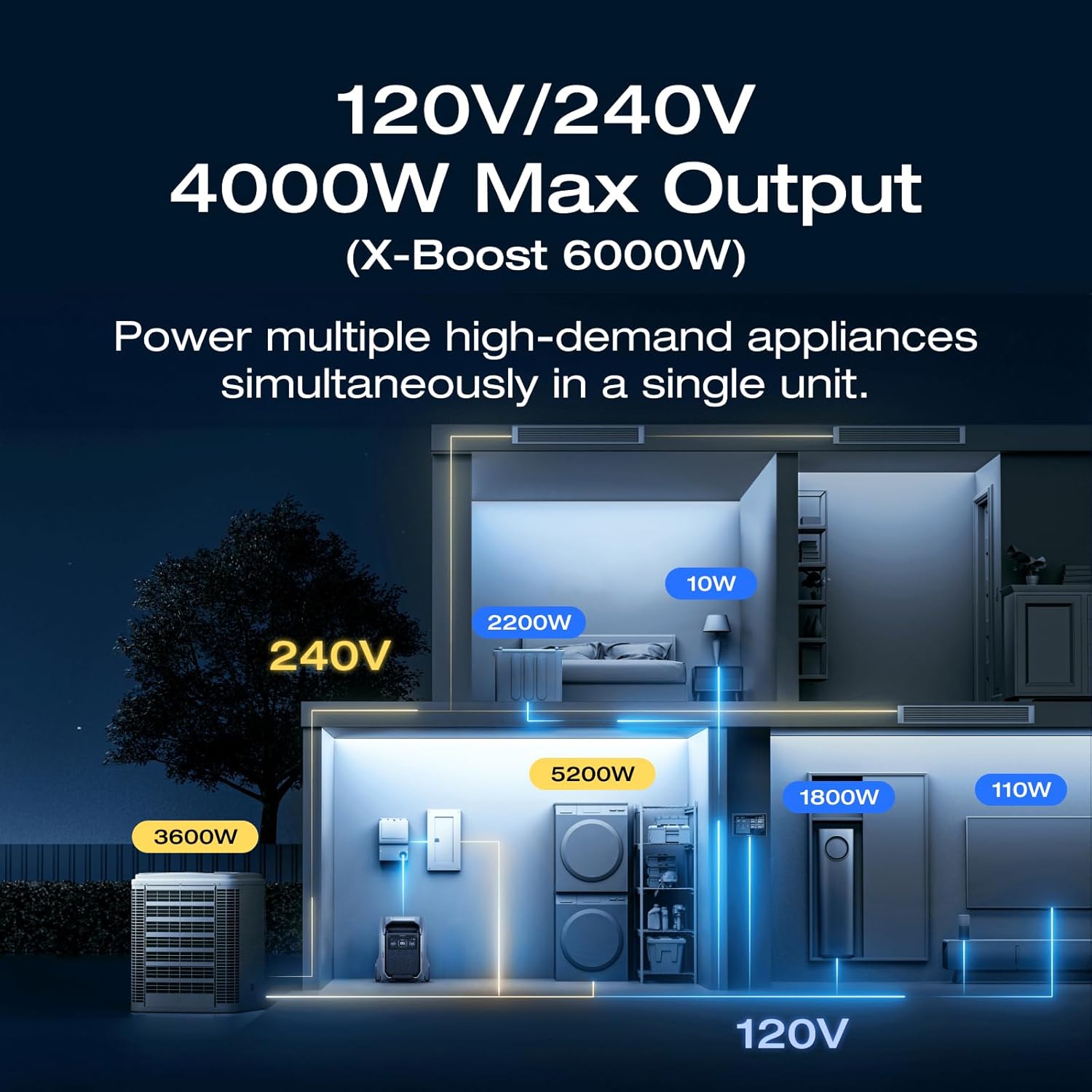
Image: The 400W solar panel being sprayed with water, demonstrating its IP68 waterproof rating and durability.
6. Troubleshooting
6.1 Common Issues and Solutions
- Unit Not Powering On: Ensure the main power switch is pressed. Check battery level. If completely discharged for prolonged periods, specialized equipment might be needed for recovery.
- Slow AC Charging: If using a 15A house outlet or small generator, adjust the charge rate via the slide switch near the AC input or through the EcoFlow app. Avoid using thin extension cords.
- No Output from AC/DC Ports: Ensure the respective AC or DC output buttons on the display are turned on. Check for overload indicators on the display.
- App Connectivity Issues: Ensure Bluetooth and Wi-Fi are enabled on your smartphone. Restart the app and the DELTA Pro 3 unit.
- Overload Protection: If an appliance draws too much power, the unit may shut down to protect itself. Reduce the load or use the X-Boost feature for compatible devices.
Video: This video demonstrates the various charging options for the DELTA Pro 3, including AC wall charging, solar, and other methods, which can be helpful for troubleshooting charging issues.
7. Specifications
| Feature | Detail |
|---|---|
| Brand | EF ECOFLOW |
| Model Name | EFD521 |
| Wattage (Battery Capacity) | 4096 Watt-hours |
| Output Wattage (AC) | 4000W (6000W with X-Boost, scalable up to 12000W) |
| Voltage | 120 Volts / 240 Volts |
| Power Source | Solar Powered |
| Fuel Type | Non-gasoline |
| Item Weight | 150 Pounds |
| Product Dimensions | 16.16"L x 13.43"W x 27.38"H |
| Battery Type | LFP (Lithium Iron Phosphate) |
| IP Rating (Battery Pack) | IP65 |
| IP Rating (400W Solar Panel) | IP68 |
| UPC | 842783143105 |
8. Warranty and Support
The EF ECOFLOW DELTA Pro 3 comes with a 5-year warranty, ensuring peace of mind regarding its quality and performance. For any issues, questions, or technical support, please contact EcoFlow customer service. They are available to assist you with any concerns related to your product.
You can visit the official EF ECOFLOW Store on Amazon for more information and support resources.