
1. Product Overview
Thank you for choosing the R.W.FLAME Nugget Ice Maker. This countertop ice machine is designed to provide soft, chewable pellet ice quickly and efficiently, perfect for your kitchen, office, or parties. With its compact design and user-friendly features, enjoying fresh ice has never been easier.

Image: The R.W.FLAME Nugget Ice Maker in black, shown with an ice scoop and a refreshing blue beverage, highlighting its compact size and the type of ice it produces.
Key Features:
- Fast Ice Making: Produces ice cubes in approximately 10 minutes, with a capacity of up to 34 pounds in 24 hours.
- Self-Cleaning Function: Simplifies maintenance with an automatic cleaning cycle.
- Transparent Cover & LED Light: Allows monitoring of the ice-making process and provides indicators for 'Ice Full' and 'Add Water'.
- Compact & Portable Design: Measuring 11.3(D) x 8.66(W) x 12.68(H) inches, it is easy to move and fits well in various spaces.
- Quiet Operation: Engineered with a quiet cooling system for a tranquil environment.

Image: An infographic illustrating the key performance metrics of the nugget ice maker, including its daily ice production capacity, speed of ice generation, and water tank volume.

Image: Two vibrant red cocktails garnished with lime and mint, showcasing the soft, chewable nugget ice produced by the machine, ideal for beverages.
2. What's in the Box
Upon unpacking your R.W.FLAME Nugget Ice Maker, please ensure all components are present and in good condition:
- R.W.FLAME Nugget Ice Maker Unit
- Ice basket
- Ice Scoop
- User Manual (this document)
3. Setup
3.1 Unpacking
- Carefully remove the ice maker from its packaging.
- Remove all packing materials, tape, and protective film from the unit.
- Retain the packaging for future storage or transportation.
3.2 Placement
- Place the ice maker on a flat, stable, and level surface.
- Ensure there is adequate ventilation around the unit (at least 4 inches of space on all sides). Do not block the air vents.
- Avoid placing the unit near heat sources (e.g., ovens, radiators) or in direct sunlight.
- Ensure the power outlet is easily accessible.
3.3 Initial Cleaning
Before first use, it is recommended to clean the ice maker:
- Add clean drinking water to the water tank up to the MAX fill line.
- Long-press the "On/Off" button for 5 seconds to initiate the automatic self-cleaning cycle.
- Allow the cleaning cycle to complete (approximately 15 minutes).
- Drain the water from the unit using the drainage plug located at the bottom or side.
- Wipe the interior and exterior with a soft, damp cloth.

Image: A close-up view of the drainage plug, typically located at the bottom or side of the unit, used for emptying water from the reservoir.
4. Operating Instructions
4.1 Making Ice
- Ensure the unit is plugged into a grounded electrical outlet.
- Open the transparent cover and remove the ice basket.
- Fill the water tank with clean drinking water up to the MAX fill line. Do not overfill.
- Replace the ice basket and close the transparent cover.
- Press the "On/Off" button once to start the ice-making process. The indicator light will illuminate.
- The ice maker will begin producing ice in approximately 10 minutes.
- When the ice basket is full, the "Ice Full" indicator light will turn on, and the machine will pause. Remove ice to resume production.
- If the water level is low, the "Add Water" indicator light will turn on. Add more water to the tank to continue ice production.

Image: The R.W.FLAME Nugget Ice Maker with a detailed view of its control panel, highlighting the simple one-click operation button and indicator lights for 'Ice Full' and 'Add Water'.
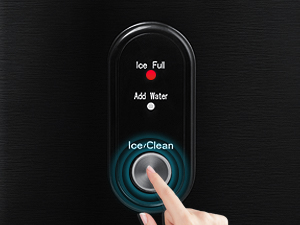
Image: A close-up of the ice maker's intuitive control panel, showing the single 'Ice/Clean' button and the indicator lights for 'Ice Full' and 'Add Water', emphasizing ease of use.
4.2 Removing Ice
Use the provided ice scoop to remove ice from the ice basket. Do not use sharp objects, as this may damage the unit.

Image: The ice basket of the R.W.FLAME Nugget Ice Maker, filled with fresh nugget ice, ready for use. A lemon and rosemary sprigs are visible, suggesting its use in beverages.
5. Maintenance
5.1 Self-Cleaning Function
The self-cleaning function helps maintain the hygiene of your ice maker:
- Ensure the water tank is filled with clean water.
- Long-press the "On/Off" button for 5 seconds. The unit will enter self-cleaning mode.
- The cleaning cycle will run for approximately 15 minutes.
- Once complete, drain the water from the unit.

Image: The R.W.FLAME Nugget Ice Maker during its self-cleaning cycle, illustrating the internal water circulation process that helps maintain cleanliness.
5.2 Regular Cleaning
- Always unplug the unit before cleaning.
- Wipe the exterior with a soft, damp cloth.
- For the interior, use a mild detergent and water solution. Rinse thoroughly with clean water.
- Ensure all parts are completely dry before reassembling or storing the unit.
- It is recommended to clean the unit at least once a week or more frequently depending on usage.
5.3 Storage
If the ice maker will not be used for an extended period:
- Perform a self-cleaning cycle and drain all water.
- Ensure the unit is completely dry.
- Store the ice maker in a cool, dry place, away from direct sunlight and heat sources.
6. Troubleshooting
If you encounter issues with your ice maker, please refer to the following common problems and solutions:
| Problem | Possible Cause | Solution |
|---|---|---|
| "Add Water" indicator is on. | Water tank is empty or water level is too low. | Add clean drinking water to the water tank up to the MAX fill line. |
| "Ice Full" indicator is on. | Ice basket is full. | Remove ice from the ice basket. |
| Ice maker is not producing ice. | No water, power issue, or ambient temperature is too high. | Check water level, ensure unit is plugged in, and place in a cooler environment. |
| Ice tastes strange. | Unit needs cleaning or water quality is poor. | Perform self-cleaning cycle. Use fresh, filtered water. |
| Unusual noise during operation. | Unit not level, or internal components need inspection. | Ensure unit is on a flat, stable surface. If noise persists, contact customer support. |
If the problem persists after attempting these solutions, please contact R.W.FLAME customer support for assistance.
7. Specifications
| Specification | Value |
|---|---|
| Brand | R.W.FLAME |
| Model Name | Z580012-Stainless Black-3 |
| Item Model Number | ZYP-Z580012 |
| Product Dimensions (D x W x H) | 11.3" x 8.66" x 12.68" (12.6"D x 11.22"W x 8.66"H) |
| Weight | 21.98 Pounds |
| Capacity (Water Tank) | 1.1 Liters |
| Ice Production (24 Hours) | 34 lbs |
| Ice Making Time | Approx. 10 minutes |
| Wattage | 130 watts |
| Manufacturer | R.W.FLAME |
| Date First Available | April 1, 2024 |
8. Warranty and Support
The R.W.FLAME Nugget Ice Maker comes with a standard manufacturer's warranty. Please refer to the warranty card included with your product for specific terms and conditions, or visit the official R.W.FLAME website for detailed warranty information.
For technical support, troubleshooting assistance beyond this manual, or warranty claims, please contact R.W.FLAME customer service. Contact information can typically be found on the product packaging, the official brand website, or your purchase receipt.
Customer Service Contact:
- Refer to your product packaging or the R.W.FLAME official website for the most current contact details.


