
1. Introduction
This manual provides essential information for the MULS 14.4V 2600mAh Li-ion battery, designed as a replacement for various Pyle Pure Clean robot vacuum cleaner models. It covers product specifications, compatibility, safety guidelines, installation procedures, and maintenance tips to ensure optimal performance and longevity of your replacement battery.

Image 1.1: The MULS 14.4V 2600mAh rechargeable battery pack, showing its label with voltage and capacity information.
2. Safety Information
WARNING: Read all safety instructions before use. Failure to follow these instructions may result in electric shock, fire, or serious injury.
- Batteries are prohibited from being used in water or fire.
- Do not knock or disassemble the battery.
- Keep the battery away from children and pets.
- Do not short-circuit the battery terminals.
- Do not expose the battery to extreme temperatures (above 60°C/140°F or below -20°C/-4°F).
- Dispose of used batteries according to local regulations. Do not dispose of in household waste.

Image 2.1: Visual representation of the battery's safety features, including Over-Current, Over-Heating, Over-Discharge, Short-Circuit, Over-Voltage, and Over-Charge Protection.
This battery is certified by CE, FCC, and RoHS, ensuring it meets high safety and quality standards. It incorporates multiple protection mechanisms to prevent common battery-related hazards.
3. Product Specifications
The MULS 14.4V PUCRC95 replacement battery is engineered with high-quality materials and circuit boards to ensure reliable performance and durability.
- Battery Type: Rechargeable Li-ion
- Voltage: 14.4V
- Capacity: 2600mAh
- Item Weight: Approximately 1.9 pounds
- Package Dimensions: Approximately 5.4 x 4.8 x 1.18 inches

Image 3.1: Detailed product parameters of the rechargeable battery pack, highlighting its Li-ion type, 14.4V voltage, and 2600mAh capacity.
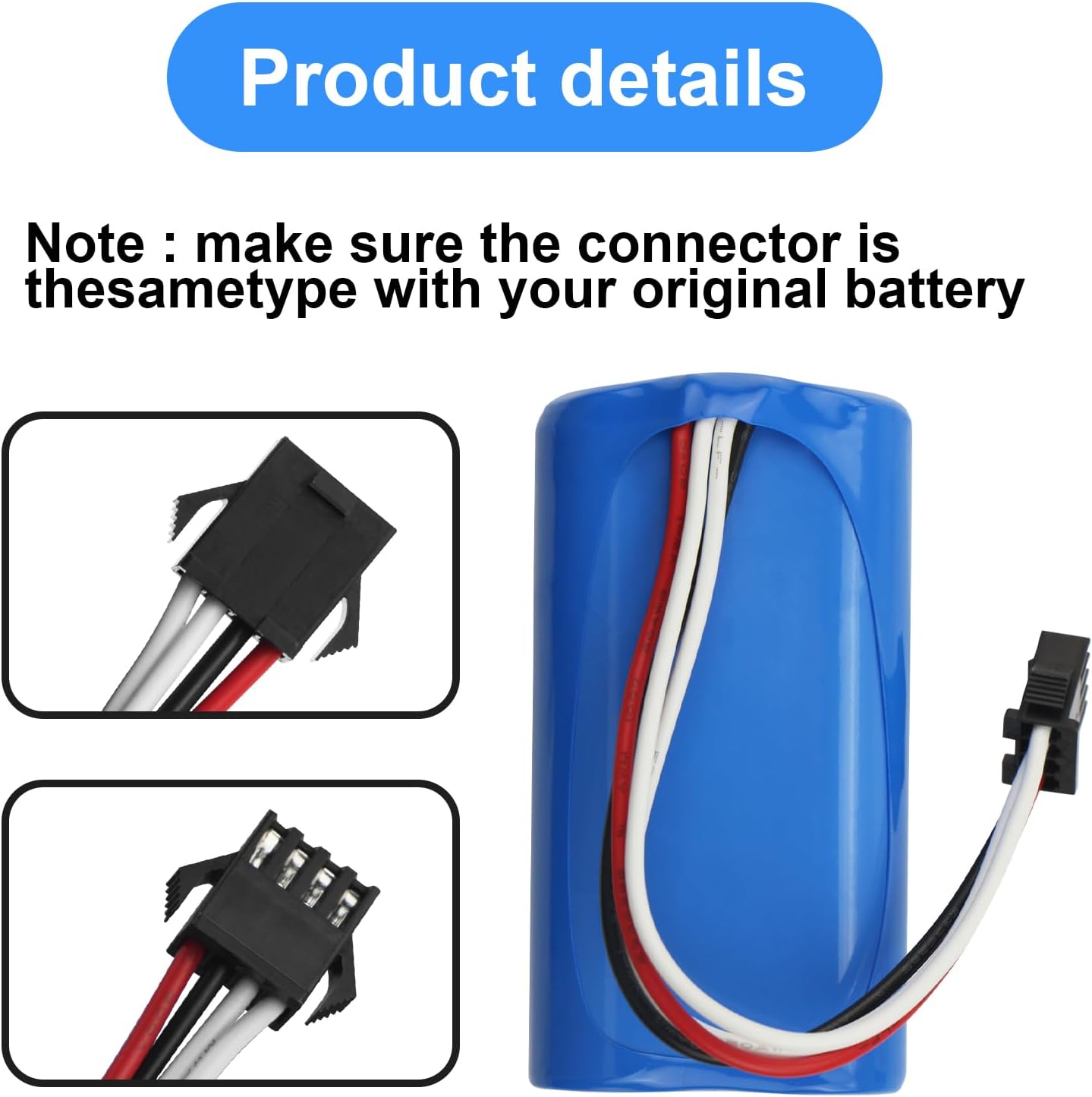
Image 3.2: Close-up view of the battery's connector and its approximate dimensions (1.45 inches height, 2.75 inches length).
4. Compatibility
This MULS replacement battery is compatible with the following Pyle Pure Clean Robot Vacuum Cleaner models:
- Pyle Pure Clean PUCRC95 Robot Vacuum Cleaner
- Pyle Pure Clean PRTPUCRC9520 Robot Vacuum Cleaner
- Pyle Pure Clean PUCRC95UK Robot Vacuum Cleaner
- Pyle Pure Clean PUCRC96B Robot Vacuum Cleaner
It is designed as a direct replacement for part number: PRTPUCRC95BATT Cleaner.

Image 4.1: The replacement battery shown alongside two Pyle Pure Clean PUCRC95 robot vacuum cleaners, illustrating compatibility.
Important: Before installation, carefully compare the connector type of this replacement battery with your original battery to ensure they are identical. Incompatibility of the connector will prevent proper installation and function.
5. Installation (Battery Replacement)
Follow these general steps to replace the battery in your Pyle Pure Clean robot vacuum cleaner. Specific steps may vary slightly by model, refer to your vacuum's original manual for detailed instructions on accessing the battery compartment.
- Power Off: Ensure your robot vacuum cleaner is completely powered off and disconnected from its charging base or power adapter.
- Access Battery Compartment: Turn the robot vacuum upside down. Locate the battery compartment, usually secured by screws or a latch. Use a screwdriver if necessary to open it.
- Remove Old Battery: Carefully disconnect the old battery's connector from the vacuum's port. Remove the old battery from its compartment.
- Install New Battery: Insert the MULS replacement battery into the compartment, ensuring it fits snugly. Connect the battery's plug to the corresponding port in the vacuum. Ensure the connection is firm and secure.
- Close Compartment: Close the battery compartment cover and secure it with screws or latches.
- Initial Charge: Place the robot vacuum on its charging base or connect it to the power adapter for an initial full charge before its first use.
6. Charging Guidelines
To maximize the lifespan and performance of your new MULS battery, adhere to the following charging practices:
- Always use the original charging base or power adapter provided with your robot vacuum cleaner.
- Allow the battery to fully charge before its first use and after each cleaning cycle.
- Avoid completely draining the battery frequently, as this can reduce its overall lifespan.
- Do not leave the battery on charge for extended periods beyond a full charge, though modern Li-ion batteries have overcharge protection.
- Charge the battery in a well-ventilated area, away from flammable materials.
7. Maintenance
Proper maintenance can extend the life of your battery:
- Storage: If the robot vacuum will not be used for an extended period, store the battery at approximately 50% charge in a cool, dry place. Recharge it every 3-6 months to prevent deep discharge.
- Cleaning: Keep the battery terminals and compartment clean and free of dust or debris.
- Temperature: Operate and store the battery within recommended temperature ranges to prevent damage.
8. Troubleshooting
If you encounter issues with your new battery, consider the following:
| Problem | Possible Cause | Solution |
|---|---|---|
| Battery does not fit or connect | Incorrect connector type or physical dimensions. | Verify the battery's connector matches your original battery. Double-check your vacuum model number against the compatibility list. |
| Robot vacuum does not power on after battery replacement | Battery not properly connected or not charged. | Ensure the battery connector is firmly seated. Place the vacuum on its charging base for a full charge. |
| Short run time | Battery not fully charged or degraded performance. | Ensure the battery is fully charged. If the issue persists after several charge cycles, contact customer support. |
9. Warranty and Customer Support
MULS is committed to providing high-quality products and excellent customer service.
- Money-Back Guarantee: Enjoy a 30-day no-questions-asked full money-back guarantee.
- Exchange Guarantee: A 12-month exchange guarantee is provided for product defects or performance issues.
- Customer Service: For any problems or inquiries, please contact our 24/7 email service. We are dedicated to resolving your concerns efficiently.
Please note that the return window through the retailer may close a month after product receipt. For issues beyond this period but within the 12-month exchange guarantee, please contact MULS directly.