
1. Product Overview
The AMORIL Upgraded Aluminum Servo Saver (Part Number R11137) is designed to enhance the durability and performance of your Mini 1/10 Remote Control Truck RZ001G-A. Crafted from robust aluminum, this component provides superior protection for your RC truck's steering servo, preventing damage from impacts and excessive force.
Key Features:
- Durable Construction: Made from high-quality aluminum for long-lasting performance and increased resilience.
- Servo Saver Mechanism: Engineered to absorb shocks and protect the steering servo from damage during operation.
- Compatibility: Specifically designed to fit Mini 1/10 RC Truck RZ001G-A models.
- Included Components: Comes with a spring and a screwdriver for convenient installation.
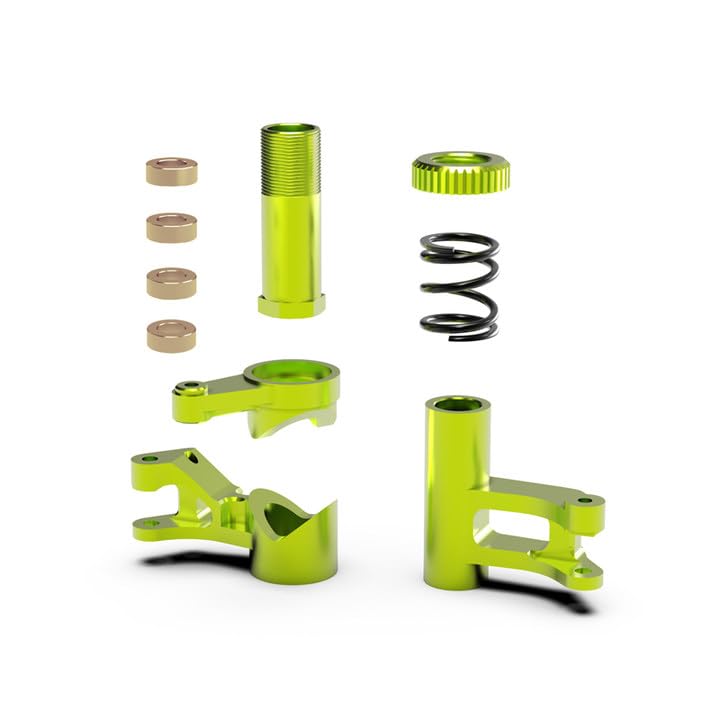
Figure 1: AMORIL Upgraded Aluminum Servo Saver with included spring and screwdriver.
2. Installation Instructions
This section outlines the general steps for installing the AMORIL Upgraded Aluminum Servo Saver. Always refer to your RC truck's specific manual for detailed disassembly and reassembly procedures.
Required Tools:
- Screwdriver (included)
- Small pliers (not included, may be helpful)
Installation Steps:
- Prepare the Vehicle: Ensure your RC truck is powered off and the battery is disconnected. Place the truck on a stable, clean surface.
- Access the Servo Saver: Carefully remove any body panels or components that obstruct access to the existing servo saver and steering servo. This may involve unscrewing several small screws.
- Remove the Old Servo Saver: Using the appropriate screwdriver, detach the old servo saver from the steering servo horn and any associated linkages. Note the orientation of the components for reassembly.
- Install the New Servo Saver:
- Assemble the new AMORIL aluminum servo saver, ensuring the included spring is correctly seated.
- Attach the new servo saver to the steering servo horn. Ensure it is securely fastened but not overtightened, allowing the servo saver mechanism to function correctly.
- Reconnect any steering linkages to the new servo saver.
- Test Steering Functionality: Before reassembling the truck, reconnect the battery and power on the RC system. Carefully test the steering by moving the steering wheel on your remote control. Ensure the wheels turn smoothly and the servo saver operates without binding.
- Reassemble the Vehicle: Once satisfied with the installation and functionality, reattach all removed body panels and components.
Caution: Overtightening screws can damage plastic components. Always use appropriate force.
3. Operation and Function
The AMORIL Upgraded Aluminum Servo Saver is a passive component designed to protect your RC truck's steering servo. It does not require active operation by the user.
How a Servo Saver Works:
When the steering system experiences an impact or excessive force (e.g., hitting an obstacle, landing hard), the servo saver's spring-loaded mechanism allows the steering linkage to momentarily slip or flex. This action absorbs the shock, preventing the full force from being transmitted directly to the delicate gears inside the steering servo. The aluminum construction of this servo saver provides enhanced rigidity and durability compared to standard plastic versions, offering superior protection.
4. Maintenance
Regular maintenance ensures the longevity and optimal performance of your AMORIL Aluminum Servo Saver.
- Inspection: Periodically inspect the servo saver for any signs of wear, bending, or damage, especially after significant impacts.
- Cleaning: Keep the servo saver free from dirt, dust, and debris. A soft brush or compressed air can be used for cleaning. Avoid harsh chemicals that may damage the aluminum finish.
- Fastener Check: Ensure all screws and fasteners connecting the servo saver to the servo horn and steering linkages remain tight. Retighten if necessary, but avoid overtightening.
- Spring Condition: Check the spring for any signs of fatigue or deformation. A worn spring may reduce the effectiveness of the servo saver.
5. Troubleshooting
If you encounter issues related to your steering system after installing the servo saver, consider the following:
- Loose Steering: If the steering feels excessively loose or unresponsive, check that the servo saver is securely attached and that its spring is properly seated and not worn out. Ensure all steering linkages are tight.
- Binding/Sticking Steering: Inspect the servo saver and surrounding components for any obstructions or misalignments that might cause binding. Ensure screws are not overtightened, which can restrict movement.
- Servo Damage After Impact: While the servo saver is designed to protect, extreme impacts can still cause damage. If the servo is no longer functioning correctly, it may need replacement.
- Incorrect Part Fitment: Double-check that the servo saver is indeed the correct part for your Mini 1/10 RC Truck RZ001G-A.
6. Product Specifications
| Attribute | Detail |
|---|---|
| Brand | AMORIL |
| Model Name | RZ001G-A (Compatible with) |
| Manufacturer Part Number | R11137 |
| Material Type | Aluminum |
| Color | Green |
| Included Components | Spring, Screwdriver |
| Assembly Required | Yes |
| Recommended Age | Adult (168 months and up) |
| Item Dimensions (Approx.) | 0.1 x 0.1 x 0.1 inches (Note: These dimensions are likely placeholders and may not represent the actual product size accurately.) |
7. Warranty and Support
For specific warranty information regarding your AMORIL Upgraded Aluminum Servo Saver, please refer to the purchase documentation or contact the retailer where the product was acquired.
If you require technical assistance or have questions about the product, please contact AMORIL customer support through their official website or the platform where you made your purchase. Provide your product model number (R11137) and a detailed description of your inquiry for efficient support.
