
Introduction
This manual provides detailed instructions for the installation, operation, and maintenance of your METEESER 9" Touchscreen Android Car Radio. Designed specifically for Chevrolet Chevy Camaro models from 2008 to 2015, this unit integrates advanced features such as wireless CarPlay, Android Auto, Bluetooth, GPS navigation, DSP EQ, and backup camera support to enhance your driving experience.
What's in the Box
Please verify that all components listed below are included in your package:
- Main Head Unit
- Backup Camera
- GPS Antenna
- External Microphone
- USB Cable x 2
- Manual
- RCA Cable
- Canbus Decoder
- Acoustic Adapter
- Power Cable
- Installation Tool
- Rear Camera Input Cable
- Radio Antenna

Image: Overview of the METEESER car stereo package contents, including the main unit, GPS antenna, RCA cables, USB cables, Canbus, microphone, rear camera, acoustic adapter, power cable, installation tool, rear camera input cable, and radio antenna.
Key Features
The METEESER car stereo offers a range of features designed for convenience and performance:
- Wireless Apple CarPlay & Android Auto: Seamless integration with your smartphone for navigation, music, calls, and messaging without a USB cable.
- Custom Fit for Chevrolet Camaro 2008–2015: Designed for a perfect fit and supports factory steering wheel controls.
- Large 9" HD Touchscreen: High-resolution display for clear visuals and responsive control.
- Bluetooth & DSP Audio Enhancement: Stable hands-free calls, music streaming, and advanced audio tuning with DSP EQ.
- GPS Navigation & Backup Camera Support: Built-in GPS with online/offline maps and automatic rear view display when backing up.

Image: Demonstrates the wireless CarPlay and Android Auto interface, showing smartphone integration for apps like Spotify, Maps, and Messages.

Image: Illustrates the WiFi connection capability and GPS navigation features, displaying both online and offline map options.
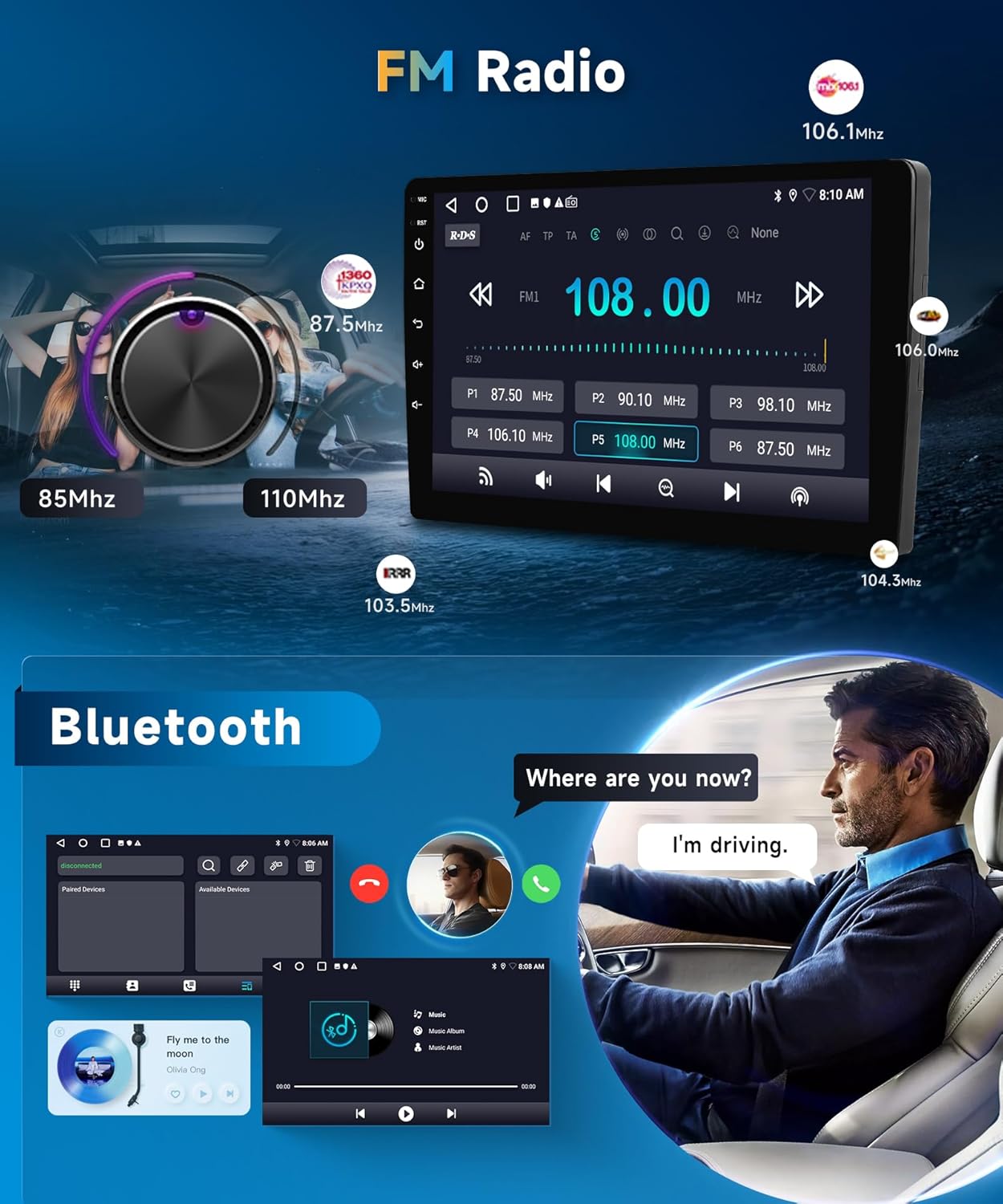
Image: Displays the FM radio interface with frequency tuning and the Bluetooth hands-free calling screen.

Image: Shows the backup camera display with parking guidelines and highlights the integration with steering wheel controls.

Image: Features the split-screen mode for multitasking and the Digital Sound Processor (DSP) equalizer interface for audio customization.
Setup and Installation
Professional installation is recommended for optimal performance and to avoid potential issues. Ensure your vehicle's central control panel matches the product's design before installation.
Pre-Installation Check
Before beginning installation, compare your car's original central control panel with the product images to confirm compatibility. This unit is designed for Chevrolet Chevy Camaro models from 2008-2015.

Image: Shows the dashboard of a Chevrolet Chevy Camaro before and after the installation of the METEESER 9" touchscreen car stereo, highlighting the custom fit.
Wiring Diagram
Refer to the following diagram for proper wiring connections. Ensure all cables are securely connected to their corresponding ports.

Image: A comprehensive wiring diagram illustrating the connections for the power cable, RCA input/output, USB ports, camera input, GPS antenna, and Canbus decoder.
Important: When connecting the unit, ensure the car is running to prevent potential fuse issues due to higher power draw compared to the stock radio.
Operating Instructions
Wireless CarPlay & Android Auto Connection
To connect your smartphone wirelessly, navigate to the Zlink application on the head unit. Enable Bluetooth on your phone and pair it with the car stereo (device name: Car BT). Once paired, confirm the connection on your phone to activate CarPlay or Android Auto. This allows for hands-free calls, navigation, music, and messaging.
Video: This video demonstrates the step-by-step process for connecting a smartphone to the car stereo using wireless CarPlay and Android Auto, including Bluetooth pairing and app activation.
Bluetooth & DSP Audio
The built-in Bluetooth module provides stable connections for hands-free calls and audio streaming. Utilize the Digital Sound Processor (DSP) with its EQ tuning capabilities to customize your audio experience, adjusting frequencies for clearer sound, deeper bass, and overall enhanced performance.
GPS Navigation
The unit supports built-in GPS navigation. You can use both online and offline maps for guidance. Ensure the GPS antenna is properly installed for optimal signal reception.
Backup Camera Functionality
When a compatible backup camera is connected, the display will automatically switch to the rear view when the vehicle is put into reverse, aiding in safe parking and maneuvering.
Steering Wheel Controls
The system supports your factory steering wheel controls, allowing you to manage audio, calls, and other functions without taking your hands off the wheel.
Split Screen Mode
Utilize the split-screen feature to run two applications simultaneously, such as navigation and music playback, for enhanced multitasking.
Maintenance
To ensure the longevity and optimal performance of your car stereo, follow these maintenance guidelines:
- Cleaning: Use a soft, dry cloth to clean the touchscreen and exterior. Avoid abrasive cleaners or solvents.
- Software Updates: Periodically check for software updates to ensure you have the latest features and bug fixes. Follow the instructions provided with the update package.
- Environmental Conditions: Avoid exposing the unit to extreme temperatures or direct sunlight for prolonged periods.
Troubleshooting
If you encounter any issues, refer to the solutions below. For persistent problems, contact customer support.
Dashboard Language Changed to Chinese
After installation, some users may find their car's instrument panel language has changed. This can often be resolved by navigating to the car's settings menu on the head unit and changing the language to English or your preferred language. If the issue persists, contact customer support for a compatible agreement version.
Backup Camera Not Working
If the backup camera does not display an image when in reverse, check all connections, especially the rear camera input cable and power supply to the camera. Ensure the camera is properly installed and functioning. If the issue continues, the camera unit may be defective, and you should contact support.
Power/Fuse Issues During Installation
The new car stereo may draw more power than the original unit. To prevent blowing a fuse during installation, it is recommended to have your car running when you plug in the new head unit. If a fuse has already blown, replace it with one of the correct amperage.
Specifications
| Item Weight | 4.49 pounds |
| Product Dimensions | 9.4 x 6.4 x 11.1 inches |
| Display Size | 9 Inches |
| Resolution | 720 x 1280 |
| Voice Command | Touchscreen |
| Connectivity Technology | Bluetooth, Wi-Fi, USB, FM/RDS |
| Special Feature | Wireless CarPlay |
| Map Type | Worldwide |
| Vehicle Service Type | Car |
| Mounting Type | Dashboard Mount |
Warranty and Support
Your METEESER car stereo comes with a 2-year warranty. For technical assistance or warranty claims, please contact METEESER Tech customer support.
Contacting Support
You can reach customer support by visiting the METEESER Store on Amazon and clicking the "Ask a question" button. Alternatively, you may find an email address for direct support on the product packaging or included documentation.

Image: Details on METEESER's support, including lifetime technical support, professional customer service, a 2-year warranty, and a contact email address.