
Introduction
This instruction manual provides detailed guidance for assembling and operating your Mould King 19015T Trailer Truck Technique Building Blocks Kit. This advanced model kit consists of 3,399 pieces, designed for enthusiasts aged 14 and above. It features remote control and app control capabilities, along with pneumatic functions for realistic operation. Please read this manual thoroughly before beginning assembly to ensure a smooth and enjoyable building experience.
Safety Information
- This product contains small parts and is recommended for individuals aged 14 years and older.
- Keep all packaging materials away from children to prevent choking hazards.
- Do not ingest any building block pieces.
- Ensure batteries are inserted correctly according to polarity markings.
- Do not mix old and new batteries, or different types of batteries.
- Dispose of used batteries responsibly.
- Avoid exposing electronic components to water or extreme temperatures.
Package Contents
Before starting assembly, verify that all components are present. The kit includes:
- 3,399 Building Block Pieces
- 1x MK4 Battery Box
- 2x M Motors
- 1x Remote Control
- Pneumatic Accessories
- Instruction Manual (this document)
- 1x Lithium Metal Battery (included for operation)

Figure 1: Included electronic components and control methods.
Setup and Assembly
The Mould King 19015T Trailer Truck is an intricate model. Follow the included detailed instruction manual (separate physical booklet) for step-by-step assembly.
- Unpack Components: Carefully open all bags containing building blocks and electronic parts. Organize them by type or color as suggested in the physical manual.
- Review Instructions: Before starting, familiarize yourself with the overall assembly process by reviewing the physical instruction booklet.
- Follow Steps: Assemble the model piece by piece, paying close attention to the diagrams and instructions provided in the physical manual. Ensure all connections are secure.
- Electronic Integration: Install the MK4 battery box, M motors, and pneumatic accessories as directed. Proper connection is crucial for functionality.
- Battery Installation: Insert the included Lithium Metal battery into the battery box, observing correct polarity.

Figure 2: The Mould King 19015T Trailer Truck kit and assembled model.
Note on Compatibility: This 19015T Trailer Truck model can be combined with the 19015 Tractor Truck (sold separately) to create a larger, integrated 2-in-1 vehicle. Refer to the respective manuals for combination instructions.

Figure 3: The 19015T Trailer Truck combined with the 19015 Tractor Truck.
Operating Instructions
The Mould King 19015T Trailer Truck offers dual control modes: a dedicated remote control and a smartphone application.
Remote Control Operation
- Power On: Ensure the battery box on the model is switched on.
- Pairing: Follow the pairing instructions in the physical manual to connect the remote control to the model.
- Movement: Use the joysticks or buttons on the remote control to move the trailer truck (if connected to a tractor) and operate its functions.
- Pneumatic Functions: Specific buttons on the remote control will activate the pneumatic features, such as lifting/lowering the support brackets or operating ramps.

Figure 4: Dual control mode via remote or app.
App Control Operation
- Download App: Download the official Mould King control app from your device's app store.
- Power On: Ensure the battery box on the model is switched on.
- Connect: Open the app and follow the on-screen instructions to connect your smartphone to the model via Bluetooth.
- Control Functions: The app interface will provide virtual controls for driving, steering, and operating the pneumatic functions of the trailer truck.
Key Functions
- Bracket Lift: Use the designated control to raise and lower the trailer's support brackets for coupling and uncoupling.
- Ramp Control: Operate the rear ramps to extend and retract them for loading and unloading.

Figure 5: Pneumatic bracket lift mechanism.
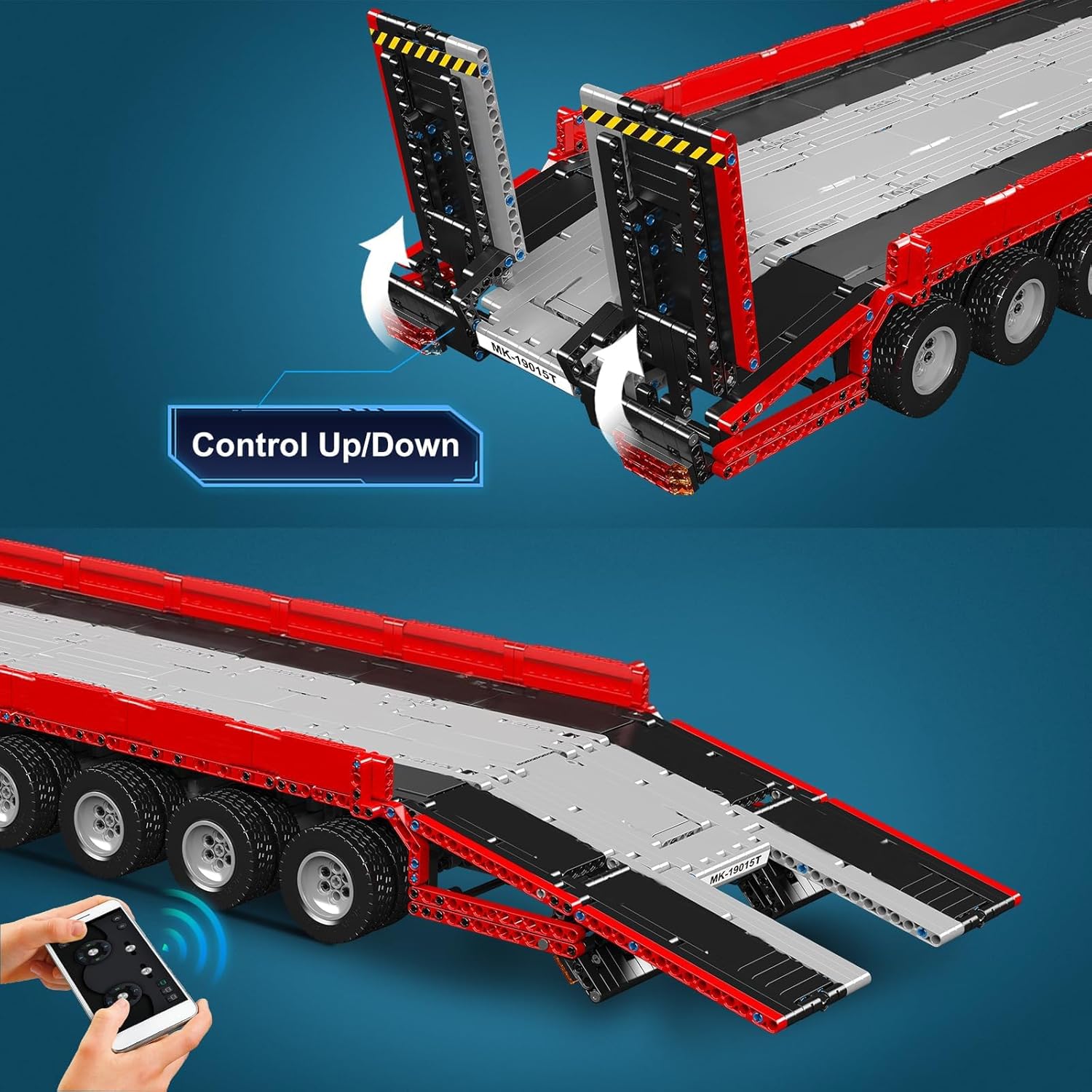
Figure 6: Control for raising and lowering the ramps.
Maintenance
- Cleaning: Dust the model regularly with a soft, dry cloth. For stubborn dirt, use a slightly damp cloth and dry immediately. Do not use harsh chemicals.
- Storage: Store the assembled model in a cool, dry place away from direct sunlight to prevent discoloration or warping of plastic parts.
- Battery Care: Remove the Lithium Metal battery if the model will not be used for an extended period to prevent leakage.
- Component Check: Periodically inspect connections and moving parts for wear or looseness. Re-secure any loose pieces.
Troubleshooting
| Problem | Possible Cause | Solution |
|---|---|---|
| Model does not respond to remote/app. |
|
|
| Gears slip or movement is inconsistent. |
|
|
| Pneumatic functions (e.g., bracket lift, ramps) do not operate. |
|
|
| Missing or damaged parts. |
|
|
Specifications
| Feature | Detail |
|---|---|
| Model Number | 19015T |
| Brand | Mould King |
| Number of Pieces | 3,399 |
| Recommended Age | 14 years and up |
| Assembled Dimensions (Approx.) | 132.5 cm (52.16 inches) Length x 26.2 cm (10.31 inches) Width x 17 cm (6.69 inches) Height |
| Item Weight | 12.42 pounds |
| Material | High-quality ABS Plastic |
| Power Source | 1x MK4 Battery Box (includes 1x Lithium Metal battery) |
| Motors | 2x M Motors |
| Control Methods | Remote Control, Smartphone App Control |
Warranty and Support
For warranty information, missing parts, or technical support, please contact Mould King customer service directly. Refer to the packaging or the official Mould King website for contact details.
Manufacturer: Mould King