
GIKPAL gaming desk
GIKPAL L Shaped Gaming Desk User Manual
Model: gaming desk | Brand: GIKPAL
Introduction
This manual provides comprehensive instructions for the assembly, operation, and maintenance of your GIKPAL L Shaped Gaming Desk. Designed for versatility, this desk can be configured as a 66-inch corner desk or a 95-inch long straight desk, offering flexible solutions for home offices, gaming setups, and study areas. It features a sturdy metal frame, a durable and easy-to-clean desktop, and integrated storage solutions including a movable monitor stand, side storage pockets, headphone hooks, and adjustable shelves.

Figure 1: Overview of the GIKPAL L Shaped Gaming Desk setup.
Setup and Assembly
The GIKPAL L Shaped Gaming Desk is designed for straightforward assembly. All necessary tools and detailed instructions are included to guide you through the process. The desk offers reversible configurations, allowing you to set it up as a left-corner, right-corner, or a long straight desk to best suit your space requirements.
Assembly Steps:
- Unpack Components: Carefully unpack all parts and hardware. Verify that all components listed in the instruction manual are present.
- Identify Configuration: Decide whether you will assemble the desk as a left L-shape, right L-shape, or a long straight desk. Refer to the diagrams below for visual guidance.
- Assemble Frame: Follow the step-by-step instructions to assemble the metal frame components. Ensure all screws are tightened securely but do not overtighten until the entire frame is assembled.
- Attach Desktop Panels: Place the desktop panels onto the assembled frame. Secure them using the provided hardware.
- Install Accessories: Attach the movable monitor stand, side storage bag, and headphone hooks as per your preference and the instructions.
- Adjust Leveling Feet: Adjust the footpads at the bottom of the desk to ensure stability and prevent scratching your floor.

Figure 2: Desk dimensions and configuration options for assembly.
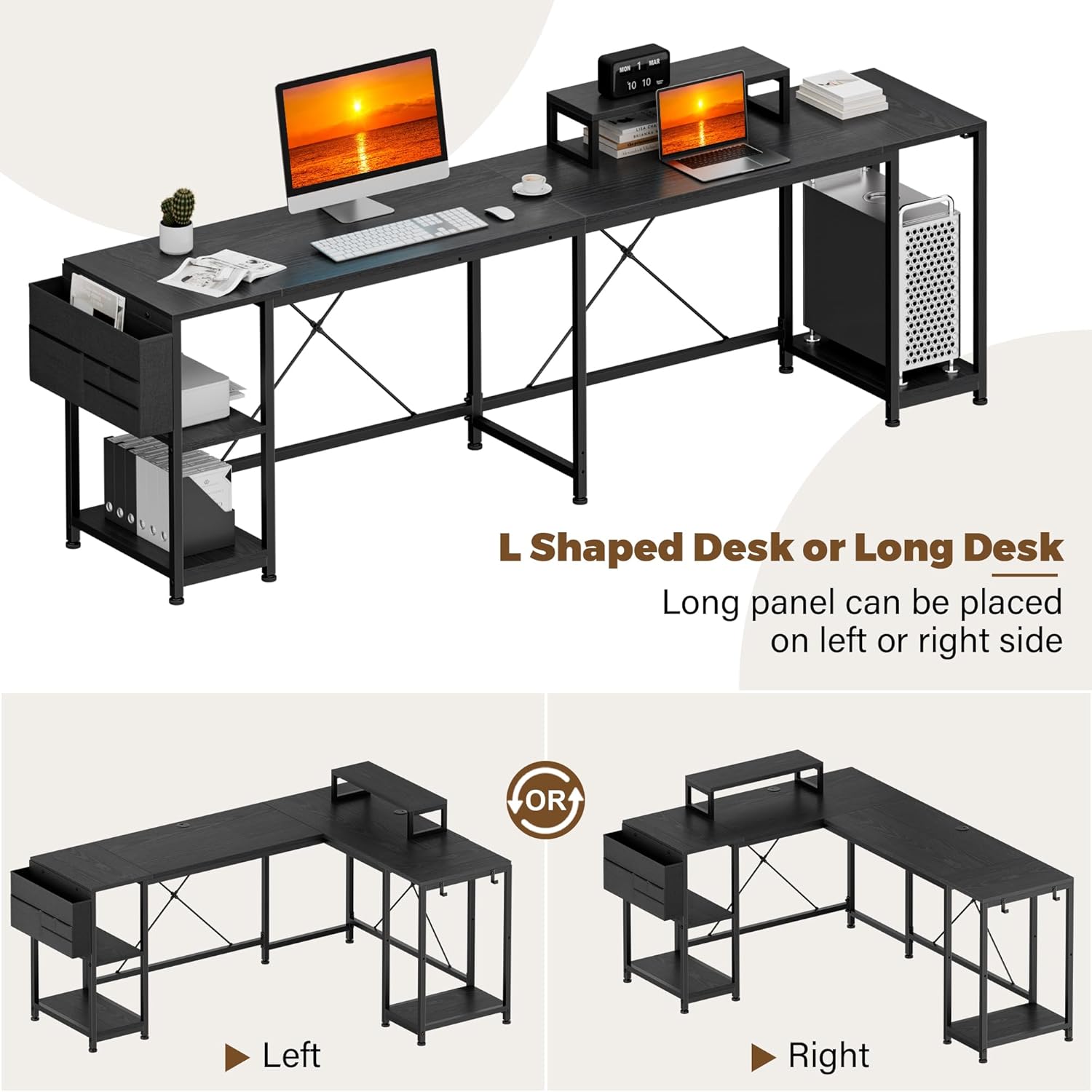
Figure 3: Visual representation of the reversible L-shaped and long straight desk configurations.
Operating and Features
Your GIKPAL L Shaped Gaming Desk is equipped with several features designed to enhance your workspace organization and comfort.
- Movable Monitor Stand: The included monitor stand can be positioned anywhere along the desk surface to optimize your viewing angle and free up desktop space.
- Side Storage Bag: A convenient side storage bag is provided for easy access to documents, notebooks, or other office supplies, helping to keep your main desktop clear.
- Headphone/Bag Hooks: Integrated hooks allow you to hang headphones, bags, or other accessories, keeping them within reach and off the floor.
- Flexible Storage Shelves: The desk includes adjustable shelves that can accommodate various items, including a computer tower, books, or decorative items. These shelves help customize your storage space.
- Cable Management: Built-in cable management grommets help organize and route your power and data cables, maintaining a tidy and safe workspace.

Figure 4: Detailed view of key desk features.

Figure 5: Examples of flexible storage shelves and space customization.
Maintenance
To ensure the longevity and appearance of your GIKPAL L Shaped Gaming Desk, follow these simple maintenance guidelines:
- Cleaning: Wipe the desktop and metal frame with a damp cloth. For stubborn marks, a mild soap solution can be used, followed by wiping with a clean, dry cloth. Avoid harsh chemicals or abrasive cleaners.
- Spills: Immediately wipe up any spills to prevent staining or damage to the desktop surface.
- Hardware Check: Periodically check all screws and fasteners to ensure they remain tight. Retighten if necessary to maintain desk stability.
- Avoid Excessive Weight: Do not place excessive weight on the desk or shelves beyond their intended capacity.
Troubleshooting
If you encounter any issues with your GIKPAL L Shaped Gaming Desk, consider the following common troubleshooting tips:
- Desk Wobbles:
- Ensure all assembly screws are fully tightened.
- Adjust the leveling footpads at the bottom of the desk legs to compensate for uneven flooring.
- Missing Parts:
- Double-check all packaging materials. If parts are still missing, contact GIKPAL customer support with your purchase details.
- Difficulty Assembling:
- Review the assembly instructions carefully, paying close attention to the orientation of parts.
- Ensure you are using the correct screws for each step as indicated in the manual.
- If available, refer to any instructional videos provided by GIKPAL for visual guidance.
Specifications
| Feature | Detail |
|---|---|
| Brand | GIKPAL |
| Model Number | gaming desk |
| Product Dimensions (L x W x H) | 95"D x 18.9"W x 29.5"H (Long Straight Desk) |
| Color | Modern Black |
| Style | Gaming |
| Base Material | Metal |
| Top Material Type | Wood |
| Special Feature | Storage Shelf, Movable Monitor Stand, Side Storage Bag, Headphone Hooks, Cable Management |
| Item Weight | 79 Pounds |
| Number Of Shelves | 3 (Adjustable) |
| Assembly Required | Yes (All tools included) |
| Product Care Instructions | Wipe with Damp Cloth |
Customer Support
For any questions, concerns, or assistance with your GIKPAL L Shaped Gaming Desk, please contact GIKPAL customer support. You can often find support contact information on the product packaging or through the official GIKPAL brand store online.
Visit the official GIKPAL store for more information: GIKPAL Store