
Introduction
The YYK-Q63 Wireless Bluetooth 5.3 TWS Earbuds offer an advanced audio experience with robust features designed for active lifestyles. These earbuds provide 60 hours of total playback time, come with a wireless charging case, and feature an LED power display. With IPX7 waterproofing and active noise cancellation, they are suitable for various activities, from daily commutes to intense workouts. The ergonomic design with ear hooks ensures a secure and comfortable fit.
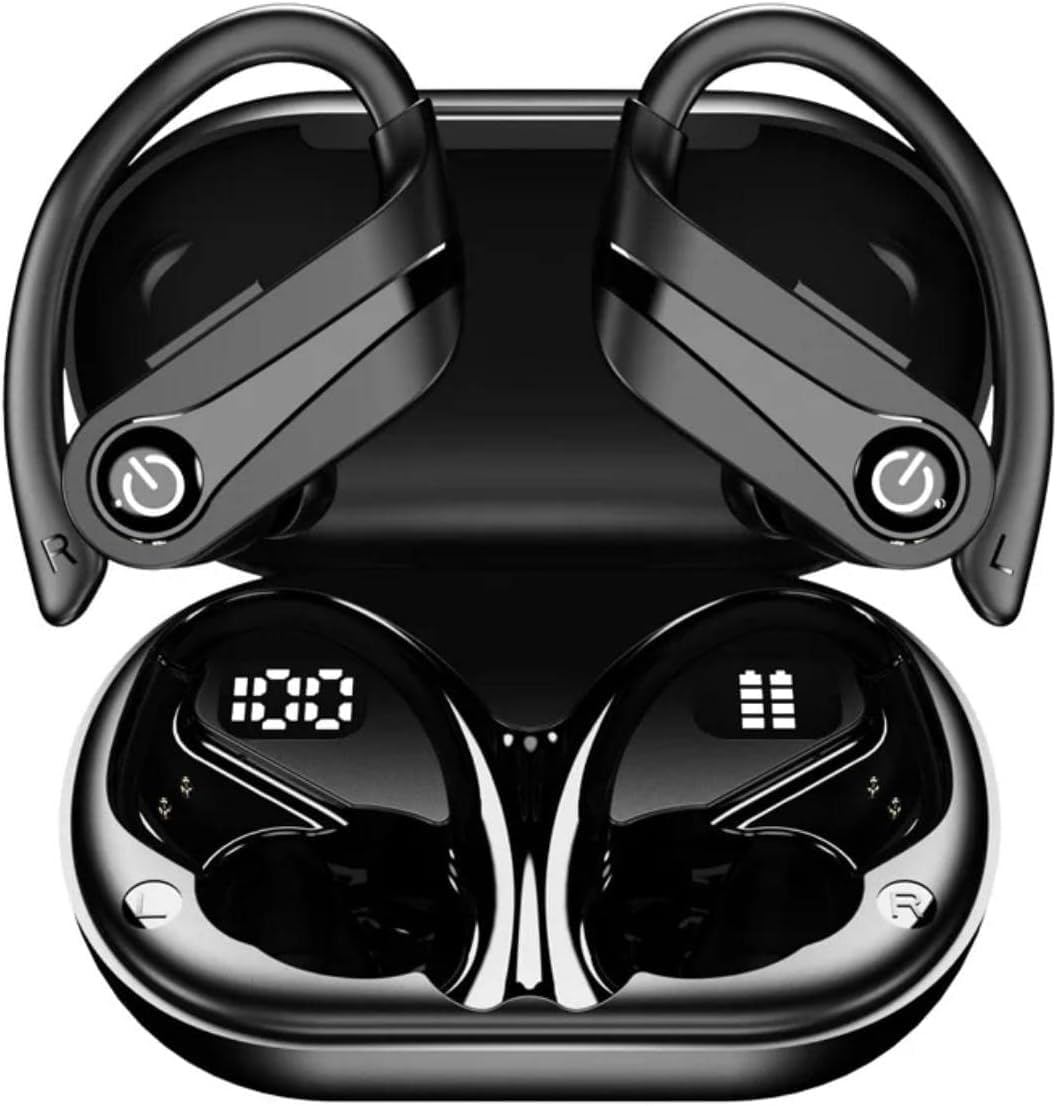
Image: The YYK-Q63 Wireless Bluetooth Earbuds, black, shown in their open charging case, displaying LED battery indicators on the earbuds.
What's in the Box
Upon opening your YYK-Q63 package, please verify that all the following items are included:
- YYK-Q63 Wireless Bluetooth Earbuds (Left and Right)
- Wireless Charging Case
- USB Type-C Charging Cable
- User Manual
- Ear Cushions (various sizes)
Specifications
| Feature | Detail |
|---|---|
| Model Name | YYK-Q63 |
| Connectivity Technology | Wireless (Bluetooth 5.3) |
| Wireless Communication Technology | Bluetooth |
| Bluetooth Version | 5.3 |
| Water Resistance Level | IPX7 Waterproof |
| Noise Control | Active Noise Cancellation |
| Battery Life (Total Playback) | 60 Hours |
| Standby Time | 120 Hours |
| Charging Time | 1-2 Hours |
| Charging Connector | Type-C |
| Earpiece Shape | Ear Hook |
| Built-in Microphone | Yes |
| Volume Control | Yes |
| LED Display | Yes (for power levels) |
| Compatible Devices | Cellphones, Tablets, Laptops, iPod, Gaming Devices |
Setup and Pairing
- Initial Charge: Before first use, place both earbuds into the charging case and connect the Type-C cable to a power source. The LED display on the case will indicate charging status. Charge for 1-2 hours until fully charged.
- Power On: Open the charging case. The earbuds will automatically power on and enter pairing mode. You will see the LED indicators on the earbuds flashing.
- Bluetooth Pairing:
- Go to the Bluetooth settings on your device (smartphone, tablet, laptop).
- Search for available devices.
- Select "YYK-Q63" from the list.
- Once connected, the earbud LEDs will stop flashing, and you may hear a confirmation tone.
- Automatic Reconnection: After initial pairing, the earbuds will automatically connect to the last paired device when removed from the charging case, provided Bluetooth is enabled on the device.

Image: The YYK-Q63 Earbuds shown alongside a smartphone, tablet, and charging case, illustrating their broad compatibility with various devices.
Operating Instructions
Controls:
- Play/Pause: Single tap on either earbud.
- Next Track: Double tap on the right earbud.
- Previous Track: Double tap on the left earbud.
- Volume Up: Triple tap on the right earbud.
- Volume Down: Triple tap on the left earbud.
- Answer/End Call: Single tap on either earbud.
- Reject Call: Press and hold either earbud for 2 seconds.
- Activate Voice Assistant: Press and hold either earbud for 3 seconds.
- Active Noise Cancellation (ANC): Long press the touch area on either earbud to toggle ANC on/off.
Wearing the Earbuds:
The YYK-Q63 earbuds feature an ergonomic in-ear design with over-ear hooks for a secure and comfortable fit, especially during physical activities. Gently place the earbud into your ear canal and adjust the ear hook over your ear until it feels stable and comfortable.
Image: A person wearing the YYK-Q63 earbud, demonstrating the secure and comfortable fit provided by the over-ear hook design.
Charging
The YYK-Q63 earbuds and charging case are designed for convenient power management.
- Charging the Earbuds: Place the earbuds into the charging case. They will automatically begin charging. The LED display on the case shows the battery level of the case and individual earbuds.
- Charging the Case: Connect the provided Type-C USB cable to the charging port on the case and plug the other end into a USB power adapter (not included). The LED display will show the charging progress. A full charge takes approximately 1-2 hours.
- Battery Life: Enjoy up to 60 hours of total playback time with multiple charges from the case. The standby time is up to 120 hours.

Image: The YYK-Q63 Earbuds resting in their charging case, highlighting the digital LED display that shows the battery percentage of the case and the charging status of each earbud.
Maintenance and Care
- Cleaning: Regularly clean the earbuds and charging case with a soft, dry, lint-free cloth. For ear tips, remove them and clean with mild soap and water, then dry thoroughly before reattaching.
- Water Resistance (IPX7): The earbuds are IPX7 waterproof, meaning they can withstand submersion in up to 1 meter of water for 30 minutes. However, the charging case is not waterproof. Do not expose the charging case to water. Always ensure earbuds are dry before placing them back in the charging case.
- Storage: When not in use, store the earbuds in their charging case to protect them and keep them charged. Store in a cool, dry place away from extreme temperatures.
- Avoid Impact: Do not drop or subject the earbuds or case to strong impacts, as this may damage internal components.

Image: The YYK-Q63 Earbuds and their charging case submerged in water, visually representing their IPX7 waterproof rating, suitable for sweat and rain.
Troubleshooting
| Problem | Possible Solution |
|---|---|
| Earbuds not pairing with device |
|
| Only one earbud working |
|
| Low volume or poor sound quality |
|
| Charging case not charging |
|
Official Product Video
Watch the official product video for a visual guide on the YYK-Q63 Wireless Bluetooth Earbuds, highlighting key features and usage.
Video: An official product video showcasing the Generic YYK-Q63 Wireless Bluetooth Earbuds, detailing their features and benefits.
Warranty and Support
For warranty information and customer support regarding your YYK-Q63 Wireless Bluetooth Earbuds, please refer to the documentation included in your product packaging or visit the official Generic product support website. Keep your purchase receipt as proof of purchase for any warranty claims.


