
1. Introduction
This manual provides instructions for the safe and effective use of your Generic 3-in-1 Steam Pet Brush. This device is designed to assist in grooming by gently removing loose hair, cleaning the pet's coat, and providing a massage. The steam function helps to loosen dirt and debris, making it easier to remove fur and dander, and can be used with warm water or a pet-safe solution for skin care.
Please read this manual thoroughly before first use and retain it for future reference.
2. Product Features
- 3-in-1 Functionality: Combines hair removal, coat cleaning, and massage in one device.
- Steam Mist: Emits a gentle steam mist to reduce static and prevent loose fur from scattering.
- Pet-Safe Design: Features soft, silicone bristles with rounded tips to ensure comfort and prevent skin irritation.
- Ergonomic and Easy to Use: Designed for comfortable handling with a one-click spray function.
- Rechargeable Battery: Equipped with a long-lasting USB rechargeable battery for cordless operation.

Image of the steam brush, highlighting its ergonomic design and silicone bristles. The brush is designed to provide a soothing massage while grooming.
3. Safety Information
- Do not immerse the device in water.
- Keep out of reach of children and pets when not in use.
- Use only warm water or pet-safe grooming solutions in the water tank. Do not use harsh chemicals.
- Ensure the charging port is dry before connecting the USB cable.
- Do not use if the device is damaged or malfunctioning.
- Avoid directing steam directly into your pet's eyes, ears, or nose.
- Always supervise your pet during grooming sessions.
4. Package Contents
- 1 x Generic Cat Steam Brush
- 1 x USB Charging Cable

Image depicting the steam brush, suitable for various pets including dogs, cats, and rabbits, along with the included USB charging cable.
5. Setup
5.1 Charging the Device
- Locate the USB charging port on the device.
- Connect the provided USB charging cable to the brush and to a compatible USB power source (e.g., computer, wall adapter).
- Allow the device to charge fully before first use. The charging indicator light (if present) will typically change color or turn off when fully charged.
5.2 Filling the Water Tank
- Locate the water inlet on the brush.
- Open the water inlet cover.
- Carefully fill the tank with warm water or a pet-safe grooming solution. Do not overfill.
- Securely close the water inlet cover to prevent leaks.
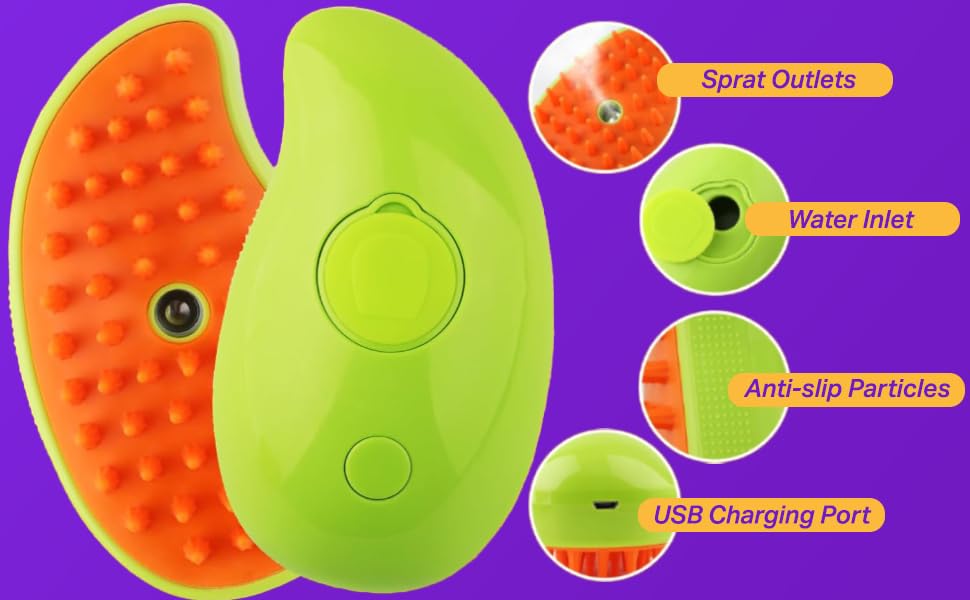
Diagram illustrating the key components: Spray Outlets, Water Inlet, Anti-slip Particles, and USB Charging Port.
6. Operation
- Ensure the brush is charged and the water tank is filled.
- Press the power button to turn on the device.
- To activate the steam function, press the designated spray button (often a one-touch button).
- Gently brush your pet's coat in the direction of hair growth. The steam will help to moisten the fur, making it easier to remove loose hair and detangle.
- Continue brushing until the desired grooming is achieved.
- After use, press the power button to turn off the device.

Image demonstrating the ease of use, with a dog being brushed and steam emanating from the brush. Insets show filling the water tank and the brush collecting hair. The process is designed for easy combing of tangled hairs.

Image showing the steam technology in action. For pets with skin issues, a suitable solution can be added to the water reservoir for healing care. Warm water is recommended as pets often prefer moist combing and warmth.
7. Maintenance and Cleaning
- After Each Use: Remove accumulated hair from the brush bristles. The self-cleaning mechanism (if applicable) can be activated to push hair off the bristles.
- Empty Water Tank: Empty any remaining water or solution from the tank after each grooming session to prevent stagnation and buildup.
- Clean Bristles: Wipe the silicone bristles with a damp cloth. For thorough cleaning, a mild soap solution can be used, ensuring no water enters the electronic components.
- Dry Thoroughly: Ensure the brush is completely dry before storing or recharging.
- Storage: Store the brush in a clean, dry place away from direct sunlight.
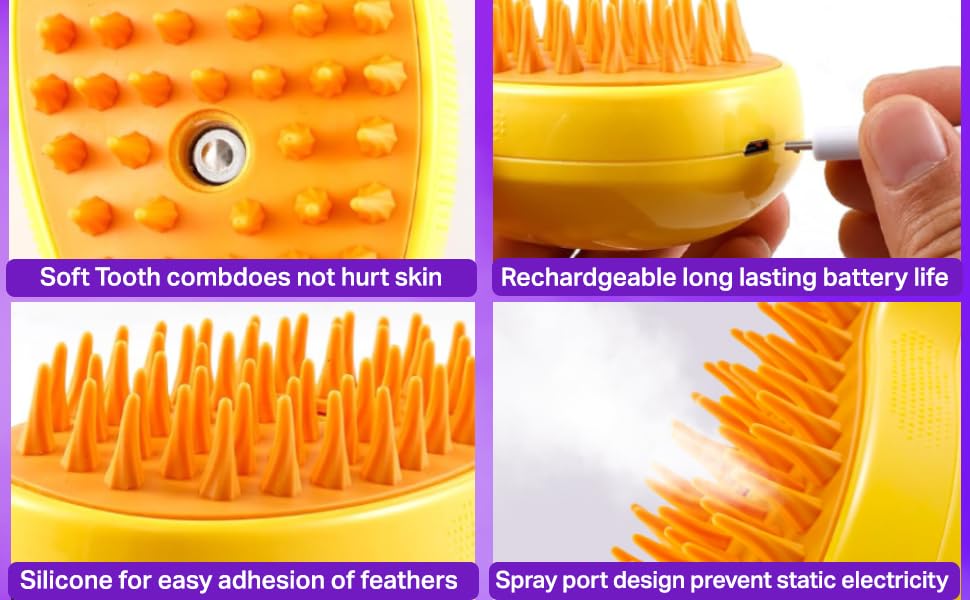
Close-up images detailing brush features: soft teeth designed not to hurt skin, rechargeable long-lasting battery life, silicone material for effective fur adhesion, and a spray port design to prevent static electricity.
8. Troubleshooting
| Problem | Possible Cause | Solution |
|---|---|---|
| Brush does not turn on. | Battery is depleted. | Charge the device fully using the provided USB cable. |
| Steam function is not working / No mist. | Water tank is empty or improperly closed. Spray nozzle is clogged. | Refill the water tank and ensure the cover is securely closed. Gently clean the spray nozzle with a soft cloth or cotton swab. |
| Hair is difficult to remove from bristles. | Excessive hair buildup. | Regularly clean the brush after each use. Use the release button (if available) to push hair off the bristles. |
| Device is leaking. | Water tank cover is not sealed properly. Tank is overfilled. | Ensure the water tank cover is tightly closed. Do not overfill the tank. |
9. Specifications
- Model: B0D11Z83HC
- Dimensions: 4.65 x 2.8 x 2.44 inches
- Weight: 3.53 ounces
- Battery: 1 Lithium Ion battery (rechargeable)
- Material: Silicone (Bristles and Handle)
- Color: Blue
- Manufacturer: Shop & Like

Image illustrating the product dimensions: approximately 4.52 inches in length, 2.55 inches in width, and 2.16 inches in height. The USB charging cable is also shown with a length of 3.54 inches.
10. Warranty and Support
Specific warranty information for this product may vary. Please refer to the documentation provided at the time of purchase or contact your retailer for details regarding warranty coverage.
For technical support or inquiries, please contact the manufacturer or the seller through your purchase platform.