
1. Introduction and Overview
The ZOOX AcroBooster 65W is an advanced aquarium LED lighting system designed to promote optimal coral growth and enhance the vibrant colors of your aquatic environment. It features 33 high-power LED chips integrated onto a compact 18mm ceramic substrate, offering superior thermal dissipation compared to traditional aluminum or copper substrates. This innovative design ensures maximum LED performance, extended lifespan, and durability.
The light delivers seamless color mixing and exceptional light penetration, setting a new standard for aquarium illumination. It incorporates cutting-edge LED chips that reproduce a 14000K true sunlight spectrum, including a seamless 400-480nm UV and full blue spectrum, specifically engineered to maximize coral coloration and accelerate growth.
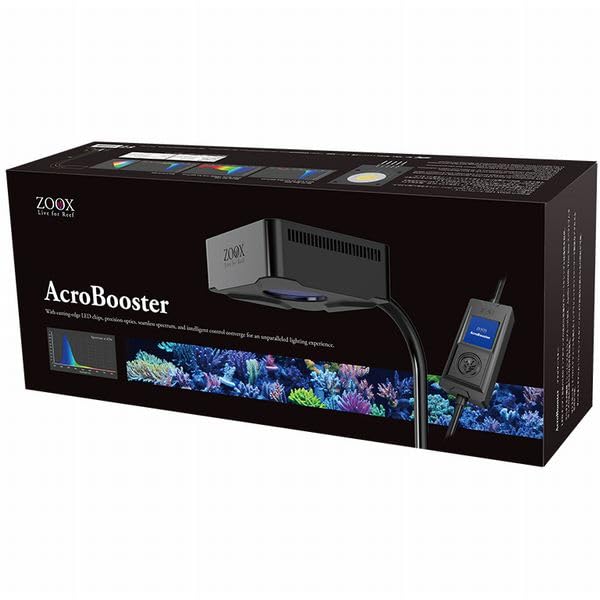
Figure 1: ZOOX AcroBooster 65W LED Light with Goose-neck Mount
2. Safety Information
Please read all safety instructions carefully before operating this product. Failure to follow these instructions may result in electric shock, fire, or serious injury.
- Do not immerse the light unit or power adapter in water. This product is designed for use above the water surface.
- Ensure your hands are dry before handling the power plug or controller.
- Always unplug the unit from the power outlet before performing any maintenance, cleaning, or installation.
- Keep the power cord away from sharp objects, high temperatures, and moving parts.
- Do not operate the unit if any part is damaged, especially the power cord or light housing. Contact customer support for replacement parts or service.
- This product is intended for indoor use only.
- Keep out of reach of children and pets.
3. Package Contents
Verify that all items are present and in good condition upon opening the package. If any items are missing or damaged, please contact your retailer.
- ZOOX AcroBooster 65W LED Light Unit
- Flexible Goose-neck Mounting Arm
- Intelligent Controller
- Power Adapter
- User Manual (this document)
4. Setup Instructions
Follow these steps to properly set up your ZOOX AcroBooster 65W LED light.
4.1 Mounting the Light
- Attach the flexible goose-neck mounting arm to the light unit by screwing it into the designated port on the light fixture.
- Secure the clamp of the goose-neck arm to the rim of your aquarium. Ensure the clamp is tightened securely to prevent accidental detachment. The clamp is designed for aquarium glass up to 12mm thick.
- Adjust the goose-neck arm to position the light unit directly over your aquarium at the desired height and angle. Ensure the light is level and stable.

Figure 2: Mounting Dimensions and Clamp Detail
4.2 Connecting Power and Controller
- Connect the intelligent controller to the light unit's power input cable.
- Connect the power adapter to the intelligent controller.
- Plug the power adapter into a suitable electrical outlet. Ensure the outlet is protected by a Ground Fault Circuit Interrupter (GFCI) for safety in aquatic environments.

Figure 3: Intelligent Controller
5. Operating Instructions
The ZOOX AcroBooster 65W features an intelligent controller for easy management of your lighting schedule and spectrum.
5.1 Initial Power On
Once plugged in, the light will power on to its default setting. The controller display will illuminate, showing the current time and program status.
5.2 Setting Time and Date
Refer to the controller's on-screen menu to set the correct time and date. Accurate timekeeping is crucial for proper schedule execution.
5.3 Programming Lighting Schedules
The intelligent controller allows you to set up to 6 distinct lighting schedules. Each schedule can be customized for:
- Start and End Times: Define when the light turns on and off.
- Intensity Levels: Adjust the overall brightness.
- Spectrum Composition: Fine-tune the balance of UV, blue, and 14000K white light to suit your coral species and desired aesthetic.
Navigate through the controller's menu using the buttons to access the schedule settings. Follow the on-screen prompts to create and save your desired programs. The Apollo 14000K True Sun spectrum, combined with seamless UV and blue, is optimized for coral growth and vibrant coloration.
5.4 Manual Control
The controller also provides options for manual override, allowing you to temporarily adjust brightness or turn the light on/off outside of programmed schedules.

Figure 4: ZOOX AcroBooster 65W LED Light Head
6. Maintenance
Regular maintenance ensures the longevity and optimal performance of your ZOOX AcroBooster 65W LED light.
- Cleaning the Light Unit: Periodically wipe the light unit and lens with a soft, damp cloth to remove salt creep, dust, and water spots. Always unplug the unit before cleaning. Do not use abrasive cleaners or solvents.
- Checking Connections: Ensure all electrical connections (power adapter, controller, light unit) are secure and free from corrosion.
- Ventilation: Ensure the ventilation slots on the light unit are not obstructed to allow for proper heat dissipation.
7. Troubleshooting
If you encounter issues with your ZOOX AcroBooster 65W, refer to the following common problems and solutions:
| Problem | Possible Cause | Solution |
|---|---|---|
| Light does not turn on. | No power, loose connection, faulty adapter. | Check power outlet, ensure all cables are securely connected. Test with another outlet. |
| Light flickers or dims unexpectedly. | Loose connection, power fluctuation, controller issue. | Check all connections. Ensure power supply is stable. Reset controller to factory settings if issue persists. |
| Controller display is blank. | No power to controller, controller malfunction. | Verify power connection to the controller. If power is present and display remains blank, contact support. |
| Light does not follow programmed schedule. | Incorrect time setting, schedule not saved, controller malfunction. | Check time and date settings on the controller. Re-enter and save schedules. |
If the problem persists after attempting these solutions, please contact customer support.
8. Specifications
Detailed technical specifications for the ZOOX AcroBooster 65W LED light.
| Feature | Specification |
|---|---|
| Model Number | ZX6A65 |
| Manufacturer | ZOOX |
| Product Type | LED Light |
| Max Compatible Light Source Wattage | 65 Watts |
| Max Compatible Light Source Power Consumption | 65 Watts |
| Product Dimensions (L x W x H) | 36.4 x 10 x 10 cm |
| Color | Black |
| Power Source | Corded Electric |
| Number of Items | 1 |
| Country of Origin | China |
| ASIN | B0D119DHWJ |
9. Warranty and Support
For warranty information, technical support, or service inquiries, please contact the retailer where you purchased the ZOOX AcroBooster 65W LED light. Please have your proof of purchase and the product model number (ZX6A65) available when contacting support.