
Introduction
This manual provides essential information for the safe and efficient use of the COKYIS EGX150 PLC Ethernet Gateway Module. Please read this manual thoroughly before installation and operation, and keep it for future reference.
The EGX150 is designed to facilitate communication between Programmable Logic Controllers (PLCs) and Ethernet networks, enabling seamless data exchange and remote monitoring in industrial automation environments. It is a critical component for power transmission products and industrial control systems.
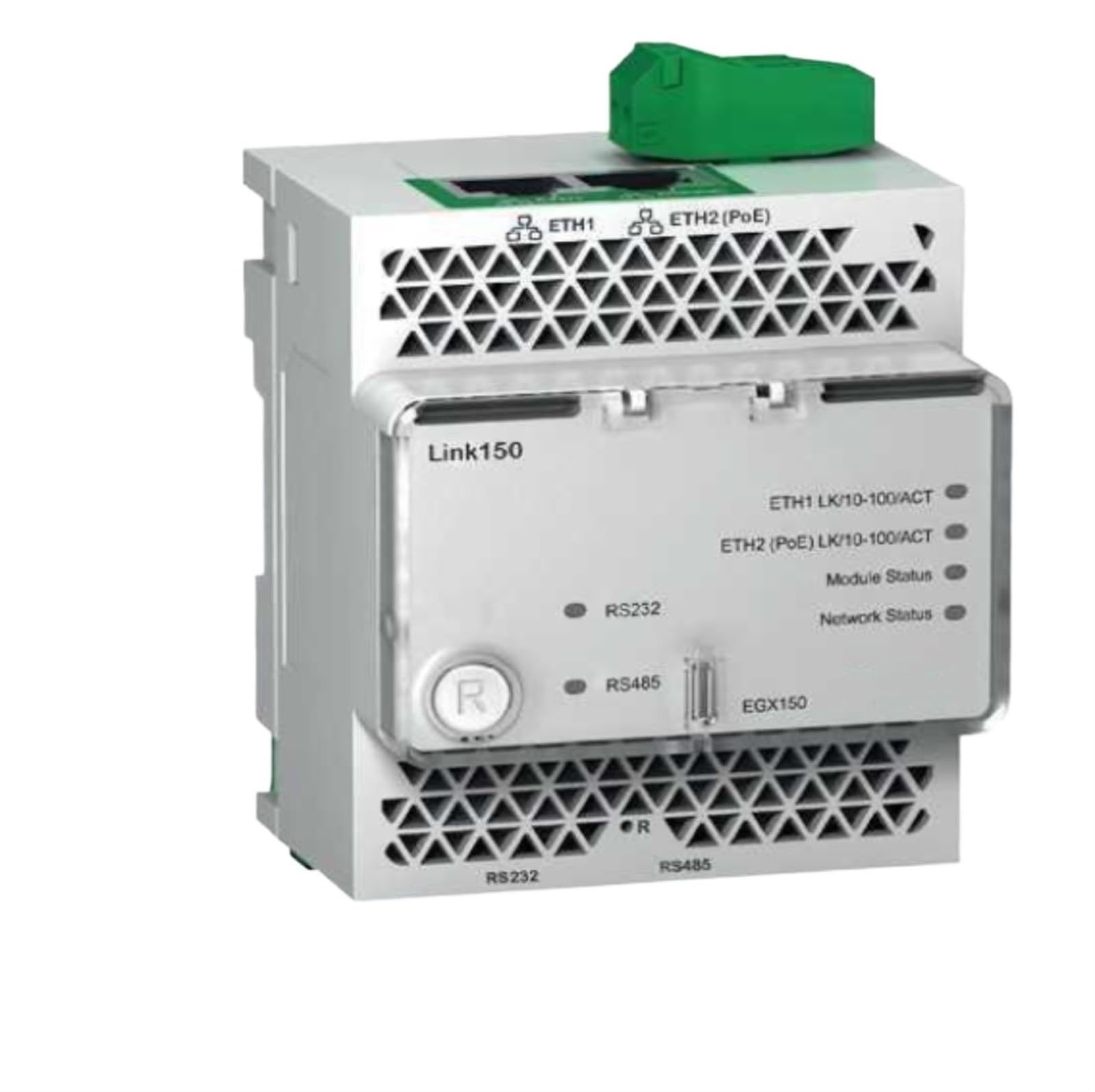
Figure 1: Front view of the COKYIS EGX150 PLC Ethernet Gateway Module, showing its compact design and various ports.
Safety Information
Always observe the following safety precautions to prevent injury and damage to the device:
- Ensure power is disconnected before installation or maintenance.
- Only qualified personnel should perform installation and wiring.
- Operate the device within its specified environmental conditions.
- Avoid exposing the module to excessive moisture, dust, or extreme temperatures.
- Do not attempt to open or modify the module; this will void the warranty.
Setup
1. Unpacking and Inspection
Carefully remove the EGX150 module from its packaging. Inspect the module for any signs of physical damage. If any damage is found, do not proceed with installation and contact your supplier.
2. Mounting
The EGX150 module is designed for DIN rail mounting. Ensure a secure and stable mounting location within an industrial control panel, away from excessive vibration or heat sources.
- Attach the module to a standard 35mm DIN rail by hooking the top edge and pressing down until it clicks into place.
- Verify that the module is firmly secured and does not wobble.
3. Wiring
Refer to the wiring diagram below for proper connections. Ensure all connections are tight and secure.
- Power Supply: Connect a 24V DC power supply to the designated power terminals. Observe polarity.
- PLC Connection: Connect the PLC communication cable to the appropriate port (e.g., RS-232, RS-485) on the EGX150 module.
- Ethernet Connection: Connect a standard Ethernet cable (RJ45) from the EGX150 module to your network switch or router.
Figure 2: Illustrative diagram of the EGX150 module's connection points for power, PLC, and Ethernet. (Note: This is a placeholder image as no specific wiring diagram image was provided.)
Operating
1. Power On
Once all connections are secure, apply power to the EGX150 module. The power indicator LED should illuminate, indicating successful power-up.
2. Configuration
The EGX150 module typically requires network and PLC communication parameter configuration. This is usually done via a web interface or a dedicated configuration utility provided by COKYIS. Refer to the software manual for detailed configuration steps.
- IP Address: Configure the module's IP address, subnet mask, and gateway to match your network settings.
- PLC Protocol: Select the appropriate PLC communication protocol (e.g., Modbus TCP, Ethernet/IP) and configure its parameters.
- Data Mapping: Map the PLC data registers to the Ethernet communication points as required by your application.
3. Status Indicators
Monitor the status LEDs on the EGX150 module to verify proper operation:
- Power LED: Solid green indicates power is supplied.
- Link/Act LED (Ethernet): Solid green indicates a network link; blinking indicates data activity.
- Status LED (PLC): Varies by protocol; typically indicates communication status with the PLC. Refer to the specific protocol documentation for details.
Maintenance
The COKYIS EGX150 module is designed for minimal maintenance. However, periodic checks are recommended to ensure optimal performance and longevity.
- Cleaning: Keep the module free from dust and debris. Use a soft, dry cloth for cleaning. Do not use liquid cleaners.
- Connection Checks: Periodically inspect all wiring connections for tightness and signs of corrosion.
- Firmware Updates: Check the COKYIS website for any available firmware updates. Follow the provided instructions carefully for any update procedures.
- Environmental Conditions: Ensure the operating environment remains within the specified temperature and humidity ranges.
Troubleshooting
This section provides solutions to common issues encountered with the EGX150 module.
| Problem | Possible Cause | Solution |
|---|---|---|
| No Power LED illumination | No power supply; incorrect wiring; faulty power supply. | Check power connections and supply voltage. Ensure correct polarity. Test power supply. |
| No Ethernet Link/Act LED | Faulty Ethernet cable; incorrect network settings; network switch issue. | Replace Ethernet cable. Verify network settings (IP, subnet). Check network switch status. |
| PLC communication failure | Incorrect PLC protocol settings; faulty PLC cable; PLC not responding. | Verify PLC communication parameters in the module's configuration. Check PLC cable. Ensure PLC is operational. |
| Module unresponsive | Software error; hardware malfunction. | Perform a power cycle (turn off, wait 10 seconds, turn on). If issue persists, contact technical support. |
Specifications
The following are the technical specifications for the COKYIS EGX150 PLC Ethernet Gateway Module:
- Model: EGX150
- Input Voltage: Typically 24V DC (check product label for exact range)
- Power Consumption: (Information not provided in source, placeholder for typical value)
- Ethernet Ports: 1 x RJ45 (10/100 Mbps)
- PLC Ports: (e.g., RS-232, RS-485 - specific details not provided in source)
- Operating Temperature: (Information not provided in source, placeholder for typical range)
- Storage Temperature: (Information not provided in source, placeholder for typical range)
- Humidity: (Information not provided in source, placeholder for typical range)
- Dimensions (L x W x H): 1.18 x 0.79 x 0.39 inches (30 x 20 x 10 mm)
- Weight: 1.76 ounces (50 grams)
- Mounting: DIN Rail
- ASIN: B0D111J5Z3
Warranty and Support
Warranty Information
COKYIS products are typically covered by a limited warranty against defects in materials and workmanship. The specific warranty period and terms may vary. Please refer to the warranty card included with your product or visit the official COKYIS website for detailed warranty information.
Note: Any unauthorized modification or improper use of the device will void the warranty.
Technical Support
For technical assistance, troubleshooting beyond this manual, or inquiries regarding your COKYIS EGX150 module, please contact COKYIS customer support. Contact details can usually be found on the official COKYIS website or on the product packaging.
When contacting support, please have your product model (EGX150) and ASIN (B0D111J5Z3) ready.
